ആമുഖം
The KRK GoAux 3 portable nearfield monitors are engineered to deliver high-quality sound in a compact, travel-friendly design. Ideal for musicians, producers, and audio enthusiasts on the go, these monitors provide accurate audio reproduction for mixing, monitoring, and general listening. This manual provides essential information for setting up, operating, and maintaining your GoAux 3 monitors.

ചിത്രം 1: മുൻഭാഗം view of the KRK GoAux 3 Portable Studio Monitors.
പാക്കേജ് ഉള്ളടക്കം
താഴെ ലിസ്റ്റ് ചെയ്തിരിക്കുന്ന എല്ലാ ഇനങ്ങളും നിങ്ങളുടെ പാക്കേജിൽ ഉൾപ്പെടുത്തിയിട്ടുണ്ടെന്ന് ഉറപ്പാക്കുക:
- KRK GoAux 3 Portable Studio Monitors (Pair)
- Adjustable Monitor Stands (Pair)
- Speaker Link Cable
- പവർ കേബിൾ
- നൈലോൺ ചുമക്കുന്ന ബാഗ്
- ദ്രുത ആരംഭ ഗൈഡ്

Figure 2: KRK GoAux 3 monitors and included accessories within the carrying bag.

Figure 3: The durable nylon carrying bag for the GoAux 3 monitors.

Figure 4: Included speaker link cable and power cable.
സജ്ജമാക്കുക
1. Speaker Placement and Stands
Position the monitors on a stable, flat surface, ideally at ear level in an equilateral triangle with your listening position. The included adjustable stands allow for optimal angling to direct sound towards your ears.
- Unfold the adjustable monitor stands.
- Secure each monitor to its stand using the provided thumb screws, aligning the screw with the threaded insert on the bottom of the monitor.
- Adjust the stand to your desired angle for optimal listening.

Figure 5: The adjustable monitor stands.
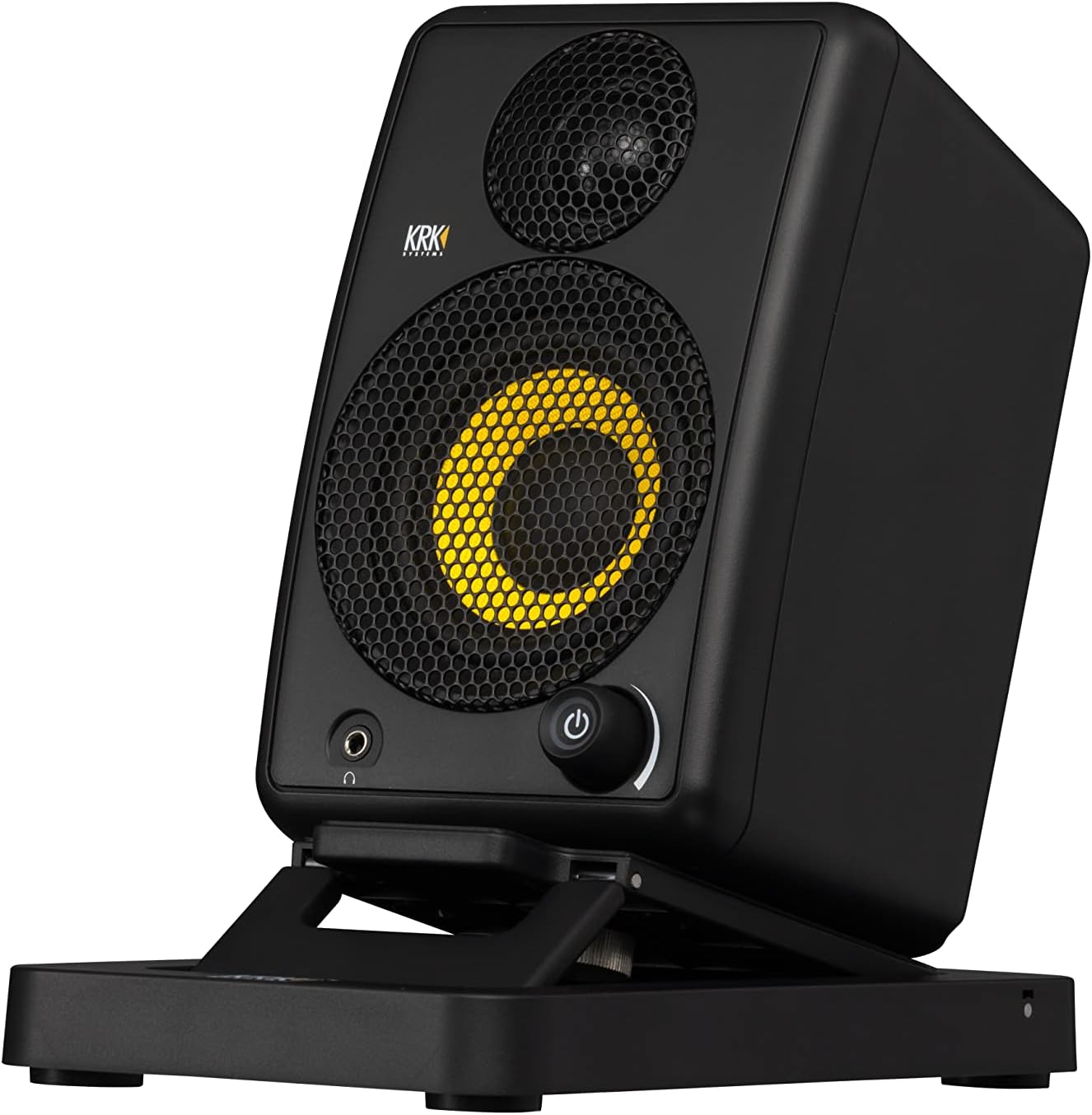
Figure 6: GoAux 3 monitor on its adjustable stand.
2. സ്പീക്കറുകൾ ബന്ധിപ്പിക്കുന്നു
- Connect the provided speaker link cable from the 'OUT TO RIGHT' port on the rear of the left (main) speaker to the 'RIGHT SPEAKER' input on the rear of the right (passive) speaker.
- Connect the power cable to the AC input on the rear of the left (main) speaker, then plug it into a suitable AC power outlet.
3 ഓഡിയോ ഇൻപുട്ട് കണക്ഷനുകൾ
The GoAux 3 offers multiple input options:
- ഓക്സ് ഇൻപുട്ട്: Use a 1/8" (3.5mm) stereo cable to connect devices like smartphones, tablets, or laptops to the 'AUX IN' port.
- RCA ഇൻപുട്ടുകൾ: Use RCA cables to connect audio interfaces, DJ mixers, or other audio equipment to the 'LEFT IN' and 'RIGHT IN' RCA ports.
- ബ്ലൂടൂത്ത്: For wireless connection, refer to the 'Bluetooth Pairing' section under Operating.
4. ഹെഡ്ഫോൺ കണക്ഷൻ
A 1/8" (3.5mm) stereo headphone output is located on the front panel of the left speaker. Plugging in headphones will automatically mute the GoAux 3 speakers, allowing for private monitoring.
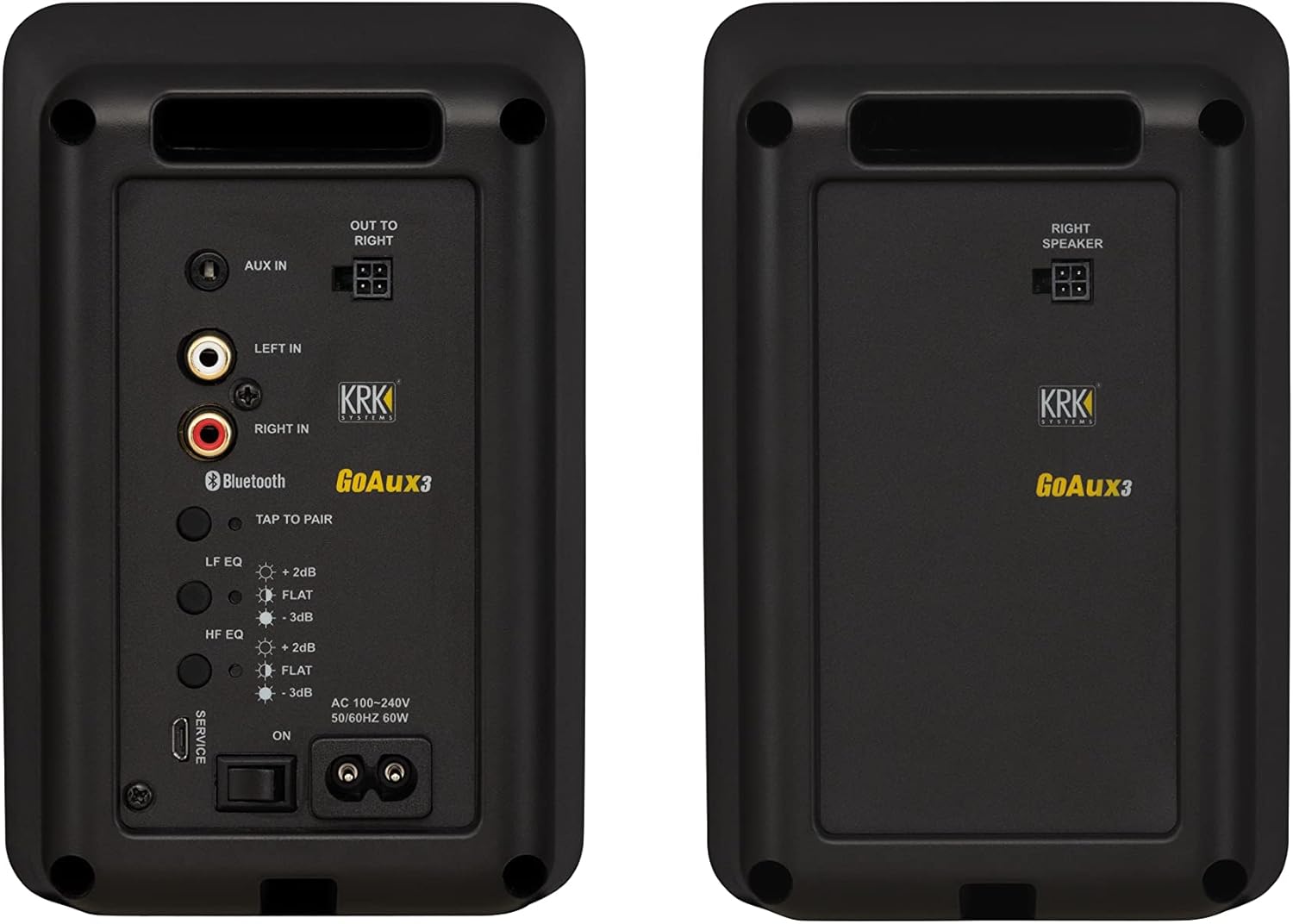
Figure 7: Rear panel of the GoAux 3 (left) and GoAux 4 (right) monitors. Note: GoAux 3 features Aux In, RCA In, Bluetooth, LF/HF EQ, and speaker link out. GoAux 3 does not include USB Audio In or Auto ARC functionality.
Operating the GoAux 3
1. പവർ ഓൺ/ഓഫ്, വോളിയം നിയന്ത്രണം
- To power on the monitors, flip the 'ON/OFF' switch on the rear panel of the left speaker to 'ON'.
- The front panel power/volume knob will illuminate. Rotate this knob clockwise to increase volume and counter-clockwise to decrease.
- To power off, flip the 'ON/OFF' switch to 'OFF'.
2. EQ Adjustments
The GoAux 3 features Low Frequency (LF) and High Frequency (HF) EQ controls on the rear panel of the left speaker to tailor the sound to your environment and preference.
- LF EQ: Adjusts the bass response. Options typically include +2dB, FLAT, and -3dB.
- HF EQ: Adjusts the treble response. Options typically include +2dB, FLAT, and -3dB.
- Press the respective LF EQ or HF EQ buttons to cycle through the available settings. The illuminated indicator will show the current setting.
3. ബ്ലൂടൂത്ത് ജോടിയാക്കൽ
- Ensure the monitors are powered on.
- Press the 'TAP TO PAIR' button on the rear panel of the left speaker. The Bluetooth indicator will begin blinking.
- On your Bluetooth-enabled device (smartphone, tablet, computer), search for available devices and select 'KRK GoAux 3'.
- Once paired, the Bluetooth indicator will glow solid blue.
4. സ്റ്റാൻഡ്ബൈ മോഡ്
The GoAux 3 monitors feature an automatic standby mode to conserve power. If no audio signal is detected for approximately 30 minutes, the monitors will enter standby mode, indicated by a dimming of the power/volume knob LED.
- To manually enter standby mode, press and hold the power/volume knob for 3 seconds.
- To exit standby mode, double-tap the power/volume knob.
വീഡിയോ 1: ഒരു ഓവർview of the KRK GoAux 3 Portable Monitors, highlighting key features and portability.
Video 2: A detailed look at the KRK GoAux 3, including connections and controls. Note: The video briefly shows the rear panel of a GoAux 4 model; please refer to Figure 7 for the specific GoAux 3 rear panel layout.
മെയിൻ്റനൻസ്
- വൃത്തിയാക്കൽ: Use a soft, dry cloth to clean the exterior of the monitors. Avoid abrasive cleaners or solvents.
- സംഭരണം: When not in use or for transport, store the monitors and accessories in the provided nylon carrying bag to protect them from dust and damage.
- വെൻ്റിലേഷൻ: Ensure adequate airflow around the rear of the main speaker to prevent overheating.
ട്രബിൾഷൂട്ടിംഗ്
- ശബ്ദമില്ല:
- Check power connections and ensure the monitors are powered on.
- Verify audio source connection (Aux, RCA, Bluetooth).
- Ensure volume is turned up on both the monitors and the audio source.
- ഹെഡ്ഫോണുകൾ പ്ലഗ് ഇൻ ചെയ്തിട്ടുണ്ടെങ്കിൽ, സ്പീക്കർ ഔട്ട്പുട്ട് പ്രവർത്തനക്ഷമമാക്കാൻ അവ അൺപ്ലഗ് ചെയ്യുക.
- വികലമായ ശബ്ദം:
- Reduce the volume on both the monitors and the audio source.
- ഓഡിയോ കേബിളുകൾക്ക് കേടുപാടുകൾ സംഭവിച്ചിട്ടുണ്ടോ അല്ലെങ്കിൽ കണക്ഷനുകൾ അയഞ്ഞിട്ടുണ്ടോ എന്ന് പരിശോധിക്കുക.
- Ensure EQ settings are appropriate for your listening environment.
- ബ്ലൂടൂത്ത് ജോടിയാക്കൽ പ്രശ്നങ്ങൾ:
- Ensure the monitors are in pairing mode (blinking Bluetooth LED).
- Forget 'KRK GoAux 3' from your device's Bluetooth settings and attempt to re-pair.
- Move your device closer to the monitors.
- Monitors Enter Standby Unexpectedly:
- This is normal behavior if no audio signal is detected for 30 minutes. Double-tap the power/volume knob to wake them.
സ്പെസിഫിക്കേഷനുകൾ
| ഫീച്ചർ | സ്പെസിഫിക്കേഷൻ |
|---|---|
| മോഡലിൻ്റെ പേര് | GoAUX 3 |
| സ്പീക്കർ തരം | Portable Nearfield Monitor |
| വൂഫർ വ്യാസം | 3 Inches (Glass Aramid) |
| ട്വീറ്റർ വ്യാസം | 1 Inch (Soft Textile Dome) |
| മൊത്തം സിസ്റ്റം പവർ | 60 Watts RMS (Bi-ampഉയർത്തി) |
| ഫ്രീക്വൻസി പ്രതികരണം | 65 ഹെർട്സ് - 20 കിലോ ഹെർട്സ് |
| സിഗ്നൽ-ടു-നോയിസ് അനുപാതം | 95 ഡി.ബി |
| കണക്റ്റിവിറ്റി ടെക്നോളജി | Bluetooth, 1/8" Aux, RCA Stereo |
| ബ്ലൂടൂത്ത് ശ്രേണി | 10 മീറ്റർ |
| EQ നിയന്ത്രണങ്ങൾ | LF EQ (+2dB, FLAT, -3dB), HF EQ (+2dB, FLAT, -3dB) |
| ഹെഡ്ഫോൺ ഔട്ട്പുട്ട് | 1/8" (3.5mm) Stereo (Front Panel) |
| കാബിനറ്റ് മെറ്റീരിയൽ | അക്രിലോണിട്രൈൽ ബ്യൂട്ടാഡീൻ സ്റ്റൈറൈൻ (എബിഎസ്) |
| ഉൽപ്പന്ന അളവുകൾ (ഓരോന്നും) | 4.72"D x 6.8"W x 4.37"H |
| ഇനത്തിൻ്റെ ഭാരം | 10.18 pounds (Pair) |

Figure 8: Dimensions of the KRK GoAux 3 monitor on its stand.
വാറൻ്റിയും പിന്തുണയും
വാറൻ്റി വിവരങ്ങൾ
The KRK GoAux 3 Portable Studio Monitors come with a Limited Warranty. Please refer to the warranty card included in your package or visit the official KRK webകവറേജ്, ദൈർഘ്യം, സേവന നടപടിക്രമങ്ങൾ എന്നിവയെക്കുറിച്ചുള്ള വിശദമായ നിബന്ധനകൾക്കും വ്യവസ്ഥകൾക്കും സൈറ്റ്.
ഉപഭോക്തൃ പിന്തുണ
For technical assistance, troubleshooting beyond this manual, or warranty claims, please contact KRK Customer Support through their official website or the contact information provided in your product documentation. Ensure you have your product model number (GoAUX 3) and proof of purchase available when contacting support.


