AXIS Q3538-SLVE Dome Camera User Manual
മോഡൽ: 02463-001
1. ആമുഖം
The AXIS Q3538-SLVE Dome Camera is a robust, high-performance surveillance solution designed for demanding environments. Its marine-grade stainless steel casing ensures durability and resistance to corrosive elements like seawater and cleaning chemicals. This camera delivers superior 4K resolution image quality, making it ideal for critical surveillance applications even in the harshest weather conditions.
This manual provides essential information for the proper installation, operation, and maintenance of your AXIS Q3538-SLVE Dome Camera. Please read it thoroughly before using the product.
2 സുരക്ഷാ വിവരങ്ങൾ
Always adhere to the following safety guidelines to prevent damage to the product or injury to personnel:
- എല്ലാ വൈദ്യുത കണക്ഷനുകളും പ്രാദേശിക കോഡുകളും ചട്ടങ്ങളും പാലിക്കുന്നുണ്ടെന്ന് ഉറപ്പാക്കുക.
- ഏതെങ്കിലും ഇൻസ്റ്റാളേഷനോ അറ്റകുറ്റപ്പണിയോ നടത്തുന്നതിന് മുമ്പ് വൈദ്യുതി വിച്ഛേദിക്കുക.
- ക്യാമറ തുറക്കാനോ പരിഷ്ക്കരിക്കാനോ ശ്രമിക്കരുത് casing beyond what is described in this manual. Refer all servicing to qualified personnel.
- Use only Axis Communications approved accessories and power supplies.
- Install the camera in a location that can support its weight and is protected from unauthorized access.
- Avoid pointing the camera directly at strong light sources, as this may damage the image sensor.
3. പാക്കേജ് ഉള്ളടക്കം
പാക്കേജിൽ എല്ലാ ഘടകങ്ങളും ഉണ്ടെന്ന് ഉറപ്പാക്കുക:
- AXIS Q3538-SLVE Dome Camera
- ഇൻസ്റ്റലേഷൻ ഗൈഡ്
- ഡ്രിൽ ടെംപ്ലേറ്റ്
- കണക്റ്റർ കിറ്റ്
- Resistorx T20 tool
- കേബിൾ ഗ്രന്ഥികൾ
Note: Specific contents may vary slightly depending on the region or package version.
4. സജ്ജീകരണവും ഇൻസ്റ്റാളേഷനും
Proper installation is crucial for the camera's performance and longevity. This section outlines general steps. Refer to the detailed installation guide included with your product for specific instructions and diagrams.
4.1 ക്യാമറ മൗണ്ടിംഗ്
The AXIS Q3538-SLVE is designed for secure mounting on walls or ceilings. Use the provided drill template to mark and drill holes. Ensure the mounting surface is strong enough to support the camera's weight (approximately 5.6 pounds).
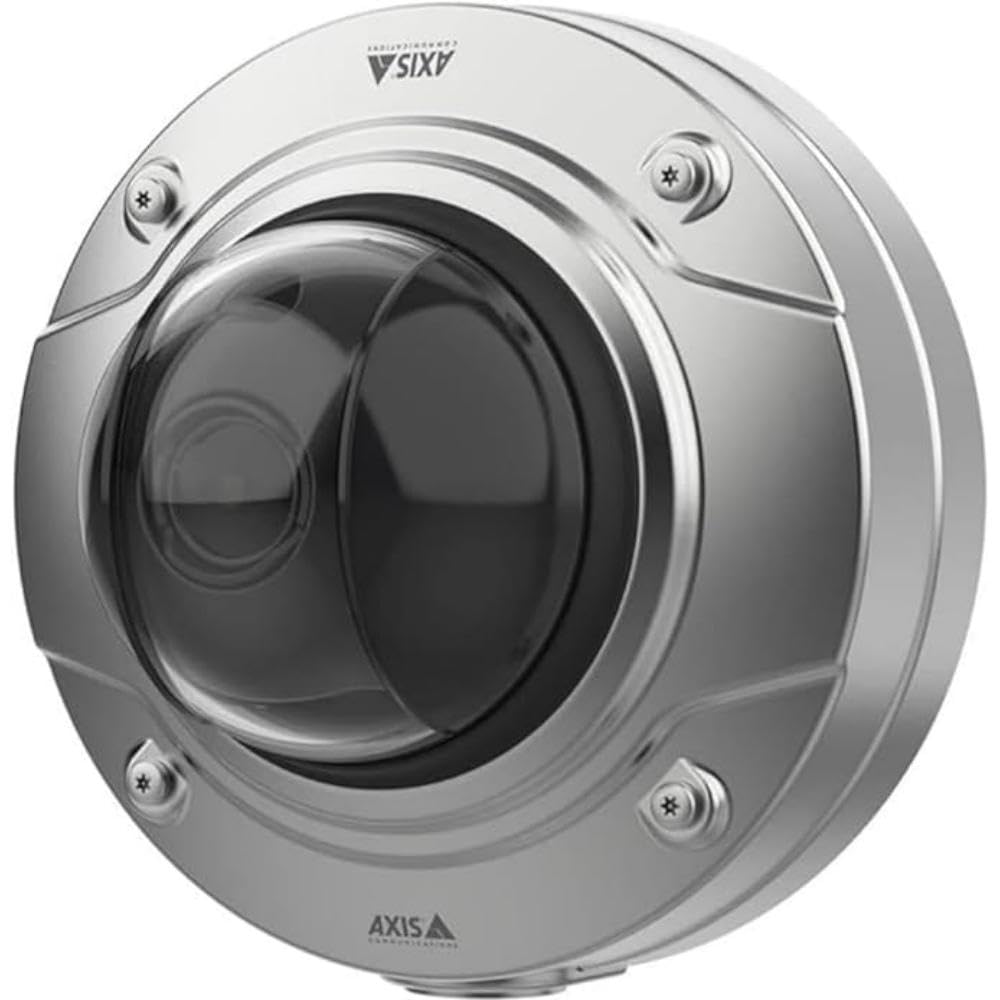
ചിത്രം 1: മുൻഭാഗം view of the AXIS Q3538-SLVE Dome Camera, highlighting its durable marine-grade stainless steel construction and the protective dome over the lens.
4.2 പവർ, നെറ്റ്വർക്ക് കണക്ഷൻ
The camera can be powered via Power over Ethernet (PoE) or an external power supply (28 Volts). Connect a standard Ethernet cable to the camera's network port. For PoE, ensure your network switch or injector provides sufficient power. For external power, connect the power adapter to the designated power input.
- PoE കണക്ഷൻ: Connect an Ethernet cable from a PoE-enabled switch or injector to the camera's RJ45 port.
- ബാഹ്യ ശക്തി: Connect a 28V DC power supply to the camera's power input terminal.
4.3 പ്രാരംഭ കോൺഫിഗറേഷൻ
After connecting power and network, the camera will boot up. Use the AXIS IP Utility or AXIS Device Manager software to discover the camera on your network and assign an IP address. Access the camera's web എ വഴിയുള്ള ഇന്റർഫേസ് web browser to complete the initial setup, including setting a strong password and configuring network settings.
5. പ്രവർത്തന നിർദ്ദേശങ്ങൾ
Once installed and configured, the AXIS Q3538-SLVE Dome Camera can be operated through its web interface or integrated with a Video Management System (VMS).
5.1 ആക്സസ് ചെയ്യുന്നു Web ഇൻ്റർഫേസ്
എ തുറക്കുക web browser and enter the camera's IP address. Log in using the administrator credentials you set during initial configuration. The web interface provides access to live view, recording settings, motion detection, image settings, and more.
5.2 തത്സമയം View ഒപ്പം റെക്കോർഡിംഗ്
ൽ നിന്ന് web ഇന്റർഫേസ്, നിങ്ങൾക്ക് കഴിയും view the live video feed. Configure recording schedules, motion detection zones, and storage locations (e.g., network-attached storage, SD card if supported) within the camera's settings. The camera supports 8 MP effective video resolution for detailed surveillance.
5.3 ഇമേജ് ക്രമീകരണങ്ങൾ
Adjust image parameters such as brightness, contrast, saturation, white balance, and exposure to optimize video quality for your specific environment. The camera's advanced imaging features ensure clear footage even in challenging lighting conditions.
6. പരിപാലനം
Regular maintenance ensures optimal performance and extends the lifespan of your camera.
- വൃത്തിയാക്കൽ: Periodically clean the camera's dome and casinഗ്രാം വിത്ത് എ സോഫ്റ്റ്, ഡിamp cloth. Avoid abrasive cleaners or solvents that could damage the marine-grade stainless steel or the optical dome.
- ഫേംവെയർ അപ്ഡേറ്റുകൾ: Regularly check the Axis Communications website for the latest firmware updates. Keeping the firmware updated ensures access to new features, performance improvements, and security patches.
- കേബിൾ പരിശോധന: Periodically inspect all cables and connections for signs of wear or damage, especially in harsh environments.
7. പ്രശ്നപരിഹാരം
This section addresses common issues you might encounter. For more complex problems, refer to the Axis Communications support webസൈറ്റ് അല്ലെങ്കിൽ സാങ്കേതിക പിന്തുണയുമായി ബന്ധപ്പെടുക.
| പ്രശ്നം | സാധ്യമായ കാരണം | പരിഹാരം |
|---|---|---|
| ഇമേജ്/വീഡിയോ ഫീഡ് ഇല്ല | No power, network issue, incorrect IP address. | Check power connection (PoE or external 28V). Verify network cable. Confirm camera's IP address and network settings. |
| മോശം ചിത്ര നിലവാരം | Dirty lens, improper focus, low light, incorrect image settings. | Clean the dome. Adjust focus if applicable. Check lighting conditions. Adjust brightness, contrast, and exposure settings in the web ഇൻ്റർഫേസ്. |
| ആക്സസ് ചെയ്യാൻ കഴിയില്ല web ഇൻ്റർഫേസ് | Incorrect IP address, network connectivity issue, firewall blocking. | Verify IP address. Ping the camera's IP. Check network cables. Temporarily disable firewall on your PC to test. |
8 സ്പെസിഫിക്കേഷനുകൾ
| ഫീച്ചർ | വിശദാംശങ്ങൾ |
|---|---|
| മോഡൽ നമ്പർ | 02463-001 |
| ബ്രാൻഡ് | ആക്സിസ് കമ്മ്യൂണിക്കേഷൻസ് |
| ഫലപ്രദമായ വീഡിയോ റെസല്യൂഷൻ | 8 എംപി (4കെ) |
| അന്താരാഷ്ട്ര സംരക്ഷണ റേറ്റിംഗ് | IP54 |
| വൈദ്യുതി ഉപഭോഗം | 3 വാട്ട്സ് |
| വാല്യംtage | 28 വോൾട്ട് (DC) |
| ഇനത്തിന്റെ അളവുകൾ (L x W x H) | 19.69 x 19.69 x 11.02 ഇഞ്ച് |
| ഇനത്തിൻ്റെ ഭാരം | 5.6 പൗണ്ട് |
| നിറം | ചാരനിറം |
| Casing മെറ്റീരിയൽ | Marine-grade stainless steel |
9. വാറൻ്റിയും പിന്തുണയും
Axis Communications products are covered by a limited warranty. For detailed warranty information, please refer to the warranty statement provided with your product or visit the official Axis Communications webസൈറ്റ്.
For technical support, product documentation, firmware downloads, and FAQs, please visit the Axis Communications support portal:
www.axis.com/support (www.axis.com/support) എന്ന വിലാസത്തിൽ ലഭ്യമാണ്.
When contacting support, please have your camera's model number (02463-001) and serial number ready.


