1. ഉൽപ്പന്നം കഴിഞ്ഞുview
The CP PLUS 4MP Outdoor Smart Wi-Fi PT Camera (Model CP-Z41A) is designed for enhanced outdoor security and surveillance. This camera offers a 4MP Quad HD resolution for clear video quality, 360° pan and tilt capabilities for comprehensive area coverage, and advanced features such as two-way audio, superior night vision, human body detection, and smart motion tracking. It is built for easy installation and seamless integration with smart home systems like Alexa and Google Assistant.
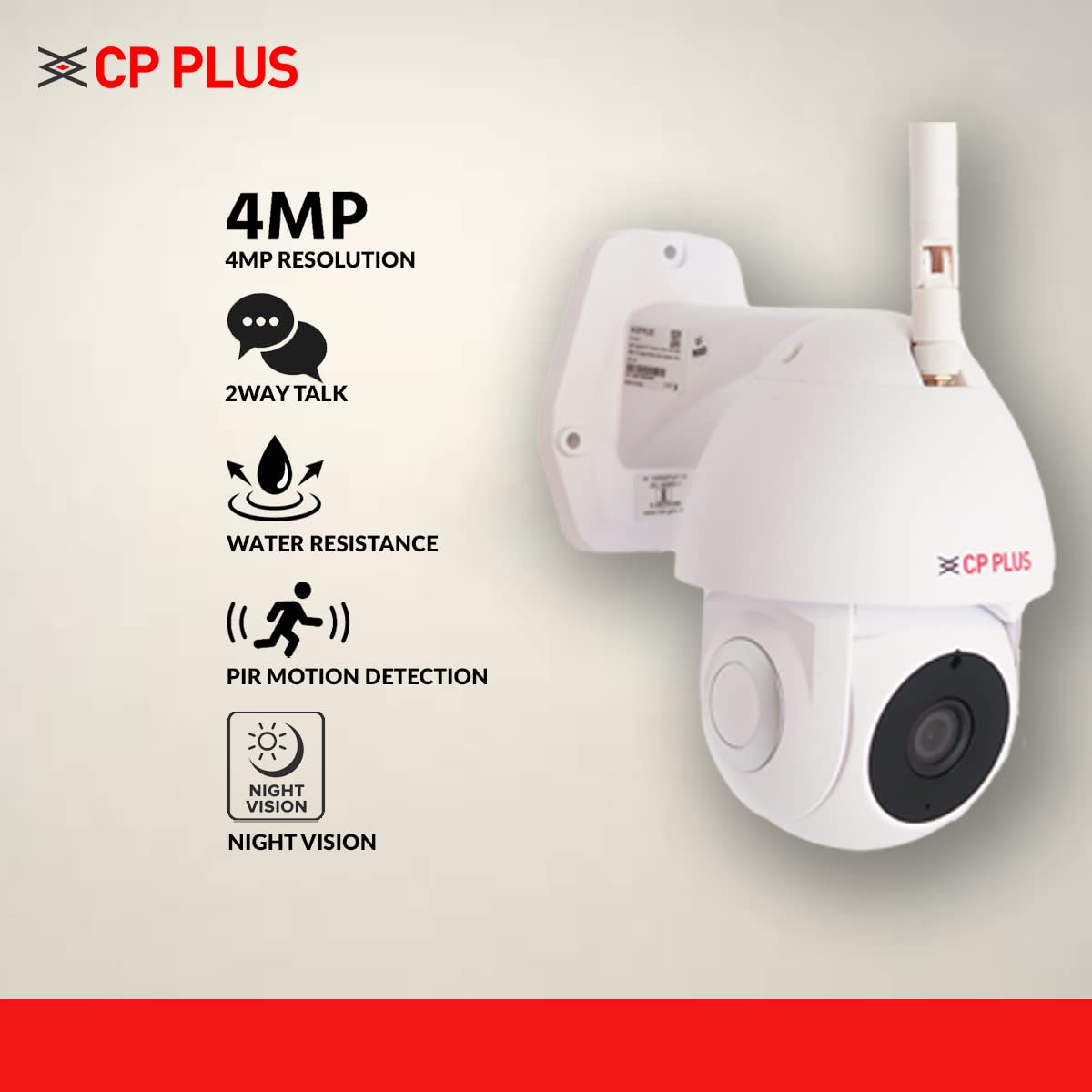
ചിത്രം 1: മുൻഭാഗം view of the CP PLUS 4MP Outdoor Smart Wi-Fi PT Camera.
2. ബോക്സിൽ എന്താണുള്ളത്?
Upon opening the product packaging, you will find the following components:
- CP PLUS 4MP Outdoor Smart Wi-Fi PT Camera (Model CP-Z41A)
- USB കേബിൾ
- പവർ അഡാപ്റ്റർ
- ഉപയോക്തൃ മാനുവൽ (ഈ പ്രമാണം)
- മൗണ്ടിംഗ് സ്ക്രൂകളും വാൾ പ്ലഗുകളും
വീഡിയോ 1: അൺബോക്സിംഗ്, പിന്നെയുംview of the CP PLUS 4MP Outdoor Smart Wi-Fi PT Camera, showing included accessories and initial setup steps.
3 പ്രധാന സവിശേഷതകൾ
The CP-Z41A camera is equipped with several features to enhance your security experience:
- 4MP Quad HD Resolution: വ്യക്തവും വിശദവുമായ വീഡിയോ ഫൂ നൽകുന്നുtagഫലപ്രദമായ നിരീക്ഷണത്തിനായി ഇ.
- 360° പാൻ & ടിൽറ്റ്: വിശാലമായ viewing angle, allowing you to remotely adjust the camera's perspective to cover all areas.
- ദ്വിമുഖ സംസാരം: Features an inbuilt microphone and speaker for real-time communication with visitors or to deter intruders.
- സുപ്പീരിയർ നൈറ്റ് വിഷൻ: Equipped with IR lights for clear visibility up to 20 meters in low-light or complete darkness, utilizing a larger CMOS image sensor for improved image quality.
- Human Body Detection & Smart Motion Tracking: Intelligently detects human movement and tracks the subject, reducing false alarms from pets or inanimate objects.
- IP65 ജല പ്രതിരോധം: Designed for outdoor use, offering protection against dust and water splashes.
- SD കാർഡ് പിന്തുണ: Supports local storage up to 128GB for continuous recording.
- H.265 കംപ്രഷൻ: Efficient video compression technology that allows for longer recording times on the same storage capacity while maintaining video quality.
- Alexa & Google Assistant Support: Integrates with smart home ecosystems for voice-controlled viewing of camera feeds.

Figure 2: The camera's motion alert feature in action, detecting movement.

Figure 3: Illustration of the camera's night vision, providing clear images in darkness.

Figure 4: Demonstrating the two-way talk feature, allowing communication through the camera.

Figure 5: Connecting the CP-Z41A camera with the EzyKam+ mobile application.
Video 2: Detailed demonstration of the CP PLUS 4MP Outdoor Smart Wi-Fi PT Camera's key features, including pan/tilt, night vision, and smart detection.
4. സജ്ജീകരണ നിർദ്ദേശങ്ങൾ
- ക്യാമറ അൺപാക്ക് ചെയ്യുക: ബോക്സിൽ നിന്ന് എല്ലാ ഘടകങ്ങളും ശ്രദ്ധാപൂർവ്വം നീക്കം ചെയ്യുക.
- ആന്റിന ഘടിപ്പിക്കുക: Screw the detachable antenna onto the designated port on the camera. Ensure it is securely fastened for optimal Wi-Fi connectivity.
- പവർ ഓൺ: Connect the USB cable to the camera and the power adapter, then plug the adapter into a power outlet. The camera will power on and initiate its startup sequence.
- Install EzyKam+ App: Download and install the "EzyKam+" application on your iOS or Android smartphone. You can find the app on the App Store or Google Play Store, or by scanning the QR code provided on the product packaging.
- ഉപകരണം ചേർക്കുക: Open the EzyKam+ app, create an account or log in, and follow the in-app instructions to add a new device. Select your camera model (CP-Z41A).
- വൈഫൈയിലേക്ക് കണക്റ്റുചെയ്യുക: The app will guide you through connecting the camera to your 2.4GHz Wi-Fi network. Ensure your smartphone is connected to the same 2.4GHz Wi-Fi network during setup. You may be prompted to scan a QR code displayed on your phone with the camera lens.
- ക്യാമറ ഘടിപ്പിക്കുക: Use the provided mounting screws and wall plugs to securely install the camera in your desired outdoor location. Ensure the mounting surface is stable and provides a clear view നിങ്ങൾ നിരീക്ഷിക്കാൻ ആഗ്രഹിക്കുന്ന പ്രദേശത്തിന്റെ.
- Optional LAN Connection: If Wi-Fi signal is weak or unstable, you can connect the camera directly to your router using an Ethernet cable via the LAN port on the camera.
5. പ്രവർത്തന നിർദ്ദേശങ്ങൾ
- തത്സമയം View: Open the EzyKam+ app and select your camera to view the live feed. You can pan and tilt the camera remotely using the controls within the app.
- ടു-വേ ഓഡിയോ: To use the two-way talk feature, tap the microphone icon in the live view interface. Speak into your phone, and your voice will be transmitted through the camera's speaker. Listen for responses through the camera's microphone.
- റെക്കോർഡിംഗും പ്ലേബാക്കും: The camera continuously records to the inserted SD card (up to 128GB). To view രേഖപ്പെടുത്തി footage, access the "Playback" option in the app. You can select specific dates and times to review സംഭവങ്ങൾ.
- മോഷൻ അലേർട്ടുകൾ: Enable motion detection and human body detection in the app settings to receive real-time alerts on your smartphone when activity is detected.
- രാത്രി കാഴ്ച: The camera automatically switches to night vision mode in low light conditions. You can manually toggle night mode settings within the app if needed.
- സ്വകാര്യത മോഡ്: Utilize the privacy mode feature in the app to temporarily disable video recording and live view for specific areas or times, ensuring your privacy.
- സ്മാർട്ട് ഹോം ഇൻ്റഗ്രേഷൻ: Connect your camera to Alexa or Google Assistant through their respective apps. Once linked, you can use voice commands to view the camera feed on compatible smart displays or TVs.
6. പരിപാലനം
- ലെൻസ് വൃത്തിയാക്കുക: വ്യക്തമായ ചിത്ര നിലവാരം ഉറപ്പാക്കാൻ, മൃദുവായതും ഉണങ്ങിയതുമായ തുണി ഉപയോഗിച്ച് ക്യാമറ ലെൻസ് പതിവായി വൃത്തിയാക്കുക. അബ്രസിവ് ക്ലീനറുകൾ ഒഴിവാക്കുക.
- കണക്ഷനുകൾ പരിശോധിക്കുക: Periodically inspect all cable connections (power, LAN) for secure fit and signs of wear.
- ഫേംവെയർ അപ്ഡേറ്റുകൾ: Keep the camera's firmware updated through the EzyKam+ app to ensure optimal performance and access to new features.
- SD കാർഡ് മാനേജുമെന്റ്: If using an SD card, ensure it is functioning correctly. Consider formatting it periodically through the app to maintain performance.
7. പ്രശ്നപരിഹാരം
| പ്രശ്നം | സാധ്യമായ പരിഹാരം |
|---|---|
| ക്യാമറ വൈഫൈയിലേക്ക് കണക്റ്റ് ചെയ്യുന്നില്ല |
|
| മോശം വീഡിയോ നിലവാരം |
|
| മോഷൻ അലേർട്ടുകൾ പ്രവർത്തിക്കുന്നില്ല |
|
| രണ്ട് വഴികളിലുള്ള സംഭാഷണ പ്രശ്നങ്ങൾ |
|
8 സ്പെസിഫിക്കേഷനുകൾ
| ഫീച്ചർ | വിശദാംശങ്ങൾ |
|---|---|
| മോഡൽ | CP-Z41A |
| ഫലപ്രദമായ വീഡിയോ റെസല്യൂഷൻ | 4 എംപി (2560x1440) |
| മൗണ്ടിംഗ് തരം | മതിൽ മൗണ്ട് |
| നിറം | വെള്ള |
| വയർലെസ് കമ്മ്യൂണിക്കേഷൻ ടെക്നോളജി | വൈഫൈ (2.4GHz) |
| ഫോം ഫാക്ടർ | PT (Pan & Tilt) |
| Viewing ആംഗിൾ | 360 ഡിഗ്രി (പാൻ), 110 ഡിഗ്രി (ടിൽറ്റ്) |
| നൈറ്റ് വിഷൻ റേഞ്ച് | 20 മീറ്റർ |
| മെറ്റീരിയൽ | പ്ലാസ്റ്റിക് |
| വാല്യംtage | 5 വോൾട്ട് (എസി) |
| വാട്ട്tage | 6 വാട്ട്സ് |
| അന്താരാഷ്ട്ര സംരക്ഷണ റേറ്റിംഗ് | IP65 |
| ഫ്ലാഷ് മെമ്മറി തരം | SD (up to 128 GB) |
| ഇനത്തിൻ്റെ ഭാരം | 650 ഗ്രാം |
| ഓപ്പറേറ്റിംഗ് സിസ്റ്റം അനുയോജ്യത | ആൻഡ്രോയിഡ്, ഐഒഎസ് |
| പ്രത്യേക സവിശേഷതകൾ | 2 Way Audio, Motion Sensor, Night Vision, PTZ Technology |
| നിയന്ത്രണ രീതി | Voice (Alexa, Google Assistant) |
9. വാറൻ്റിയും പിന്തുണയും
This CP PLUS camera comes with a 1 വർഷത്തെ വാറൻ്റി from the date of purchase. For any technical assistance, warranty claims, or product-related inquiries, please contact CP PLUS customer support. Manufacturer details: CP PLUS (Aditya Infotech Ltd.) F-28 Okhla Industrial Area, Phase 1, New Delhi 110020, INDIA. Contact: 8800952952.
For additional information, please refer to the official CP PLUS website or the product detail page on Amazon.


