1. ആമുഖം
This manual provides essential information for the assembly, operation, and maintenance of your Qaba Wooden Kids Study Desk. This desk is designed to accommodate children aged 3-12 years, featuring a height-adjustable tabletop and a tiltable desktop to support various activities from writing to drawing. It includes integrated storage solutions to help maintain an organized study environment.

Image 1.1: The Qaba Wooden Kids Study Desk, highlighting its design and features.
2 സുരക്ഷാ വിവരങ്ങൾ
Please read and follow all safety instructions provided in this manual to ensure safe use of the product. Keep small parts away from children during assembly. Ensure all fasteners are securely tightened before use. Regularly inspect the desk for any loose parts or damage.
3. സജ്ജീകരണവും അസംബ്ലിയും
Assembly of the Qaba Wooden Kids Study Desk is required. It is recommended that one person performs the assembly. A screwdriver is the primary tool recommended for assembly. Please ensure all components are present before beginning.
3.1. പാക്കേജ് ഉള്ളടക്കം
Verify that all parts listed in the included assembly guide are present and undamaged. If any parts are missing or damaged, please contact customer support.
3.2. അസംബ്ലി ഘട്ടങ്ങൾ
- ഘടകങ്ങൾ അൺപാക്ക് ചെയ്യുക: പാക്കേജിംഗിൽ നിന്ന് എല്ലാ ഭാഗങ്ങളും ശ്രദ്ധാപൂർവ്വം നീക്കം ചെയ്ത് പോറലുകൾ ഉണ്ടാകാതിരിക്കാൻ വൃത്തിയുള്ളതും മൃദുവായതുമായ ഒരു പ്രതലത്തിൽ വയ്ക്കുക.
- അടിസ്ഥാന ഫ്രെയിം കൂട്ടിച്ചേർക്കുക: Attach the horizontal support bar to the vertical desk legs using the provided fasteners. Ensure the anti-slip grippers are correctly oriented at the bottom of the legs.
- Attach Desktop Supports: Secure the desktop support mechanisms to the assembled base frame.
- Install Desktop: Carefully place the desktop onto the support mechanisms and secure it. Ensure the tilt mechanism is correctly aligned.
- സംഭരണ യൂണിറ്റ് കൂട്ടിച്ചേർക്കുക: Attach the shelving and back panel to the rear of the desktop.
- ഡ്രോയർ ഇൻസ്റ്റാൾ ചെയ്യുക: Slide the drawer into its designated slot beneath the desktop, ensuring the ball-bearing slides operate smoothly.
- ആക്സസറികൾ അറ്റാച്ചുചെയ്യുക: Install the pen holder and any other small shelves or accessories as indicated in the assembly guide.
- അന്തിമ പരിശോധന: Confirm all screws and fasteners are tight. Test the height adjustment and tilt functions for smooth operation.
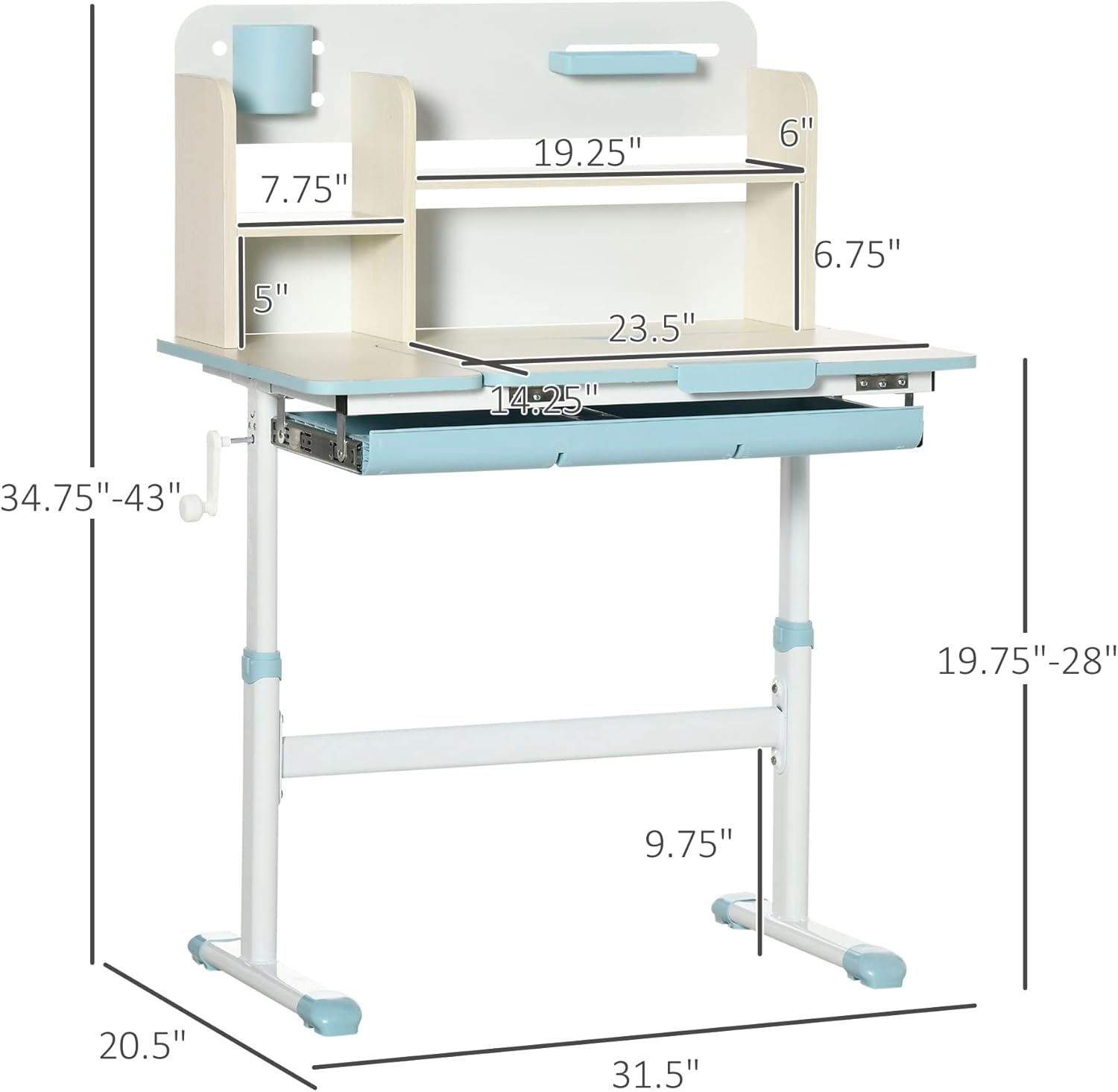
Image 3.1: Dimensional diagram of the study desk, useful for assembly and placement.
4. പ്രവർത്തന നിർദ്ദേശങ്ങൾ
4.1 ഉയരം ക്രമീകരിക്കൽ
The desk's height can be adjusted to accommodate children of various ages and heights. The tabletop adjusts from approximately 19.75 inches to 28 inches. To adjust the height, locate the manual lifting mechanism on the side of the desk. Turn the crank handle to raise or lower the desktop to the desired position. Ensure the desk is stable after adjustment.

Image 4.1: Detail of the manual height adjustment crank.
4.2. Tiltable Desktop
The desktop features a tilt mechanism, allowing the surface to be angled from 0 to 60 degrees. This feature is beneficial for different activities:
- 0-10°: Ideal for writing and general desk work.
- 10-30°: Suitable for reading, reducing neck strain.
- 30-60°: Optimal for drawing, painting, and other artistic activities.
To adjust the tilt, lift the front edge of the desktop. The mechanism will lock into place at various angles. To lower, lift slightly and then push down to release the lock.

Image 4.2: Visual guide for desktop tilt angles.
4.3. സംഭരണ സവിശേഷതകൾ
The desk includes multiple storage options to keep study materials organized:
- ഷെൽവിംഗ്: The integrated hutch provides open shelves for books, stationery, and decorative items.
- ഡ്രോയർ: A pull-out drawer beneath the desktop offers enclosed storage for smaller items like pens, pencils, and erasers.
- പേന ഹോൾഡർ: A dedicated pen holder is included for easy access to writing instruments.

ചിത്രം 4.3: കഴിഞ്ഞുview of the desk's storage capabilities.

Image 4.4: Child utilizing the study desk.
5. പരിപാലനം
To maintain the appearance and functionality of your Qaba Wooden Kids Study Desk, follow these guidelines:
- വൃത്തിയാക്കൽ: പരസ്യം ഉപയോഗിച്ച് മേശയുടെ പ്രതലങ്ങൾ തുടയ്ക്കുകamp തുണി. കഠിനമായ രാസവസ്തുക്കളോ അബ്രാസീവ് ക്ലീനറുകളോ ഉപയോഗിക്കുന്നത് ഒഴിവാക്കുക, കാരണം ഇവ ഫിനിഷിന് കേടുവരുത്തും.
- പരിശോധന: എല്ലാ സ്ക്രൂകളും ഫാസ്റ്റനറുകളും ഇറുകിയതായി ഉറപ്പാക്കാൻ ഇടയ്ക്കിടെ പരിശോധിക്കുക. സ്ഥിരത നിലനിർത്താൻ ആവശ്യമെങ്കിൽ വീണ്ടും മുറുക്കുക.
- പരിസ്ഥിതി വ്യവസ്ഥകൾ: Avoid placing the desk in direct sunlight or near heat sources, which can cause warping or discoloration of the wood.
6. പ്രശ്നപരിഹാരം
This section addresses common issues you might encounter with your study desk.
6.1. Desk is Wobbly
- ഫാസ്റ്റനറുകൾ പരിശോധിക്കുക: എല്ലാ അസംബ്ലി സ്ക്രൂകളും ബോൾട്ടുകളും സുരക്ഷിതമായി മുറുക്കിയിട്ടുണ്ടെന്ന് ഉറപ്പാക്കുക.
- ക്രമീകരിക്കാവുന്ന പാദങ്ങൾ: The desk is equipped with adjustable feet. Turn the feet at the bottom of the legs to level the desk on uneven surfaces.
- തറ ഉപരിതലം: മേശ പരന്നതും തുല്യവുമായ പ്രതലത്തിൽ സ്ഥാപിച്ചിട്ടുണ്ടെന്ന് ഉറപ്പാക്കുക.

Image 6.1: Detail of the adjustable foot for leveling.
6.2. Drawer Does Not Slide Smoothly
- ഇൻസ്റ്റാളേഷൻ പരിശോധിക്കുക: Verify that the drawer slides were installed correctly during assembly and are aligned properly.
- തടസ്സങ്ങൾ: Inspect the drawer and its tracks for any foreign objects or debris that might be impeding movement.
- ലൂബ്രിക്കേഷൻ: If the ball-bearing slides feel stiff, a small amount of silicone-based lubricant can be applied to the tracks.

ചിത്രം 6.2: View of the drawer and tilt mechanism.
7 സ്പെസിഫിക്കേഷനുകൾ
| ഫീച്ചർ | സ്പെസിഫിക്കേഷൻ |
|---|---|
| ബ്രാൻഡ് | ഖാബ |
| മോഡൽ നമ്പർ | 312-084V00BU ന്റെ സവിശേഷതകൾ |
| മൊത്തത്തിലുള്ള അളവുകൾ (D x W x H) | 20.5" x 31.5" x 34.75" - 43" |
| ക്രമീകരിക്കാവുന്ന ഉയരം പരിധി | 19.75" - 28" (tabletop) |
| Desktop Tilt Angle | 0 - 60 Degrees |
| ഭാര ശേഷി (പട്ടിക) | 176 പൗണ്ട് |
| ഭാര ശേഷി (ഡ്രോയർ) | 11 പൗണ്ട് |
| ശുപാർശ ചെയ്യുന്ന പ്രായം | 3-12 വയസ്സ് |
| മെറ്റീരിയൽ | എഞ്ചിനീയേർഡ് വുഡ് (മുകളിൽ), ലോഹം (അടിത്തറ) |
| നിറം | നീല |
| അസംബ്ലി ആവശ്യമാണ് | അതെ |
| ഉപകരണങ്ങൾ ശുപാർശ ചെയ്യുന്നു | സ്ക്രീൻ ഡ്രൈവർ |
| ഇനത്തിൻ്റെ ഭാരം | 38.5 പൗണ്ട് |
8. വാറൻ്റി വിവരങ്ങൾ
This Qaba product comes with a limited warranty. The manufacturer, Aosom LLC, provides a limited warranty for this product. Please refer to the warranty documentation included with your purchase for specific terms, conditions, and duration of coverage. Keep your proof of purchase for warranty claims.
9. ഉപഭോക്തൃ പിന്തുണ
For further assistance, questions, or to report missing/damaged parts, please contact Qaba customer support. You can also visit the official Qaba store for more information and products:


