ഉൽപ്പന്നം കഴിഞ്ഞുview
The Arlo Pro 5S Spotlight Security Camera is designed to provide advanced home security with its 2K HDR video capabilities, dual-band Wi-Fi connectivity, and integrated spotlight. This wireless camera offers comprehensive surveillance for both indoor and outdoor environments, ensuring detailed monitoring day and night.

ചിത്രം: മുൻഭാഗം view of the Arlo Pro 5S Spotlight Security Camera, showcasing its sleek white and black design with the lens and spotlight visible.
എന്താണ് ഉൾപ്പെടുത്തിയിരിക്കുന്നത്
The Arlo Pro 5S 2K Spotlight Security Camera package includes all necessary components for immediate setup and operation:
- (1) ആർലോ പ്രോ 5 ക്യാമറ
- (1) റീചാർജ് ചെയ്യാവുന്ന ബാറ്ററി
- (1) മാഗ്നറ്റിക് ചാർജിംഗ് കേബിൾ
- (1) Wall Mount and Screw Kit
- (1) ദ്രുത ആരംഭ ഗൈഡ്
- (1) വീഡിയോ മോണിറ്ററിംഗ് ഡെക്കൽ
സജ്ജീകരണവും ഇൻസ്റ്റാളേഷനും
Setting up your Arlo Pro 5S camera is designed to be straightforward and wireless, allowing for flexible placement both indoors and outdoors.
പ്രാരംഭ സജ്ജീകരണ ഘട്ടങ്ങൾ:
- ബാറ്ററി ചാർജ് ചെയ്യുക: Fully charge the included rechargeable battery using the magnetic charging cable.
- Arlo Secure ആപ്പ് ഡൗൺലോഡ് ചെയ്യുക: Install the Arlo Secure App on your smartphone (compatible with Android and iOS).
- അക്കൗണ്ട് സൃഷ്ടിക്കൽ/ലോഗിൻ: Open the app and follow the on-screen instructions to create a new Arlo account or log in to an existing one.
- ഉപകരണം ചേർക്കുക: Select "Add New Device" in the app and choose the Arlo Pro 5S camera.
- ജോടിയാക്കൽ: Follow the app's prompts to pair your camera. This typically involves scanning a QR code on the camera.
- Wi-Fi കണക്ഷൻ: The camera will automatically connect to the strongest available Wi-Fi network (supports 2.4GHz and 5GHz dual-band Wi-Fi).
ക്യാമറ ഘടിപ്പിക്കുന്നു:
The camera comes with a wall mount and screw kit for secure installation.
- ആവശ്യമുള്ള ഫീൽഡ് നൽകുന്ന ഒരു സ്ഥലം തിരഞ്ഞെടുക്കുക view (160 degrees) and is within Wi-Fi range.
- Use the provided screws to secure the wall mount.
- Attach the camera to the mounted base, ensuring it is firmly in place.

Image: A smartphone displaying the Arlo app interface for camera setup, with the Arlo Pro 5S camera visible in the foreground, illustrating the ease of wireless setup.
Operating Your Arlo Pro 5S Camera
The Arlo Pro 5S offers a range of features to enhance your security monitoring experience.
പ്രധാന സവിശേഷതകൾ:
- 2K HDR Video: Captures clear, detailed footage with high dynamic range, ensuring visibility in both bright and dark areas.
- 12x ഡിജിറ്റൽ സൂം: Allows for closer inspection of recorded video or live streams.
- കളർ നൈറ്റ് വിഷൻ: Provides full-color video even in low-light conditions, offering better identification than traditional black and white night vision.
- സംയോജിത സ്പോട്ട്ലൈറ്റ്: Illuminates the area upon motion detection, deterring intruders and enabling color night vision.
- 2-വേ ഓഡിയോ: Communicate with visitors or deter unwanted guests using the built-in speaker and microphone.
- ചലനം കണ്ടെത്തലും അലേർട്ടുകളും: ചലനം കണ്ടെത്തുമ്പോൾ നിങ്ങളുടെ സ്മാർട്ട്ഫോണിൽ തത്സമയ അറിയിപ്പുകൾ സ്വീകരിക്കുക.
- തത്സമയ സ്ട്രീമിംഗ്: Access a live feed of your camera's view anytime, anywhere via the Arlo Secure App.
- സംയോജിത സൈറൺ: Remotely activate a loud siren to scare off intruders.
- 160-ഡിഗ്രി ഫീൽഡ് ഓഫ് View: Covers a wide area, minimizing blind spots.

Image: An infographic highlighting the key features of the Arlo Pro 5S 2K Camera, including 2K HDR Video, Large Field of View, Color Night Vision, 2-Way Audio, Built-in Spotlight, Motion Detection & Alerts, Integrated Siren, Easy Wire-Free Setup, Dual-Band Wi-Fi, and Arlo Secure App compatibility.

Image: A visual representation of the camera's 160-degree field of view, showing a wide outdoor area captured by the camera.
Arlo Secure App & Subscription:
The Arlo Secure App is your central control hub. While basic features like real-time notifications and live streaming are available without a subscription, an Arlo Secure plan (paid subscription required after trial) unlocks advanced functionalities:
- 60-Day Video Recording History
- Person & Vehicle Recognition
- Package & Animal Detection
- Smart Activity & Privacy Zones
- കസ്റ്റം ഡിറ്റക്ഷൻ
- അഗ്നി കണ്ടെത്തൽ
- Advanced Audio Detection (Scream, Dog Bark, Glass Break)
- 24/7 Professional Monitoring & Emergency Response (with Premium Plan)
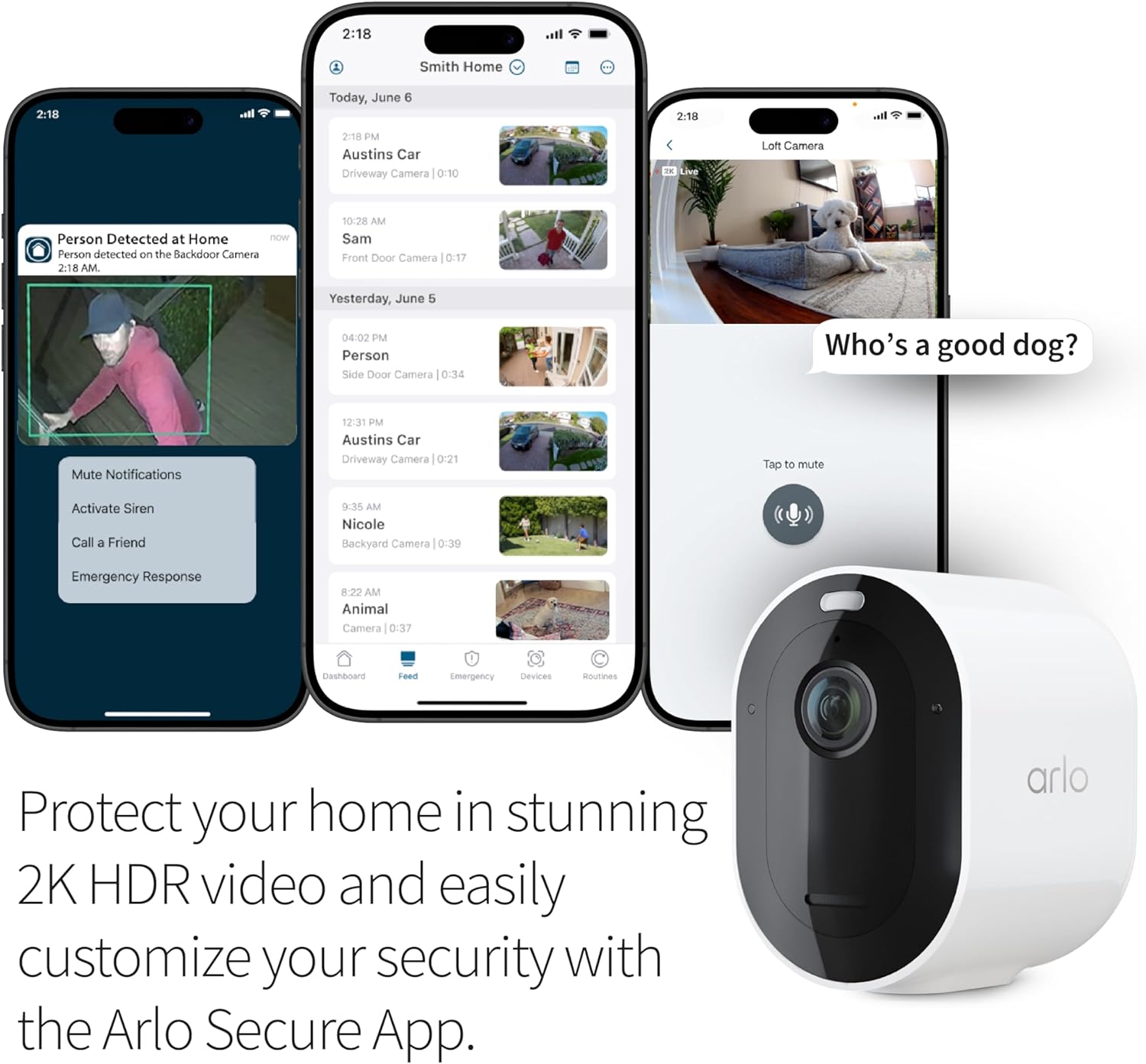
Image: Multiple smartphones displaying the Arlo Secure App interface, showing features like person detection notifications, live view, and event history, demonstrating how to protect your home with 2K HDR video.

Image: A graphic detailing the features included with and without an Arlo Secure subscription, highlighting premium features like 60-day video history and advanced detection.
സ്മാർട്ട് ഹോം ഇൻ്റഗ്രേഷൻ:
The Arlo Pro 5S camera seamlessly integrates with popular smart home ecosystems:
- ആമസോൺ അലക്സ: ഇതിനായി വോയ്സ് കമാൻഡുകൾ ഉപയോഗിക്കുക view live feeds on compatible devices.
- Apple Home: (Requires Arlo SmartHub, sold separately) Integrate with your Apple Home ecosystem.
- ഗൂഗിൾ ഹോം: നിങ്ങളുടെ ക്യാമറ നിയന്ത്രിക്കുക, view feeds through Google Assistant.
- ഇഫ്ത്തിത്ത്: Create custom automations, such as receiving low battery notifications or turning on compatible lights when motion is detected.

Image: An Arlo camera displayed next to a smart display showing a live feed, with logos for Alexa, IFTTT, Apple Home, and Google Home, illustrating smart home compatibility.
ബാറ്ററിയും പരിപാലനവും
The Arlo Pro 5S camera is designed for easy maintenance, primarily focusing on its rechargeable battery.
ബാറ്ററി മാനേജ്മെൻ്റ്:
- The camera uses a rechargeable Lithium Ion battery (included).
- Battery life varies based on usage, video quality settings, and environmental factors.
- When the battery is low, you will receive notifications via the Arlo Secure App.
- To recharge, simply remove the battery and connect it to the magnetic charging cable.
- For continuous power, consider purchasing an optional solar panel accessory (sold separately) to keep the battery charged.
വൃത്തിയാക്കൽ:
- ക്യാമറ ലെൻസും ബോഡിയും മൃദുവായ, d തുണി ഉപയോഗിച്ച് സൌമ്യമായി തുടയ്ക്കുക.amp പൊടിയും അവശിഷ്ടങ്ങളും നീക്കം ചെയ്യാനുള്ള തുണി.
- Avoid using harsh chemicals or abrasive materials that could damage the camera.
ട്രബിൾഷൂട്ടിംഗ്
If you encounter issues with your Arlo Pro 5S camera, refer to the following common troubleshooting tips:
കണക്റ്റിവിറ്റി പ്രശ്നങ്ങൾ:
- Wi-Fi സിഗ്നൽ പരിശോധിക്കുക: Ensure the camera is within range of your Wi-Fi router and has a strong signal. The camera supports dual-band (2.4GHz and 5GHz) Wi-Fi and automatically connects to the stronger network.
- റൂട്ടർ ഇടപെടൽ: Move the camera or router to minimize interference from other electronic devices.
- Restart Camera/Router: Power cycle both your Arlo camera and Wi-Fi router.
- App Not Finding Camera: If the app fails to detect the camera during setup, ensure the camera is powered on and in pairing mode. Re-attempt the pairing process.
False Alerts / Motion Detection:
- സംവേദനക്ഷമത ക്രമീകരിക്കുക: In the Arlo Secure App, adjust the motion detection sensitivity settings to reduce unwanted alerts from pets or environmental factors.
- പ്രവർത്തന മേഖലകൾ കോൺഫിഗർ ചെയ്യുക: Utilize the activity zone feature in the app to define specific areas for motion detection, ignoring irrelevant areas.
- Subscription Features: For advanced filtering (Person, Vehicle, Animal, Package detection), ensure you have an active Arlo Secure subscription.
ബാറ്ററി വേഗത്തിൽ തീർന്നു:
- Frequent Recordings: High motion activity or frequent live view access can deplete the battery faster. Adjust settings or consider a solar panel.
- Weak Wi-Fi: A weak Wi-Fi signal can cause the camera to work harder, consuming more power. Improve signal strength if possible.
- താപനില തീവ്രത: Very cold or hot temperatures can affect battery performance.
കൂടുതൽ വിശദമായ ട്രബിൾഷൂട്ടിംഗിന്, ഔദ്യോഗിക വെബ്സൈറ്റ് കാണുക. ട്രബിൾഷൂട്ടിംഗ് ഗൈഡ് (PDF) അല്ലെങ്കിൽ ഉപയോക്തൃ മാനുവൽ (PDF).
സ്പെസിഫിക്കേഷനുകൾ
| ഫീച്ചർ | വിശദാംശങ്ങൾ |
|---|---|
| മോഡലിൻ്റെ പേര് | Arlo Pro 5S 2K (VMC4060A) |
| ഇൻഡോർ/ഔട്ട്ഡോർ ഉപയോഗം | ഔട്ട്ഡോർ |
| പവർ ഉറവിടം | ബാറ്ററി പവർ (1 ലിഥിയം അയൺ ബാറ്ററി ഉൾപ്പെടുത്തിയിരിക്കുന്നു) |
| കണക്റ്റിവിറ്റി ടെക്നോളജി | വൈഫൈ (ഡ്യുവൽ-ബാൻഡ് 2.4GHz & 5GHz) |
| വീഡിയോ ക്യാപ്ചർ റെസല്യൂഷൻ | 2K HDR |
| Viewing ആംഗിൾ | 160 ഡിഗ്രി |
| പ്രത്യേക സവിശേഷതകൾ | 2-Way Audio, Built-In Spotlight, Motion Sensor, Color Night Vision, Noise Reduction, Weather Proof |
| അളവുകൾ (L x W x H) | 3.5 x 2 x 3 ഇഞ്ച് |
| ഇനത്തിൻ്റെ ഭാരം | 11 ഔൺസ് (0.69 പൗണ്ട്) |
| അന്താരാഷ്ട്ര സംരക്ഷണ റേറ്റിംഗ് | IP65 |
| അനുയോജ്യമായ ഉപകരണങ്ങൾ | Smartphone (Android, iOS), Amazon Alexa, Apple Home (with SmartHub), Google Home, IFTTT |
| യു.പി.സി | 193108144100 |
വാറൻ്റി വിവരങ്ങൾ
The Arlo Pro 5S Spotlight Security Camera comes with a standard 1 വർഷത്തെ വാറൻ്റി വാങ്ങിയ തീയതി മുതൽ. സാധാരണ ഉപയോഗത്തിലുള്ള മെറ്റീരിയലുകളിലെയും ജോലികളിലെയും വൈകല്യങ്ങൾ ഈ വാറന്റി ഉൾക്കൊള്ളുന്നു. വാറന്റി ക്ലെയിമുകൾക്കായി നിങ്ങളുടെ വാങ്ങിയതിന്റെ തെളിവ് സൂക്ഷിക്കുക.
For detailed warranty terms and conditions, please refer to the official Arlo webസൈറ്റ് അല്ലെങ്കിൽ നിങ്ങളുടെ ഉൽപ്പന്നത്തിൽ ഉൾപ്പെടുത്തിയിരിക്കുന്ന ഡോക്യുമെന്റേഷൻ.
ഉപഭോക്തൃ പിന്തുണ
കൂടുതൽ സഹായം, സാങ്കേതിക പിന്തുണ അല്ലെങ്കിൽ അന്വേഷണങ്ങൾക്കായി, ദയവായി ഇനിപ്പറയുന്ന ഉറവിടങ്ങൾ ഉപയോഗിക്കുക:
- Arlo Secure App: Access help and support directly through the application.
- 24/7 Chat Support: Available via the Arlo app or their official webസൈറ്റ്.
- ഔദ്യോഗിക ഉപയോക്തൃ ഗൈഡ്: A comprehensive guide is available for download: ഉപയോക്തൃ മാനുവൽ (PDF).
- പ്രശ്ന പരിഹാരത്തിന് സഹായിക്കുന്ന മാർഗധർശി: For specific issues, consult the ട്രബിൾഷൂട്ടിംഗ് ഗൈഡ് (PDF).
- Arlo Community: Connect with other users and find solutions at the Arlo community forums.
Product use and support are primarily for the United States region.


