1. ആമുഖം
Thank you for choosing the Mondaine A997MCAL86SBV Mini Wall Clock and Alarm Clock. This device combines the iconic Swiss Railways clock design with practical alarm functionality, suitable for both wall mounting and desk placement. This manual provides essential information for the proper setup, operation, and maintenance of your clock.
പ്രധാന സവിശേഷതകൾ:
- Iconic Mondaine Swiss Railways clock design.
- Dual functionality: can be used as a wall clock or a desk clock.
- Integrated alarm function.
- Durable aluminum case with a grey dial and matching hands.
- Compact 12.5 cm (4.92 inch) diameter.
2. പാക്കേജ് ഉള്ളടക്കം
Please check the package contents to ensure all items are present and undamaged.
- Mondaine A997MCAL86SBV Mini Wall Clock and Alarm Clock
- നിർദ്ദേശ മാനുവൽ (ഈ പ്രമാണം)
- കുറിപ്പ്: ബാറ്ററികൾ ഉൾപ്പെടുത്തിയിട്ടില്ല, പ്രത്യേകം വാങ്ങണം.
3 സുരക്ഷാ വിവരങ്ങൾ
Please read and understand all safety instructions before using the clock. Failure to follow these instructions may result in damage to the product or personal injury.
- Keep the clock away from water and high humidity.
- Avoid exposing the clock to extreme temperatures or direct sunlight for prolonged periods.
- ക്ലോക്ക് സ്വയം വേർപെടുത്താനോ നന്നാക്കാനോ ശ്രമിക്കരുത്. എല്ലാ സേവനങ്ങളും യോഗ്യതയുള്ള ഉദ്യോഗസ്ഥരെ ഏൽപ്പിക്കുക.
- ഉപയോഗിച്ച ബാറ്ററികൾ പ്രാദേശിക നിയന്ത്രണങ്ങൾ അനുസരിച്ച് ഉത്തരവാദിത്തത്തോടെ നീക്കം ചെയ്യുക.
- ബാറ്ററികൾ കുട്ടികൾക്ക് ലഭ്യമാകാതെ സൂക്ഷിക്കുക.
4. സജ്ജീകരണം
4.1 ബാറ്ററി ഇൻസ്റ്റാളേഷൻ
- ക്ലോക്കിന്റെ പിൻഭാഗത്ത് ബാറ്ററി കമ്പാർട്ട്മെന്റ് കവർ കണ്ടെത്തുക.
- കവർ സ്ലൈഡുചെയ്തോ സൌമ്യമായി തുറന്നോ നീക്കം ചെയ്യുക.
- Insert one (1) product-specific battery (not included) into the compartment, ensuring the positive (+) and negative (-) terminals align correctly with the markings.
- ബാറ്ററി കമ്പാർട്ട്മെന്റ് കവർ സുരക്ഷിതമായി മാറ്റിസ്ഥാപിക്കുക.
4.2 സമയം ക്രമീകരിക്കുന്നു
- On the back of the clock, locate the time setting knob (usually a small wheel or crown).
- Rotate the knob in either direction to move the hour and minute hands to the correct time.
- Ensure the hands are aligned properly and move smoothly.
4.3 Placement (Wall Mount or Desk)
Your Mondaine clock is designed for versatile placement.
- For Desk Use: Place the clock on a stable, flat surface. The integrated stand (if present) should be extended for stability.
- വാൾ മൗണ്ടിംഗിനായി: Use a suitable screw or hook (not included) securely fastened into the wall. Hang the clock using the keyhole slot on the back. Ensure the clock is level and securely mounted to prevent it from falling.
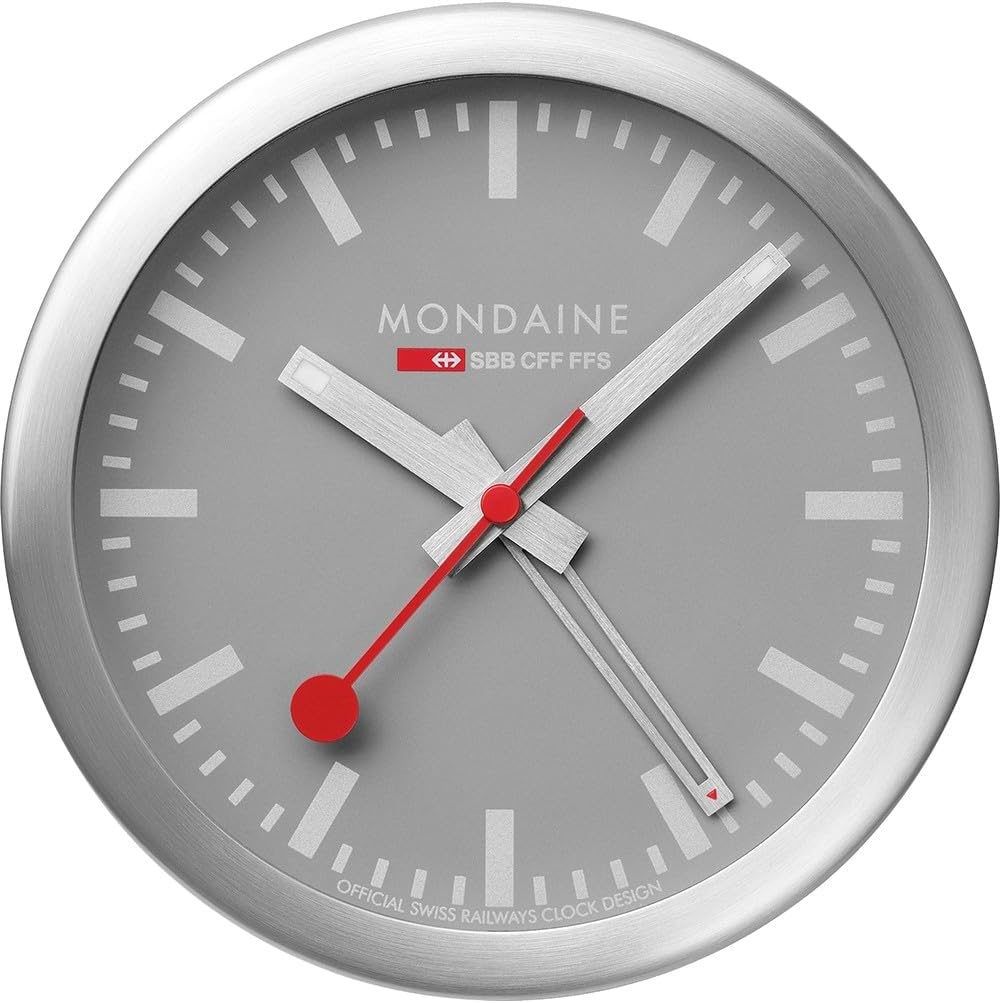
ചിത്രം 1: മുൻഭാഗം view of the Mondaine A997MCAL86SBV Mini Wall Clock.

Figure 2: Dimensions of the Mondaine A997MCAL86SBV Mini Wall Clock, indicating a 4.92-inch diameter.
5. പ്രവർത്തന നിർദ്ദേശങ്ങൾ
5.1 അലാറം സജ്ജമാക്കുന്നു
- Locate the alarm setting knob on the back of the clock (distinct from the time setting knob).
- Rotate this knob to move the alarm hand (often a smaller, separate hand or indicator) to your desired alarm time.
- Be mindful of AM/PM if your clock has a 12-hour display and the alarm mechanism distinguishes between them (though typically for simple analog alarms, it's a 12-hour cycle).
5.2 അലാറം സജീവമാക്കൽ/നിർജ്ജീവമാക്കൽ
- Find the alarm ON/OFF switch or button on the back or side of the clock.
- Slide the switch to the "ON" position to activate the alarm.
- When the alarm sounds, slide the switch to the "OFF" position to deactivate it. Some models may have a snooze button on top; press it to temporarily silence the alarm.
6. പരിപാലനം
6.1 വൃത്തിയാക്കൽ
- Wipe the clock's surface with a soft, dry, lint-free cloth.
- അബ്രാസീവ് ക്ലീനറുകളോ, ലായകങ്ങളോ, കെമിക്കൽ സ്പ്രേകളോ ഉപയോഗിക്കരുത്, കാരണം ഇവ ഫിനിഷിന് കേടുവരുത്തും.
- Avoid getting moisture into the clock mechanism.
6.2 ബാറ്ററി മാറ്റിസ്ഥാപിക്കൽ
- Replace the battery when the clock starts losing time or the alarm function weakens.
- വിഭാഗം 4.1-ൽ വിവരിച്ചിരിക്കുന്ന ബാറ്ററി ഇൻസ്റ്റാളേഷൻ ഘട്ടങ്ങൾ പാലിക്കുക.
- Always use a fresh, high-quality battery of the specified type.
7. പ്രശ്നപരിഹാരം
| പ്രശ്നം | സാധ്യമായ കാരണം | പരിഹാരം |
|---|---|---|
| Clock not running or losing time. | നിർജ്ജീവമായ അല്ലെങ്കിൽ ദുർബലമായ ബാറ്ററി. | ബാറ്ററി പുതിയൊരെണ്ണം ഉപയോഗിച്ച് മാറ്റിസ്ഥാപിക്കുക. |
| അലാറം മുഴങ്ങുന്നില്ല. | അലാറം സജീവമാക്കിയിട്ടില്ല അല്ലെങ്കിൽ തെറ്റായി സജ്ജീകരിച്ചിട്ടില്ല. | Ensure the alarm switch is "ON" and the alarm hand is set to the desired time. Check battery. |
| Clock hands are stuck. | Obstruction or internal mechanism issue. | Gently check for any visible obstructions. If none, contact customer support. Do not force the hands. |
| Loud ticking noise. | Normal operation for some analog movements. | This is often characteristic of analog clocks. If it's unusually loud, ensure the clock is on a stable surface. |
8 സ്പെസിഫിക്കേഷനുകൾ
| ബ്രാൻഡ് | മൊണ്ടെയ്ൻ |
| മോഡൽ നമ്പർ | A997MCAL86SBV |
| നിറം | ചാരനിറം/വെള്ളി |
| ഡിസ്പ്ലേ തരം | അനലോഗ് |
| പ്രത്യേക ഫീച്ചർ | അലാറം |
| ഉൽപ്പന്ന അളവുകൾ | 12.5 cm (4.92"W x 4.92"H) |
| പവർ ഉറവിടം | ബാറ്ററി പവർ |
| ആകൃതി | വൃത്താകൃതി |
| ഇൻഡോർ/ഔട്ട്ഡോർ ഉപയോഗം | ഇൻഡോർ |
| ഫ്രെയിം മെറ്റീരിയൽ | അലുമിനിയം |
| ഡയൽ കളർ | ചാരനിറം |
| മൗണ്ടിംഗ് തരം | Wall Mount (also suitable for desk placement) |
| ഇനത്തിൻ്റെ ഭാരം | 0.4 കിലോഗ്രാം (14.1 ഔൺസ്) |
| ബാറ്ററികൾ ആവശ്യമാണ് | Yes (1 Product Specific battery) |
| ബാറ്ററികൾ ഉൾപ്പെടുത്തിയിട്ടുണ്ട് | ഇല്ല |
9. വാറൻ്റിയും പിന്തുണയും
9.1 വാറൻ്റി വിവരങ്ങൾ
This Mondaine clock comes with a manufacturer's warranty. Please refer to the warranty card included with your purchase for specific terms, conditions, and duration. In cases where no specific guarantee is provided, standard consumer rights apply.
9.2 ഉപഭോക്തൃ പിന്തുണ
For technical assistance, troubleshooting beyond this manual, or warranty claims, please contact Mondaine customer support.
- Webസൈറ്റ്: www.mondaine.com
- ഇമെയിൽ: ഉദ്യോഗസ്ഥനെ റഫർ ചെയ്യുക webബന്ധപ്പെടാനുള്ള വിശദാംശങ്ങൾക്കുള്ള സൈറ്റ്.
- ഫോൺ: ഉദ്യോഗസ്ഥനെ റഫർ ചെയ്യുക webബന്ധപ്പെടാനുള്ള വിശദാംശങ്ങൾക്കുള്ള സൈറ്റ്.