1. ആമുഖം
Thank you for choosing the Mission 700 2-Way Vented-Box Standmount Speakers. This manual provides essential information for the proper setup, operation, and maintenance of your new speakers. Please read these instructions thoroughly before use to ensure optimal performance and longevity of your product.
The Mission 700 speakers are designed to deliver articulate and insightful sound performance with immersive bass clarity, featuring a classic retro design and Mission's Inverted Driver Geometry.
2 സുരക്ഷാ വിവരങ്ങൾ
ഇനിപ്പറയുന്ന സുരക്ഷാ മുൻകരുതലുകൾ പാലിക്കുക:
- Do not expose speakers to extreme temperatures, humidity, or direct sunlight.
- സ്പീക്കറുകൾക്ക് ചുറ്റും ശരിയായ വായുസഞ്ചാരം ഉറപ്പാക്കുക.
- Avoid placing speakers near heat sources or in enclosed spaces without adequate airflow.
- ശുപാർശ ചെയ്യുന്നത് മാത്രം ഉപയോഗിക്കുക amplifier power (25 - 150 Watts) to prevent damage.
- കുട്ടികൾക്കും വളർത്തുമൃഗങ്ങൾക്കും ലഭ്യമാകാതെ സൂക്ഷിക്കുക.
- Disconnect from power before cleaning or moving.
3. ബോക്സിൽ എന്താണുള്ളത്?
അൺപാക്ക് ചെയ്യുമ്പോൾ, എല്ലാ ഘടകങ്ങളും ഉണ്ടെന്ന് ദയവായി പരിശോധിക്കുക:
- Mission 700 Speakers (Pair)
- Speaker Grill Covers (Pair)
- ഇൻസ്ട്രക്ഷൻ മാനുവൽ (ഈ പ്രമാണം)

Image: The Mission 700 speakers, showcasing their design and included grilles. One speaker is shown with its grille removed, revealing the woofer, tweeter, and bass port. The other speaker has its grille attached.
4. സജ്ജീകരണം
4.1 സ്പീക്കർ പ്ലേസ്മെന്റ്
The Mission 700 speakers are designed for standmount or bookshelf use. Optimal placement is crucial for sound quality. Consider the following:
- ചുമരുകളിൽ നിന്നുള്ള ദൂരം: Experiment with placing speakers away from walls to reduce bass boom and improve soundstage.
- സ്റ്റീരിയോ ഇമേജിംഗ്: Position speakers to form an equilateral triangle with your primary listening position for the best stereo image.
- ഉയരം: Ensure the tweeter is approximately at ear level when seated. Dedicated speaker stands are recommended for optimal performance.
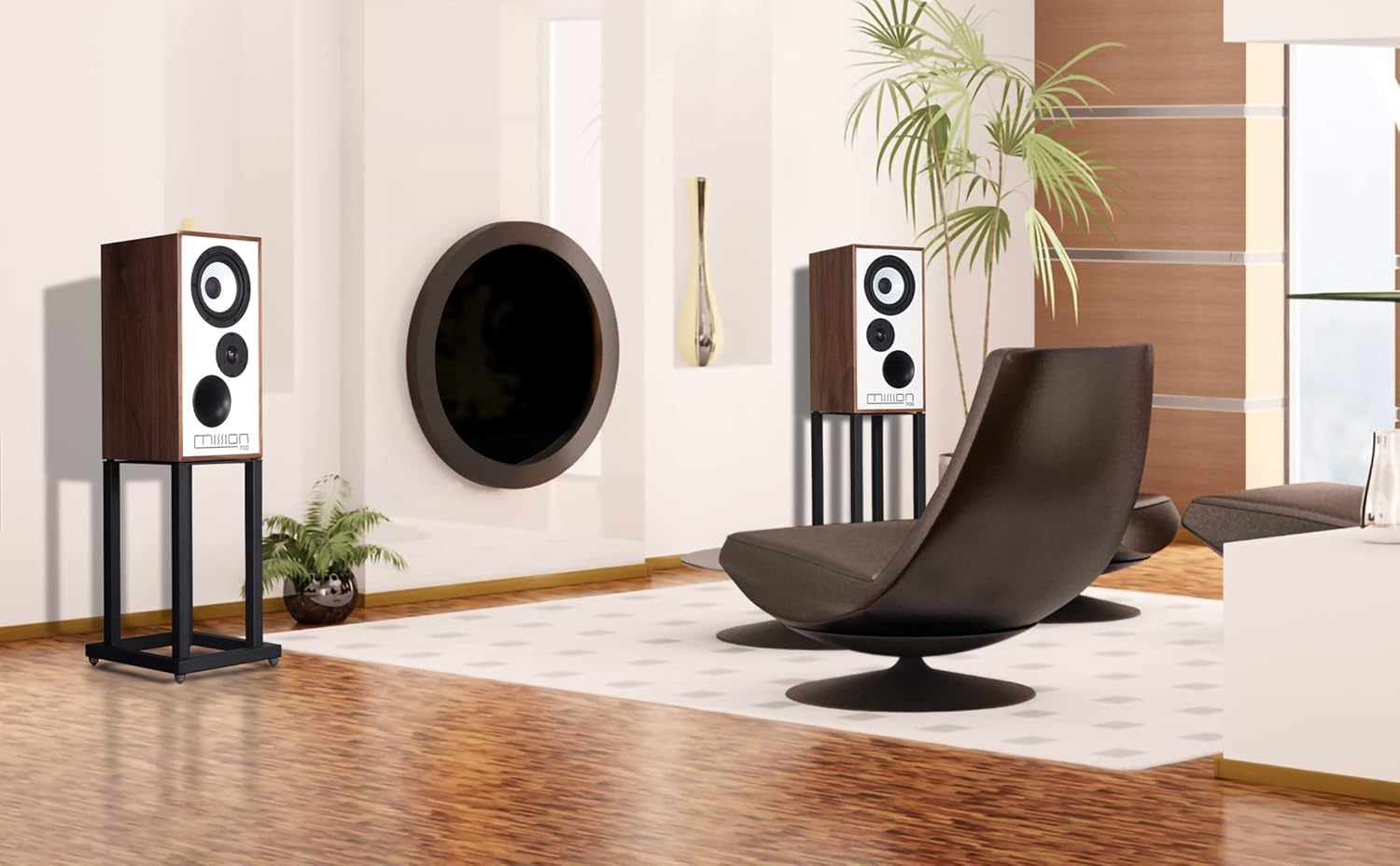
ചിത്രം: ഒരു മുൻ കാമുകൻample of Mission 700 speakers positioned in a room, demonstrating typical placement for home audio systems.
4.2 ഒരു കണക്റ്റുചെയ്യുന്നു Ampജീവപര്യന്തം
Use high-quality speaker cables to connect your Mission 700 speakers to your amplifier. Ensure correct polarity (+ to + and - to -) for each speaker.
- നിങ്ങളുടെ ഓഫാക്കുക ampഎന്തെങ്കിലും കണക്ഷനുകൾ ഉണ്ടാക്കുന്നതിന് മുമ്പ് ലൈഫയർ.
- Connect the positive (red) terminal on the speaker to the positive (red) terminal on the ampജീവൻ.
- Connect the negative (black) terminal on the speaker to the negative (black) terminal on the ampജീവൻ.
- രണ്ടാമത്തെ സ്പീക്കറിനായി ആവർത്തിക്കുക.

Image: The rear panel of a Mission 700 speaker, highlighting the two speaker terminals (red and black) for amplifier connection and the product information label.
5. പ്രവർത്തന നിർദ്ദേശങ്ങൾ
Once properly connected, your Mission 700 speakers are ready for use. Ensure your amplifier is powered on and set to the correct input source. Adjust the volume gradually to a comfortable listening level.
The Mission 700 features an Inverted Driver Geometry, where the tweeter is positioned below the mid/bass driver. This design aims to equalize the path length from the drivers to the listener's ear, optimizing time alignment and improving overall sound coherence.

Image: A close-up of the Mission 700 speaker's front baffle, illustrating the inverted driver geometry with the tweeter placed below the main driver and the bass port at the bottom.
6. പരിപാലനം
നിങ്ങളുടെ സ്പീക്കറുകളുടെ രൂപവും പ്രകടനവും നിലനിർത്താൻ:
- വൃത്തിയാക്കൽ: Use a soft, dry cloth to wipe the cabinet surfaces. Avoid abrasive cleaners or solvents.
- ഗ്രില്ലുകൾ: The speaker grilles can be gently removed for cleaning. Use a soft brush or vacuum cleaner with a brush attachment to remove dust. Reattach carefully.
- ഡ്രൈവർ പരിചരണം: Avoid touching the speaker drivers (woofer and tweeter) directly, as this can cause damage.
7. പ്രശ്നപരിഹാരം
If you encounter issues with your Mission 700 speakers, refer to the following common solutions:
- ശബ്ദമില്ല:
- സ്പീക്കറുകൾക്കും പോർട്ടബിലിറ്റിക്കും ഇടയിലുള്ള എല്ലാ കേബിൾ കണക്ഷനുകളും പരിശോധിക്കുക. amplifier. Ensure they are secure and correctly polarized.
- പരിശോധിച്ചുറപ്പിക്കുക amplifier ഓണാക്കി ശരിയായ ഇൻപുട്ട് ഉറവിടത്തിലേക്ക് സജ്ജീകരിച്ചിരിക്കുന്നു.
- സ്ഥിരീകരിക്കുക amplifier's volume is not set to minimum or muted.
- വികലമായ ശബ്ദം:
- നിങ്ങളുടെ ഫോണിലെ വോളിയം ലെവൽ കുറയ്ക്കുക. ampജീവൻ.
- സ്പീക്കർ കേബിൾ കണക്ഷനുകളിൽ അയഞ്ഞ സ്ട്രാൻഡുകളോ ഷോർട്ട് സർക്യൂട്ടുകളോ ഉണ്ടോ എന്ന് പരിശോധിക്കുക.
- ഉറപ്പാക്കുക amplifier's power output is within the recommended range for the speakers (25 - 150 Watts).
- സ്പീക്കറുകളിൽ നിന്നുള്ള അസമമായ ശബ്ദം:
- Check individual speaker connections for correct polarity.
- Ensure speakers are placed symmetrically in the room.
- സ്ഥിരീകരിക്കുക amplifier balance settings.
If problems persist, consult your dealer or Mission customer support.
8 സ്പെസിഫിക്കേഷനുകൾ
| ഫീച്ചർ | വിശദാംശങ്ങൾ |
|---|---|
| മോഡലിൻ്റെ പേര് | മിഷൻ 700 |
| സ്പീക്കർ തരം | 2-Way Vented-Box Standmount / Bookshelf |
| ശുപാർശ ചെയ്തത് Ampജീവിതശക്തി | 25 - 150 വാട്ട്സ് |
| ട്വീറ്റർ വ്യാസം | 1 ഇഞ്ച് |
| സറൗണ്ട് സൗണ്ട് ചാനൽ കോൺഫിഗറേഷൻ | 2.0 |
| ഉൽപ്പന്ന അളവുകൾ (D x W x H) | 20"D x 12"W x 10"H |
| മെറ്റീരിയൽ | Plastic, Textile (for grilles) |
| നിറം | Walnut (as per this variant) |
| മൗണ്ടിംഗ് തരം | ഷെൽഫ് മ .ണ്ട് |
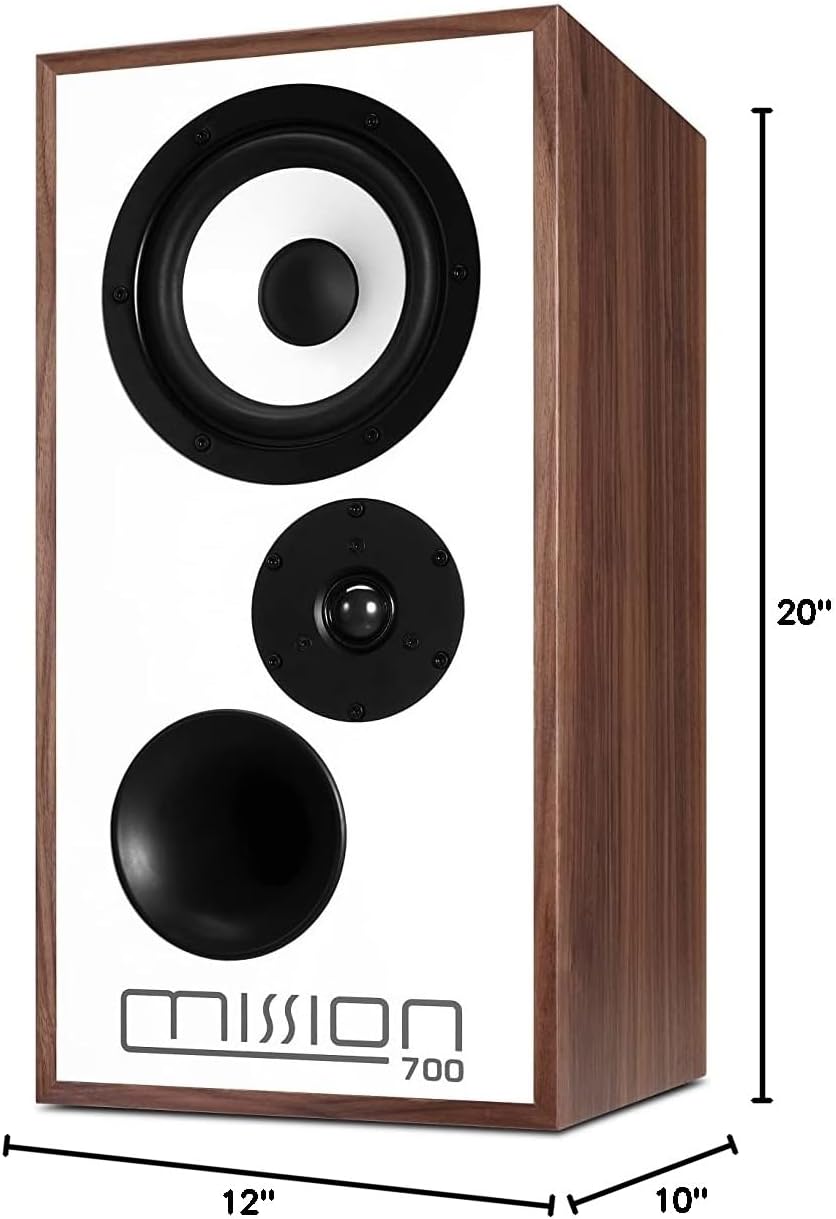
Image: The Mission 700 speaker with its physical dimensions clearly indicated.
9. വാറൻ്റിയും പിന്തുണയും
Mission products are manufactured to high standards and are warranted against defects in materials and workmanship. For specific warranty terms and conditions, please refer to the warranty card included with your product or contact your local Mission dealer.
For technical support or service inquiries, please contact Mission customer service through their official website or your authorized dealer. Please have your model number (Mission 700) and purchase details ready.


