1. ഉൽപ്പന്നം കഴിഞ്ഞുview
The Baseus Bowie WM02 True Wireless Earphones are designed to provide a seamless audio experience with their compact design and advanced wireless technology. These earphones offer clear sound, comfortable fit, and intuitive touch controls for music playback and call management.

Image: Baseus Bowie WM02 True Wireless Earphones packaging box.
2. ബോക്സിൽ എന്താണുള്ളത്?
Carefully unpack your Baseus Bowie WM02 True Wireless Earphones package. Ensure all items listed below are present and in good condition.
- Baseus Bowie WM02 True Wireless Earbuds (Left and Right)
- ചാർജിംഗ് കേസ്
- USB-C ചാർജിംഗ് കേബിൾ
- Silicone Ear Tips (Multiple Sizes)
- ഉപയോക്തൃ മാനുവൽ (ഈ പ്രമാണം)
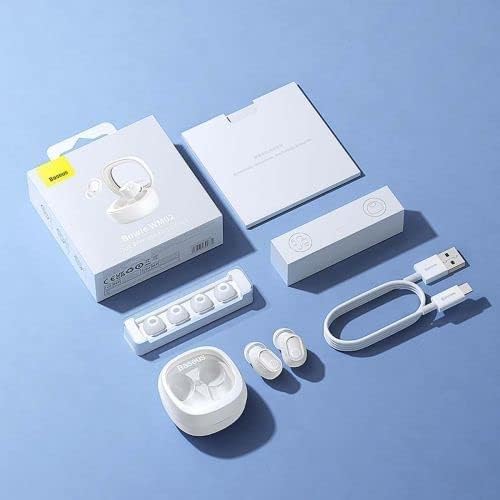
Image: Contents of the Baseus Bowie WM02 True Wireless Earphones package.
3. സജ്ജീകരണം
3.1 ഇയർഫോണുകളും കേസും ചാർജ് ചെയ്യുന്നു
ആദ്യ ഉപയോഗത്തിന് മുമ്പ്, ഇയർഫോണുകളും ചാർജിംഗ് കേസും പൂർണ്ണമായും ചാർജ് ചെയ്യുക.
- ഇയർബഡുകൾ ചാർജിംഗ് കേസിൽ വയ്ക്കുക. അവ അവയുടെ സ്ലോട്ടുകളിൽ ശരിയായി സ്ഥാപിച്ചിട്ടുണ്ടെന്ന് ഉറപ്പാക്കുക.
- USB-C ചാർജിംഗ് കേബിൾ കേസിലെ ചാർജിംഗ് പോർട്ടിലേക്കും മറ്റേ അറ്റം ഒരു USB പവർ അഡാപ്റ്ററിലേക്കോ (ഉൾപ്പെടുത്തിയിട്ടില്ല) അല്ലെങ്കിൽ കമ്പ്യൂട്ടറിന്റെ USB പോർട്ടിലേക്കോ ബന്ധിപ്പിക്കുക.
- The indicator light on the charging case will show charging status. Once fully charged, the light will indicate completion (refer to specific light behavior in the quick start guide if provided).
3.2 ബ്ലൂടൂത്ത് ജോടിയാക്കൽ
Follow these steps to pair your earphones with a Bluetooth-enabled device.
- Open the charging case. The earbuds will automatically enter pairing mode, and the indicator light on the earbuds will flash.
- നിങ്ങളുടെ ഉപകരണത്തിൽ (സ്മാർട്ട്ഫോൺ, ടാബ്ലെറ്റ് മുതലായവ), ബ്ലൂടൂത്ത് പ്രവർത്തനക്ഷമമാക്കുക.
- ഇതിനായി തിരയുക Bluetooth devices and select "Baseus Bowie WM02" from the list.
- Once connected, the indicator lights on the earbuds will stop flashing, indicating successful pairing.

Image: Earbuds in open charging case, ready for pairing or use.
3.3 ഇയർബഡുകൾ ധരിക്കൽ
ഒപ്റ്റിമൽ ശബ്ദ നിലവാരത്തിനും സുഖത്തിനും, ശരിയായ ഫിറ്റ് ഉറപ്പാക്കുക.
- Choose the ear tips that best fit your ear canal. Experiment with different sizes for the most secure and comfortable seal.
- Gently insert each earbud into your ear, twisting slightly until it feels snug and secure.
4. പ്രവർത്തന നിർദ്ദേശങ്ങൾ
4.1 പവർ ഓൺ/ഓഫ്
- പവർ ഓൺ: ചാർജിംഗ് കെയ്സ് തുറക്കുക, ഇയർബഡുകൾ സ്വയമേവ ഓണാകും.
- പവർ ഓഫ്: ഇയർബഡുകൾ തിരികെ ചാർജിംഗ് കെയ്സിലേക്ക് വയ്ക്കുക, ലിഡ് അടയ്ക്കുക. അവ യാന്ത്രികമായി ഓഫാകുകയും ചാർജ് ചെയ്യാൻ തുടങ്ങുകയും ചെയ്യും.
4.2 ടച്ച് നിയന്ത്രണങ്ങൾ
The Baseus Bowie WM02 earphones feature intuitive touch controls on each earbud.
| ആക്ഷൻ | ഇടത് ഇയർബഡ് | വലത് ഇയർബഡ് |
|---|---|---|
| പ്ലേ/താൽക്കാലികമായി നിർത്തുക | ഒറ്റ ടാപ്പ് | ഒറ്റ ടാപ്പ് |
| അടുത്ത ട്രാക്ക് | ട്രിപ്പിൾ ടാപ്പ് | ട്രിപ്പിൾ ടാപ്പ് |
| മുമ്പത്തെ ട്രാക്ക് | N/A | N/A |
| ഉത്തരം / കോൾ അവസാനിപ്പിക്കുക | ഒറ്റ ടാപ്പ് | ഒറ്റ ടാപ്പ് |
| കോൾ നിരസിക്കുക | അമർത്തിപ്പിടിക്കുക (2 സെ) | അമർത്തിപ്പിടിക്കുക (2 സെ) |
| വോയ്സ് അസിസ്റ്റൻ്റ് സജീവമാക്കുക | രണ്ടുതവണ ടാപ്പ് ചെയ്യുക | രണ്ടുതവണ ടാപ്പ് ചെയ്യുക |
Note: Specific touch control functions may vary slightly. Refer to the quick start guide for any additional or alternative controls.
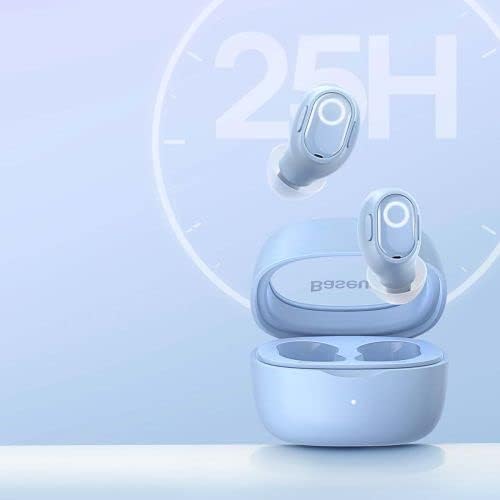
Image: Earbuds and case, illustrating long battery life.
5. പരിപാലനവും പരിചരണവും
- വൃത്തിയാക്കൽ: Regularly clean the earbuds and charging case with a soft, dry, lint-free cloth. Do not use harsh chemicals or abrasive materials. Gently remove any earwax or debris from the ear tips and speaker mesh using a small, soft brush.
- സംഭരണം: ഉപയോഗത്തിലില്ലാത്തപ്പോൾ, പൊടിയിൽ നിന്നും കേടുപാടുകളിൽ നിന്നും സംരക്ഷിക്കാൻ ഇയർഫോണുകൾ ചാർജിംഗ് കേസിൽ സൂക്ഷിക്കുക. നേരിട്ടുള്ള സൂര്യപ്രകാശവും കടുത്ത താപനിലയും ഏൽക്കാത്ത തണുത്തതും വരണ്ടതുമായ സ്ഥലത്ത് സൂക്ഷിക്കുക.
- ബാറ്ററി കെയർ: To prolong battery life, avoid fully discharging the earphones and case frequently. Charge them regularly, even if not in constant use.
- ജല പ്രതിരോധം: These earphones are not waterproof. Avoid exposure to water, sweat, or high humidity.
6. പ്രശ്നപരിഹാരം
If you encounter issues with your Baseus Bowie WM02 earphones, try the following solutions:
- ശബ്ദമില്ല:
- ഇയർഫോണുകൾ ചാർജ് ചെയ്തിട്ടുണ്ടെന്ന് ഉറപ്പാക്കുക.
- Check if the earphones are properly connected to your device.
- നിങ്ങളുടെ ഉപകരണത്തിലും ഇയർഫോണുകളിലും വോളിയം ക്രമീകരിക്കുക.
- ജോടിയാക്കൽ പ്രശ്നങ്ങൾ:
- നിങ്ങളുടെ ഉപകരണത്തിൽ ബ്ലൂടൂത്ത് പ്രവർത്തനക്ഷമമാക്കിയിട്ടുണ്ടെന്ന് ഉറപ്പാക്കുക.
- Make sure the earphones are in pairing mode.
- നിങ്ങളുടെ ബ്ലൂടൂത്ത് ലിസ്റ്റിൽ നിന്ന് ഉപകരണം മറന്ന് വീണ്ടും ജോടിയാക്കാൻ ശ്രമിക്കുക.
- Ensure the earphones are not connected to another device.
- ഇയർബഡുകൾ ചാർജ് ചെയ്യുന്നില്ല:
- ചാർജിംഗ് കേബിൾ സുരക്ഷിതമായി ബന്ധിപ്പിച്ചിട്ടുണ്ടെന്ന് ഉറപ്പാക്കുക.
- വൈദ്യുതി ഉറവിടം പരിശോധിക്കുക.
- ഇയർബഡുകളിലെയും കെയ്സിലെയും ചാർജിംഗ് കോൺടാക്റ്റുകൾ വൃത്തിയാക്കുക.
- ഒരു ഇയർബഡ് പ്രവർത്തിക്കുന്നില്ല:
- Place both earbuds back into the case, close the lid, wait a few seconds, then open it again.
- Try re-pairing the earphones with your device.
പ്രശ്നം നിലനിൽക്കുകയാണെങ്കിൽ, കൂടുതൽ സഹായത്തിനായി ഉപഭോക്തൃ പിന്തുണയുമായി ബന്ധപ്പെടുക.
7 സ്പെസിഫിക്കേഷനുകൾ
| ഫീച്ചർ | വിശദാംശങ്ങൾ |
|---|---|
| ബ്രാൻഡ് | ബേസിയസ് |
| മോഡൽ നമ്പർ | എൻജിടിഡബ്ല്യു 180003 |
| ഉൽപ്പന്ന അളവുകൾ | 50 x 50 x 28 സെ.മീ |
| ഇനത്തിൻ്റെ ഭാരം | 60 ഗ്രാം |
| നിറം | നീല |
| മെറ്റീരിയൽ തരം | സ്ഥിരസ്ഥിതി |
| നിർമ്മാതാവ് | ബേസിയസ് |
8 സുരക്ഷാ വിവരങ്ങൾ
- ഉൽപ്പന്നം വേർപെടുത്തുകയോ നന്നാക്കുകയോ പരിഷ്കരിക്കുകയോ ചെയ്യരുത്. ഇത് തീ, വൈദ്യുതാഘാതം, അല്ലെങ്കിൽ ഉൽപ്പന്നത്തിന് പൂർണ്ണമായ കേടുപാടുകൾ എന്നിവയ്ക്ക് കാരണമായേക്കാം.
- ഉയർന്ന താപനില, നേരിട്ടുള്ള സൂര്യപ്രകാശം, ഉയർന്ന ഈർപ്പം എന്നിവയിൽ നിന്ന് ഉൽപ്പന്നത്തെ അകറ്റി നിർത്തുക.
- ഉൽപ്പന്നം ശക്തമായ ആഘാതങ്ങൾക്ക് വിധേയമാക്കുകയോ ഉപേക്ഷിക്കുകയോ ചെയ്യരുത്.
- കുട്ടികൾക്കും വളർത്തുമൃഗങ്ങൾക്കും എത്താൻ പറ്റാത്ത വിധത്തിൽ സൂക്ഷിക്കുക. ചെറിയ ഭാഗങ്ങൾ ശ്വാസംമുട്ടലിന് കാരണമായേക്കാം.
- Do not use the earphones at excessively high volumes for prolonged periods, as this may cause hearing damage.
- Be aware of your surroundings when using the earphones, especially in traffic or other potentially dangerous situations.
9. വാറൻ്റിയും പിന്തുണയും
Baseus products are covered by a limited warranty. For detailed warranty terms and conditions, please refer to the warranty card included with your product or visit the official Baseus website. If you require technical support or have questions about your product, please contact Baseus customer service through their official channels.
കൂടുതൽ വിവരങ്ങൾക്ക്, സന്ദർശിക്കുക ആമസോണിലെ ബേസിയസ് സ്റ്റോർ.


