ആമുഖം
Welcome to the user manual for your CANYON Sandy KW-44 Smartwatch. This guide provides essential information on setting up, operating, maintaining, and troubleshooting your device. Please read this manual carefully to ensure optimal performance and longevity of your smartwatch.
സജ്ജമാക്കുക
1. പാക്കേജ് ഉള്ളടക്കം
ആരംഭിക്കുന്നതിന് മുമ്പ്, പാക്കേജിൽ എല്ലാ ഇനങ്ങളും ഉണ്ടെന്ന് ഉറപ്പാക്കുക:
- CANYON Sandy KW-44 Smartwatch
- ചാർജിംഗ് കേബിൾ
- ഉപയോക്തൃ മാനുവൽ (ഈ പ്രമാണം)

Figure 1: Product packaging showing the smartwatch and brand details.
2. സ്മാർട്ട് വാച്ച് ചാർജ് ചെയ്യുന്നു
ആദ്യ ഉപയോഗത്തിന് മുമ്പ്, നിങ്ങളുടെ സ്മാർട്ട് വാച്ച് പൂർണ്ണമായും ചാർജ് ചെയ്യുക.
- സ്മാർട്ട് വാച്ചിലെ ചാർജിംഗ് പോർട്ടിലേക്ക് ചാർജിംഗ് കേബിൾ ബന്ധിപ്പിക്കുക.
- കേബിളിന്റെ മറ്റേ അറ്റം ഒരു USB പവർ അഡാപ്റ്ററുമായി (ഉൾപ്പെടുത്തിയിട്ടില്ല) അല്ലെങ്കിൽ ഒരു കമ്പ്യൂട്ടറിന്റെ USB പോർട്ടുമായി ബന്ധിപ്പിക്കുക.
- സ്ക്രീനിലെ ചാർജിംഗ് ഇൻഡിക്കേറ്റർ ചാർജിംഗ് സ്റ്റാറ്റസ് കാണിക്കും.
- ഒരു പൂർണ്ണ ചാർജ് സാധാരണയായി ഏകദേശം 2 മണിക്കൂർ എടുക്കും.
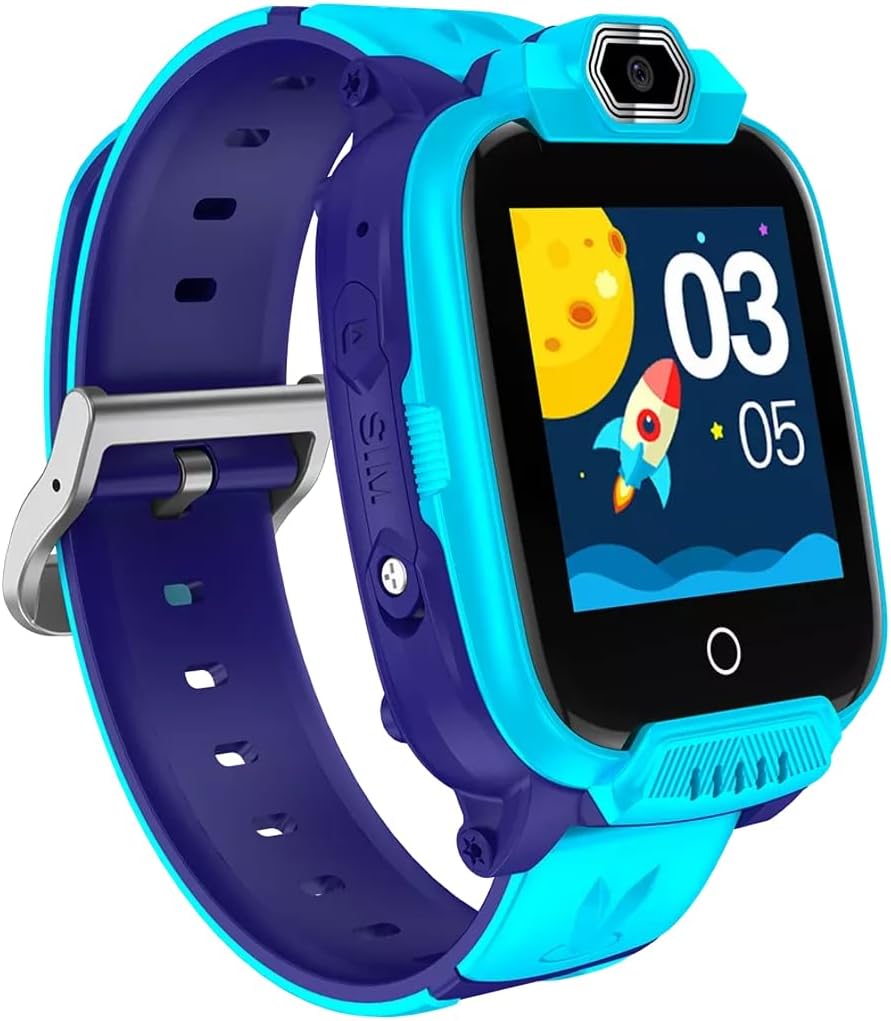
ചിത്രം 2: കോണാകൃതിയിലുള്ളത് view of the CANYON Sandy KW-44 Smartwatch, showing the side buttons and SIM card slot area.
3. SIM Card Installation (Optional)
The smartwatch supports a SIM card for call functions.
- Power off the smartwatch.
- ഉപകരണത്തിന്റെ വശത്ത് സിം കാർഡ് സ്ലോട്ട് കണ്ടെത്തുക (ചിത്രം 2 കാണുക).
- Carefully insert a nano-SIM card into the slot with the gold contacts facing up, ensuring it clicks into place.
- സിം കാർഡ് സ്ലോട്ട് കവർ സുരക്ഷിതമായി അടയ്ക്കുക.
- സ്മാർട്ട് വാച്ച് ഓൺ ചെയ്യുക.
4. ആപ്പ് ഇൻസ്റ്റാളേഷനും ജോടിയാക്കലും
To unlock full features and manage your smartwatch, download the companion app on your smartphone.
- ഇതിനായി തിരയുക the "CANYON Life" app (or similar, check product documentation for exact app name) in your smartphone's app store (Google Play Store or Apple App Store).
- ആപ്പ് ഡൗൺലോഡ് ചെയ്ത് ഇൻസ്റ്റാൾ ചെയ്യുക.
- ഒരു അക്കൗണ്ട് സൃഷ്ടിക്കുന്നതിനോ ലോഗിൻ ചെയ്യുന്നതിനോ ആപ്പ് തുറന്ന് ഓൺ-സ്ക്രീൻ നിർദ്ദേശങ്ങൾ പാലിക്കുക.
- നിങ്ങളുടെ സ്മാർട്ട്ഫോണിൽ ബ്ലൂടൂത്ത് പ്രവർത്തനക്ഷമമാക്കുക.
- In the app, select "Add Device" and choose your CANYON Sandy KW-44 from the list of available devices.
- നിങ്ങളുടെ സ്മാർട്ട്ഫോണിലും സ്മാർട്ട് വാച്ചിലും പെയറിംഗ് അഭ്യർത്ഥന സ്ഥിരീകരിക്കുക.
പ്രവർത്തന നിർദ്ദേശങ്ങൾ
1. അടിസ്ഥാന നാവിഗേഷൻ

ചിത്രം 3: മുൻഭാഗം view of the CANYON Sandy KW-44 Smartwatch, showing the main display with time and a rocket graphic.
- പവർ ഓൺ/ഓഫ്: Press and hold the power button (usually on the side) to turn the device on or off.
- ടച്ച് സ്ക്രീൻ: Swipe left/right or up/down to navigate through menus and features. Tap to select an option.
- ബാക്ക് ബട്ടൺ: A dedicated button or a swipe gesture may be used to go back to the previous screen.
2. കോളുകൾ ചെയ്യലും സ്വീകരിക്കലും
With a properly installed and activated SIM card, you can make and receive calls directly from your smartwatch.
- ഒരു കോൾ ചെയ്യുന്നു: Access the "Dialer" or "Contacts" app on the smartwatch, select a contact or dial a number, and tap the call icon.
- ഒരു കോൾ സ്വീകരിക്കുന്നു: When a call comes in, the smartwatch will ring and display the caller ID. Tap the green answer icon to accept or the red icon to decline.
3. ക്യാമറ ഉപയോഗിക്കുന്നത്
The smartwatch is equipped with a built-in camera.
- Navigate to the "Camera" application on your smartwatch.
- സ്ക്രീൻ ഉപയോഗിച്ച് നിങ്ങളുടെ ഷോട്ട് ഫ്രെയിം ചെയ്യുക a ആയി viewഫൈൻഡർ.
- Tap the capture button on the screen to take a photo.
- Photos are saved to the smartwatch's internal memory.

ചിത്രം 4: കോണാകൃതിയിലുള്ളത് view of the CANYON Sandy KW-44 Smartwatch, highlighting the camera lens above the display.
4. മറ്റ് സവിശേഷതകൾ
Explore other functionalities available on your smartwatch, which may include:
- സമയ പ്രദർശനം: Customizable watch faces.
- അറിയിപ്പുകൾ: നിങ്ങളുടെ ജോടിയാക്കിയ സ്മാർട്ട്ഫോണിൽ നിന്ന് കോളുകൾ, സന്ദേശങ്ങൾ, ആപ്പ് അറിയിപ്പുകൾ എന്നിവയ്ക്കുള്ള അലേർട്ടുകൾ സ്വീകരിക്കുക.
- പ്രവർത്തന ട്രാക്കിംഗ്: Monitor steps, distance, and calories (if supported by the model).
- മ്യൂസിക് പ്ലെയർ: Play music stored on the device or control music on your paired phone.
മെയിൻ്റനൻസ്
1. വൃത്തിയാക്കൽ
- Wipe the smartwatch and strap with a soft, damp തുണി.
- കഠിനമായ രാസവസ്തുക്കളോ ഉരച്ചിലുകൾ ഉപയോഗിക്കരുത്.
- ചാർജ് ചെയ്യുന്നതിനുമുമ്പ് ഉപകരണം ഉണങ്ങിയെന്ന് ഉറപ്പാക്കുക.
2. ബാറ്ററി പരിചരണം
- ബാറ്ററി ലൈഫിനെ ബാധിച്ചേക്കാവുന്ന, ഉയർന്ന താപനില ഒഴിവാക്കുക.
- ദീർഘനേരം ബാറ്ററി പൂർണ്ണമായി ഡിസ്ചാർജ് ചെയ്യരുത്.
- നൽകിയിരിക്കുന്ന ചാർജിംഗ് കേബിൾ മാത്രം ഉപയോഗിക്കുക.
3. ജല പ്രതിരോധം (IP67)
The CANYON Sandy KW-44 Smartwatch is rated IP67, meaning it is protected from dust and can withstand immersion in water up to 1 meter for 30 minutes.
- Do not use the smartwatch for swimming or diving.
- ചൂടുവെള്ളം, നീരാവി, അല്ലെങ്കിൽ ഉയർന്ന മർദ്ദമുള്ള വാട്ടർ ജെറ്റുകൾ എന്നിവയിൽ സമ്പർക്കം ഒഴിവാക്കുക.
- Ensure all ports and covers are securely closed to maintain water resistance.
ട്രബിൾഷൂട്ടിംഗ്
| പ്രശ്നം | സാധ്യമായ പരിഹാരം |
|---|---|
| സ്മാർട്ട് വാച്ച് ഓണാകുന്നില്ല. | Ensure the battery is charged. Connect to the charger for at least 30 minutes. |
| സ്മാർട്ട്ഫോണുമായി ജോടിയാക്കാൻ കഴിയില്ല. |
|
| സിം കാർഡ് കണ്ടെത്തിയില്ല. |
|
| സ്ക്രീൻ പ്രതികരിക്കുന്നില്ല. | Restart the smartwatch by pressing and holding the power button. If unresponsive, allow the battery to drain completely and then recharge. |
സ്പെസിഫിക്കേഷനുകൾ
| ഫീച്ചർ | വിശദാംശങ്ങൾ |
|---|---|
| ബ്രാൻഡ് | കനിയൻ |
| മോഡലിൻ്റെ പേര് | സാൻഡി KW-44 |
| മോഡൽ നമ്പർ | CNE-KW44BL |
| സ്ക്രീൻ വലിപ്പം | 1.44 ഇഞ്ച് |
| കണക്റ്റിവിറ്റി ടെക്നോളജി | ബ്ലൂടൂത്ത് |
| വയർലെസ് കമ്മ്യൂണിക്കേഷൻ സ്റ്റാൻഡേർഡ് | ബ്ലൂടൂത്ത് |
| മെമ്മറി സ്റ്റോറേജ് കപ്പാസിറ്റി | 512 MB |
| ബാറ്ററി തരം | 1 Lithium-polymer (Rechargeable) |
| ഉൾപ്പെടുത്തിയ ഘടകങ്ങൾ | ചാർജിംഗ് കേബിൾ |
| സ്ട്രാപ്പ് വീതി | 20 മില്ലിമീറ്റർ |
| വാട്ടർ റെസിസ്റ്റൻസ് റേറ്റിംഗ് | IP67 (Dust protected, immersion up to 1m for 30 min) |
വാറൻ്റിയും പിന്തുണയും
For warranty information and technical support, please refer to the official CANYON website or contact their customer service. Details are typically provided on the product packaging or the manufacturer's official support page.
നിർമ്മാതാവ്: കനിയൻ


