1. ആമുഖം
This manual provides comprehensive instructions for the installation, operation, and maintenance of your Durablow SH4001D Dual WiFi Gas Fireplace Valve and Blower Remote Control. This smart home device allows you to control your gas fireplace and its blower fan via a smartphone application, voice commands, and programmable schedules. It supports both 2.4G and 5G WiFi networks for seamless integration into your smart home ecosystem.
2 സുരക്ഷാ വിവരങ്ങൾ
- ഗ്യാസ് വിതരണം: If your house is unattended, do NOT use any remote functions. Always turn OFF the main gas supply to the fireplace when leaving your home for extended periods.
- പ്രൊഫഷണൽ ഇൻസ്റ്റാളേഷൻ: While designed for DIY upgrade, if you are unsure about any wiring or gas connections, consult a qualified professional.
- താപനില പരിധി: The WiFi controller box has an engineering plastic housing. Avoid exposing it to temperatures exceeding 130°F (54°C) to prevent damage.
- പവർ ഔട്ട്ലെറ്റ്: Ensure a power outlet is available under or near your fireplace for the controller box and blower fan.
- FCC പാലിക്കൽ: This device complies with FCC regulations. Any changes or modifications not expressly approved by the manufacturer could void the user's authority to operate the equipment.
3. പാക്കേജ് ഉള്ളടക്കം
താഴെ ലിസ്റ്റ് ചെയ്തിരിക്കുന്ന എല്ലാ ഇനങ്ങളും നിങ്ങളുടെ പാക്കേജിൽ ഉൾപ്പെടുത്തിയിട്ടുണ്ടെന്ന് ഉറപ്പാക്കുക:
- WiFi Controller Box (SH4001D)
- USB Power Adapter + Cable for Controller Box
- 2-Way Power Splitter
- 3-Prong Power Cord for Blower
- ഉപയോക്തൃ മാനുവൽ
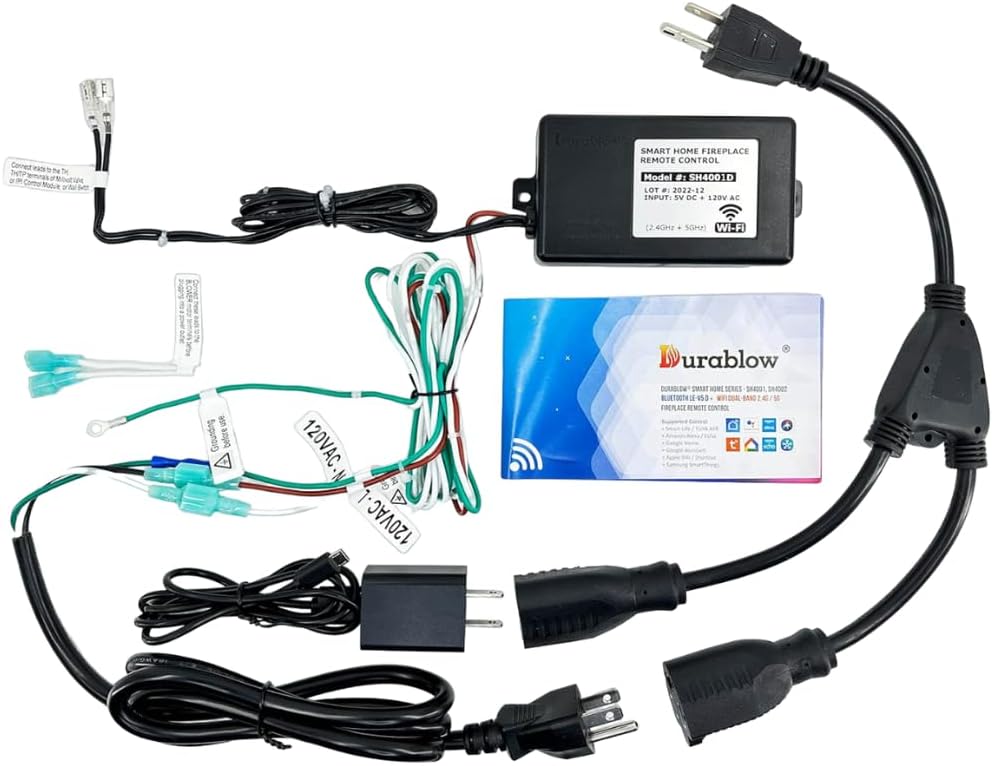
Image 3.1: All components included in the Durablow SH4001D package.
4. സജ്ജീകരണവും ഇൻസ്റ്റാളേഷനും
This section guides you through the physical installation and wiring of the Durablow SH4001D system.
4.1 വയറിംഗ് ഓവർview
The Durablow SH4001D connects to your fireplace's gas valve (millivolt or IPI control module) and a 120VAC blower fan. The system requires a 120VAC power source.

Image 4.1: Complete wiring diagram for the SH4001D. Note that the control module, valve, and fan are not included.
4.2 കണക്ഷൻ ഘട്ടങ്ങൾ
- ഊർജ്ജ സ്രോതസ്സ്: Connect the USB power adapter to the WiFi controller box. Plug the USB power adapter into one socket of the 2-way power splitter.
- Blower Fan Connection: Connect the 3-prong power cord for the blower to the other socket of the 2-way power splitter. Plug your 120VAC blower fan into this 3-prong cord.
- Gas Valve/IPI Module Connection: The controller box provides an ON/OFF signal. Connect these wires to your fireplace's IPI control module, millivolt gas valve, or existing ON/OFF wall switch terminals. Refer to your fireplace's specific manual for terminal identification (e.g., TH/TP, TH).
- ഗ്രൗണ്ടിംഗ്: Ensure proper grounding. The green wire from the controller box should be connected to a suitable ground point, such as the blower motor casing.

Image 4.2: Detailed wiring diagram for the SH4001D, illustrating connections for power, blower, and fireplace control.

ചിത്രം 4.3: ഉദാample of grounding connection to a blower motor. Ensure proper grounding before use.
4.3 അനുയോജ്യതാ കുറിപ്പുകൾ
The Durablow SH4001D is compatible with:
- Millivolt valves
- Dexen or SIT electronic IPI control modules
- Most fireplace blower fans (120VAC)
It is not compatible with locking solenoid gas valve systems.

ചിത്രം 4.4: ഉദാample of an IPI control module.

Image 4.5: Components of a pilot assembly.

Image 4.6: Gas valve with TH/TP terminals (for reference, actual appearance may vary).
4.4 Wiring Diagrams for Different Systems
The following diagrams illustrate common wiring configurations:

Image 4.7: Millivolt Valve Wiring.

Image 4.8: Replacing existing switch/thermostat.

Image 4.9: IPI System with Blower Wiring.

Image 4.10: In Series Wiring.

Image 4.11: In Parallel Wiring.
5. ആപ്പ് ഇൻസ്റ്റാളേഷനും ജോടിയാക്കലും
The Durablow SH4001D operates with the free Smart-Life APP, available for both iOS and Android devices. No additional hub or gateway is required.
5.1 ആപ്പ് ഡൗൺലോഡ്
ഇതിനായി തിരയുക "Smart-Life" in your device's app store and download the application.
5.2 ഉപകരണ ജോടിയാക്കൽ
Follow the quick pairing modes detailed in the installation manual provided with your product to connect the controller box to the Smart-Life APP. Ensure your smartphone is connected to the same WiFi network (2.4G or 5G) that you intend to use for the controller.

Image 5.1: Key features of the Smart-Life APP integration.
6. പ്രവർത്തന നിർദ്ദേശങ്ങൾ
Once paired, you can control your fireplace and blower using the Smart-Life APP or voice commands.
6.1 ആപ്പ് നിയന്ത്രണം
- ഓൺ/ഓഫ് നിയന്ത്രണം: Use the main switch within the app to turn your fireplace ON or OFF.
- Blower Fan Speed: Adjust the blower fan speed directly from the app. Available settings include OFF, Low, Medium, and High.
- പ്രോഗ്രാം ചെയ്യാവുന്ന ഷെഡ്യൂൾ: Set 24/7 schedules for automatic ON/OFF control of your fireplace.
- അന്തർനിർമ്മിത ടൈമർ: Utilize the timer function for temporary operation.
- കുടുംബ പങ്കിടൽ: Share control of the device with other family members through the app.

Image 6.1: Smart-Life App interface for fireplace control and blower fan speed adjustment.
6.2 ശബ്ദ നിയന്ത്രണം
The Durablow SH4001D is compatible with popular voice assistants via the Smart-Life APP, including Amazon Alexa, Google Home, SmartThings, and Siri. Once integrated, you can use voice commands such as "Alexa, turn on the fireplace" to operate your device.

ചിത്രം 6.2: ഉദാample of voice control integration with a smart home assistant.
7. പരിപാലനം
The Durablow SH4001D requires minimal maintenance. Keep the controller box clean and free from dust. Ensure it is not exposed to excessive heat, as its engineering plastic housing should not exceed 130°F (54°C).
8. പ്രശ്നപരിഹാരം
If you encounter issues with your Durablow SH4001D, consider the following:
- ശക്തിയില്ല: Check all power connections, including the USB adapter, 2-way splitter, and wall outlet. Ensure the outlet has power.
- വൈഫൈ കണക്ഷൻ ഇല്ല: Verify your WiFi network is active and broadcasting on 2.4G or 5G. Ensure the controller box is within range of your router. Re-attempt the pairing process as described in Section 5.2.
- Fireplace Not Responding: Confirm that the wiring to your gas valve or IPI module is correct and secure. Check your fireplace's pilot light and gas supply.
- Blower Not Operating: Ensure the blower fan is properly plugged into the 3-prong power cord and the fan itself is functional. Check the blower speed setting in the app.
- ആപ്പ് പ്രശ്നങ്ങൾ: Ensure your Smart-Life APP is updated to the latest version. Try restarting the app or your smartphone.
9 സ്പെസിഫിക്കേഷനുകൾ
| ഫീച്ചർ | സ്പെസിഫിക്കേഷൻ |
|---|---|
| മോഡലിൻ്റെ പേര് | SH4001D |
| ബ്രാൻഡ് | ഡ്യൂറബ്ലോ |
| നിയന്ത്രണ രീതി | ആപ്പ്, റിമോട്ട് |
| വൈഫൈ കണക്റ്റിവിറ്റി | Dual WiFi (2.4G+5G) |
| വോയ്സ് അസിസ്റ്റന്റ് അനുയോജ്യത | Amazon Alexa, Google Home, SmartThings, Siri |
| Blower Fan Speed Settings | OFF, High, Medium, Low (4 levels) |
| പവർ ഉറവിടം | 120 വോൾട്ട് (എസി) |
| ഉൽപ്പന്ന അളവുകൾ | 6"D x 4.5"W x 4"H |
| ഇനത്തിൻ്റെ ഭാരം | 1.31 പൗണ്ട് |
| സുരക്ഷാ സർട്ടിഫിക്കേഷൻ | FCC അംഗീകരിച്ചു |
10. വാറൻ്റി വിവരങ്ങൾ
The Durablow SH4001D comes with a 1 വർഷത്തെ പരിമിത വാറൻ്റി വാങ്ങിയ തീയതി മുതൽ. സാധാരണ ഉപയോഗത്തിലുള്ള മെറ്റീരിയലുകളിലെയും ജോലികളിലെയും വൈകല്യങ്ങൾ ഈ വാറന്റി ഉൾക്കൊള്ളുന്നു. വാറന്റി ക്ലെയിമുകൾക്കായി നിങ്ങളുടെ വാങ്ങിയതിന്റെ തെളിവ് സൂക്ഷിക്കുക.
11. പിന്തുണ
For technical assistance, troubleshooting, or warranty inquiries, please contact Durablow customer support. Refer to the contact information provided on the product packaging or the official Durablow webസൈറ്റ്.


