ഉൽപ്പന്നം കഴിഞ്ഞുview
The OMTech Polar 50W Desktop Laser Engraver is a versatile CO2 laser machine designed for engraving and cutting various materials. It features a spacious 12"x20" (300x510 mm) work area, a 5MP camera for precise positioning, and compatibility with popular software like RDWorks and LightBurn. This manual provides essential information for setup, operation, maintenance, and troubleshooting.
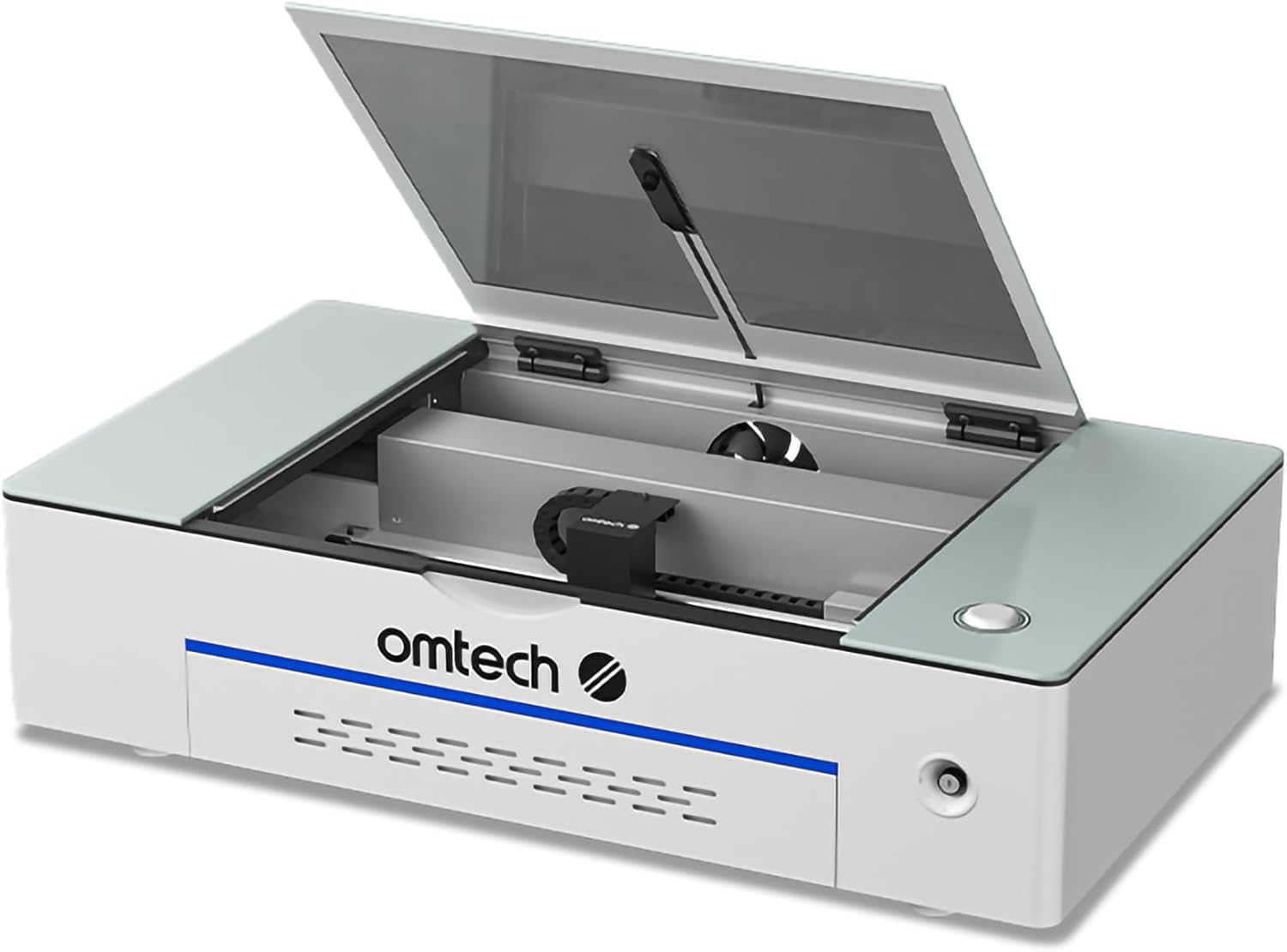
Image: The OMTech Polar 50W Desktop Laser Engraver, showcasing its compact design and open lid revealing the interior workspace.
സുരക്ഷാ വിവരങ്ങൾ
Always prioritize safety when operating the laser engraver. This machine is a Class 2 laser product with an output power of 0.827 mW.
- നേത്ര സംരക്ഷണം: ലേസർ ബീമിലേക്ക് ഒരിക്കലും നേരിട്ട് നോക്കരുത്. എല്ലായ്പ്പോഴും ഉചിതമായ ലേസർ സുരക്ഷാ ഗ്ലാസുകൾ ഉപയോഗിക്കുക.
- വെൻ്റിലേഷൻ: Ensure proper ventilation to remove smoke and fumes generated during operation. Use the provided fume extractor and ducting.
- മെറ്റീരിയൽ അനുയോജ്യത: CO2 ലേസറുകൾക്ക് അംഗീകൃത വസ്തുക്കൾ മാത്രം കൊത്തുപണി ചെയ്യുകയോ മുറിക്കുകയോ ചെയ്യുക. വിഷ പുക പുറപ്പെടുവിക്കുന്നതോ വളരെ കത്തുന്നതോ ആയ വസ്തുക്കൾ ഒഴിവാക്കുക.
- അടിയന്തരമായി നിർത്തുക: Familiarize yourself with the emergency stop button location.
- Cover Protection: The machine is equipped with a safety interlock that automatically cuts power when the cover is opened during operation. Do not bypass this feature.
- Laser Key Lock: Use the laser key lock to prevent unauthorized use.

Image: Diagram illustrating the safety features of the OMTech Polar, including the cover protection, laser key lock, and the powerful duct fan for smoke removal.
സജ്ജീകരണവും ഇൻസ്റ്റാളേഷനും
അൺപാക്കിംഗും പരിശോധനയും
Carefully unpack all components and inspect for any damage. Retain original packaging for future transport or service.
പാക്കേജ് ഉള്ളടക്കം
താഴെ ലിസ്റ്റ് ചെയ്തിരിക്കുന്ന എല്ലാ ഇനങ്ങളും നിങ്ങളുടെ പാക്കേജിൽ ഉൾപ്പെടുത്തിയിട്ടുണ്ടെന്ന് ഉറപ്പാക്കുക:
- 1 × Desktop Laser Engraver
- 1 × USB Flash Drive (with Software)
- 1 × Laser Head Set
- 2 × Exhaust Pipes
- 2 × Rotary Axes
- 1 × Duct Fan with Remote
- 5 × Wood Boards
- 1 × Duct Fan Adapter
- 5 × Paper Boards
- 3 × ഹോസ് Clamps
- 5 × Acrylic Boards
- 2 × Rotary Axis Wires
- 1 × പവർ കേബിൾ
- 1 × Box with Tools
- 2 × USB Cables
- 1 × Box with Fuses
- 1 × ഇഥർനെറ്റ് കേബിൾ
- 1 × ഇൻസ്ട്രക്ഷൻ മാനുവൽ

Image: Visual representation of the OMTech Polar 50W Laser Engraver and its main accessories included in the package, such as the fan, ducting, and rotary attachments.
പ്ലെയ്സ്മെന്റും പരിസ്ഥിതിയും
Place the engraver on a stable, level surface. Ensure adequate space around the machine for ventilation and access. The dimensions of the unit are approximately 38.2 x 22.3 x 9.2 inches. Maintain a clean, dust-free environment.
ബന്ധിപ്പിക്കുന്ന ഘടകങ്ങൾ
- പവർ കണക്ഷൻ: Connect the power cable to the engraver and a grounded electrical outlet.
- USB/Ethernet Connection: Connect the engraver to your computer using either a USB or Ethernet cable for data transfer.
- പുക വേർതിരിച്ചെടുക്കൽ: Attach the duct fan and exhaust pipes to the designated port on the engraver. Ensure proper sealing to effectively remove smoke and debris.
- വാട്ടർ ചില്ലർ: The machine features a built-in water chiller system. Ensure the water tank is filled with distilled water or a recommended coolant.
- Rotary Axes (Optional): If using the rotary axes for cylindrical objects, connect them according to the instructions provided with the accessory.
പ്രവർത്തന നിർദ്ദേശങ്ങൾ
Powering On and Initial Checks
Turn on the main power switch. The machine will perform a self-check. Ensure the lid is closed and the laser key is in the 'on' position before starting any operation.
Software Compatibility and Usage
The OMTech Polar 50W is compatible with several software applications, including RDWorks (bundled), LightBurn, CorelDRAW, and AutoCAD.
- RDWorks: The included software provides comprehensive control over the laser engraver. Refer to the RDWorks manual for detailed instructions.
- ലൈറ്റ് ബേൺ: A popular third-party software known for its intuitive interface and advanced features. A separate license may be required.
- CorelDRAW & AutoCAD: These design software can be used to create designs that are then imported into RDWorks or LightBurn for laser processing.

Image: Icons representing the software compatibility of the OMTech Polar, including LightBurn, CorelDRAW, and AutoCAD, alongside a laptop displaying a design interface.
Material Placement and Focusing
Place your material securely on the workbed. The machine features an "Easy Focus" function. Utilize the integrated 5MP high-resolution camera for accurate positioning and alignment of your designs on the material.

ചിത്രം: ഒരു ക്ലോസ്-അപ്പ് view of the 5MP high-resolution camera, highlighting its role in accurate design positioning.
Engraving and Cutting Parameters
Adjust laser power, engraving speed (up to 500 mm/s), and cutting depth (up to 0.4 inches for single pass on basswood) based on the material type and desired outcome. Refer to material testing guides for optimal settings.
പിന്തുണയ്ക്കുന്ന മെറ്റീരിയലുകൾ
The OMTech Polar 50W supports a wide range of materials for engraving and cutting. Refer to the table below for common materials:
| മെറ്റീരിയൽ | കൊത്തുപണി | കട്ടിംഗ് | മെറ്റീരിയൽ | കൊത്തുപണി | കട്ടിംഗ് |
|---|---|---|---|---|---|
| മരം | ✓ | ✓ | മൈലാർ | ✓ | ✓ |
| അക്രിലിക് | ✓ | ✓ | കോർക്ക് | ✓ | ✓ |
| തുകൽ | ✓ | ✓ | ഗ്ലാസ് | ✓ | ✗ |
| പ്ലാസ്റ്റിക് | ✓ | ✓ | ഫൈബർഗ്ലാസ് | ✓ | ✗ |
| കാർഡ്ബോർഡ് | ✓ | ✓ | സെറാമിക് | ✓ | ✗ |
| Pressboard | ✓ | ✓ | ഇഷ്ടിക | ✓ | ✗ |
| തുണിത്തരങ്ങൾ | ✓ | ✓ | കല്ല് | ✓ | ✗ |
| എം.ഡി.എഫ് | ✓ | ✓ | ജേഡ് | ✓ | ✗ |
| റബ്ബർ | ✓ | ✓ | മാർബിൾ | ✓ | ✗ |
| പി.വി.സി | ✓ | ✓ | ഷെയ്ൽ | ✓ | ✗ |
| മുള | ✓ | ✓ | സിമൻ്റ് | ✓ | ✗ |
| ക്രാഫ്റ്റ് പേപ്പർ | ✓ | ✓ | കൊറിയൻ | ✓ | ✗ |
| കോറഗേറ്റഡ് പേപ്പർ | ✓ | ✓ | പൂശിയ ലോഹം | ✓ | ✗ |
| തോന്നി | ✓ | ✓ | ഇലക്ട്രോലേറ്റഡ് മെറ്റൽ | ✓ | ✗ |
| ഡെൽറിൻ | ✓ | ✓ | ചായം പൂശിയ ലോഹം | ✓ | ✗ |
| മെലാമൈൻ | ✓ | ✓ | ആനോഡൈസ്ഡ് മെറ്റൽ | ✓ | ✗ |
Note: ✓ indicates supported, ✗ indicates not supported for cutting.

Image: A comprehensive table detailing the compatibility of the OMTech Polar with various materials for both engraving and cutting applications.
മെയിൻ്റനൻസ്
പതിവ് അറ്റകുറ്റപ്പണികൾ ഒപ്റ്റിമൽ പ്രകടനം ഉറപ്പാക്കുകയും നിങ്ങളുടെ ലേസർ എൻഗ്രേവറിന്റെ ആയുസ്സ് വർദ്ധിപ്പിക്കുകയും ചെയ്യുന്നു.
- ലെൻസും കണ്ണാടിയും വൃത്തിയാക്കൽ: Regularly inspect and clean the laser lens and reflective mirrors using specialized lens cleaning solution and wipes. Dust and debris can significantly reduce laser performance.
- വാട്ടർ ചില്ലർ പരിപാലനം: Periodically check the water level in the built-in water chiller and refill with distilled water or recommended coolant as needed. Ensure the water remains clean and free of algae.
- Fume Extractor and Ducting: Clean the fume extractor fan and inspect the ducting for blockages or leaks to ensure efficient smoke and dust removal.
- വർക്ക്ബെഡ് വൃത്തിയാക്കൽ: Clean the workbed regularly to remove debris and residue from engraved or cut materials.
- ലൂബ്രിക്കേഷൻ: Apply a small amount of lubricant to the guide rails and moving parts as recommended in the detailed product manual to ensure smooth operation.
ട്രബിൾഷൂട്ടിംഗ്
നിങ്ങൾ നേരിട്ടേക്കാവുന്ന സാധാരണ പ്രശ്നങ്ങളെ ഈ വിഭാഗം അഭിസംബോധന ചെയ്യുന്നു. കൂടുതൽ സങ്കീർണ്ണമായ പ്രശ്നങ്ങൾക്ക്, ഉപഭോക്തൃ പിന്തുണയുമായി ബന്ധപ്പെടുക.
- ലേസർ വെടിവയ്ക്കുന്നില്ല:
- Check if the laser key is in the 'on' position.
- Ensure the lid is fully closed and the safety interlock is engaged.
- Verify power connection and software settings.
- മോശം കൊത്തുപണി/മുറിക്കൽ നിലവാരം:
- ലേസർ ലെൻസും കണ്ണാടികളും വൃത്തിയാക്കുക.
- Ensure proper focus.
- Adjust power and speed settings for the material.
- Check for material inconsistencies.
- സോഫ്റ്റ്വെയർ കണക്ഷൻ പ്രശ്നങ്ങൾ:
- Verify USB/Ethernet cable connection.
- മെഷീനും കമ്പ്യൂട്ടറും പുനരാരംഭിക്കുക.
- Ensure correct drivers are installed.
- For LightBurn, ensure you have the correct license for DSP machines if applicable.
- Camera Calibration Issues:
- Refer to the software's specific instructions for camera calibration.
- ജോലിസ്ഥലത്ത് മതിയായ വെളിച്ചം ഉറപ്പാക്കുക.
സ്പെസിഫിക്കേഷനുകൾ
| ഉൽപ്പന്ന അളവുകൾ | 38.2 x 22.3 x 9.2 ഇഞ്ച് |
| ഇനം മോഡൽ നമ്പർ | RYGEL-0503 |
| ലേസർ പവർ | 50W CO2 Laser |
| വർക്ക് ഏരിയ | 12" x 20" (300x510 മിമി) |
| പരമാവധി. കൊത്തുപണി വേഗത | 500 മിമി/സെ |
| പരമാവധി. കട്ടിംഗ് ഡെപ്ത് | 0.4" (Single Pass on Basswood) |
| ക്യാമറ | 5MP High-Resolution Camera |
| ലേസർ ക്ലാസ് | ക്ലാസ് 2, 0.827 മെഗാവാട്ട് ഔട്ട്പുട്ട് പവർ |
| നിർമ്മാതാവ് | ഒഎംടെക് |
| ആദ്യ തീയതി ലഭ്യമാണ് | നവംബർ 22, 2022 |
വാറൻ്റിയും പിന്തുണയും
വാറൻ്റി വിവരങ്ങൾ
The OMTech Polar 50W Desktop Laser Engraver typically comes with a return policy allowing for refund or replacement within 30 days of purchase. For detailed warranty terms and conditions, please refer to your purchase documentation or contact OMTech customer service.
ഉപഭോക്തൃ സേവനവും സാങ്കേതിക പിന്തുണയും
OMTech provides comprehensive customer service and technical support.
- ആഗോള ഉപഭോക്തൃ സേവനം: A 24-hour service team is available in the U.S., the Philippines, and China.
- U.S.-based Technical Support: Quick response to resolve any issues you encounter.
- ഡെമോ റൂം പ്രോഗ്രാം: OMTech has over 60 demo room hosts across the U.S., with the number continually increasing, offering local support and demonstrations.
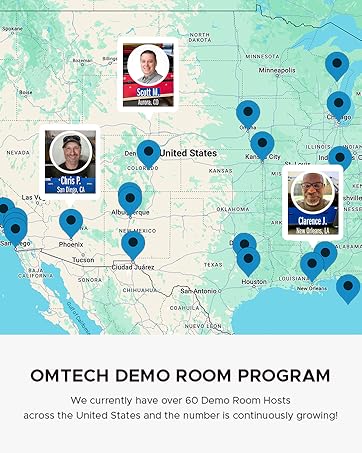
Image: A map illustrating the widespread network of OMTech demo room hosts across the United States, indicating local support availability.


