ആമുഖം
This manual provides detailed instructions for the setup, operation, and maintenance of your Herneum XO-0201B-US Vintage Turntable. This belt-drive manual turntable features built-in stereo speakers, Bluetooth input and output capabilities, and supports double-speed vinyl records. Please read this manual thoroughly before use to ensure proper function and longevity of your device.
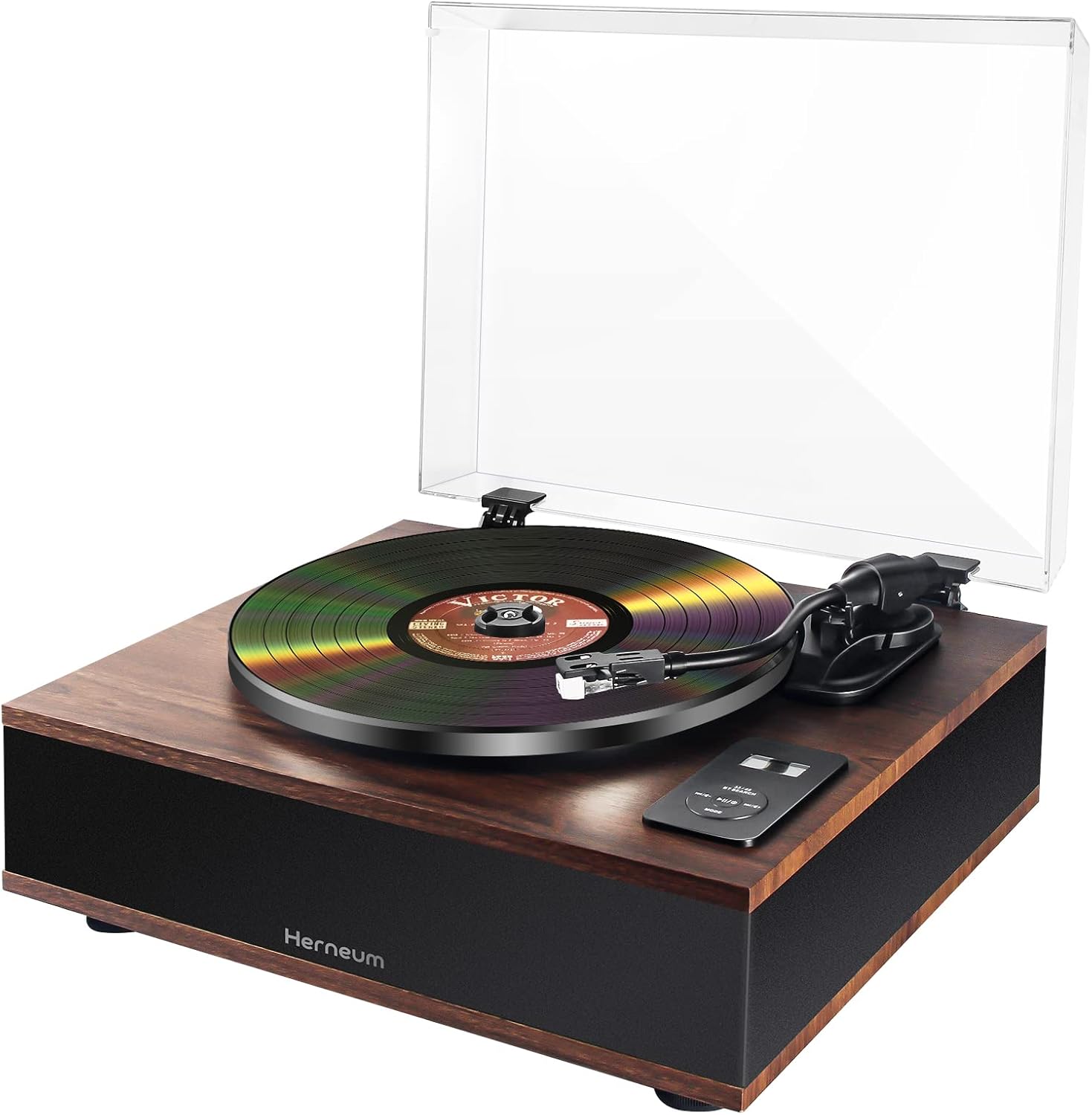
Image: The Herneum XO-0201B-US Vintage Turntable, showcasing its wooden finish, clear dust cover, and a vinyl record on the platter.
ബോക്സിൽ എന്താണുള്ളത്
അൺപാക്ക് ചെയ്യുമ്പോൾ എല്ലാ ഘടകങ്ങളും ഉണ്ടെന്ന് ഉറപ്പാക്കുക:
- Herneum XO-0201B-US Record Player
- Record Cleaning Kit (includes velvet brush, stylus brush, small nylon brush)
- പവർ അഡാപ്റ്റർ (വ്യക്തമായി പട്ടികപ്പെടുത്തിയിട്ടില്ല, പക്ഷേ പ്രവർത്തനത്തിനായി സൂചിപ്പിച്ചിരിക്കുന്നു)
- ഉപയോക്തൃ മാനുവൽ (ഈ പ്രമാണം)

Image: A visual representation of the turntable's dimensions, along with icons for Aux-in, Bluetooth, Headphone jack, and Belt drive. Below, a close-up of the removable dust cover and the components of the record cleaning kit: a velvet brush, a stylus brush, and a small nylon brush.
ഉൽപ്പന്ന സവിശേഷതകൾ
ബ്ലൂടൂത്ത് ഇൻപുട്ടും ഔട്ട്പുട്ടും
The turntable features built-in Bluetooth with high-resolution encoding, allowing you to pair with compatible Bluetooth devices. This enables wireless audio playback to headphones or external speakers, and also allows you to stream music from your smartphone or tablet to the turntable's built-in speakers. The effective range is approximately 10 meters.

Image: A diagram illustrating the Herneum turntable's Bluetooth capabilities, showing connections to external speakers, wireless headphones, and a smartphone for both input and output.
High-Output Magnetic Cartridge
Equipped with an exclusive moving magnet stylus, this turntable provides a flat frequency response for natural sound reproduction. The stylus tracks at a mere 2.0 grams of force, ensuring rich audio playback from your vinyl records.

Image: A detailed close-up of the turntable's tonearm and the moving magnet cartridge with its stylus resting on the grooves of a vinyl record.
Auto-Stop Functionality
This manual turntable includes an automatic stop feature. At the end of a vinyl record, the platter will cease rotation, preventing unnecessary wear on the stylus and record. The tonearm must be manually returned to its resting position.
Precise Construction
The turntable features a heavy base designed to minimize external vibrations, contributing to stable playback. The belt-driven die-cast aluminum platter ensures excellent rotational stability and reduces friction for smooth, quiet operation. The static balance straight tonearm is adjustable and includes a stable hydraulic lift and an anti-skating mechanism for precise tracking performance.
ഉയർന്ന ഫിഡിലിറ്റി ശബ്ദം
With four built-in speakers and extra-large cavities, the system delivers powerful bass and clear treble. The full-range speaker system provides high-resolution stereo sound. A built-in phono preamp allows for wired connection to external receivers, integrated ampലൈഫയറുകൾ, അല്ലെങ്കിൽ പവർഡ് സ്പീക്കറുകൾ.
സജ്ജീകരണ നിർദ്ദേശങ്ങൾ
- ടേൺടേബിൾ അൺപാക്ക് ചെയ്യുക: പാക്കേജിംഗിൽ നിന്ന് എല്ലാ ഘടകങ്ങളും ശ്രദ്ധാപൂർവ്വം നീക്കം ചെയ്യുക. ഭാവിയിലെ ഗതാഗതത്തിനോ സംഭരണത്തിനോ വേണ്ടി പാക്കേജിംഗ് സൂക്ഷിക്കുക.
- പ്ലേറ്റർ സ്ഥാപിക്കുക: Gently place the aluminum platter onto the spindle. Ensure it sits flat and securely.
- Install the Belt: Locate the drive belt under the platter. Stretch the belt around the motor pulley.
- സ്റ്റൈലസ് പ്രൊട്ടക്ടർ നീക്കം ചെയ്യുക: Carefully remove the clear plastic protector from the stylus tip. Avoid touching the stylus.
- പവർ ബന്ധിപ്പിക്കുക: പവർ അഡാപ്റ്റർ ടർൺടേബിളിന്റെ പവർ ഇൻപുട്ടിലേക്കും തുടർന്ന് ഒരു വാൾ ഔട്ട്ലെറ്റിലേക്കും പ്ലഗ് ചെയ്യുക.
- Position the Dust Cover: Place the removable dust cover onto the hinges at the back of the turntable.
പ്രവർത്തന നിർദ്ദേശങ്ങൾ
റെക്കോർഡുകൾ പ്ലേ ചെയ്യുന്നു
- വേഗത തിരഞ്ഞെടുക്കുക: Choose the appropriate speed (33 or 45 RPM) using the speed selector switch, typically located on the turntable's control panel.
- സ്ഥല രേഖ: Carefully place a vinyl record onto the platter. For 45 RPM records with a large center hole, use the included 45 RPM adapter.
- ലിഫ്റ്റ് ടോൺ ആം: ക്യൂയിംഗ് ലിവർ ഉപയോഗിച്ച് ടോൺആം സൌമ്യമായി ഉയർത്തുക.
- പൊസിഷൻ സ്റ്റൈലസ്: Manually move the tonearm and position the stylus directly over the desired starting groove of the record.
- താഴത്തെ ടോൺ ആം: Slowly lower the cueing lever to allow the stylus to descend onto the record. The record will begin to play.
- ഓട്ടോ-സ്റ്റോപ്പ്: When the record finishes, the platter will automatically stop rotating. Manually lift the tonearm and return it to its rest.

Image: A person's hands carefully placing a vinyl record onto the turntable, with an indication that the device supports 7-inch, 10-inch, and 12-inch records at 33 and 45 RPM.
Bluetooth Connectivity (Input)
- പവർ ഓൺ: ടർടേബിൾ ഓണാണെന്ന് ഉറപ്പാക്കുക.
- ബ്ലൂടൂത്ത് മോഡ് സജീവമാക്കുക: Press the 'MODE' button on the turntable's control panel until the Bluetooth indicator light flashes, indicating pairing mode.
- ഉപകരണം ജോടിയാക്കുക: On your smartphone or other Bluetooth device, search for available devices and select 'Herneum Turntable' (or similar name).
- കണക്ഷൻ സ്ഥിരീകരിക്കുക: Once paired, the Bluetooth indicator light will become solid. You can now stream audio from your device to the turntable's built-in speakers.
Bluetooth Connectivity (Output)
- പവർ ഓൺ: Ensure the turntable is powered on and in record playing mode.
- ബ്ലൂടൂത്ത് ഔട്ട്പുട്ട് സജീവമാക്കുക: Refer to the turntable's control panel for a dedicated Bluetooth output button or mode. Activate it to put the turntable in output pairing mode (indicator light may flash differently).
- Pair External Device: Put your Bluetooth headphones or external speaker into pairing mode.
- കണക്ഷൻ സ്ഥിരീകരിക്കുക: The turntable will automatically connect to the nearest available Bluetooth audio device. Once connected, audio from the playing record will be transmitted wirelessly.
മെയിൻ്റനൻസ്
Cleaning the Turntable and Records
- പൊടി കവർ: Regularly wipe the dust cover with a soft, dry, anti-static cloth to prevent dust buildup.
- ടേൺടേബിൾ ബോഡി: മൃദുവായ, ചെറുതായി ഡി ഉപയോഗിക്കുകamp cloth to clean the turntable's exterior. Avoid abrasive cleaners or solvents.
- രേഖകള്: Use the provided velvet brush to gently wipe dust and debris from your vinyl records before and after each play. Brush in the direction of the grooves.
- സ്റ്റൈലസ്: Use the small stylus brush to carefully clean the stylus tip. Brush gently from back to front (away from the tonearm pivot). Never brush side-to-side.

Image: A close-up of the record cleaning kit, showing the velvet brush, stylus brush, and small nylon brush, essential tools for maintaining your vinyl collection and turntable.
ട്രബിൾഷൂട്ടിംഗ്
| പ്രശ്നം | സാധ്യമായ കാരണം | പരിഹാരം |
|---|---|---|
| ശക്തിയില്ല | പവർ അഡാപ്റ്റർ ബന്ധിപ്പിച്ചിട്ടില്ല അല്ലെങ്കിൽ ഔട്ട്ലെറ്റ് തകരാറിലാണ്. | പവർ അഡാപ്റ്റർ ടർൺടേബിളിലേക്കും വർക്കിംഗ് വാൾ ഔട്ട്ലെറ്റിലേക്കും സുരക്ഷിതമായി പ്ലഗ് ചെയ്തിട്ടുണ്ടെന്ന് ഉറപ്പാക്കുക. |
| സ്പീക്കറുകളിൽ നിന്ന് ശബ്ദമില്ല | Volume too low, incorrect mode selected, or external speakers not connected/paired. | Increase volume. Ensure correct input mode (Phono/Bluetooth). If using external speakers, check connections or Bluetooth pairing. |
| Record speed is incorrect | തെറ്റായ വേഗത തിരഞ്ഞെടുത്തു. | Adjust the speed selector switch to 33 or 45 RPM to match the record. |
| ബ്ലൂടൂത്ത് ജോടിയാക്കൽ പരാജയപ്പെടുന്നു | Device too far, turntable not in pairing mode, or interference. | Ensure devices are within 10 meters. Put turntable in Bluetooth pairing mode. Turn off other Bluetooth devices to reduce interference. |
| ശബ്ദം ഒഴിവാക്കൽ അല്ലെങ്കിൽ വികലമാക്കൽ | Dirty record/stylus, damaged stylus, or turntable not level. | Clean record and stylus. Inspect stylus for damage; replace if necessary. Ensure turntable is on a flat, stable surface. |
സ്പെസിഫിക്കേഷനുകൾ
| ഫീച്ചർ | സ്പെസിഫിക്കേഷൻ |
|---|---|
| മോഡൽ നമ്പർ | XO-0201B-US |
| ഉൽപ്പന്ന അളവുകൾ | 16.9 x 13.9 x 7.7 ഇഞ്ച് |
| ഇനത്തിൻ്റെ ഭാരം | 18 പൗണ്ട് |
| ബ്രാൻഡ് | ഹെർണിയം |
| പരമാവധി റൊട്ടേഷണൽ സ്പീഡ് | 45 RPM (supports 33 RPM also) |
| പ്രത്യേക സവിശേഷതകൾ | Built-in Speakers, Dust Cover, Bluetooth Input/Output, Auto-Stop |
| മെറ്റീരിയൽ | പ്ലാസ്റ്റിക് (മരം പോലെ തോന്നിക്കുന്ന ഫിനിഷുള്ളത്) |
| നിറം | ബ്രൗൺ |
| അനുയോജ്യമായ ഉപകരണങ്ങൾ | Headphones, MP3 Player, Personal Computer, Smartphone, Tablet |
വാറൻ്റിയും പിന്തുണയും
Your Herneum XO-0201B-US Turntable is covered by a manufacturer's warranty. For specific warranty details, claims, or technical support, please refer to the warranty card included with your product or visit the official Herneum store online.
കൂടുതൽ സഹായത്തിന്, നിങ്ങൾക്ക് സന്ദർശിക്കാവുന്നതാണ് Herneum Store on Amazon.


