ആമുഖം
This manual provides detailed instructions for the setup, operation, and maintenance of your Gioteck SC3 Wireless Pro Controller. Designed for use with Nintendo Switch, PC, and mobile devices, this controller features programmable back buttons, customizable RGB lighting, and changeable magnetic thumb sticks for an enhanced gaming experience.
1. സജ്ജീകരണം
1.1 പാക്കേജ് ഉള്ളടക്കം
- Gioteck SC3 Wireless Pro Controller
- യുഎസ്ബി ചാർജിംഗ് കേബിൾ
- Additional Magnetic Thumb Sticks (if included)
- ഉപയോക്തൃ മാനുവൽ (ഈ പ്രമാണം)
1.2 കൺട്രോളർ ചാർജ് ചെയ്യുന്നു
Before initial use, fully charge the controller. Connect the supplied USB charging cable to the controller's charging port and the other end to a USB power source (e.g., Nintendo Switch dock, PC USB port, or USB wall adapter).
- LED ഇൻഡിക്കേറ്റർ ചാർജിംഗ് സ്റ്റാറ്റസ് കാണിക്കും.
- സാധാരണയായി ഒരു പൂർണ്ണ ചാർജ് ഏകദേശം 2-3 മണിക്കൂർ എടുക്കും.
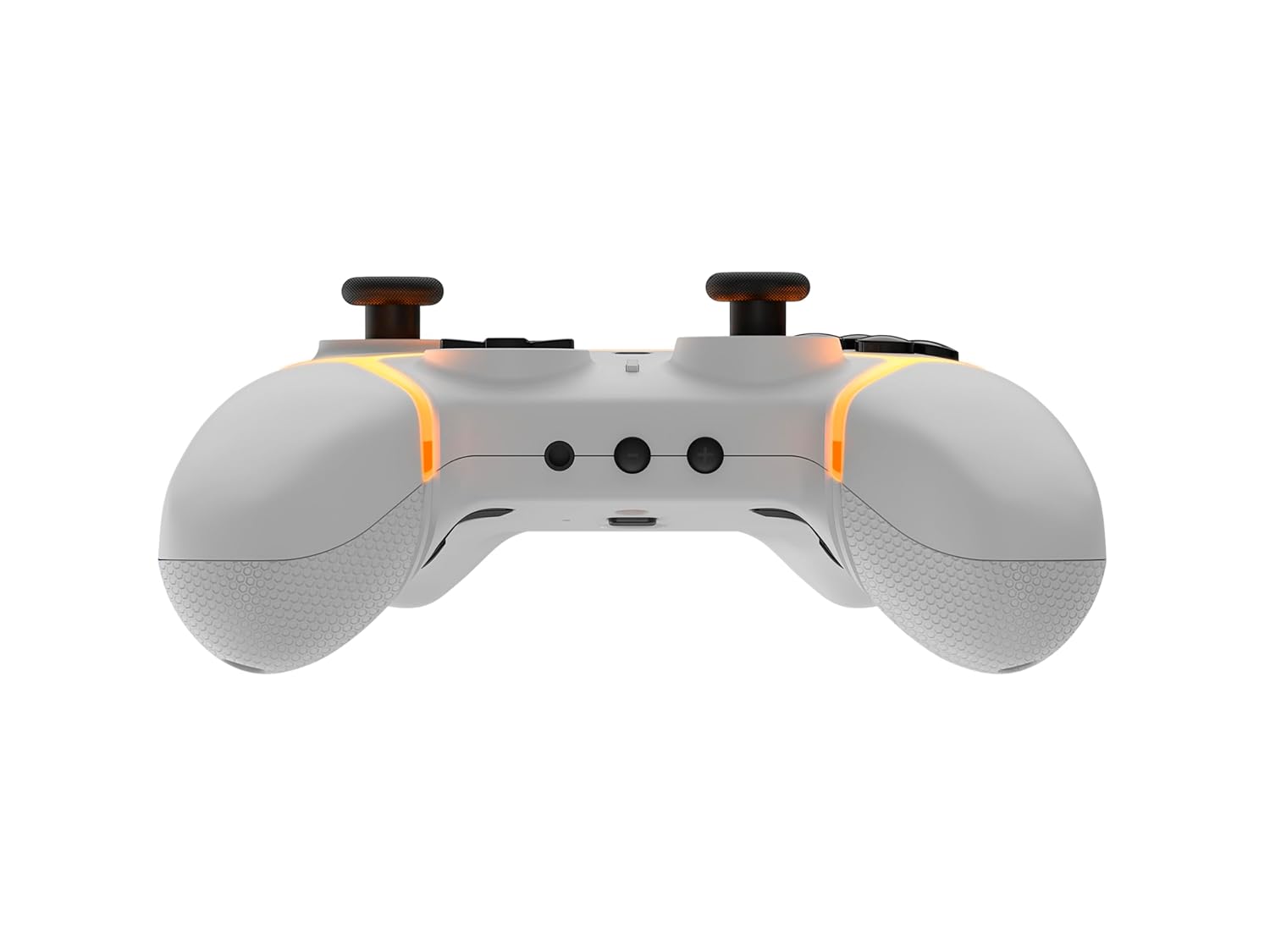
ചിത്രം: താഴെ view of the Gioteck SC3 controller, highlighting the USB-C charging port located between the two textured grips.
1.3 നിൻടെൻഡോ സ്വിച്ചുമായി ജോടിയാക്കൽ
- നിൻടെൻഡോ സ്വിച്ച് ഹോം മെനുവിൽ നിന്ന്, തിരഞ്ഞെടുക്കുക കൺട്രോളറുകൾ, പിന്നെ ഗ്രിപ്പ്/ഓർഡർ മാറ്റുക.
- On the SC3 controller, press and hold the ജോടിയാക്കൽ ബട്ടൺ (usually a small button on the top or back) for a few seconds until the LED indicators begin to flash rapidly.
- Once the controller is recognized by the Switch, the player LED(s) on the controller will illuminate solid, indicating successful pairing.
- അമർത്തുക ഒരു ബട്ടൺ സ്ഥിരീകരിക്കാൻ.
Note: For subsequent uses, the controller should automatically reconnect to the last paired Switch console when powered on.
1.4 Connecting to PC/Mobile (Bluetooth)
- Ensure Bluetooth is enabled on your PC or mobile device.
- On the SC3 controller, press and hold the ജോടിയാക്കൽ ബട്ടൺ for a few seconds until the LED indicators flash rapidly.
- On your PC/mobile device, navigate to Bluetooth settings and search for new devices.
- Select "Gioteck SC3" or similar from the list of available devices to pair.
- The controller's LED will become solid upon successful connection.
1.5 Installing Magnetic Thumb Sticks
The SC3 controller features changeable magnetic thumb sticks. To replace them:
- Gently pull the existing thumb stick straight up to remove it.
- Align the desired magnetic thumb stick with the base and gently push it down until it snaps into place.

ചിത്രം: മുൻഭാഗം view of the Gioteck SC3 controller, showcasing the magnetic thumb sticks and button layout.
2. പ്രവർത്തന നിർദ്ദേശങ്ങൾ
2.1 ബട്ടൺ ലേഔട്ട്
The SC3 controller features a traditional button layout. Refer to the image below for button identification.

ചിത്രം: കോണാകൃതിയിലുള്ള മുൻഭാഗം view of the Gioteck SC3 controller, displaying the full button layout including face buttons, D-pad, analog sticks, and shoulder buttons.
- ഇടത്/വലത് അനലോഗ് സ്റ്റിക്കുകൾ: ചലനത്തിനും ക്യാമറ നിയന്ത്രണത്തിനും.
- ഡി-പാഡ്: ദിശാ ഇൻപുട്ട്.
- A/B/X/Y ബട്ടണുകൾ: ആക്ഷൻ ബട്ടണുകൾ.
- L/R/ZL/ZR ബട്ടണുകൾ: ഷോൾഡർ, ട്രിഗർ ബട്ടണുകൾ.
- +/- ബട്ടണുകൾ: Start/Select equivalents.
- ഹോം ബട്ടണ്: Returns to the console's home menu.
- ക്യാപ്ചർ ബട്ടൺ: സ്ക്രീൻഷോട്ടുകൾ എടുക്കുന്നു.
2.2 പ്രോഗ്രാം ചെയ്യാവുന്ന ബാക്ക് ബട്ടണുകൾ
The SC3 controller includes programmable back buttons (M1, M2, M3, M4) for custom assignments.

ചിത്രം: പിൻഭാഗം view of the Gioteck SC3 controller, clearly showing the four programmable back buttons (M1, M2, M3, M4) and textured grips.
പ്രോഗ്രാമിംഗ് ഘട്ടങ്ങൾ:
- അമർത്തിപ്പിടിക്കുക പ്രോഗ്രാം ബട്ടൺ (refer to diagram if available, usually a small button on the back) until the LED indicator flashes.
- അമർത്തുക ബാക്ക് ബട്ടൺ (M1, M2, M3, or M4) you wish to program. The LED will flash slowly.
- അമർത്തുക ഇൻപുട്ട് ബട്ടൺ (e.g., A, B, X, Y, L, R, ZL, ZR, D-pad direction) you want to assign to the back button.
- അമർത്തുക പ്രോഗ്രാം ബട്ടൺ again to save the assignment. The LED will stop flashing.
- Repeat for other back buttons as desired.
To clear a programmed button, follow steps 1-2, then press the Program Button again without pressing an input button.
2.3 RGB ലൈറ്റിംഗ് കസ്റ്റമൈസേഷൻ
The controller features customizable RGB lighting. Specific instructions for changing colors or effects are typically found in the product's quick start guide or by pressing a dedicated button combination (e.g., Function + R3).
Consult the quick start guide included with your controller for precise button combinations to adjust RGB lighting.
2.4 ചലന നിയന്ത്രണങ്ങൾ
The SC3 controller supports motion controls, allowing for immersive gameplay in compatible Nintendo Switch titles. No special setup is usually required; motion controls activate automatically when supported by the game.
2.5 Audio Headset Jack
A 3.5mm audio headset jack is located on the controller for connecting compatible headsets. It includes dedicated mute and volume control buttons.
- വോളിയം കൂട്ടുക/താഴ്ത്തുക: ഓഡിയോ ഔട്ട്പുട്ട് ക്രമീകരിക്കുക.
- നിശബ്ദ ബട്ടൺ: Mute/unmute microphone input.

ചിത്രം: മുകളിൽ view of the Gioteck SC3 controller, highlighting the 3.5mm audio jack, volume controls, and mute button.
3. പരിപാലനം
3.1 വൃത്തിയാക്കൽ
നിങ്ങളുടെ കൺട്രോളർ വൃത്തിയാക്കാൻ, മൃദുവായതും ഉണങ്ങിയതുമായ ഒരു തുണി ഉപയോഗിക്കുക. കഠിനമായ അഴുക്കിന്, ചെറുതായി dampen the cloth with water. Avoid using harsh chemicals, abrasive cleaners, or solvents, as these can damage the controller's finish and internal components.
- Do not immerse the controller in water or any other liquid.
- Ensure all ports are dry before charging or connecting devices.
3.2 സംഭരണം
കൺട്രോളർ നേരിട്ട് സൂര്യപ്രകാശം ഏൽക്കാത്തതും തീവ്രമായ താപനില ഏൽക്കാത്തതുമായ ഒരു തണുത്ത വരണ്ട സ്ഥലത്ത് സൂക്ഷിക്കുക. കേടുപാടുകൾ സംഭവിക്കാതിരിക്കാൻ കൺട്രോളറിൽ ഭാരമുള്ള വസ്തുക്കൾ വയ്ക്കുന്നത് ഒഴിവാക്കുക.
3.3 ബാറ്ററി കെയർ
The controller contains a rechargeable battery. To prolong battery life:
- ബാറ്ററി ഇടയ്ക്കിടെ പൂർണ്ണമായും ഡിസ്ചാർജ് ചെയ്യുന്നത് ഒഴിവാക്കുക.
- Charge the controller regularly, even if not in use for extended periods (e.g., once every 3-6 months).
- Do not expose the controller to temperatures above 60°C (140°F).
4. പ്രശ്നപരിഹാരം
4.1 കൺട്രോളർ കണക്റ്റുചെയ്യുന്നില്ല/ജോടിയാക്കുന്നില്ല
- ബാറ്ററി പരിശോധിക്കുക: കൺട്രോളർ ആവശ്യത്തിന് ചാർജ്ജ് ചെയ്തിട്ടുണ്ടെന്ന് ഉറപ്പാക്കുക.
- വീണ്ടും ജോടി: Follow the pairing instructions in Section 1.3 or 1.4.
- ഇടപെടൽ: Move closer to the console/device and away from potential sources of wireless interference (e.g., Wi-Fi routers, other Bluetooth devices).
- കൺട്രോളർ പുനഃസജ്ജമാക്കുക: Locate a small reset button (often a pinhole) on the back of the controller. Use a paperclip to press and hold it for a few seconds. Then attempt to re-pair.
- Update Console/Device Software: Ensure your Nintendo Switch, PC, or mobile device's operating system is up to date.
4.2 Buttons/Sticks Not Responding
- Re-sync: കൺട്രോളർ വിച്ഛേദിച്ച് വീണ്ടും ബന്ധിപ്പിക്കുക.
- വൃത്തിയാക്കുക: ബട്ടണുകൾക്കോ സ്റ്റിക്കുകൾക്കോ ചുറ്റും അവശിഷ്ടങ്ങൾ അടിഞ്ഞുകൂടുന്നില്ലെന്ന് ഉറപ്പാക്കുക.
- Test in another game/menu: Determine if the issue is specific to a game or system-wide.
- കൺട്രോളർ പുനഃസജ്ജമാക്കുക: Perform a hard reset as described above.
4.3 Motion Controls Not Working
- ഗെയിം അനുയോജ്യത: Verify that the game you are playing supports motion controls.
- വീണ്ടും കാലിബ്രേറ്റ് ചെയ്യുക: On Nintendo Switch, you can recalibrate motion controls in the system settings.
- കൺട്രോളർ പുനഃസജ്ജമാക്കുക: ഒരു ഹാർഡ് റീസെറ്റ് നടത്തുക.
5 സ്പെസിഫിക്കേഷനുകൾ
| മോഡൽ: | Gioteck SC3 Wireless Pro Controller |
| അനുയോജ്യത: | Nintendo Switch (Original, Lite, OLED), PC, Mobile Devices |
| കണക്റ്റിവിറ്റി: | ബ്ലൂടൂത്ത് വയർലെസ് |
| അളവുകൾ (ഏകദേശം): | 2.87 x 5.35 x 6.34 ഇഞ്ച് (7.29 x 13.59 x 16.1 സെ.മീ) |
| ഭാരം (ഏകദേശം): | 10.6 ഔൺസ് (300 ഗ്രാം) |
| ഓഡിയോ ജാക്ക്: | 3.5mm with mute and volume controls |
| പ്രത്യേക സവിശേഷതകൾ: | Programmable back buttons, Magnetic thumb sticks, RGB lighting, Motion controls |
6. വാറൻ്റി വിവരങ്ങൾ
The Gioteck SC3 Wireless Pro Controller comes with a manufacturer's warranty. For specific details regarding warranty coverage, duration, and claims process, please refer to the warranty card included with your product or visit the official Gioteck webസൈറ്റ്.
വാറന്റി ആവശ്യങ്ങൾക്കായി നിങ്ങളുടെ വാങ്ങിയതിന്റെ തെളിവ് സൂക്ഷിക്കുക.
7. ഉപഭോക്തൃ പിന്തുണ
If you encounter any issues or have questions not covered in this manual, please contact Gioteck customer support. Contact information can typically be found on the product packaging or the official Gioteck webസൈറ്റ്.
Gioteck Official Webസൈറ്റ്: www.gioteck.com


