ഉൽപ്പന്നം കഴിഞ്ഞുview
The RAINPOINT Sprinkler Timer 2 Outlet is a programmable water timer designed for efficient garden and yard irrigation. It features independent control for two zones, allowing for customized watering schedules. With an easy-to-read 2.5" LCD display and user-friendly controls, managing your watering needs has never been simpler. Key features include flexible programming options, manual and automatic modes, and a rain delay function to prevent overwatering.

Figure 1: RAINPOINT Sprinkler Timer 2 Outlet, showing the main unit with its dual outlets and large LCD screen.
സജ്ജീകരണവും ഇൻസ്റ്റാളേഷനും
നിങ്ങളുടെ RAINPOINT സ്പ്രിംഗ്ളർ ടൈമർ സജ്ജീകരിക്കാൻ ഈ ഘട്ടങ്ങൾ പാലിക്കുക:
- ബാറ്ററി ഇൻസ്റ്റാളേഷൻ: Open the battery compartment (refer to Figure 5 for location) and insert 2 AA batteries. Ensure correct polarity. The timer features a low battery alert to prevent water leakage.
- ഫ്യൂസെറ്റിലേക്ക് കണക്റ്റുചെയ്യുക: Attach the timer securely to your outdoor faucet. The durable inlet with a built-in filter helps prevent debris from entering the system and reduces water leakage.
- ഹോസുകൾ ബന്ധിപ്പിക്കുക: Attach your garden hoses to the two independent outlets (Zone 1 and Zone 2) at the bottom of the timer. The wider outlets are designed for smoother water flow.
- പ്രാരംഭ സജ്ജീകരണം: Turn the dial to "SET CLOCK" to set the current time. Use the "+" and "-" buttons to adjust and "OK" to confirm.

ചിത്രം 2: ഓവർview of upgraded features including extra waterproof LCD window, longer inlet, wider outlets, and IP65 waterproof rating.

Figure 3: Close-up of the durable inlet with a filter, designed to prevent leakage and ensure clean water flow.

Figure 4: Image showing the battery compartment, highlighting the use of 2 AA batteries and the upgraded IP65 waterproof ring for enhanced protection.
Video 1: An informational video explaining the benefits and features of the 2-zone water timer, including its dual functionality for different watering needs.
പ്രവർത്തന നിർദ്ദേശങ്ങൾ
The RAINPOINT Sprinkler Timer offers flexible programming for optimal watering:
- Setting Start Time: Turn the dial to "START TIME". Use "+" and "-" to set the desired watering start time for each zone (Zone 1 and Zone 2 can be set independently). Press "OK" to confirm.
- Setting How Long: Turn the dial to "HOW LONG". Set the watering duration from 1 minute to 3 hours 59 minutes. This can be customized for each zone.
- Setting How Often: Turn the dial to "HOW OFTEN". Choose the watering frequency, from 1 hour to 12 hours, or from 1 day to 7 days. Up to 38 watering frequencies are available.
- മാനുവൽ നനവ്: The timer supports 3 separate manual/auto modes: ZONE 1, ZONE 2, or Both ZONE. To activate manual watering, press the "MANUAL" button. Manual watering time can be set from 1 minute to 8 hours.
- മഴയുടെ കാലതാമസം: To temporarily pause watering due to rain, use the "DELAY" button. You can set a delay for 24, 48, or 72 hours to prevent overwatering.

Figure 5: The large programming dial and bright white buttons make setting schedules intuitive and easy to read.

Figure 6: The timer's dual-zone capability allows for independent or simultaneous watering of two distinct areas.
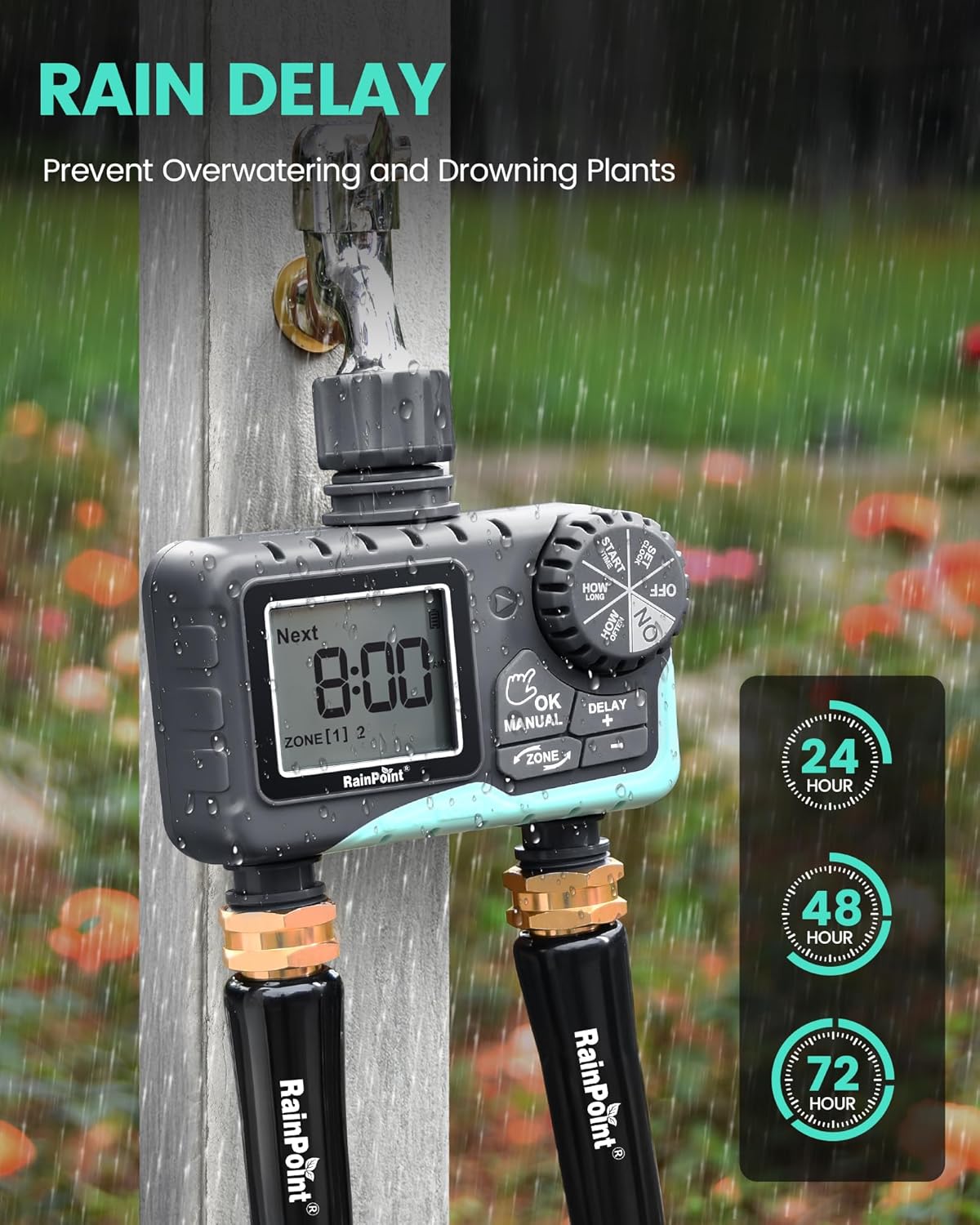
Figure 7: The rain delay feature helps conserve water by pausing scheduled watering for 24, 48, or 72 hours.
Video 2: A demonstration of the 2.7-inch LCD display and its clear interface for setting watering schedules.
മെയിൻ്റനൻസ്
- ബാറ്ററി മാറ്റിസ്ഥാപിക്കൽ: When the battery level drops below 5%, a low-battery alert will appear on the display, and the valve will automatically shut off to prevent continuous water flow. Replace batteries promptly to ensure uninterrupted operation.
- ഇൻലെറ്റ് ഫിൽട്ടർ ക്ലീനിംഗ്: Periodically check and clean the filter located in the timer's inlet connection to prevent debris buildup and maintain optimal water flow.
- ശീതകാലം: Before freezing temperatures, disconnect the timer from the faucet and hoses. Drain any remaining water and store the timer indoors in a dry, protected area to prevent damage from freezing.
ട്രബിൾഷൂട്ടിംഗ്
| പ്രശ്നം | സാധ്യമായ കാരണം | പരിഹാരം |
|---|---|---|
| Timer not watering / Valve not opening | Low battery; Incorrect programming; Water pressure too low. | Replace batteries; Check and adjust watering schedule; Ensure adequate water pressure from faucet. |
| കണക്ഷനുകളിൽ വെള്ളം ചോർച്ച | Loose connection; Worn gasket; Damaged threads. | Tighten connections; Replace gaskets; Use plumber's tape on threads if necessary. |
| ഡിസ്പ്ലേ പ്രവർത്തിക്കുന്നില്ല | Dead batteries; Extreme temperatures. | Replace batteries; Move timer to a moderate temperature environment. |
If issues persist, please refer to the support section for further assistance.
സ്പെസിഫിക്കേഷനുകൾ
- മോഡൽ നമ്പർ: TCITV205NHV2-C
- നിറം: ചാര-പച്ച
- മെറ്റീരിയൽ: പ്ലാസ്റ്റിക്
- ഉൽപ്പന്ന അളവുകൾ: 2.9"D x 5.4"W x 5.4"H
- ഇനത്തിൻ്റെ ഭാരം: 8.48 ഔൺസ്
- ക്രമീകരണങ്ങളുടെ എണ്ണം: 38 പ്രോഗ്രാമുകൾ
- സ്ക്രീൻ വലിപ്പം: 2.5 ഇഞ്ച് എൽസിഡി
- ഊർജ്ജ സ്രോതസ്സ്: 2 AA ബാറ്ററികൾ (ഉൾപ്പെടുത്തിയിട്ടില്ല)
- നനയ്ക്കൽ കാലയളവ്: 1 min to 3 hrs 59 mins (Auto), 1 min to 8 hrs (Manual)
- നനയ്ക്കൽ ആവൃത്തി: 1 hour to 12 hours, or 1 day to 7 days
- വാട്ടർപ്രൂഫ് റേറ്റിംഗ്: IP65
വാറൻ്റിയും പിന്തുണയും
RAINPOINT is committed to providing high-quality products and excellent customer service. While specific warranty details are not provided in this manual, many customers have reported positive experiences with RAINPOINT's support team, including prompt responses and product replacements for issues.
For further assistance, you may refer to the official User Guide (PDF) available online or contact RAINPOINT customer service directly. Contact information can typically be found on the product packaging or the official RAINPOINT webസൈറ്റ്.
ഉപയോക്തൃ ഗൈഡ് (PDF): ഉപയോക്തൃ ഗൈഡ് ഡൗൺലോഡ് ചെയ്യുക


