ആമുഖം
This manual provides comprehensive instructions for the installation, operation, and maintenance of your AMPIRE CPM100 Smartphone Monitor. Please read this manual thoroughly before using the device to ensure proper functionality and safety.
ദി AMPIRE CPM100 is a high-resolution 10-inch touchscreen monitor designed to integrate smartphone functionalities like Apple CarPlay and Android Auto into vehicles without a factory-installed display. It also features an integrated Full-HD dashcam and an input for an optional rear-view ക്യാമറ.
ഉൽപ്പന്ന സവിശേഷതകൾ
- 25.4cm (10") IPS Touchscreen Display with 1600 x 600 resolution.
- Wireless Apple CarPlay and Android Auto compatibility.
- Integrated AHD Dual-Dashcam with 1080p Full-HD (Front).
- Connectivity: Bluetooth, USB-C, SD card slot.
- Automatic power-on when operating voltagഇ പ്രയോഗിക്കുന്നു.
- Audio output options: 3.5mm jack, FM transmitter, or built-in 3W speaker.
- LINUX 4.9 OS operating system with 1GB memory.
- Dedicated input for rear-view ക്യാമറ.
പാക്കേജ് ഉള്ളടക്കം
Please verify that all items listed below are included in your package. If any items are missing or damaged, contact your retailer immediately.
- AMPIRE CPM100 Smartphone Monitor Unit
- പവർ കേബിൾ
- മൌണ്ടിംഗ് ബ്രാക്കറ്റ്
- യുഎസ്ബി-സി കേബിൾ
- 3.5 എംഎം ഓഡിയോ കേബിൾ
- ഉപയോക്തൃ മാനുവൽ (ഈ പ്രമാണം)
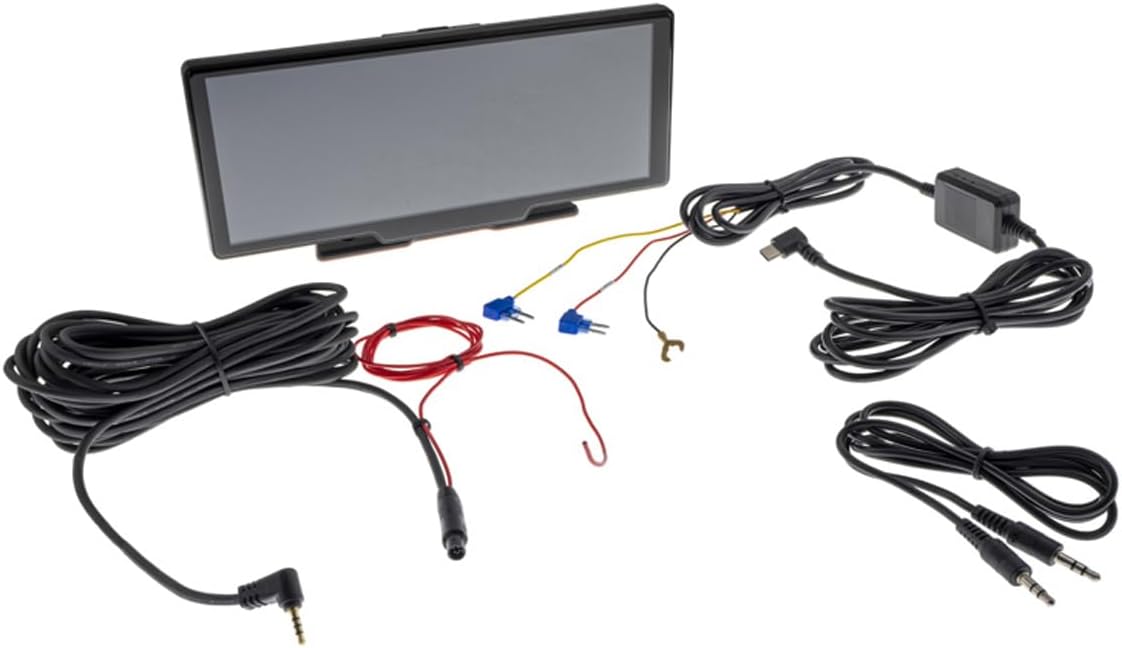
ചിത്രം: കഴിഞ്ഞുview യുടെ AMPIRE CPM100 package contents, including the monitor unit, various cables (power, USB-C, audio), and mounting accessories.
സജ്ജീകരണവും ഇൻസ്റ്റാളേഷനും
1. മോണിറ്റർ മൌണ്ട് ചെയ്യുന്നു
ദി AMPIRE CPM100 comes with a versatile mounting bracket. Choose a stable, flat surface on your dashboard that does not obstruct your view or interfere with airbag deployment. Ensure the chosen location allows for easy access to the touchscreen and ports.
- മൗണ്ടിംഗ് ഉപരിതലം നന്നായി വൃത്തിയാക്കുക.
- Attach the mounting bracket to the desired location using the provided adhesive pad or screws. If using screws, ensure no vital vehicle components are damaged during drilling.
- Secure the monitor unit to the mounting bracket. The bracket allows for angle adjustment to optimize viewing.

ചിത്രം: വശം view യുടെ AMPIRE CPM100 monitor demonstrating the adjustable angle of the mounting bracket, allowing for various viewസ്ഥാനങ്ങൾ.

Image: Close-up of the rear of the AMPIRE CPM100 monitor, highlighting the screw holes for the mounting bracket with dimensions (30mm width, 18.5mm height) for precise installation.
2. പവർ കണക്ഷൻ
Connect the provided power cable to the monitor and to a suitable 12V power source in your vehicle (e.g., cigarette lighter socket or fuse box). The device is designed for automatic power-on when operating voltagഇ കണ്ടെത്തി.
3. Dashcam Installation
The integrated dashcam is located on the front of the monitor. Ensure its view is unobstructed. For optimal recording, clean your windshield regularly.
4. Optional Rear-View ക്യാമറ കണക്ഷൻ
If you are installing an optional rear-view camera, connect its video output to the dedicated input on the AMPIRE CPM100. Refer to your rear-view camera's manual for specific wiring instructions. The monitor will automatically switch to the rear-view camera display when reverse gear is engaged (requires proper wiring to the vehicle's reverse light signal).
പ്രവർത്തന നിർദ്ദേശങ്ങൾ
1. പ്രാരംഭ പവർ ഓണും സജ്ജീകരണവും
Once connected to power, the monitor will automatically turn on. Follow the on-screen prompts for initial language selection and basic settings.
2. Connecting to Apple CarPlay / Android Auto
ദി AMPIRE CPM100 supports wireless Apple CarPlay and Android Auto. Ensure Bluetooth and Wi-Fi are enabled on your smartphone.
- On the monitor, navigate to the CarPlay or Android Auto icon.
- On your smartphone, search for the monitor's Bluetooth name (usually "AMPIRE CPM100" or similar) and pair.
- രണ്ട് ഉപകരണങ്ങളിലും ജോടിയാക്കൽ കോഡ് സ്ഥിരീകരിക്കുക.
- Once paired via Bluetooth, the system will prompt you to connect via Wi-Fi for the full CarPlay/Android Auto experience.
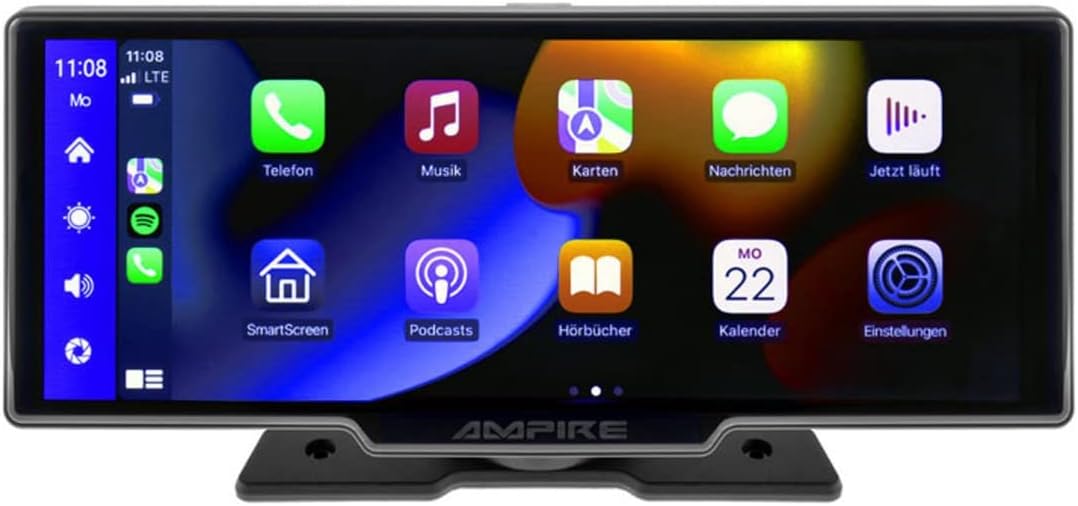
ചിത്രം: ദി AMPIRE CPM100 monitor displaying the Apple CarPlay interface with various application icons such as Phone, Music, Maps, Messages, and Podcasts.

Image: A collage of eight different screen viewൽ നിന്നുള്ള എസ് AMPIRE CPM100, showcasing various functionalities including Apple CarPlay, Android Auto, navigation, dashcam view, and rear-view ക്യാമറ ഡിസ്പ്ലേ.
3. Dashcam Operation
The integrated dashcam automatically begins recording when the device powers on. Recordings are saved to an inserted SD card (not included). Ensure a high-speed SD card (Class 10 or higher) is used. The dashcam records in 1080p Full-HD resolution.
4. ഓഡിയോ putട്ട്പുട്ട്
You can output audio from the CPM100 via three methods:
- 3.5mm ഓഡിയോ ജാക്ക്: Connect the provided 3.5mm audio cable from the monitor to your vehicle's AUX input.
- എഫ്എം ട്രാൻസ്മിറ്റർ: Select an unused FM frequency on the monitor and tune your vehicle's radio to the same frequency.
- ബിൽറ്റ്-ഇൻ സ്പീക്കർ: The monitor has a 3W speaker for direct audio output.
5. മീഡിയ പ്ലേബാക്ക്
The device supports media playback via USB-C and SD card. Insert your storage device, and the monitor will allow you to browse and play compatible audio and video files.
മെയിൻ്റനൻസ്
- വൃത്തിയാക്കൽ: Use a soft, dry cloth to clean the screen and exterior. Do not use abrasive cleaners or solvents.
- SD കാർഡ്: Regularly format the SD card (at least once a month) to ensure optimal dashcam performance and prevent data corruption. Back up important recordings before formatting.
- ഫേംവെയർ അപ്ഡേറ്റുകൾ: നിർമ്മാതാവ് പരിശോധിക്കുക webനിങ്ങളുടെ ഉപകരണത്തിൽ ഏറ്റവും പുതിയ സവിശേഷതകളും ബഗ് പരിഹാരങ്ങളും ഉണ്ടെന്ന് ഉറപ്പാക്കാൻ ലഭ്യമായ ഏതെങ്കിലും ഫേംവെയർ അപ്ഡേറ്റുകൾക്കായി സൈറ്റ്.
ട്രബിൾഷൂട്ടിംഗ്
| പ്രശ്നം | സാധ്യമായ കാരണം | പരിഹാരം |
|---|---|---|
| മോണിറ്റർ പവർ ഓണാക്കുന്നില്ല. | വൈദ്യുതി കണക്ഷനില്ല അല്ലെങ്കിൽ വൈദ്യുതി കേബിളിന് തകരാറില്ല. | Check power cable connection. Ensure vehicle's power outlet is functional. |
| CarPlay/Android Auto കണക്റ്റ് ചെയ്യുന്നില്ല. | Bluetooth/Wi-Fi issues, incompatible phone, or incorrect pairing. | Ensure Bluetooth and Wi-Fi are on your phone. Forget device and re-pair. Check phone's compatibility. |
| Dashcam not recording. | No SD card, full SD card, or faulty SD card. | Insert an SD card. Format the SD card. Replace with a new, compatible SD card. |
| ഓഡിയോ ഔട്ട്പുട്ട് ഇല്ല. | Incorrect audio output setting or cable issue. | Check audio output settings (AUX, FM, Speaker). Verify cable connections. Ensure FM frequency is clear. |
സ്പെസിഫിക്കേഷനുകൾ
| ഫീച്ചർ | വിശദാംശങ്ങൾ |
|---|---|
| ഡിസ്പ്ലേ വലിപ്പം | 25.4 സെ.മീ (10 ഇഞ്ച്) |
| ഡിസ്പ്ലേ തരം | ഐപിഎസ് ടച്ച്സ്ക്രീൻ |
| റെസലൂഷൻ | 1600 x 600 പിക്സലുകൾ |
| ഓപ്പറേറ്റിംഗ് സിസ്റ്റം | LINUX 4.9 OS |
| മെമ്മറി | 1 ജിബി |
| കണക്റ്റിവിറ്റി | Wireless Apple CarPlay, Wireless Android Auto, Bluetooth, USB-C, SD Card |
| ഡാഷ്ക്യാം | Integrated AHD Dual-Dashcam, 1080p Full-HD (Front) |
| ഓഡിയോ ഔട്ട്പുട്ട് | 3.5mm Jack, FM Transmitter, 3W Speaker |
| പിൻ ക്യാമറ ഇൻപുട്ട് | അതെ |
| ഭാരം | 1.14 കിലോഗ്രാം |
| നിറം | കറുപ്പ് അല്ലെങ്കിൽ വെള്ളി |
വാറൻ്റിയും പിന്തുണയും
വാറന്റി വിവരങ്ങൾക്കും സാങ്കേതിക പിന്തുണയ്ക്കും, ദയവായി ഔദ്യോഗിക വെബ്സൈറ്റ് സന്ദർശിക്കുക. AMPഐ.ആർ.ഇ webസൈറ്റിൽ ബന്ധപ്പെടുക അല്ലെങ്കിൽ നിങ്ങളുടെ അംഗീകൃത ഡീലറെ ബന്ധപ്പെടുക. വാറന്റി ക്ലെയിമുകൾക്കുള്ള വാങ്ങലിന്റെ തെളിവായി നിങ്ങളുടെ വാങ്ങൽ രസീത് സൂക്ഷിക്കുക.
നിർമ്മാതാവ്: AMPഐ.ആർ.ഇ
മോഡൽ നമ്പർ: സിപിഎം100
ആദ്യം ലഭ്യമായത്: നവംബർ 23, 2022


