XFX Speedster MERC310 AMD Radeon RX 7900XT Graphics Card
ഉപയോക്തൃ മാനുവൽ
1. ആമുഖം
This manual provides essential information for the installation, operation, maintenance, and troubleshooting of your XFX Speedster MERC310 AMD Radeon RX 7900XT Ultra Gaming Graphics Card. Please read this manual thoroughly before proceeding with installation to ensure proper setup and optimal performance.
2 സുരക്ഷാ വിവരങ്ങൾ
- ഏതെങ്കിലും ഘടകങ്ങൾ ഇൻസ്റ്റാൾ ചെയ്യുന്നതിനോ നീക്കം ചെയ്യുന്നതിനോ മുമ്പ് നിങ്ങളുടെ കമ്പ്യൂട്ടറിൽ നിന്ന് എല്ലായ്പ്പോഴും പവർ വിച്ഛേദിക്കുക.
- സെൻസിറ്റീവ് ഘടകങ്ങൾ സ്പർശിക്കാതിരിക്കാൻ ഗ്രാഫിക്സ് കാർഡിന്റെ അരികുകളിൽ തന്നെ പിടിക്കുക.
- Use anti-static precautions (e.g., an anti-static wrist strap) to prevent electrostatic discharge (ESD) damage.
- കമ്പ്യൂട്ടർ കെയ്സിൽ അമിതമായി ചൂടാകുന്നത് തടയാൻ ആവശ്യമായ വായുസഞ്ചാരം ഉറപ്പാക്കുക.
3. പാക്കേജ് ഉള്ളടക്കം
നിങ്ങളുടെ പാക്കേജിൽ എല്ലാ ഇനങ്ങളും ഉണ്ടെന്ന് ഉറപ്പാക്കുക:
- XFX Speedster MERC310 AMD Radeon RX 7900XT Graphics Card
- Z-Support Bar
4. ഉൽപ്പന്നം കഴിഞ്ഞുview
The XFX Speedster MERC310 AMD Radeon RX 7900XT is a high-performance graphics card designed for demanding gaming and content creation. It features the AMD RDNA 3 architecture, 20GB GDDR6 memory, and a Boost Clock of up to 2535 MHz. The card is equipped with a triple-fan cooling solution for efficient heat dissipation.
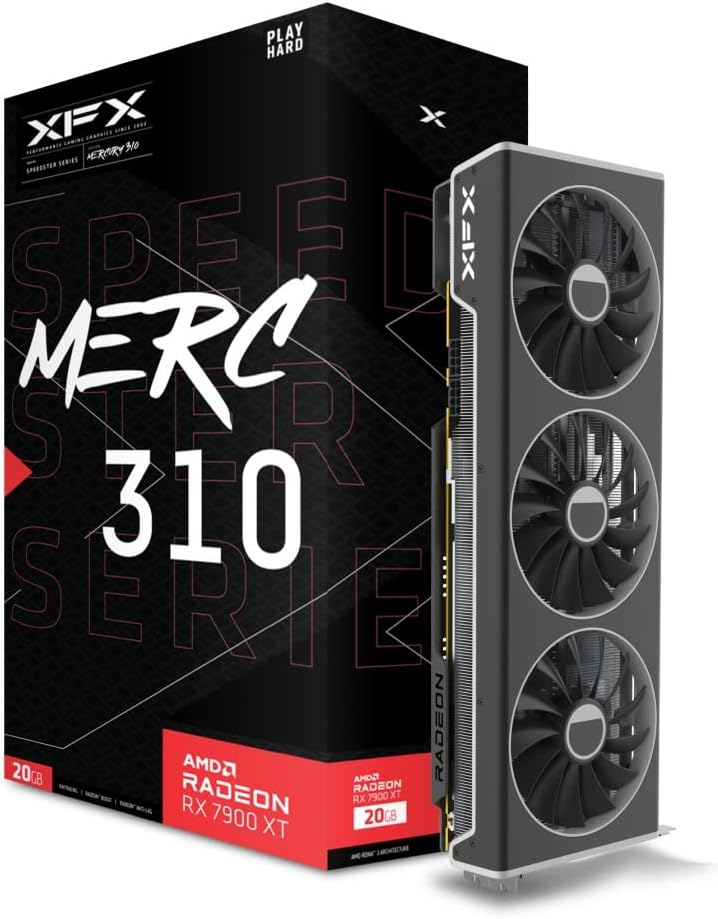
Figure 1: XFX Speedster MERC310 AMD Radeon RX 7900XT Graphics Card and retail packaging.

ചിത്രം 2: മുകളിൽ view of the graphics card, highlighting the triple-fan cooling system.

Figure 3: Double Ball Bearing Fans: The MERC 310 GPUs utilize double ball bearing structure fans that provide better endurance and efficiency over other designs. Reducing friction and heat, these fans operate quieter and have increased lifespan.
5. സജ്ജീകരണം
5.1. സിസ്റ്റം ആവശ്യകതകൾ
- വൈദ്യുതി വിതരണം: കുറഞ്ഞത് 850W പവർ സപ്ലൈ ശുപാർശ ചെയ്യുന്നു.
- കേസ് അനുയോജ്യത: The card is large (approximately 13.54 x 5.04 x 2.17 inches) and requires sufficient space within your PC case. Ensure your case can accommodate a 2.5 to 3-slot GPU.
- PCIe സ്ലോട്ട്: Requires one available PCIe 4.0 x16 slot.
5.2. ഫിസിക്കൽ ഇൻസ്റ്റലേഷൻ
- Open your computer case and locate an available PCIe 4.0 x16 slot.
- Remove any expansion slot covers that correspond to the GPU's size.
- ഗ്രാഫിക്സ് കാർഡ് PCIe സ്ലോട്ടുമായി ശ്രദ്ധാപൂർവ്വം വിന്യസിക്കുക, അത് സുരക്ഷിതമായി ഇരിക്കുന്നതുവരെ ദൃഢമായി അമർത്തുക.
- സ്ക്രൂകൾ ഉപയോഗിച്ച് ഗ്രാഫിക്സ് കാർഡ് കേസിൽ ഉറപ്പിക്കുക.
- Install the Z-Support Bar: The included Z-Support Bar helps prevent GPU sag. Follow the instructions provided with the Z-Support Bar for proper installation. This typically involves attaching the bar to the GPU and securing it to the case.
Video 1: XFX Z-Bar Graphics Support System installation guide. This video demonstrates how to install the Z-Support Bar to provide additional stability for the graphics card within your PC case.
5.3. പവർ കണക്ഷൻ
Connect the necessary 8-pin PCIe power cables from your power supply to the graphics card. Ensure all connections are firm and secure.
5.4. ഡ്രൈവർ ഇൻസ്റ്റാളേഷൻ
After physical installation, power on your computer. Download the latest AMD Radeon drivers from the official AMD website. Follow the on-screen instructions to complete the driver installation. Keeping your drivers updated is crucial for optimal performance and stability.
6. പ്രവർത്തിക്കുന്നു
6.1. പ്രാരംഭ പവർ-ഓൺ
Upon first boot, your operating system should detect the new hardware. Install the latest drivers as described in Section 5.4.
6.2. സോഫ്റ്റ്വെയർ കോൺഫിഗറേഷൻ
Utilize the AMD Adrenalin software to manage your graphics card settings. This software allows you to:
- Monitor performance metrics (FPS, temperature, power draw).
- Adjust fan curves for customized cooling and noise levels.
- Enable or disable features like AMD FreeSync, Radeon Boost, and Radeon Anti-Lag.
- Optimize game settings for the best visual experience and performance.
6.3. Display Connections
The XFX Speedster MERC310 AMD Radeon RX 7900XT supports multiple display outputs:
- ഡിസ്പ്ലേ പോർട്ട് 2.1
- HDMI 2.1
- USB-C (DisplayPort Alternate Mode)
Connect your monitor(s) to the appropriate ports on the graphics card. Ensure your cables are securely connected for stable display output.
7. പരിപാലനം
7.1. വൃത്തിയാക്കൽ
Regular cleaning helps maintain optimal cooling performance:
- Periodically use compressed air to clear dust from the fans and heatsink fins.
- കമ്പ്യൂട്ടർ വൃത്തിയാക്കുന്നതിനുമുമ്പ് പവർ ഓഫ് ചെയ്തിട്ടുണ്ടെന്നും പ്ലഗ് ഊരിവെച്ചിട്ടുണ്ടെന്നും ഉറപ്പാക്കുക.
- കാർഡിൽ നേരിട്ട് ലിക്വിഡ് ക്ലീനറുകൾ ഉപയോഗിക്കുന്നത് ഒഴിവാക്കുക.
7.2. ഡ്രൈവർ അപ്ഡേറ്റുകൾ
ഔദ്യോഗിക എഎംഡി പതിവായി പരിശോധിക്കുക website for the latest driver updates. These updates often include performance improvements, bug fixes, and support for new games and applications.
8. പ്രശ്നപരിഹാരം
If you encounter issues with your graphics card, consider the following steps:
- ഡിസ്പ്ലേ ഔട്ട്പുട്ട് ഇല്ല: Ensure the graphics card is fully seated in the PCIe slot and all power cables are securely connected. Check monitor connections and input source.
- പ്രകടന പ്രശ്നങ്ങൾ: Verify that the latest drivers are installed. Check in-game settings and adjust them if necessary. Monitor temperatures using AMD Adrenalin software to ensure the card is not overheating.
- സിസ്റ്റം അസ്ഥിരത/ക്രാഷുകൾ: നിങ്ങളുടെ പവർ സപ്ലൈ ശുപാർശ ചെയ്യുന്ന വാട്ട് നിലവാരം പാലിക്കുന്നുണ്ടെന്ന് ഉറപ്പാക്കുക.tage. Check for driver conflicts or corrupted installations. Reinstall drivers if necessary.
- ഫാൻ ശബ്ദം: Adjust fan curves in AMD Adrenalin software to find a balance between cooling performance and noise levels.
9 സ്പെസിഫിക്കേഷനുകൾ
| ഫീച്ചർ | സ്പെസിഫിക്കേഷൻ |
|---|---|
| ചിപ്സെറ്റ് | AMD RX 7900 XT |
| മെമ്മറി | 20GB GDDR6 |
| ബൂസ്റ്റ് ക്ലോക്ക് | 2535 MHz വരെ |
| തണുപ്പിക്കൽ പരിഹാരം | XFX MERC Triple Fan |
| പരമാവധി സ്ക്രീൻ റെസല്യൂഷൻ | 3840x2160 |
| മെമ്മറി സ്പീഡ് | 20 GHz |
| ഇനം മോഡൽ നമ്പർ | RX-79TMERCU9 |
| ഇനത്തിൻ്റെ ഭാരം | 5.06 പൗണ്ട് |
| ഉൽപ്പന്ന അളവുകൾ (LxWxH) | 13.54 x 5.04 x 2.17 ഇഞ്ച് |
| വീഡിയോ ഔട്ട്പുട്ട് ഇൻ്റർഫേസ് | ഡിസ്പ്ലേ പോർട്ട്, HDMI |
10. വാറൻ്റിയും പിന്തുണയും
Your XFX Speedster MERC310 AMD Radeon RX 7900XT Graphics Card is covered by a manufacturer's warranty. For specific warranty terms, technical support, or service inquiries, please refer to the official XFX webസൈറ്റിൽ ബന്ധപ്പെടുക അല്ലെങ്കിൽ അവരുടെ ഉപഭോക്തൃ പിന്തുണയുമായി ബന്ധപ്പെടുക. വാറന്റി ക്ലെയിമുകൾക്കായി നിങ്ങളുടെ വാങ്ങിയതിന്റെ തെളിവ് സൂക്ഷിക്കുക.


