1. ആമുഖം
This instruction manual provides comprehensive guidance for the installation, operation, and maintenance of your Metzler MT4.0 Wireless Doorbell Signal Converter Kit. Please read this manual thoroughly before using the product to ensure correct setup and optimal performance. Keep this manual for future reference.
1.1 ഉൽപ്പന്നം കഴിഞ്ഞുview
The Metzler MT4.0 Wireless Doorbell Signal Converter Kit is designed to extend the reach of your existing doorbell system. It converts the signal from your current doorbell into a wireless signal, which is then transmitted to a plug-in receiver. This allows you to hear your doorbell in various locations throughout your home or garden, ensuring you never miss a visitor.
1.2 പ്രധാന സവിശേഷതകൾ
- സാർവത്രിക അനുയോജ്യത: Integrates with electronic, electromechanical, and mechanical doorbell systems.
- Digital Code System: Automatic adaptation for interference-free signal transmission.
- വിപുലീകരിച്ച ശ്രേണി: Up to 300 meters (open field) between transmitter and receiver.
- Customizable Melodies: Choose from 52 polyphonic melodies.
- ക്രമീകരിക്കാവുന്ന വോളിയം: 4 levels of volume control.
- Visual Notification: LED signal for additional notification.
- സ്കേലബിളിറ്റി: Easily pair multiple receivers with one or more transmitters.
2. സുരക്ഷാ നിർദ്ദേശങ്ങൾ
ഉപകരണത്തിന് കേടുപാടുകൾ സംഭവിക്കാതിരിക്കാനോ സ്വയം പരിക്കേൽക്കാതിരിക്കാനോ ഇനിപ്പറയുന്ന സുരക്ഷാ മുൻകരുതലുകൾ പാലിക്കുക:
- മഴയോ ഈർപ്പമോ ഉപകരണത്തെ തുറന്നുകാട്ടരുത്.
- സി തുറക്കരുത്.asing of the transmitter or receiver. There are no user-serviceable parts inside.
- Ensure the power supply for the transmitter matches the specified voltage range (AC/DC: 5-24V, AC, 50Hz / 6-32V DC 3V).
- When installing the transmitter, ensure the power is disconnected from your existing doorbell system to avoid electrical shock.
- Keep the device away from direct heat sources and strong magnetic fields.
- പ്രാദേശിക നിയന്ത്രണങ്ങൾ അനുസരിച്ച് ബാറ്ററികൾ നീക്കം ചെയ്യുക.
3. പാക്കേജ് ഉള്ളടക്കം
നിങ്ങളുടെ പാക്കേജിൽ എല്ലാ ഇനങ്ങളും ഉണ്ടെന്ന് ഉറപ്പാക്കുക:
- 1x Metzler MT4.0 Wireless Transmitter (for integration into existing doorbell)
- 1x Metzler Wireless Plug-in Receiver
- 1x ഉപയോക്തൃ മാനുവൽ (ഈ പ്രമാണം)

ചിത്രം 3.1: The Metzler MT4.0 Wireless Doorbell Signal Converter Kit, showing the plug-in receiver and the compact wireless transmitter.
4. ഉൽപ്പന്ന ഘടകങ്ങൾ
4.1 Wireless Transmitter (MT4.0)
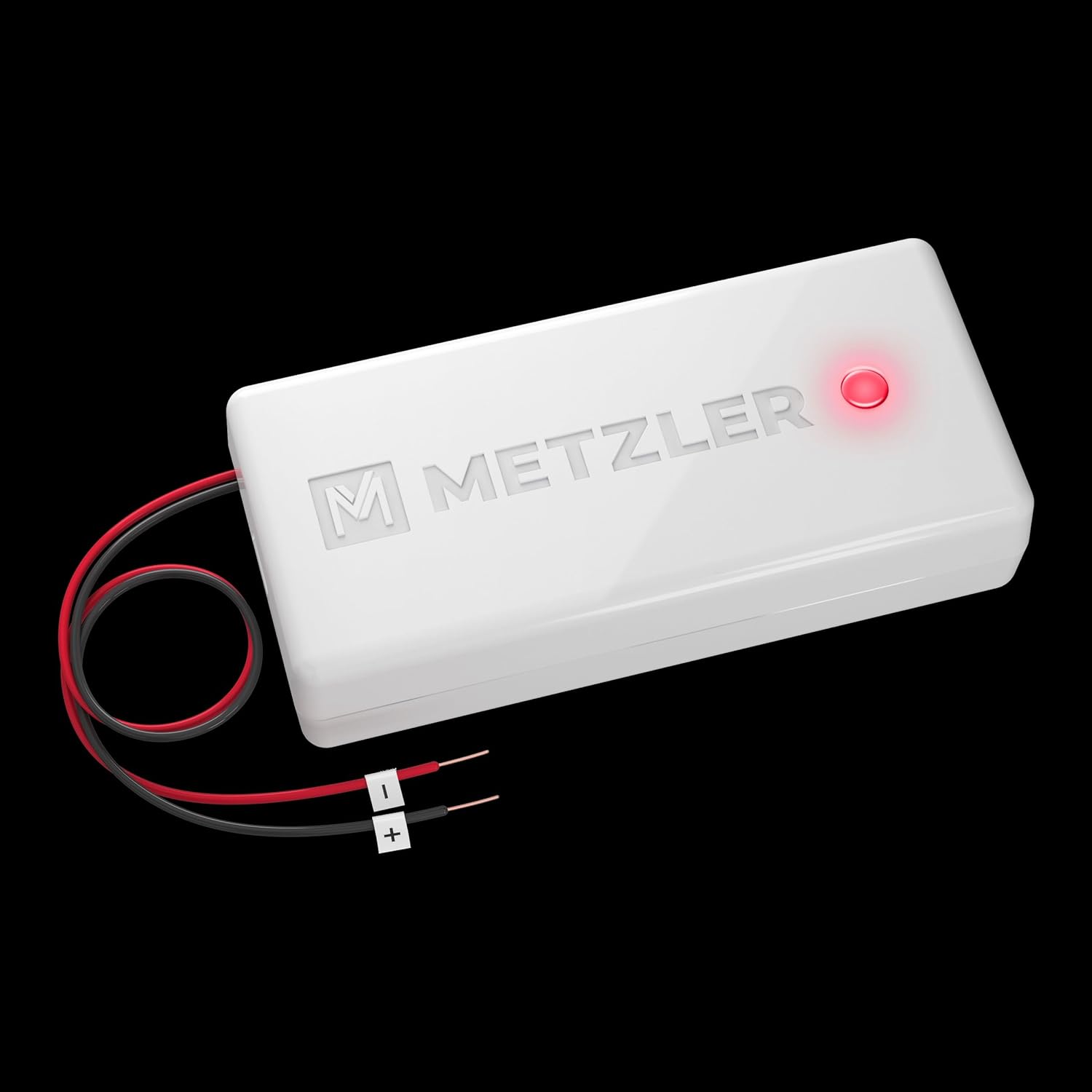
The transmitter is a small module designed to be integrated into your existing doorbell system. It converts the electrical signal from your doorbell into a wireless radio signal.

ചിത്രം 4.1: വിശദമായി view of the Metzler MT4.0 Wireless Transmitter, showing its dimensions, power input cables, and LED indicator. The image also displays the internal battery compartment and jumper settings for AC/DC or battery operation.
Key features of the transmitter:
- പവർ ഇൻപുട്ട്: Red and black wires for connection to the doorbell's power supply.
- LED സൂചകം: A small LED light (blue or red) indicates operation.
- ജമ്പർ ക്രമീകരണങ്ങൾ: Internal jumpers allow selection between AC/DC power input or internal battery operation (CR-2032).
- അളവുകൾ: Approximately 30.5 x 65 x 15 mm.
4.2 Wireless Plug-in Receiver
The receiver plugs into a standard electrical outlet and produces an audible chime and visual LED signal when it receives a signal from the transmitter.

ചിത്രം 4.2: ഫ്രണ്ട് view of the Metzler Wireless Plug-in Receiver, showing the central LED ring, volume control button (left), and melody selection button (right).
Key features of the receiver:
- പ്ലഗ്-ഇൻ ഡിസൈൻ: Connects directly to a wall outlet.
- LED സിഗ്നൽ: Central LED ring illuminates upon receiving a signal.
- വോളിയം നിയന്ത്രണ ബട്ടൺ: Adjusts the chime volume.
- Melody Selection Button: Cycles through the available chime melodies.
5. സജ്ജീകരണവും ഇൻസ്റ്റാളേഷനും
Follow these steps to install and set up your Metzler MT4.0 Wireless Doorbell Signal Converter Kit.
5.1 ട്രാൻസ്മിറ്റർ ഇൻസ്റ്റലേഷൻ
The MT4.0 transmitter can be powered either by your existing doorbell's AC/DC power supply or by an internal CR-2032 battery. Ensure the correct jumper setting is selected before installation.
5.1.1 Powering the Transmitter via Existing Doorbell (AC/DC)
- പവർ വിച്ഛേദിക്കുക: Before starting, turn off the main power supply to your existing doorbell system at the circuit breaker to prevent electrical shock.
- Access Doorbell Chime: Open your existing doorbell chime unit to access its internal wiring.
- Set Jumper: Locate the jumper on the MT4.0 transmitter circuit board. Set it to the "AC/DC" position.
- വയറുകൾ ബന്ധിപ്പിക്കുക: Connect the red and black wires from the MT4.0 transmitter സമാന്തരമായി to the power terminals of your existing doorbell chime. It is crucial to connect them in parallel, not in series. Refer to Image 5.1 for a visual guide.
- Mount Transmitter: Secure the transmitter inside the doorbell chime unit, ensuring it does not interfere with moving parts or wiring.
- പവർ പുന ore സ്ഥാപിക്കുക: Close the doorbell chime unit and restore power at the circuit breaker.

ചിത്രം 5.1: Diagram illustrating the correct parallel wiring of the Metzler MT4.0 transmitter inside an existing doorbell chime unit. The jumper setting for AC/DC power is also visible.
Important Note: The provided diagram in some packages may incorrectly show a series connection. Always connect the transmitter in parallel to your existing doorbell's power supply.
5.1.2 Powering the Transmitter via Internal Battery (CR-2032)
- ബാറ്ററി കമ്പാർട്ട്മെന്റ് ആക്സസ് ചെയ്യുക: ട്രാൻസ്മിറ്റർ തുറക്കുക casing.
- ബാറ്ററി ചേർക്കുക: Insert a CR-2032 lithium battery into the designated slot, observing polarity.
- Set Jumper: Locate the jumper on the MT4.0 transmitter circuit board. Set it to the "VBAT" position for battery operation.
- അടയ്ക്കുക സിasing: Securely close the transmitter casing.
- ടെസ്റ്റ്: Briefly connect the two wire ends (red and black) to simulate a doorbell press. The transmitter's LED should light up.
Note: When using battery power, do not connect the transmitter to an external power source.
5.2 റിസീവർ സജ്ജീകരണം
- പ്ലഗ് ഇൻ: Insert the wireless plug-in receiver into a standard electrical outlet in your desired location.
- പ്ലേസ്മെൻ്റ്: Choose a central location or an area where you frequently need to hear the doorbell. The receiver can be moved to different outlets as needed.
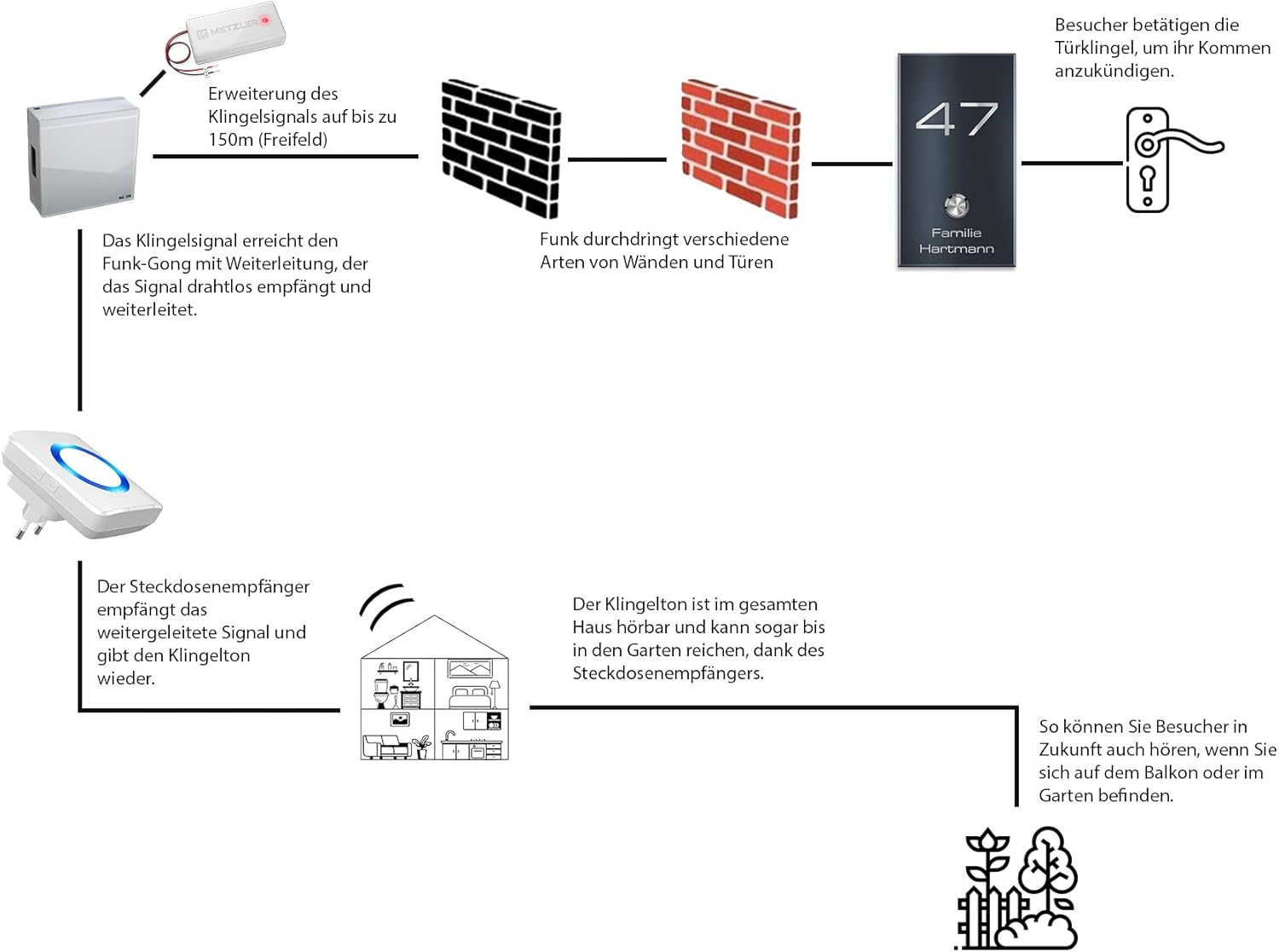
ചിത്രം 5.2: Diagram illustrating the signal flow of the Metzler wireless doorbell system. A visitor presses the doorbell, the signal is transmitted wirelessly through walls, and the plug-in receiver plays the chime, audible throughout the house and garden.
5.3 Pairing the Transmitter and Receiver
The transmitter and receiver should be paired for proper operation. If they are not paired out of the box, or if you wish to change the melody, follow these steps:
- Select Melody: On the receiver, press the melody selection button (musical note icon) repeatedly until you hear your desired chime.
- ജോടിയാക്കൽ മോഡ് നൽകുക: Press and hold the volume control button (speaker icon) on the receiver for approximately 3-5 seconds until the LED ring flashes rapidly. This indicates pairing mode.
- ട്രാൻസ്മിറ്റർ സജീവമാക്കുക: Within 5 seconds of the receiver entering pairing mode, activate the transmitter. If connected to an existing doorbell, press your doorbell button. If using battery power, briefly connect the red and black wires.
- സ്ഥിരീകരണം: The receiver will chime once and the LED ring will stop flashing, indicating successful pairing.
- ടെസ്റ്റ്: Press your doorbell button again to confirm the receiver chimes.
Note: Each time you change the melody, you must re-pair the transmitter and receiver for the new melody to be saved.
6. പ്രവർത്തന നിർദ്ദേശങ്ങൾ
6.1 വോളിയം ക്രമീകരിക്കൽ
To adjust the volume of the receiver:
- Press the volume control button (speaker icon) on the side of the receiver.
- Each press will cycle through the 4 available volume levels (from silent to loud). Select the desired level.
6.2 Changing Melodies
To change the chime melody:
- Press the melody selection button (musical note icon) on the side of the receiver.
- Each press will cycle through the 52 available polyphonic melodies. Listen to the options and stop when you hear your preferred melody.
- After selecting a new melody, you must re-pair the transmitter and receiver (refer to Section 5.3) for the new melody to be saved and used.
ചിത്രം 6.1: Visual representation of the receiver's user-defined experience, highlighting the variety of melodies, adjustable volume, visual LED notification, and flexible installation options.
7. പരിപാലനം
The Metzler MT4.0 Wireless Doorbell Signal Converter Kit requires minimal maintenance.
- വൃത്തിയാക്കൽ: Wipe the receiver and transmitter with a soft, dry cloth. Do not use abrasive cleaners or solvents.
- Battery Replacement (Transmitter): If the transmitter is battery-powered and stops working, replace the CR-2032 battery. Ensure correct polarity.
- പരിസ്ഥിതി വ്യവസ്ഥകൾ: Ensure the devices are kept in a dry environment and away from extreme temperatures.
8. പ്രശ്നപരിഹാരം
If you encounter issues with your Metzler MT4.0 kit, refer to the following common problems and solutions:
| പ്രശ്നം | സാധ്യമായ കാരണം | പരിഹാരം |
|---|---|---|
| Receiver does not chime when doorbell is pressed. |
|
|
| Short range or intermittent signal. |
|
|
| റിസീവർ LED മിന്നുന്നു, പക്ഷേ ശബ്ദമില്ല. | Volume is set to silent. | Increase volume using the volume button (Section 6.1). |
9 സ്പെസിഫിക്കേഷനുകൾ
| ഫീച്ചർ | വിശദാംശങ്ങൾ |
|---|---|
| മോഡൽ | MT4.0 (Full Model Number: AMZ-MT4.0_WA878-AC) |
| ബ്രാൻഡ് | Metzler |
| ട്രാൻസ്മിറ്റർ പവർ സപ്ലൈ | AC/DC: 5-24V, AC, 50Hz / 6-32V DC 3V (via doorbell wiring) or 1x CR-2032 battery |
| റിസീവർ പവർ സപ്ലൈ | Standard AC Wall Outlet (Plug-in) |
| വയർലെസ് ശ്രേണി | 300 മീറ്റർ വരെ (തുറന്ന സ്ഥലം) |
| മെലഡികൾ | 52 polyphonic options |
| വോളിയം ലെവലുകൾ | ക്രമീകരിക്കാവുന്ന 4 ലെവലുകൾ |
| പ്രത്യേക സവിശേഷതകൾ | LED display/signal, Digital Code System |
| ട്രാൻസ്മിറ്റർ അളവുകൾ | ഏകദേശം. 30.5 x 65 x 15 മി.മീ |
| ഉൽപ്പന്ന അളവുകൾ (സ്വീകർത്താവ്) | ഏകദേശം. 7.5 x 3 x 8.5 സെ |
| ഇൻഡോർ/ഔട്ട്ഡോർ ഉപയോഗം | Indoor (Receiver), Indoor (Transmitter, integrated into existing doorbell) |
10. വാറണ്ടിയും പിന്തുണയും
Information regarding specific warranty terms and customer support for the Metzler MT4.0 Wireless Doorbell Signal Converter Kit is not available in the provided product data. Please refer to the product packaging or the manufacturer's official website for the most up-to-date warranty information and support contacts.


