ആമുഖം
Thank you for choosing the typecase Touch iPad Keyboard Case. This manual provides detailed instructions for setting up, operating, maintaining, and troubleshooting your new keyboard case. Designed for iPad 10th Generation (10.9", 2022) and iPad A16 (11th Gen, 2025), this case features a 360° rotatable design, 11-color backlit keyboard, and a multi-touch trackpad to enhance your productivity and user experience.
അനുയോജ്യത
This keyboard case is specifically designed for the following iPad models:
- iPad 10th Generation (10.9-inch, 2022): മോഡലുകൾ A2696, A2757, A2777
- iPad A16 (11th Generation, 2025): മോഡലുകൾ A3354, A3355, A3356
To verify your iPad model, please check the back of your iPad or navigate to Settings > General > About > Model Number on your device.

ചിത്രം 1: Compatible iPad Models. Ensure your iPad model matches those listed for proper fit and function.
പാക്കേജ് ഉള്ളടക്കം
Upon opening the package, please ensure all the following items are included:
- typecase Touch iPad Keyboard Case
- യുഎസ്ബി ചാർജിംഗ് കേബിൾ
- ഉപയോക്തൃ മാനുവൽ
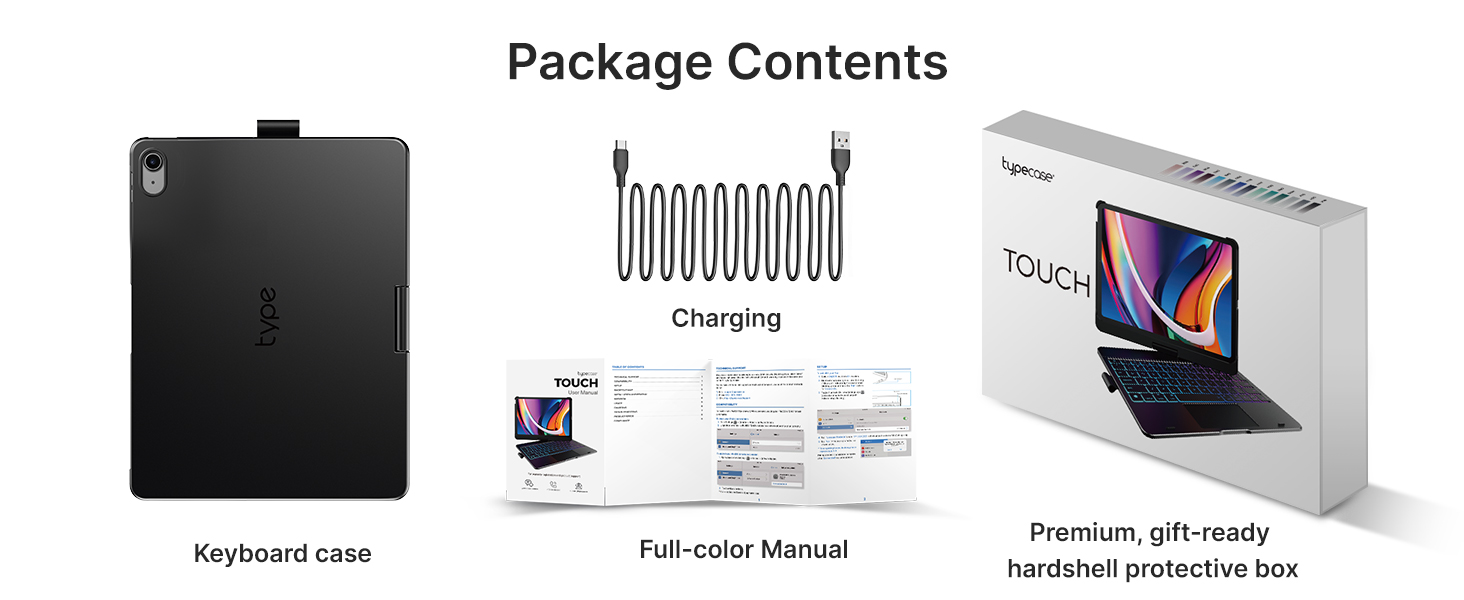
ചിത്രം 2: Package Contents. Verify all items are present before proceeding with setup.
സജ്ജീകരണവും കണക്ഷനും
1. Charging the Keyboard Case
Before first use, fully charge the keyboard case. Connect the provided USB charging cable to the charging port on the keyboard and a USB power adapter (not included). The charging indicator light will show charging status and turn off when fully charged.
2. Inserting Your iPad
Gently align your iPad with the case and press it firmly into place until it is securely seated. Ensure all ports and buttons are accessible and not obstructed by the case.
3. ബ്ലൂടൂത്ത് ജോടിയാക്കൽ
- Turn on the keyboard by sliding the power switch to the ON position. The Bluetooth indicator light will begin to flash.
- നിങ്ങളുടെ iPad-ൽ, പോകുക ക്രമീകരണങ്ങൾ > ബ്ലൂടൂത്ത്.
- ബ്ലൂടൂത്ത് ഓണാക്കിയിട്ടുണ്ടെന്ന് ഉറപ്പാക്കുക On.
- Locate "typecase Keyboard" (or similar name) in the "Other Devices" list and tap on it to connect.
- Once connected, the Bluetooth indicator light on the keyboard will stop flashing and remain solid, or turn off, indicating a successful connection.
The keyboard will automatically attempt to reconnect to the last paired device when powered on.
പ്രധാന സവിശേഷതകൾ
ബാക്ക്ലൈറ്റ് കീബോർഡ്
The keyboard features laser-etched keys with an adjustable 11-color RGB LED backlight, allowing for comfortable typing in various lighting conditions. A dedicated row of iPadOS shortcut keys provides quick access to common functions.
- Adjusting Backlight Color: അമർത്തുക ബൾബ് പ്രകാശിപ്പിക്കുക key (often Fn + Lightbulb icon) to cycle through colors.
- ബാക്ക്ലൈറ്റ് തെളിച്ചം ക്രമീകരിക്കുന്നു: അമർത്തുക തെളിച്ചം മുകളിലേക്ക്/താഴേക്ക് keys (often Fn + Up/Down arrow keys) to adjust intensity.

ചിത്രം 3: Backlit Keyboard. Features 11-color RGB backlighting and iPadOS shortcut keys.

ചിത്രം 4: 11-Color Backlight. Customize your typing experience with a range of vibrant colors.
Multi-Touch Trackpad
The integrated multi-touch trackpad allows for precise navigation and gesture controls, similar to a laptop. This enhances productivity for tasks such as document editing, web browsing, and presentation building.
- ഒറ്റ വിരൽ ടാപ്പ്: ഇടത് ക്ലിക്ക്.
- രണ്ട് വിരലുകളുടെ സ്ക്രോൾ: മുകളിലേക്കോ താഴേക്കോ സ്ക്രോൾ ചെയ്യുക.
- സൂം ചെയ്യാൻ പിഞ്ച് ചെയ്യുക: ഉള്ളടക്കം സൂം ഇൻ ചെയ്യുകയോ സൂം ഔട്ട് ചെയ്യുകയോ ചെയ്യുക.
- മൂന്ന് വിരലുകൾ ഉപയോഗിച്ച് മുകളിലേക്ക് സ്വൈപ്പ് ചെയ്യുക: Go to Home Screen.
- മൂന്ന് വിരലുകൾ ഉപയോഗിച്ച് ഇടത്തോട്ടോ വലത്തോട്ടോ സ്വൈപ്പ് ചെയ്യുക: തുറന്ന അപ്ലിക്കേഷനുകൾക്കിടയിൽ മാറുക.

ചിത്രം 5: Multi-Touch Trackpad. Supports various gestures for efficient iPad navigation.
Design and Protection
The case features a premium hard-shell design that protects all sides of your iPad. The auto sleep/wake function conserves battery life by automatically turning the iPad on/off when the case is opened/closed. An integrated holder keeps your Apple Pencil secure and easily accessible.

ചിത്രം 6: Smart Protection. Lightweight, thin profile, and key protection in tablet mode.
ഉപയോഗ മോഡുകൾ
The patented 360° rotatable hinge allows for 7 versatile use modes, adapting to various tasks and environments:
- ലാപ്ടോപ്പ് മോഡ്: Traditional laptop setup for typing and trackpad use.
- സ്റ്റാൻഡ് മോഡ്: Ideal for watching videos or presentations.
- ടെന്റ് മോഡ്: Perfect for small spaces or viewing content hands-free.
- ടാബ്ലെറ്റ് മോഡ്: Fold the keyboard back for a pure tablet experience. Keys are automatically disabled in this mode.
- Corner Mode: A stable viewing angle for drawing or note-taking.
- പങ്കിടൽ മോഡ്: Easily share your screen with others.
- Protect Mode: Fully close the case to protect your iPad during transport.

ചിത്രം 7: 7 Unique Modes. Versatile configurations for every need.

ചിത്രം 8: Patented 360° Hinge. Enables seamless transitions between modes.
മെയിൻ്റനൻസ്
Proper care and maintenance will extend the lifespan of your typecase keyboard case:
- വൃത്തിയാക്കൽ: ഒരു സോഫ്റ്റ് ഉപയോഗിക്കുക, ഡിamp cloth to wipe the exterior of the case. For the keyboard, use a soft, lint-free cloth. Avoid harsh chemicals or abrasive materials.
- സംഭരണം: When not in use for extended periods, ensure the keyboard is turned off to conserve battery. Store in a cool, dry place away from direct sunlight.
- ബാറ്ററി കെയർ: To maintain battery health, avoid fully discharging the battery frequently. Charge it regularly, even if not in constant use.
സ്പെസിഫിക്കേഷനുകൾ
| മോഡൽ നമ്പർ | KB201T-100 |
| ഉൽപ്പന്ന അളവുകൾ | 10.98 x 8.58 x 1.5 ഇഞ്ച് |
| ഇനത്തിൻ്റെ ഭാരം | 1.43 പൗണ്ട് |
| കണക്റ്റിവിറ്റി ടെക്നോളജി | ബ്ലൂടൂത്ത് |
| ബാറ്ററി തരം | 1 ലിഥിയം പോളിമർ ബാറ്ററി (ഉൾപ്പെടുത്തിയിരിക്കുന്നു) |
| കീബോർഡ് ബാക്ക്ലൈറ്റിംഗ് | 11-Color RGB LED |
| കീകളുടെ എണ്ണം | 78 |
| പ്രത്യേക സവിശേഷതകൾ | 360° Rotatable, Backlit, Ergonomic, Lightweight, Multi-Touch Trackpad, Auto Sleep/Wake, Apple Pencil Holder |
ട്രബിൾഷൂട്ടിംഗ്
| പ്രശ്നം | പരിഹാരം |
|---|---|
| കീബോർഡ് ബ്ലൂടൂത്ത് വഴി ബന്ധിപ്പിക്കുന്നില്ല. |
|
| കീകൾ പ്രതികരിക്കുന്നില്ല. |
|
| Trackpad is not working or is erratic. |
|
| ബാക്ക്ലൈറ്റ് പ്രവർത്തിക്കുന്നില്ല. |
|
വാറൻ്റിയും പിന്തുണയും
typecase is committed to providing high-quality products and excellent customer service.
- 1 വർഷത്തെ മാറ്റിസ്ഥാപിക്കൽ സേവനം: Your product is covered by a 1-year replacement service from the date of purchase for manufacturing defects.
- 30 ദിവസത്തെ റീഫണ്ട്: You are eligible for a full refund within 30 days of purchase if you are not satisfied with the product.
- ഉപഭോക്തൃ പിന്തുണ: For any problems, questions, or feedback, please contact our customer support team for quick assistance. Refer to the contact information provided on the product packaging or the official typecase webസൈറ്റ്.

ചിത്രം 9: Reliable After-Sales Service. Your satisfaction is our priority.