1. ആമുഖം
Thank you for choosing the SPC Magnes 3 WiFi Surveillance Camera. This manual provides essential information for the proper installation, operation, and maintenance of your device. Please read this manual thoroughly before using the product to ensure optimal performance and safety.
The SPC Magnes 3 is a versatile security camera designed for both indoor and outdoor use, featuring a long-lasting rechargeable battery, high-definition video, night vision, motion detection, and two-way audio communication.
2. ഉൽപ്പന്നം കഴിഞ്ഞുview
The SPC Magnes 3 camera is designed for ease of use and robust performance. Below are key components and features.
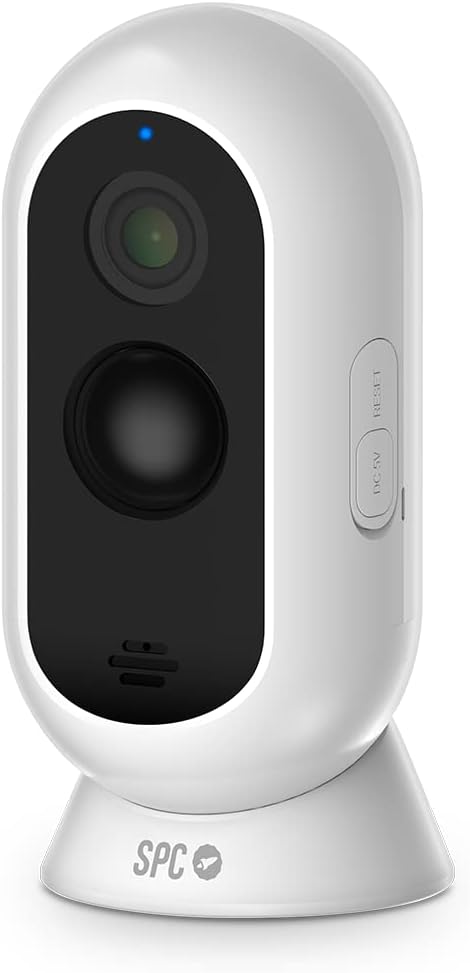
ചിത്രം 2.1: ഫ്രണ്ട് view of the SPC Magnes 3 camera, showing the lens, infrared sensors, and microphone. A blue indicator light is visible at the top.

ചിത്രം 2.2: തിരികെ view of the SPC Magnes 3 camera, highlighting the speaker grille and the DC 5V charging port, along with the reset button.

ചിത്രം 2.3: The SPC Magnes 3 camera positioned next to a smartphone, illustrating the live view and control options available through the SPC IoT mobile application.

ചിത്രം 2.4: The SPC Magnes 3 camera being attached to its magnetic wall mount, demonstrating the ease of installation and removal.
ഉൾപ്പെടുത്തിയ ഘടകങ്ങൾ:
- SPC Magnes 3 Camera
- മതിൽ മൗണ്ട്
- മാഗ്നെറ്റിക് ഹോൾഡർ
- ദ്രുത ഗൈഡ്
- USB കേബിൾ
3. സജ്ജീകരണം
3.1 ക്യാമറ ചാർജ് ചെയ്യുന്നു
Before initial use, fully charge the SPC Magnes 3 camera. Connect the provided USB cable to the DC 5V port on the camera and plug the other end into a compatible USB power adapter (not included). The indicator light will show charging status.
3.2 Installing the SPC IoT App
- ഡൗൺലോഡ് ചെയ്യുക SPC IoT application from the Google Play Store (for Android) or the Apple App Store (for iOS).
- നിങ്ങളുടെ സ്മാർട്ട്ഫോണിലോ ടാബ്ലെറ്റിലോ അപ്ലിക്കേഷൻ ഇൻസ്റ്റാൾ ചെയ്യുക.
- ആപ്പ് തുറന്ന് ഒരു അക്കൗണ്ട് സൃഷ്ടിക്കുക അല്ലെങ്കിൽ നിങ്ങൾക്ക് ഇതിനകം ഒന്ന് ഉണ്ടെങ്കിൽ ലോഗിൻ ചെയ്യുക.
3.3 ആപ്പുമായി ക്യാമറ ജോടിയാക്കൽ
- Ensure your camera is charged and powered on.
- In the SPC IoT app, tap on 'Add Device' or the '+' icon.
- Select 'Security Camera' or the appropriate device type.
- Follow the on-screen instructions to connect the camera to your 2.4GHz Wi-Fi network. You may need to scan a QR code displayed on your phone with the camera lens.
- Once connected, the camera will appear in your device list within the app.
3.4 ക്യാമറ മൗണ്ടിംഗ്
The SPC Magnes 3 can be placed on a flat surface using its magnetic base or mounted to a wall or ceiling.
- ടാബ്ലെറ്റ് പ്ലേസ്മെൻ്റ്: Simply place the camera on any stable, flat surface. The magnetic base provides stability.
- ചുമർ/സീലിംഗ് മൗണ്ടിംഗ്:
- Choose a suitable location, ensuring good Wi-Fi signal strength.
- Use the provided wall mount as a template to mark drill holes.
- ആവശ്യമെങ്കിൽ ദ്വാരങ്ങൾ തുരന്ന് വാൾ ആങ്കറുകൾ ഘടിപ്പിക്കുക.
- Secure the wall mount to the surface using screws.
- Attach the camera to the magnetic holder on the wall mount. Adjust the camera angle as needed.
The camera is IP65 waterproof, making it suitable for outdoor installation where it may be exposed to rain.
4. ഓപ്പറേഷൻ
4.1 തത്സമയം View
Open the SPC IoT app and select your SPC Magnes 3 camera from the device list to access the live video feed. You can view തത്സമയ footagഇന്റർനെറ്റ് കണക്ഷനുള്ള എവിടെ നിന്നും ഇ.
4.2 ടു-വേ ഓഡിയോ
The camera features a built-in microphone and speaker for two-way audio communication. In the live view, tap the microphone icon to speak through the camera and the speaker icon to listen to audio from the camera's location.
4.3 മോഷൻ ഡിറ്റക്ഷനും അറിയിപ്പുകളും
The SPC Magnes 3 is equipped with motion detection. When motion is detected, the camera will automatically record and send an instant notification to your smartphone via the SPC IoT app. You can adjust motion sensitivity settings within the app.
4.4 നൈറ്റ് വിഷൻ
The camera automatically switches to infrared (IR) night vision in low-light conditions, providing clear black-and-white video up to 10 meters away. This ensures continuous monitoring even in complete darkness.
4.5 റെക്കോർഡിംഗും സംഭരണവും
The camera supports local storage via a microSD card (not included) for continuous recording or event-triggered recordings. Cloud storage options may also be available through the SPC IoT app (subscription may be required).
5. പരിപാലനം
5.1 ബാറ്ററി മാനേജ്മെൻ്റ്
The 9600 mAh rechargeable battery provides up to 3 months of operation, depending on usage frequency and Wi-Fi signal quality. When the battery level is low, the app will notify you. To recharge, detach the camera from its mount and connect it to a USB power source using the provided cable.
5.2 വൃത്തിയാക്കൽ
To maintain optimal image quality, regularly clean the camera lens with a soft, dry, lint-free cloth. Do not use harsh chemicals or abrasive materials.
5.3 ഫേംവെയർ അപ്ഡേറ്റുകൾ
Periodically check the SPC IoT app for available firmware updates. Keeping your camera's firmware updated ensures the latest features, security enhancements, and bug fixes.
6. പ്രശ്നപരിഹാരം
| പ്രശ്നം | സാധ്യമായ കാരണം | പരിഹാരം |
|---|---|---|
| ക്യാമറ വൈഫൈയിലേക്ക് കണക്റ്റ് ചെയ്യുന്നില്ല | Incorrect Wi-Fi password; Camera too far from router; Only 5GHz Wi-Fi available. | Verify password; Move camera closer to router; Ensure you are connecting to a 2.4GHz Wi-Fi network. |
| മോശം ചിത്ര നിലവാരം | Dirty lens; Insufficient lighting; Poor Wi-Fi signal. | Clean the lens; Ensure adequate lighting or rely on night vision; Improve Wi-Fi signal. |
| ബാറ്ററി പെട്ടെന്ന് തീരുന്നു | Frequent motion detection events; Weak Wi-Fi signal; Continuous live view. | Adjust motion sensitivity; Improve Wi-Fi signal; Minimize continuous live viewing. |
| ചലന തിരിച്ചറിയൽ അറിയിപ്പുകളൊന്നുമില്ല | Motion detection disabled; App notifications blocked; Incorrect sensitivity. | ആപ്പിൽ ചലന കണ്ടെത്തൽ പ്രവർത്തനക്ഷമമാക്കുക; ഫോൺ അറിയിപ്പ് ക്രമീകരണങ്ങൾ പരിശോധിക്കുക; സംവേദനക്ഷമത ക്രമീകരിക്കുക. |
| ടു-വേ ഓഡിയോ പ്രവർത്തിക്കുന്നില്ല | Microphone/speaker muted in app; Volume too low. | Unmute microphone/speaker in app; Increase volume. |
7 സ്പെസിഫിക്കേഷനുകൾ
| മോഡൽ നമ്പർ | 6309 ബി |
| നിർമ്മാതാവ് | എസ്.പി.സി |
| അളവുകൾ (L x W x H) | 50 x 50 x 28 സെ.മീ |
| ഭാരം | 225 ഗ്രാം |
| നിറം | വെള്ള |
| മെറ്റീരിയൽ | പ്ലാസ്റ്റിക് |
| പവർ ഉറവിടം | ബാറ്ററി പവർഡ് (1 ലിഥിയം-അയൺ ബാറ്ററി ആവശ്യമാണ്) |
| ബാറ്ററി ശേഷി | 9600 mAh |
| പ്രത്യേക സവിശേഷതകൾ | Night vision, IP65 Waterproof, Rechargeable battery, Motion detection, Two-way audio |
| ഫീൽഡ് View | 130° |
| നൈറ്റ് വിഷൻ റേഞ്ച് | 10 മീറ്റർ വരെ |
| ഇൻസ്റ്റലേഷൻ രീതി | Screw-in (Wall Mount) / Table Mount |
| മാതൃരാജ്യം | ചൈന |
8. വാറൻ്റിയും പിന്തുണയും
For warranty information and technical support, please refer to the official SPC webസൈറ്റിൽ ബന്ധപ്പെടുക അല്ലെങ്കിൽ അവരുടെ ഉപഭോക്തൃ സേവനവുമായി ബന്ധപ്പെടുക. വാറന്റി ക്ലെയിമുകൾക്കുള്ള വാങ്ങലിന്റെ തെളിവായി നിങ്ങളുടെ വാങ്ങൽ രസീത് സൂക്ഷിക്കുക.
സ്പെയർ പാർട്സുകളുടെ ലഭ്യത സംബന്ധിച്ച വിവരങ്ങൾ നിലവിൽ ലഭ്യമല്ല.


