1. ആമുഖം
This manual provides essential information for the safe and efficient operation of your KLIM K9000 Portable Air Conditioner. Please read it thoroughly before use and retain it for future reference. The KLIM K9000 is a versatile 3-in-1 unit offering cooling, dehumidification, and fan functions.
2. സുരക്ഷാ നിർദ്ദേശങ്ങൾ
To reduce the risk of fire, electrical shock, or injury, always follow these basic precautions:
- ഉപകരണം ഉപയോഗിക്കുന്നതിന് മുമ്പ് എല്ലാ നിർദ്ദേശങ്ങളും വായിക്കുക.
- വൈദ്യുതി വിതരണം വോള്യവുമായി പൊരുത്തപ്പെടുന്നുണ്ടെന്ന് ഉറപ്പാക്കുകtagഇ റേറ്റിംഗ് ലേബലിൽ വ്യക്തമാക്കിയിരിക്കുന്നു.
- കേടായ ചരടോ പ്ലഗോ ഉപയോഗിച്ച് യൂണിറ്റ് പ്രവർത്തിപ്പിക്കരുത്.
- താപ സ്രോതസ്സുകളിൽ നിന്നും നേരിട്ടുള്ള സൂര്യപ്രകാശത്തിൽ നിന്നും ഉപകരണം അകറ്റി നിർത്തുക.
- എയർ ഇൻലെറ്റുകളോ ഔട്ട്ലെറ്റുകളോ തടയരുത്.
- വൃത്തിയാക്കുന്നതിനോ സർവീസ് ചെയ്യുന്നതിനോ മുമ്പായി എപ്പോഴും യൂണിറ്റ് അൺപ്ലഗ് ചെയ്യുക.
- ഈ ഉപകരണം, അവരുടെ സുരക്ഷയ്ക്ക് ഉത്തരവാദിയായ ഒരു വ്യക്തി ഉപകരണത്തിൻ്റെ ഉപയോഗത്തെ സംബന്ധിച്ച മേൽനോട്ടമോ നിർദ്ദേശമോ നൽകിയിട്ടില്ലെങ്കിൽ, ശാരീരികമോ ഇന്ദ്രിയപരമോ മാനസികമോ ആയ കഴിവുകൾ കുറഞ്ഞതോ അനുഭവത്തിൻ്റെയും അറിവിൻ്റെയും അഭാവം ഉള്ള വ്യക്തികൾക്ക് (കുട്ടികൾ ഉൾപ്പെടെ) ഉപയോഗിക്കാൻ ഉദ്ദേശിച്ചുള്ളതല്ല.
- നനഞ്ഞ അന്തരീക്ഷത്തിലോ വെള്ളത്തിനടുത്തോ ഉപകരണം ഉപയോഗിക്കരുത്.
- നിർമ്മാതാവ് ശുപാർശ ചെയ്യുന്ന ആക്സസറികൾ മാത്രം ഉപയോഗിക്കുക.
3. പാക്കേജ് ഉള്ളടക്കം
പാക്കേജിൽ എല്ലാ ഇനങ്ങളും ഉണ്ടെന്ന് ഉറപ്പാക്കുക:
- KLIM K9000 Air Conditioner Unit
- റിമോട്ട് കൺട്രോൾ
- എക്സ്ഹോസ്റ്റ് ഹോസ്
- എക്സ്ഹോസ്റ്റ് പോർട്ട്
- എക്സോസ്റ്റ് ഹോസ് കണക്ടർ
- ഡ്രെയിനേജ് ഹോസ്
- Window Seal Fixing Plate
- Window Cover Extension
- 2 AAA Alkaline Batteries (for remote control, if included)
4. ഉൽപ്പന്നം കഴിഞ്ഞുview
The KLIM K9000 is a compact and efficient portable air conditioner designed to provide comfort in various environments. It integrates three primary functions: cooling, dehumidification, and fan operation.

ചിത്രം 4.1: KLIM K9000 Portable Air Conditioner unit with remote control, illustrating air circulation.
Its 3-in-1 functionality allows it to cool rooms, circulate air as a fan, and reduce humidity levels, making it suitable for various climate control needs.

ചിത്രം 4.2: The KLIM K9000 offers 3-in-1 comfort: cooling, dehumidifying, and fan functions, with a 9000 BTU cooling capacity.
5. സജ്ജീകരണവും ഇൻസ്റ്റാളേഷനും
Proper installation is crucial for optimal performance. Follow these steps for quick setup:
- സ്ഥാനനിർണ്ണയം: Place the unit on a flat, stable surface, ensuring at least 30 cm (12 inches) of space around it for proper airflow.
- എക്സ്ഹോസ്റ്റ് ഹോസ് ഘടിപ്പിക്കുക: Connect the exhaust hose to the unit's exhaust port. Extend the hose and connect the window seal fixing plate or window cover extension.
- വിൻഡോ ഇൻസ്റ്റാളേഷൻ: Secure the window seal fixing plate or extension in a compatible window opening (sliding windows). For tilt windows, a separate seal kit is required and sold separately. Ensure the hot air is expelled outdoors.
- പവർ കണക്ഷൻ: ഗ്രൗണ്ടഡ് ഇലക്ട്രിക്കൽ ഔട്ട്ലെറ്റിലേക്ക് പവർ കോർഡ് പ്ലഗ് ചെയ്യുക.
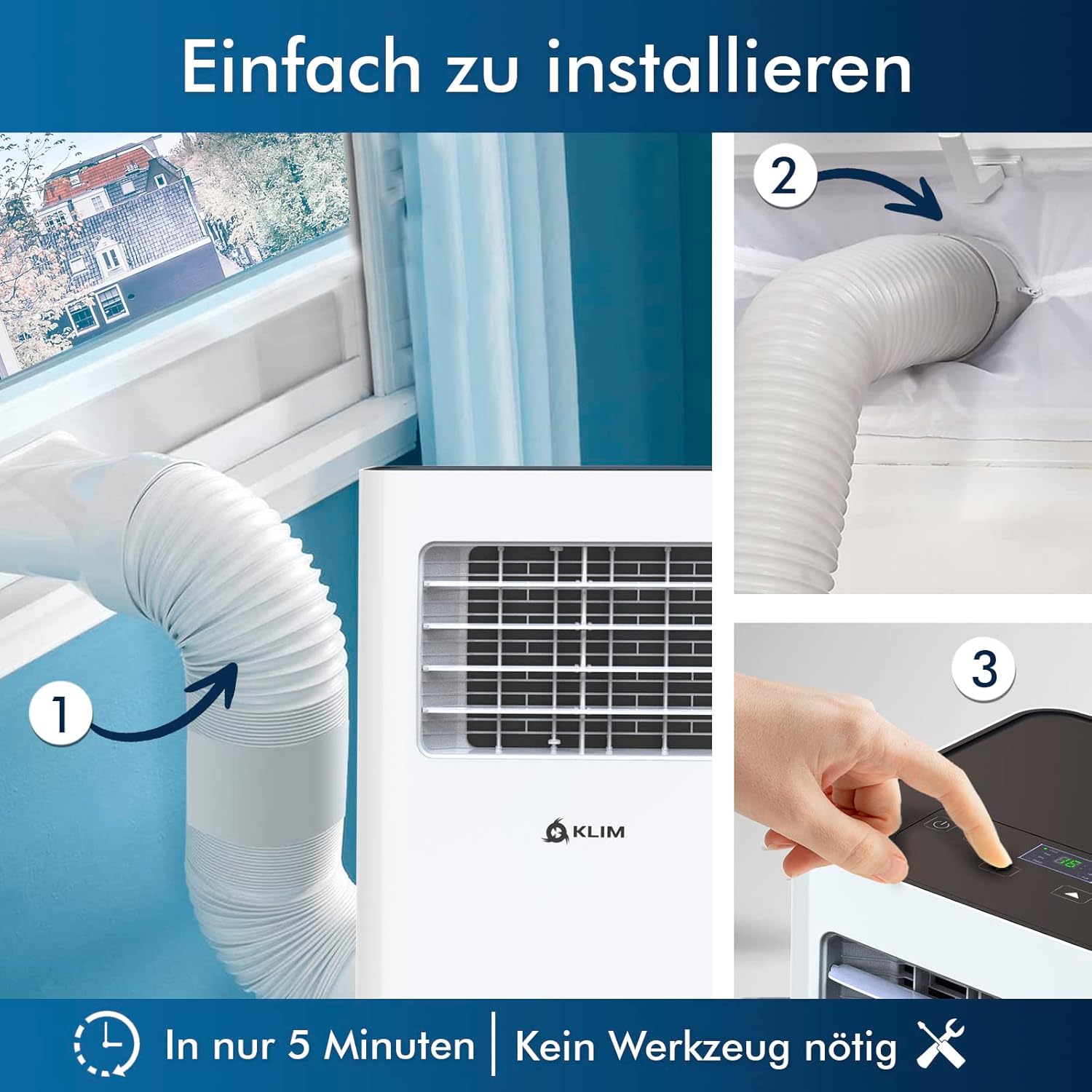
ചിത്രം 5.1: Visual guide for quick installation, typically completed in 5 minutes without special tools.

ചിത്രം 5.2: Illustration of window kit compatibility, showing options for sliding windows and mentioning a separate seal for tilt windows.
6. പ്രവർത്തന നിർദ്ദേശങ്ങൾ
The KLIM K9000 can be operated via the control panel on the unit or the included remote control.
6.1. നിയന്ത്രണ പാനലും റിമോട്ട് നിയന്ത്രണവും
The remote control allows convenient operation from a distance. Ensure AAA batteries are correctly inserted. The control panel on the unit provides direct access to all functions.
6.2 ഓപ്പറേറ്റിംഗ് മോഡുകൾ
- കൂളിംഗ് മോഡ്: Activates the compressor to cool the room. Set your desired temperature (down to 16°C). This mode is effective for rooms up to 20 m² (80 m³).
- ഫാൻ മോഡ്: Circulates air without cooling. Adjustable fan speeds are available.
- ഡീഹ്യൂമിഡിഫയർ മോഡ്: Removes excess moisture from the air. In this mode, the unit collects water, which will need to be drained.
- സ്ലീപ്പ് മോഡ്: Designed for quiet operation during rest. The unit operates at a reduced noise level (approx. 65 dB) and may adjust temperature settings automatically for comfort.

ചിത്രം 6.1: The sleep mode provides a cool and quiet environment for restful sleep, operating at approximately 65 dB.
To switch between modes, press the "Mode" button on the control panel or remote control.
7. പരിപാലനം
Regular maintenance ensures the longevity and efficiency of your KLIM K9000.
7.1. എയർ ഫിൽട്ടർ വൃത്തിയാക്കുന്നു
ഉപയോഗത്തിനനുസരിച്ച് എയർ ഫിൽറ്റർ രണ്ടാഴ്ച കൂടുമ്പോഴോ അതിലധികമോ തവണ വൃത്തിയാക്കണം. വൃത്തികെട്ട ഫിൽറ്റർ തണുപ്പിക്കൽ കാര്യക്ഷമതയും വായുപ്രവാഹവും കുറയ്ക്കും.
- പവർ ഔട്ട്ലെറ്റിൽ നിന്ന് എയർ കണ്ടീഷണർ ഊരിമാറ്റുക.
- എയർ ഫിൽറ്റർ കണ്ടെത്തി നീക്കം ചെയ്യുക (സാധാരണയായി യൂണിറ്റിന്റെ പിൻഭാഗത്തോ വശത്തോ).
- ഫിൽട്ടർ ചൂടുള്ള, സോപ്പ് വെള്ളത്തിൽ കഴുകുക. നന്നായി കഴുകിയ ശേഷം വീണ്ടും ഇടുന്നതിനുമുമ്പ് പൂർണ്ണമായും വായുവിൽ ഉണങ്ങാൻ അനുവദിക്കുക.
- ഡ്രൈ ഫിൽറ്റർ വീണ്ടും ഇൻസ്റ്റാൾ ചെയ്ത് യൂണിറ്റ് തിരികെ പ്ലഗ് ഇൻ ചെയ്യുക.
7.2. വാട്ടർ ഡ്രെയിനേജ്
The unit features an auto-evaporation system in cooling mode, reducing the need for frequent drainage. However, in high humidity or dehumidifier mode, water will accumulate and needs to be drained.
- തുടർച്ചയായ ഡ്രെയിനേജ്: For continuous dehumidification, attach the drainage hose to the drain outlet and direct it to a suitable container or floor drain.
- സ്വമേധയാലുള്ള ഡ്രെയിനേജ്: When the internal water tank is full, the unit may stop operating and display an indicator. To drain manually, unplug the unit, place a shallow pan or tray under the drain plug, and remove the plug. Be aware that the internal water container can be cumbersome to empty, and it may require two people to safely tilt the unit for complete drainage if using the bottom drain.
8. പ്രശ്നപരിഹാരം
പൊതുവായ പ്രശ്നങ്ങളും അവയുടെ പരിഹാരങ്ങളും അറിയാൻ ഈ വിഭാഗം കാണുക.
| പ്രശ്നം | സാധ്യമായ കാരണം | പരിഹാരം |
|---|---|---|
| യൂണിറ്റ് ഓണാക്കുന്നില്ല. | വൈദ്യുതിയില്ല, സർക്യൂട്ട് ബ്രേക്കർ ട്രിപ്പ് ചെയ്തു, വാട്ടർ ടാങ്ക് നിറഞ്ഞു. | Check power cord, reset breaker, drain water tank. |
| അപര്യാപ്തമായ തണുപ്പിക്കൽ. | Dirty air filter, blocked air intake/outlet, open windows/doors, room too large, exhaust hose not properly installed. | Clean filter, clear obstructions, close windows/doors, ensure proper exhaust hose installation. |
| യൂണിറ്റ് ശബ്ദമയമാണ്. | Normal operation sound (compressor/fan), unit not on a level surface. | The unit operates at approximately 65 dB, which is normal. Ensure it is on a flat surface. |
| വെള്ളം ചോർച്ച. | Drain plug not securely closed, drainage hose improperly connected. | Check drain plug, ensure drainage hose is securely attached and not kinked. |
ഈ പരിഹാരങ്ങൾ പരീക്ഷിച്ചതിനുശേഷവും പ്രശ്നം നിലനിൽക്കുകയാണെങ്കിൽ, ദയവായി ഉപഭോക്തൃ പിന്തുണയുമായി ബന്ധപ്പെടുക.
9 സ്പെസിഫിക്കേഷനുകൾ
| ബ്രാൻഡ് | KLIM |
| മോഡൽ നമ്പർ | K9000WH |
| തണുപ്പിക്കൽ ശേഷി | 9000 ബി.ടി.യു |
| ശുപാർശ ചെയ്യുന്ന മുറിയുടെ വലിപ്പം | 20 ചതുരശ്ര മീറ്റർ (80 ചതുരശ്ര മീറ്റർ) വരെ |
| പ്രവർത്തനങ്ങൾ | തണുപ്പിക്കൽ, ഡീഹ്യൂമിഡിഫയർ, ഫാൻ |
| എനർജി എഫിഷ്യൻസി ക്ലാസ് | A |
| വാർഷിക വൈദ്യുതി ഉപഭോഗം | 960 വാട്ട്സ് |
| ശബ്ദ നില | 65 ഡെസിബെൽ |
| റഫ്രിജറൻ്റ് | R-290 (Natural Refrigerant) |
| അളവുകൾ (L x W x H) | 29.5 x 32.5 x 70.4 സെ.മീ |
| ഭാരം | 25.58 കി.ഗ്രാം |
| മെറ്റീരിയൽ | എബിഎസ് |
| പവർ ഉറവിടം | ഇലക്ട്രിക് കേബിൾ |

ചിത്രം 9.1: The KLIM K9000's high energy efficiency (Class A) contributes to cost savings and environmental protection.
10. വാറൻ്റിയും പിന്തുണയും
The KLIM K9000 Portable Air Conditioner comes with a 5 വർഷത്തെ വാറൻ്റി, അതിന്റെ ഗുണനിലവാരവും പ്രകടനവും സംബന്ധിച്ച് മനസ്സമാധാനം ഉറപ്പാക്കുന്നു.
For technical assistance, warranty claims, or any questions not covered in this manual, please contact KLIM customer support through their official website or the retailer where the product was purchased. Please have your model number (K9000WH) and purchase date ready.


