ആമുഖം
This manual provides essential information for the proper use and maintenance of your AUSDOM Magic-Style Keyboard Case. Please read these instructions carefully before use to ensure optimal performance and longevity of your device.
അനുയോജ്യത
The AUSDOM Magic-Style Keyboard Case (Magkey12.9) is designed for the following iPad models:
- 2024 iPad Air 13-inch (M2): മോഡലുകൾ A2898, A2899, A2900
- 2022 iPad Pro 12.9-inch (6th Generation): Models A2436, A2437, A2764, A2766
- 2021 iPad Pro 12.9-inch (5th Generation): Models A2378, A2379, A2461, A2462
- 2020 iPad Pro 12.9-inch (4th Generation): Models A2069, A2229, A2232, A2233
- 2018 iPad Pro 12.9-inch (3rd Generation): Models A1876, A1895, A1983, A2014
Note: This keyboard case is not compatible with the iPad Pro 13-inch (M4) 2024.
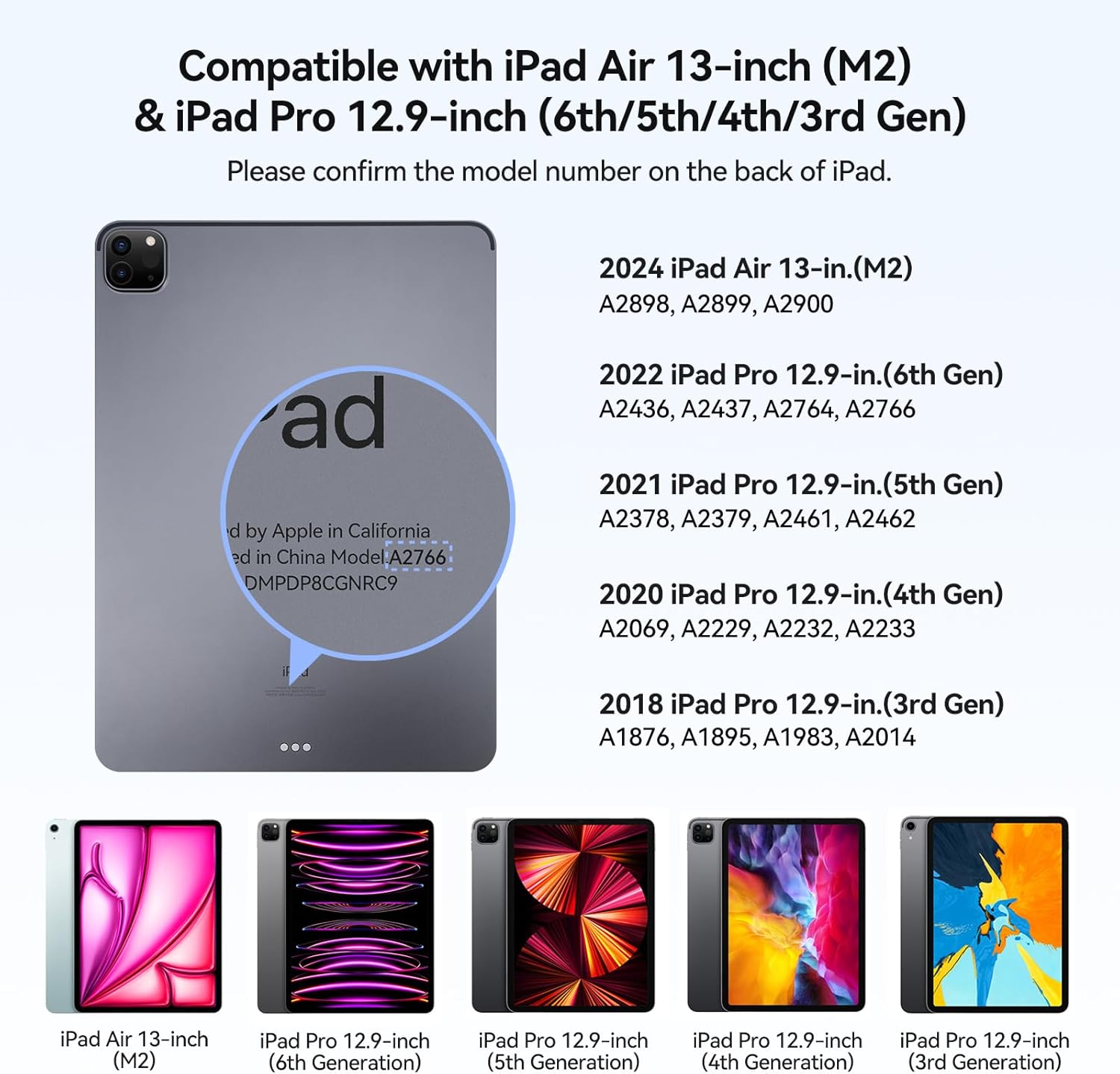
Image: Visual guide displaying compatible iPad models and their corresponding model numbers.
പാക്കേജ് ഉള്ളടക്കം
പാക്കേജിൽ എല്ലാ ഇനങ്ങളും ഉണ്ടെന്ന് ദയവായി പരിശോധിക്കുക:
- AUSDOM Magkey12.9 Keyboard Case
- USB-C ചാർജിംഗ് കേബിൾ
- ഉപയോക്തൃ മാനുവൽ (ഈ പ്രമാണം)
സജ്ജമാക്കുക
1. നിങ്ങളുടെ ഐപാഡ് അറ്റാച്ചുചെയ്യുന്നു
- കീബോർഡ് കേസ് തുറക്കുക.
- Align your compatible iPad with the magnetic back panel of the case. The iPad will securely attach due to the powerful magnetism.
- ക്രമീകരിക്കുക viewing angle. The magnetic floating cantilever design allows for a 130° viewing angle, transforming your iPad into a laptop-like setup.
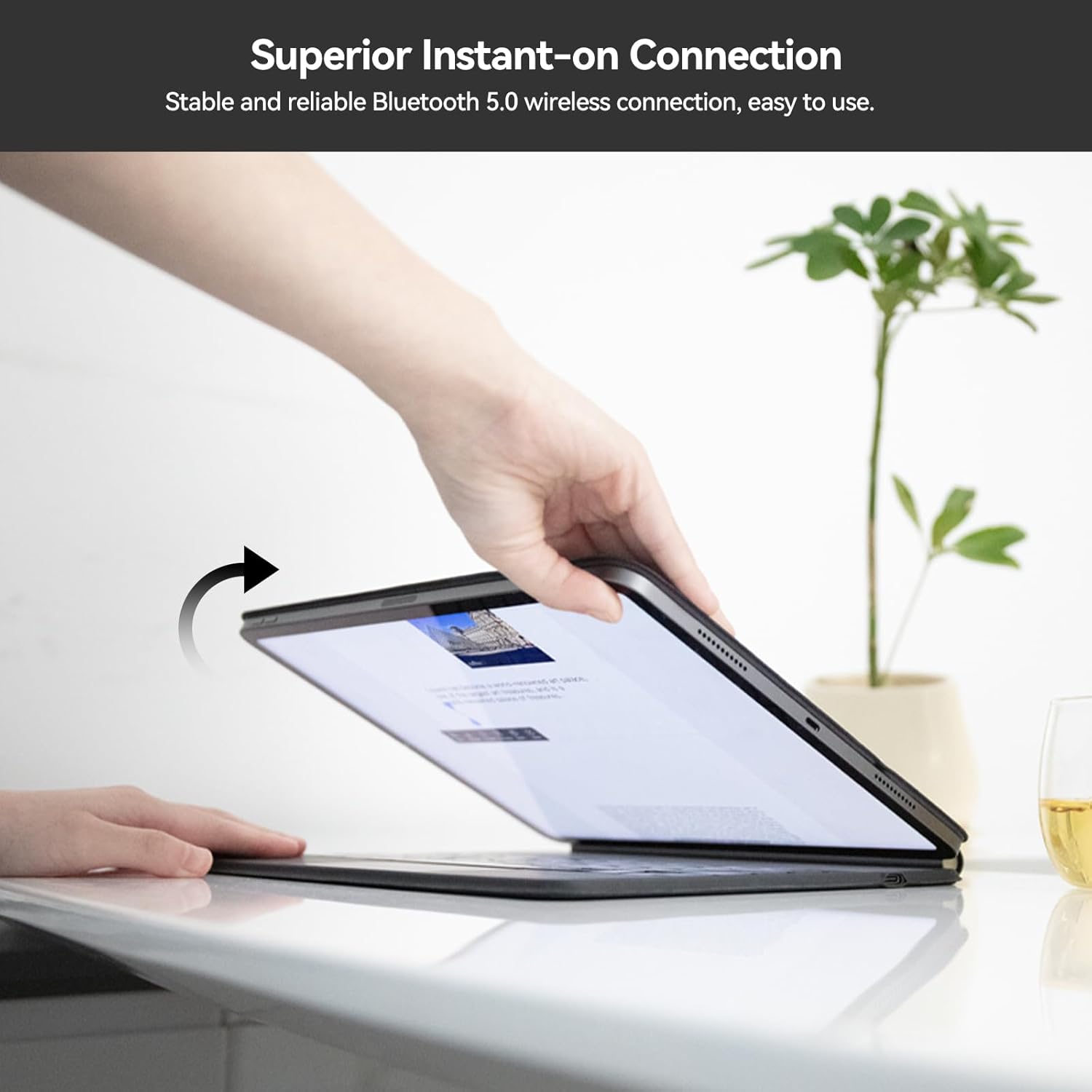
Image: A hand placing an iPad onto the magnetic back panel of the keyboard case, demonstrating the secure attachment.
2. ബ്ലൂടൂത്ത് ജോടിയാക്കൽ
- Ensure your keyboard case is charged (refer to the Maintenance section for charging instructions).
- Open the keyboard case. The keyboard will automatically power on and enter pairing mode.
- നിങ്ങളുടെ iPad-ൽ, പോകുക ക്രമീകരണങ്ങൾ > ബ്ലൂടൂത്ത്.
- ബ്ലൂടൂത്ത് ഓണാക്കുക.
- Look for "AUSDOM Keyboard" or a similar name in the "Other Devices" list and tap to connect.
- Once connected, the Bluetooth indicator light on the keyboard will turn off, and your iPad will show the keyboard as "Connected."

Image: The AUSDOM Magic-Style Keyboard Case with an iPad attached, showcasing the magnetic floating design and backlit keyboard.
പ്രവർത്തന നിർദ്ദേശങ്ങൾ
കീബോർഡ് ഉപയോഗം
കീബോർഡിൽ കുറഞ്ഞ പ്രോ സവിശേഷതയുണ്ട്file scissor-switch structure designed for a quiet, responsive, and comfortable typing experience. Simply begin typing after successful Bluetooth connection.

ചിത്രം: വിശദമായ ഒരു ചിത്രം view of the keyboard's scissor-switch mechanism, highlighting its low-profile ഡിസൈൻ.
Multi-Touch Trackpad
The integrated multi-touch trackpad allows for precise navigation and gesture control on your iPad. To optimize trackpad sensitivity, navigate to ക്രമീകരണങ്ങൾ > ജനറൽ > ട്രാക്ക്പാഡ് > ക്ലിക്ക് ചെയ്യാൻ ടാപ്പ് ചെയ്യുക നിങ്ങളുടെ iPad-ൽ.
Common gestures include:
- Tap to click: Single tap on the trackpad.
- സൂം ഇൻ ആൻഡ് ഔട്ട്: രണ്ട് വിരലുകൾ ഉപയോഗിച്ച് പിഞ്ച് ചെയ്യുക.
- Drag to move: Tap and hold an item, then drag.
- Swipe to open App switcher: മൂന്ന് വിരലുകൾ ഉപയോഗിച്ച് മുകളിലേക്ക് സ്വൈപ്പ് ചെയ്യുക.
- Swipe to open the docking station: Swipe up with one finger from the bottom edge.
- Switch between running apps: മൂന്ന് വിരലുകൾ ഉപയോഗിച്ച് ഇടത്തോട്ടോ വലത്തോട്ടോ സ്വൈപ്പ് ചെയ്യുക.

Image: A visual guide demonstrating various multi-touch gestures for the trackpad, including tap, zoom, drag, and app switching.
ബാക്ക്ലിറ്റ് കീകൾ
The keyboard features adjustable 3-level backlighting for comfortable typing in various lighting conditions.
- To cycle through backlight brightness levels (Off, Low, Medium, High), press the Fn + Light Bulb icon താക്കോൽ.
കുറുക്കുവഴി പ്രവർത്തനങ്ങൾ
Utilize the function (Fn) key in combination with other keys for quick access to various iPad features:
- Fn + &: Turn on/off the trackpad function.
- Fn + 1*: സ്ക്രീൻ തെളിച്ചം കുറയ്ക്കുക.
- Fn + 2*: സ്ക്രീൻ തെളിച്ചം കൂട്ടുക.
- Other Fn key combinations are indicated by icons on the top row of keys (e.g., media controls, search).

Image: A diagram of the keyboard layout, showing the function (Fn) key and various shortcut keys for trackpad control and brightness adjustment.
മെയിൻ്റനൻസ്
കീബോർഡ് ചാർജ് ചെയ്യുന്നു
The keyboard case is equipped with a built-in rechargeable Lithium Polymer battery. It requires external charging via the provided USB-C cable.
- Connect the USB-C end of the charging cable to the charging port on the keyboard case.
- USB-C കേബിളിന്റെ മറ്റേ അറ്റം അനുയോജ്യമായ ഒരു USB പവർ അഡാപ്റ്ററുമായി (ഉൾപ്പെടുത്തിയിട്ടില്ല) അല്ലെങ്കിൽ കമ്പ്യൂട്ടറിന്റെ USB പോർട്ടുമായി ബന്ധിപ്പിക്കുക.
- ചാർജ് ചെയ്യുമ്പോൾ ചാർജിംഗ് ഇൻഡിക്കേറ്റർ ലൈറ്റ് പ്രകാശിക്കുകയും പൂർണ്ണമായും ചാർജ്ജ് ചെയ്യുമ്പോൾ ഓഫാകുകയും ചെയ്യും.
Note: The iPad cannot charge the keyboard. They require separate charging.
ബാറ്ററി ലൈഫ്:
- Up to 90 days of continuous use with backlight off.
- Up to 7 days of continuous use with backlight on.

Image: A close-up of the keyboard case showing the USB-C charging port with a cable connected, alongside battery life indicators for backlight on/off.
വൃത്തിയാക്കൽ
To clean your keyboard case, gently wipe the surfaces with a soft, damp തുണി. ഫിനിഷിനോ ഇലക്ട്രോണിക് ഘടകങ്ങൾക്കോ കേടുവരുത്തുന്ന കഠിനമായ രാസവസ്തുക്കളോ ഉരച്ചിലുകളോ ഉള്ള വസ്തുക്കൾ ഉപയോഗിക്കുന്നത് ഒഴിവാക്കുക.
ട്രബിൾഷൂട്ടിംഗ്
- കീബോർഡ് ബ്ലൂടൂത്ത് വഴി ബന്ധിപ്പിക്കുന്നില്ല:
- കീബോർഡ് ചാർജ് ചെയ്തിട്ടുണ്ടെന്ന് ഉറപ്പാക്കുക.
- കീബോർഡ് ഓഫാക്കി ഓണാക്കുക.
- On your iPad, forget the device in Bluetooth settings and attempt to re-pair.
- നിങ്ങളുടെ ഐപാഡ് പുനരാരംഭിക്കുക.
- Keys or trackpad not responding:
- ബ്ലൂടൂത്ത് കണക്ഷൻ നില പരിശോധിക്കുക.
- Ensure the trackpad is not disabled (Fn + &).
- കീബോർഡ് റീചാർജ് ചെയ്യുക.
- iPad not securely attaching:
- Ensure your iPad model is compatible with the case.
- Verify that no debris is obstructing the magnetic connection points.
If you encounter persistent issues not resolved by these steps, please contact customer support.
സ്പെസിഫിക്കേഷനുകൾ
| ഫീച്ചർ | വിശദാംശങ്ങൾ |
|---|---|
| മോഡൽ നമ്പർ | മാക്കി12.9 |
| ഉൽപ്പന്ന അളവുകൾ | 11.22 x 9.02 x 0.69 ഇഞ്ച് (28.49 x 22.91 x 1.75 സെ.മീ) |
| ഇനത്തിൻ്റെ ഭാരം | 1.76 പൗണ്ട് (0.8 കി.ഗ്രാം) |
| കണക്റ്റിവിറ്റി ടെക്നോളജി | ബ്ലൂടൂത്ത് 5.0 |
| കീബോർഡ് വിവരണം | Wireless, Scissor-switch |
| പ്രത്യേക സവിശേഷതകൾ | Backlit (3-level), Rechargeable, Multi-Touch Trackpad, Magnetic Floating Cantilever Design, Auto Wake/Sleep |
| ബാറ്ററി തരം | ലിഥിയം പോളിമർ (ഉൾപ്പെടുത്തിയിരിക്കുന്നു) |
| കീബോർഡ് ബാക്ക്ലൈറ്റിംഗ് നിറം | ഏക നിറം |
| നിർമ്മാതാവ് | ആസ്ഡോം |

Image: Visual representation of the keyboard case's profile (0.25 inches), weight (1.76 pounds), and 130-degree adjustable viewing ആംഗിൾ.
വാറൻ്റിയും പിന്തുണയും
AUSDOM products are designed for quality and reliability. This product comes with a lifetime commitment to quality and customer satisfaction.
ഉപഭോക്തൃ പിന്തുണ
For technical assistance, troubleshooting, or warranty inquiries, please contact AUSDOM customer support. Our support team is available 24/7 to assist you.
Please refer to the official AUSDOM webഏറ്റവും പുതിയ കോൺടാക്റ്റ് വിവരങ്ങൾക്ക് സൈറ്റ് അല്ലെങ്കിൽ നിങ്ങളുടെ വാങ്ങൽ ഡോക്യുമെന്റേഷൻ.


