1. ആമുഖം
This manual provides comprehensive instructions for the installation, operation, and maintenance of your Anderic RH-786R Ceiling Fan Remote Receiver. This receiver is designed as a direct replacement for specific Casablanca Hunter ceiling fan models, ensuring seamless integration and restoration of functionality. Please read this manual thoroughly before installation to ensure proper setup and safe operation.
2. ഉൽപ്പന്നം കഴിഞ്ഞുview
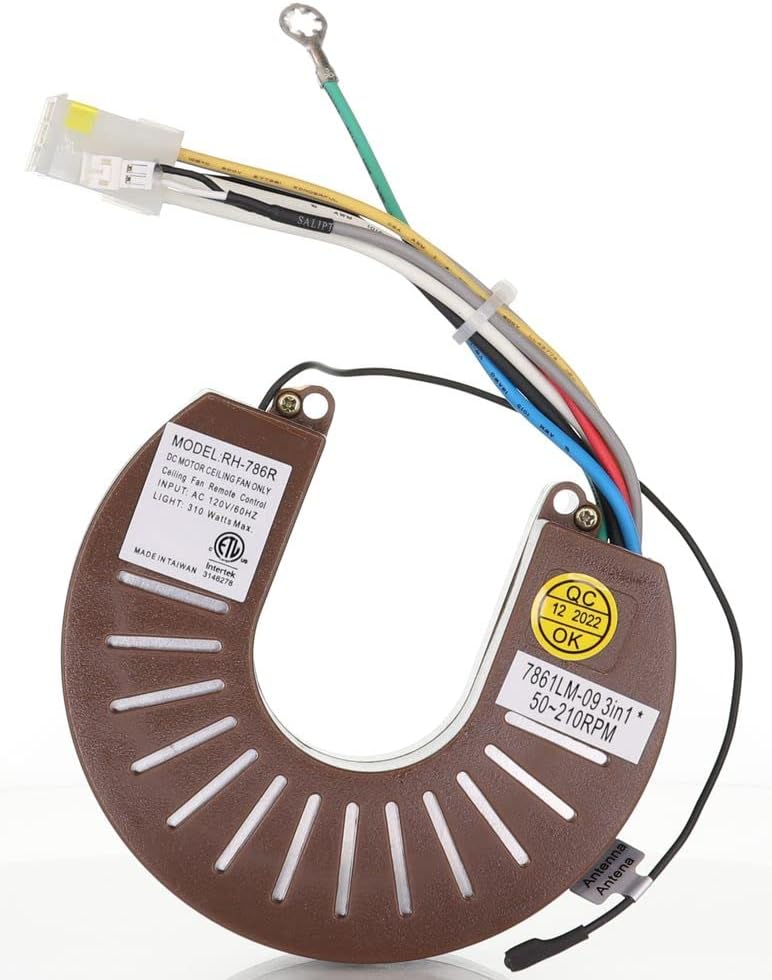
The Anderic RH-786R is a high-quality replacement receiver for DC motor ceiling fans. It is engineered to provide reliable control over your fan's speed and light functions when paired with a compatible remote transmitter.


3 അനുയോജ്യത
The Anderic RH-786R receiver is specifically designed to replace Casablanca Hunter Ceiling Fan Receiver Part#: G105301000. It is compatible with the following Casablanca ceiling fan models with DC motors:
3.1. Compatible Casablanca Models:
- Fellini DC 59518
- സ്റ്റെൽത്ത്
- Rhine 165M DC motor
3.2. Specific Series Compatibility:
- CASABLANCA Holliston DC series
- CASABLANCA Panama DC series
- CASABLANCA Stealth DC series
3.3. Legacy (pre-2013) DC Motor Fans (model numbers ending in "B"):
- Panama DC: C66U11B, C66U45B, C66U546B
- Holliston DC: C31U11B, C31U45B, C31U546B
- Stealth DC: C45G11B, C45G45B, C45G695B
3.4. New Platform (2013+) DC Motor Fans (model numbers starting with "5"):
- Panama DC: 59510, 59511, 59512
- Fellini DC: 59518
- Stealth DC: 59105, 59106, 59107
- Stealth DC LED: 59164, 59165
പ്രധാന കുറിപ്പ്: This receiver is designed to work with your existing compatible transmitter (e.g., RR787T). The receiver is sold separately and does not include the handheld remote control transmitter. While some users have reported success with other brands, the manufacturer specifies compatibility primarily with the listed Casablanca models. Ensure compatibility with your specific Casablanca Hunter ceiling fan model before installation.
4. സജ്ജീകരണവും ഇൻസ്റ്റാളേഷനും
Installation of the Anderic RH-786R receiver requires basic electrical knowledge. If you are unsure about any steps, it is recommended to consult a qualified electrician.
4.1. സുരക്ഷാ മുൻകരുതലുകൾ:
- ALWAYS TURN OFF POWER at the circuit breaker or fuse box before beginning installation.
- Ensure the fan is securely mounted and all existing wiring is in good condition.
- പരമാവധി വാട്ട് കവിയരുത്tage ratings for the fan and light.
4.2. ഇൻസ്റ്റലേഷൻ ഘട്ടങ്ങൾ:
- പവർ വിച്ഛേദിക്കുക: Locate the circuit breaker controlling the ceiling fan and turn it off. Verify power is off by attempting to operate the fan or light.
- Access Fan Canopy: Carefully lower the fan canopy (the cover that attaches to the ceiling) to expose the wiring connections.
- Remove Old Receiver (if applicable): Disconnect the wiring from the old receiver, noting the color codes and connections. It is often helpful to take a picture before disconnecting.
- Connect New Receiver: Connect the wires from the Anderic RH-786R receiver to the corresponding wires in the ceiling fan and house wiring. Refer to the wiring diagram provided with your original fan or the receiver's label for specific connections. Typical connections include:
- Black (Live/Hot)
- വെള്ള (ന്യൂട്രൽ)
- നീല വെളിച്ചം)
- Red (Fan)
- Green/Bare Copper (Ground)
- സ്ഥാനം സ്വീകരിക്കുന്നയാൾ: Carefully tuck the new receiver into the fan canopy, ensuring it does not pinch any wires. The compact design of the RH-786R facilitates easy placement.
- സുരക്ഷിത മേലാപ്പ്: Reattach the fan canopy to the ceiling bracket.
- പവർ പുന ore സ്ഥാപിക്കുക: സർക്യൂട്ട് ബ്രേക്കറിൽ പവർ വീണ്ടും ഓണാക്കുക.
- ടെസ്റ്റ് പ്രവർത്തനം: Use your compatible remote transmitter to test the fan speeds and light operation.
5. ഓപ്പറേഷൻ
Once installed, the Anderic RH-786R receiver operates in conjunction with your existing compatible remote control. The functionality will mirror that of the original receiver, allowing control over fan speed and light settings.
5.1. Pairing (if necessary):
In most cases, if replacing an identical receiver, pairing may not be required. However, if the remote does not respond after installation, follow the pairing instructions specific to your Casablanca remote control (e.g., pressing a 'Learn' button on the receiver or a specific button sequence on the remote within a set timeframe after restoring power).
5.2. അടിസ്ഥാന പ്രവർത്തനങ്ങൾ:
- ഫാൻ സ്പീഡ് നിയന്ത്രണം: Adjust fan speed (e.g., low, medium, high) using the designated buttons on your remote.
- പ്രകാശ നിയന്ത്രണം: Turn the light on/off or dim/brighten (if supported by your remote and fan) using the light control buttons.
- വിപരീത പ്രവർത്തനം: If your fan supports reverse operation via remote, use the corresponding button on your remote.
6. പരിപാലനം
The Anderic RH-786R receiver is designed for long-lasting functionality and requires minimal maintenance.
- വൃത്തിയാക്കൽ: Ensure the receiver area within the fan canopy remains free of dust and debris. Periodically, with power off, gently wipe the exterior of the receiver if accessible.
- കണക്ഷനുകൾ: If experiencing intermittent issues, ensure all wiring connections are secure and free from corrosion. Always turn off power before checking connections.
- പരിസ്ഥിതി വ്യവസ്ഥകൾ: Avoid exposing the receiver to excessive moisture or extreme temperatures, as this can affect its performance and lifespan.
7. പ്രശ്നപരിഹാരം
If you encounter issues with your Anderic RH-786R receiver, refer to the following troubleshooting guide:
| പ്രശ്നം | സാധ്യമായ കാരണം | പരിഹാരം |
|---|---|---|
| Fan/Light not responding to remote | സ്വീകർത്താവിന് അധികാരമില്ല റിമോട്ട് ജോടിയാക്കിയിട്ടില്ല Faulty remote batteries തെറ്റായ വയറിംഗ് | Check circuit breaker. Ensure all wiring connections are secure. Replace remote batteries. Perform pairing procedure (refer to remote manual). Verify wiring against diagram. |
| Fan operates, but light does not | ബൾബ് തകരാറിലായി Light wire connection loose ലൈറ്റ് വാട്ട്tagഇ കവിഞ്ഞു | Replace light bulb. Check blue wire connection to light. Ensure total light wattage 310 വാട്ട് കവിയരുത്. |
| Fan operates at only one speed | തെറ്റായ വയറിംഗ് വിദൂര പ്രശ്നം | Verify fan speed wiring. Test with a known good remote if possible. |
| ഇടയ്ക്കിടെയുള്ള പ്രവർത്തനം | അയഞ്ഞ വയറിംഗ് കണക്ഷൻ ഇടപെടൽ | Turn off power and re-secure all wire nuts. Ensure receiver is not obstructed by metal or other electronic devices. |
8 സ്പെസിഫിക്കേഷനുകൾ
| ഫീച്ചർ | സ്പെസിഫിക്കേഷൻ |
|---|---|
| മോഡൽ നമ്പർ | RH-786R |
| ഉൽപ്പന്ന അളവുകൾ | 10 x 2 x 2.7 ഇഞ്ച് |
| ഇനത്തിൻ്റെ ഭാരം | 4.8 ഔൺസ് |
| നിർമ്മാതാവ് | ആൻഡറിക് |
| അനുയോജ്യമായ ഉപകരണങ്ങൾ | Ceiling Fan (DC Motor) |
| കണക്റ്റിവിറ്റി ടെക്നോളജി | ഇൻഫ്രാറെഡ് (IR) |
| Max Light Wattage | പരമാവധി 310 വാട്ട്സ് |
9. വാറൻ്റിയും പിന്തുണയും
Anderic products are manufactured with high-quality materials to ensure durability and long-lasting functionality. For specific warranty information or technical support, please refer to the official Anderic webസൈറ്റിൽ ബന്ധപ്പെടുക അല്ലെങ്കിൽ അവരുടെ ഉപഭോക്തൃ സേവനവുമായി നേരിട്ട് ബന്ധപ്പെടുക. വാറന്റി ക്ലെയിമുകൾക്കായി നിങ്ങളുടെ വാങ്ങൽ രസീത് സൂക്ഷിക്കുക.
നിർമ്മാതാവ്: ആൻഡറിക്
Webസൈറ്റ്: Visit the Anderic Store on Amazon


