1. പ്രധാന സുരക്ഷാ നിർദ്ദേശങ്ങൾ
Please read all instructions carefully before using the Strex Cordless Air Duster. Keep this manual for future reference.
- കത്തുന്ന ദ്രാവകങ്ങൾക്കോ വാതകങ്ങൾക്കോ സമീപം ഉപകരണം പ്രവർത്തിപ്പിക്കരുത്.
- Keep the device away from water and moisture. Do not immerse in water.
- Do not point the air duster directly at people or animals.
- പ്രവർത്തന സമയത്ത് എയർ ഇൻടേക്ക് അല്ലെങ്കിൽ ഔട്ട്ലെറ്റ് തടയുന്നത് ഒഴിവാക്കുക.
- ഉപകരണം സ്വയം ഡിസ്അസംബ്ലിംഗ് ചെയ്യുകയോ നന്നാക്കുകയോ പരിഷ്കരിക്കുകയോ ചെയ്യരുത്. സഹായത്തിനായി യോഗ്യതയുള്ള സേവന ഉദ്യോഗസ്ഥരെ ബന്ധപ്പെടുക.
- Use only the provided charging cable and a compatible power adapter (not included) for charging.
- Store the device in a cool, dry place, away from direct sunlight and high temperatures.
- കുട്ടികൾക്ക് ലഭ്യമാകാതെ സൂക്ഷിക്കുക.
- The battery is rechargeable. Do not expose to fire or extreme heat.
2. പാക്കേജ് ഉള്ളടക്കം
താഴെ ലിസ്റ്റ് ചെയ്തിരിക്കുന്ന എല്ലാ ഇനങ്ങളും നിങ്ങളുടെ പാക്കേജിൽ ഉൾപ്പെടുത്തിയിട്ടുണ്ടെന്ന് ഉറപ്പാക്കുക:
- Strex Cordless Air Duster Unit
- Various Nozzles and Brushes (5 pieces)
- യുഎസ്ബി ചാർജിംഗ് കേബിൾ
- ഉപയോക്തൃ മാനുവൽ

Image: Contents of the Strex Air Duster package, showing the main unit, multiple attachments, and the user manual.
3. ഉൽപ്പന്നം കഴിഞ്ഞുview
The Strex Cordless Air Duster is designed for efficient and convenient cleaning of electronics, keyboards, car interiors, and other delicate surfaces. It features a powerful motor, a long-lasting rechargeable battery, and multiple speed settings.

Image: Strex Cordless Air Duster highlighting its key features such as adjustable power, high RPM, and battery life.
4. സജ്ജീകരണം
4.1 ഉപകരണം ചാർജ് ചെയ്യുന്നു
Before first use, fully charge the air duster. The device is equipped with a 6000mAh rechargeable lithium battery.
- Connect the provided USB charging cable to the charging port on the air duster.
- Connect the other end of the USB cable to a compatible USB power source (e.g., computer, wall adapter, car charger, power bank).
- ചാർജ് ചെയ്യുമ്പോൾ ചാർജിംഗ് ഇൻഡിക്കേറ്റർ ലൈറ്റ് പ്രകാശിക്കും.
- A full charge typically takes approximately 2 hours. The indicator light will change or turn off once charging is complete.

Image: Charging the Strex Air Duster, illustrating various compatible charging methods and battery specifications.
4.2 നോസിലുകൾ ഘടിപ്പിക്കൽ
The air duster comes with multiple nozzles for different cleaning tasks.
- നിങ്ങളുടെ ക്ലീനിംഗ് ആവശ്യങ്ങൾക്ക് അനുയോജ്യമായ നോസൽ തിരഞ്ഞെടുക്കുക.
- Align the nozzle with the air outlet of the duster.
- Gently push and twist the nozzle until it is securely attached.
- To remove, twist and pull the nozzle off.
5. പ്രവർത്തന നിർദ്ദേശങ്ങൾ
5.1 പവർ ഓൺ/ഓഫ്
- To turn on the device, press and hold the power button for a few seconds until the motor starts.
- To turn off the device, press and hold the power button again until the motor stops.
5.2 വേഗത ക്രമീകരിക്കൽ
The Strex Air Duster features three adjustable speed settings:
- Speed 1 (43000 RPM): Ideal for sensitive electronics and light dust.
- Speed 2 (47000 RPM): Suitable for general cleaning, such as laptop keyboards.
- Speed 3 (51000 RPM): For stubborn dirt and heavier debris.
To cycle through the speeds, short press the power button while the device is on. The indicator light may change to show the current speed setting.
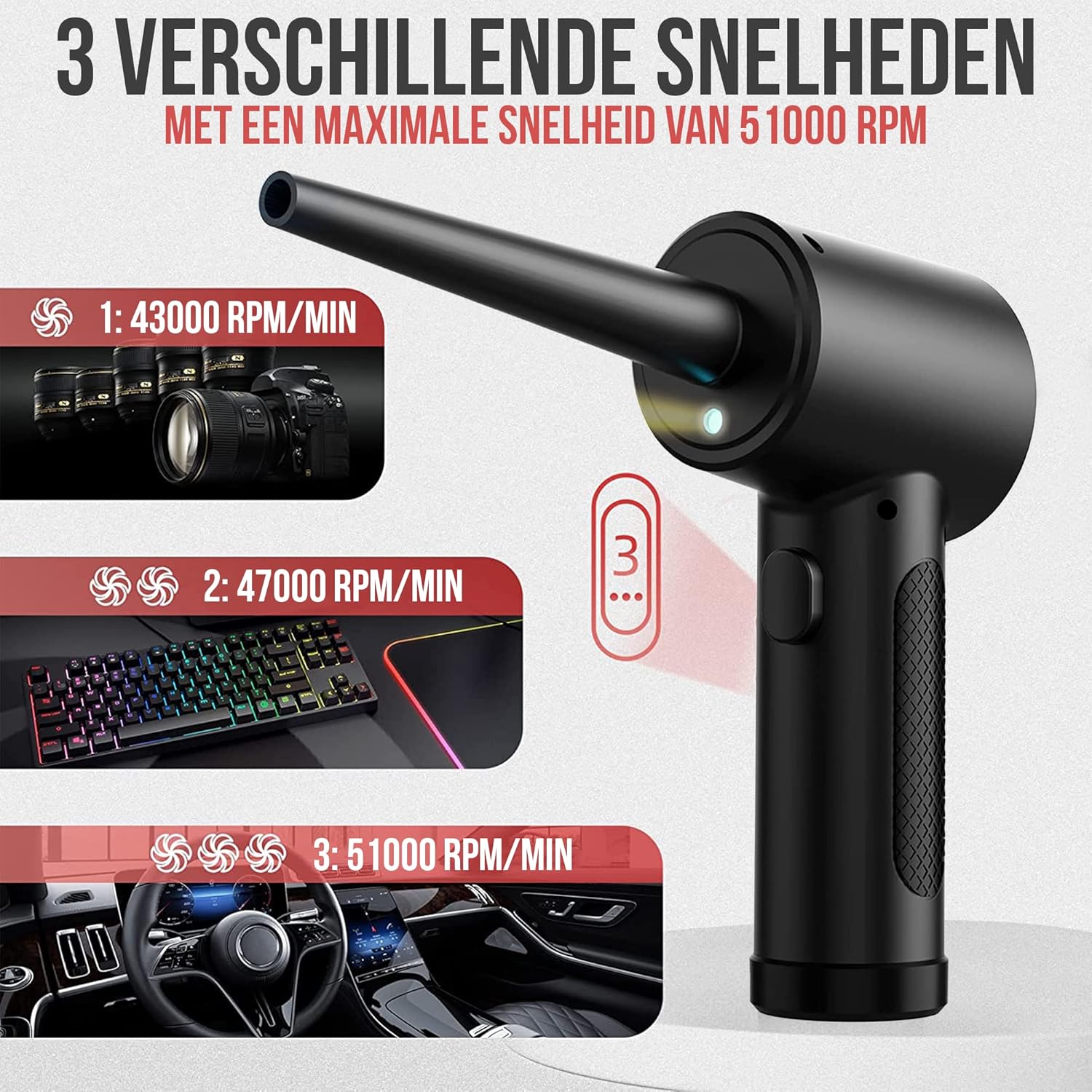
Image: Illustration of the three speed settings and their recommended uses for the Strex Air Duster.
5.3 LED ലൈറ്റ് ഉപയോഗിക്കുന്നു
The integrated LED light illuminates dark areas, ensuring thorough cleaning.
- The LED light typically activates automatically when the duster is turned on.
- Use the light to clearly see dust and debris in crevices and hard-to-reach spots.

Image: The integrated LED light in action, providing visibility for cleaning in various dark or confined spaces.
5.4 അപേക്ഷ മുൻampലെസ്
The Strex Air Duster is versatile and can be used for:
- Cleaning computer keyboards, cases, and components.
- Dusting office equipment like printers and copiers.
- Detailing car interiors, vents, and dashboards.
- Removing dust from household items, plants, and furniture.
- Cleaning pet hair from surfaces.

ചിത്രം: ഉദാamples of the Strex Air Duster's multi-purpose applications across different environments.
6. പരിപാലനം
To ensure optimal performance and longevity of your Strex Air Duster, follow these maintenance guidelines:
- പുറം വൃത്തിയാക്കൽ: മൃദുവായതും ഉണങ്ങിയതുമായ തുണി ഉപയോഗിച്ച് ഉപകരണത്തിന്റെ പുറംഭാഗം തുടയ്ക്കുക. അബ്രസീവ് ക്ലീനറുകളോ ലായകങ്ങളോ ഉപയോഗിക്കരുത്.
- നോസൽ വൃത്തിയാക്കൽ: Detach nozzles and clean them with a soft brush or cloth if they become clogged with debris. Ensure they are dry before reattaching.
- സംഭരണം: When not in use, store the air duster in a clean, dry place at room temperature.
- ബാറ്ററി കെയർ: For long-term storage, it is recommended to charge the battery to about 50% every few months to maintain battery health.
7. പ്രശ്നപരിഹാരം
If you encounter issues with your Strex Cordless Air Duster, refer to the following common problems and solutions:
| പ്രശ്നം | സാധ്യമായ കാരണം | പരിഹാരം |
|---|---|---|
| ഉപകരണം ഓണാക്കില്ല. | ബാറ്ററി തീർന്നു. | ഉപകരണം പൂർണ്ണമായും ചാർജ് ചെയ്യുക. |
| ഉപകരണം ഓണാക്കില്ല. | പവർ ബട്ടൺ ശരിയായി അമർത്തിയിട്ടില്ല. | കുറച്ച് സെക്കൻഡ് നേരത്തേക്ക് പവർ ബട്ടൺ അമർത്തിപ്പിടിക്കുക. |
| കുറഞ്ഞ വായു മർദ്ദം. | ബാറ്ററി കുറവാണ്. | ഉപകരണം റീചാർജ് ചെയ്യുക. |
| കുറഞ്ഞ വായു മർദ്ദം. | തെറ്റായ വേഗത ക്രമീകരണം. | Cycle through speed settings to select a higher speed. |
| Nozzle is loose or falls off. | Nozzle not securely attached. | Ensure the nozzle is pushed and twisted firmly onto the air outlet. |
ഈ പരിഹാരങ്ങൾ പരീക്ഷിച്ചതിന് ശേഷവും പ്രശ്നം നിലനിൽക്കുകയാണെങ്കിൽ, ദയവായി ഉപഭോക്തൃ പിന്തുണയുമായി ബന്ധപ്പെടുക.
8 സ്പെസിഫിക്കേഷനുകൾ
- മോഡൽ നമ്പർ: SP238
- മോട്ടോർ സ്പീഡ്: 43000 - 47000 - 51000 RPM (3 speeds)
- ബാറ്ററി ശേഷി: 6000 mAh
- പ്രവർത്തന സമയം: Up to 60 minutes (on lowest speed)
- ചാർജിംഗ് സമയം: ഏകദേശം 2 മണിക്കൂർ
- അളവുകൾ (L x W x H): 9 x 9 x 6.5 സെ.മീ
- ഭാരം: 335 ഗ്രാം
- മെറ്റീരിയൽ: ABS + PP
- ഇൻപുട്ട്: USB (charging cable included)
9. വാറൻ്റി വിവരങ്ങൾ
Strex products are manufactured to high-quality standards. This product is covered by a standard manufacturer's warranty against defects in materials and workmanship from the date of purchase. Please retain your proof of purchase for warranty claims. The warranty does not cover damage caused by misuse, accident, unauthorized modification, or normal wear and tear.
10. ഉപഭോക്തൃ പിന്തുണ
For any questions, technical support, or warranty inquiries regarding your Strex Cordless Air Duster SP238, please contact our customer service team. Refer to the contact information provided on the product packaging or the official Strex webസൈറ്റ്.


