1. ആമുഖം
This manual provides detailed instructions for the safe and effective use of the IDEAL Electrical 61-327 600V Manual Range Multimeter. This device is designed for measuring AC/DC voltage, resistance, continuity, diodes, and testing batteries. It is a CAT III 600V rated instrument suitable for various electrical testing applications.

ചിത്രം 1.1: ഫ്രണ്ട് view of the IDEAL Electrical 61-327 Multimeter. This image displays the multimeter's main display, rotary dial, function buttons, and input jacks for test leads.
2 സുരക്ഷാ വിവരങ്ങൾ
മുന്നറിയിപ്പ്: To avoid electric shock or personal injury, read, understand, and follow all safety information and instructions before using this multimeter. Keep this manual for future reference.
- Always ensure the multimeter is in good working condition before use. Inspect test leads for damage.
- റേറ്റുചെയ്ത വോള്യത്തേക്കാൾ കൂടുതൽ പ്രയോഗിക്കരുത്tage, as marked on the meter, between the terminals or between any terminal and ground.
- വോള്യവുമായി പ്രവർത്തിക്കുമ്പോൾ ജാഗ്രത പാലിക്കുകtag30V AC RMS, 42V പീക്ക്, അല്ലെങ്കിൽ 60V DC എന്നിവയ്ക്ക് മുകളിലുള്ള es. ഈ വോള്യങ്ങൾtagഒരു ഷോക്ക് അപകടമാണ്.
- സർക്യൂട്ടിലെ പവർ എപ്പോഴും വിച്ഛേദിച്ച് ഉയർന്ന വോള്യം ഉള്ള എല്ലാ വൈദ്യുതിയും ഡിസ്ചാർജ് ചെയ്യുക.tagപ്രതിരോധം, തുടർച്ച അല്ലെങ്കിൽ ഡയോഡുകൾ എന്നിവ പരിശോധിക്കുന്നതിന് മുമ്പ് ഇ കപ്പാസിറ്ററുകൾ.
- Do not operate the meter with the case open or the battery cover removed.
- കൃത്യമായ റീഡിംഗുകൾ ഉറപ്പാക്കാൻ കുറഞ്ഞ ബാറ്ററി സൂചകം ദൃശ്യമാകുമ്പോൾ ഉടൻ ബാറ്ററികൾ മാറ്റിസ്ഥാപിക്കുക.
- This multimeter is rated for CAT III 600V. Do not use it in environments exceeding this rating.
3. ഉൽപ്പന്ന സവിശേഷതകൾ
The IDEAL Electrical 61-327 Multimeter offers a range of features designed for electrical professionals:
- UL Certified CAT III 600V: Ensures safety and reliability for AC/DC manual range measurements.
- അളക്കാനുള്ള കഴിവുകൾ: AC/DC വോളിയം അളക്കുന്നുtage, resistance, continuity, diodes, and tests batteries.
- നോൺ-കോൺടാക്റ്റ് വോളിയംtage (NCV) Sensing: എസി വോള്യം കണ്ടെത്തുന്നുtagനേരിട്ടുള്ള സമ്പർക്കമില്ലാതെ, സുരക്ഷ വർദ്ധിപ്പിക്കുന്നു.
- ബാക്ക്ലിറ്റ് ഡിസ്പ്ലേ: Improves visibility in poorly lit environments.
- Built-in Probe Tip Holders: Allows for convenient and safer measurement by securing one lead.
- Hanging Strap Clip: Compatible with IDEAL hanging straps (sold separately, e.g., UMHS-757) for hands-free operation.
- Rugged Overmolding: Enhances grip and provides drop protection.
- ഹോൾഡ് പ്രവർത്തനം: Freezes the displayed reading for easier recording.
- Selectable Auto Power Off: ബാറ്ററി ലൈഫ് സംരക്ഷിക്കുന്നു.
4. ഘടകങ്ങളും നിയന്ത്രണങ്ങളും
Familiarize yourself with the main components and controls of your multimeter:

ചിത്രം 4.1: ഫ്രണ്ട് view of the multimeter, highlighting the display, rotary switch, and function buttons. The display shows measurement values and indicators. The rotary switch selects measurement functions. Buttons include HOLD and Backlight.

ചിത്രം 4.2: Included test leads and AAA batteries. The red and black test leads are essential for making electrical measurements. The batteries power the device.

ചിത്രം 4.3: പിൻഭാഗം view of the multimeter, showing the battery compartment cover and safety warnings. This view also illustrates the integrated test lead storage points.
5. സജ്ജീകരണം
5.1 ബാറ്ററി ഇൻസ്റ്റാളേഷൻ
The multimeter requires three (3) 1.5V AAA batteries for operation. To install or replace batteries:
- മൾട്ടിമീറ്റർ ഓഫാക്കിയിട്ടുണ്ടെന്ന് ഉറപ്പാക്കുക.
- Locate the battery compartment on the back of the meter (refer to Figure 4.3).
- ബാറ്ററി കവർ ഉറപ്പിക്കുന്ന സ്ക്രൂ അഴിക്കാൻ ഒരു സ്ക്രൂഡ്രൈവർ ഉപയോഗിക്കുക.
- ബാറ്ററി കവർ നീക്കം ചെയ്യുക.
- Insert three new 1.5V AAA batteries, observing the correct polarity (+/-) as indicated inside the compartment.
- ബാറ്ററി കവർ മാറ്റി സ്ക്രൂ സുരക്ഷിതമായി ശക്തമാക്കുക.
5.2 ടെസ്റ്റ് ലീഡുകൾ ബന്ധിപ്പിക്കുന്നു
Always connect the black test lead to the "COM" (Common) input jack. Connect the red test lead to the "VΩ" input jack for voltage, resistance, continuity, and diode measurements. Ensure connections are firm.
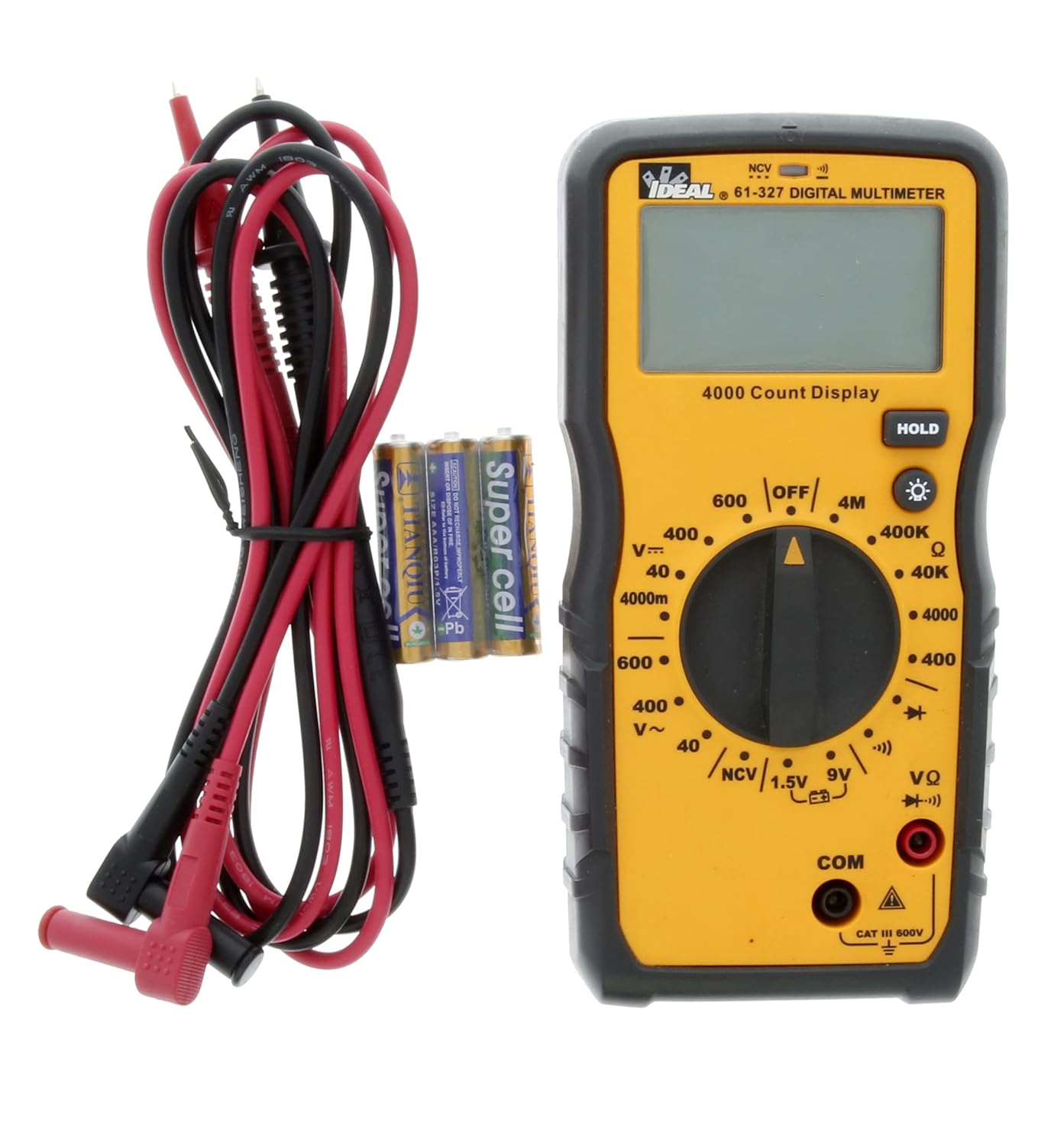
ചിത്രം 5.1: The multimeter shown with its test leads and batteries, ready for initial setup. The black lead connects to COM, and the red lead connects to VΩ.
6. പ്രവർത്തന നിർദ്ദേശങ്ങൾ
This section details how to perform various measurements using the 61-327 Multimeter.
6.1 എസി/ഡിസി വോളിയം അളക്കുന്നുtage
- Turn the rotary switch to the desired AC Voltage (V~) അല്ലെങ്കിൽ DC വോളിയംtage (V=) range. Select a range higher than the expected voltage.
- Connect the black test lead to the "COM" jack and the red test lead to the "VΩ" jack.
- നിങ്ങൾ അളക്കാൻ ആഗ്രഹിക്കുന്ന സർക്യൂട്ടിനോ ഘടകത്തിനോ സമാന്തരമായി ടെസ്റ്റ് പ്രോബുകൾ ബന്ധിപ്പിക്കുക.
- വാല്യം വായിക്കുകtagഡിസ്പ്ലേയിലെ ഇ മൂല്യം.
6.2 പ്രതിരോധം അളക്കൽ (Ω)
- മുന്നറിയിപ്പ്: Ensure the circuit is de-energized and all capacitors are discharged before measuring resistance.
- Turn the rotary switch to the desired Resistance (Ω) range.
- Connect the black test lead to the "COM" jack and the red test lead to the "VΩ" jack.
- Connect the test probes across the component where resistance is to be measured.
- ഡിസ്പ്ലേയിലെ പ്രതിരോധ മൂല്യം വായിക്കുക.
6.3 തുടർച്ച പരിശോധന
- മുന്നറിയിപ്പ്: Ensure the circuit is de-energized before performing a continuity test.
- Turn the rotary switch to the Continuity (•))) position.
- Connect the black test lead to the "COM" jack and the red test lead to the "VΩ" jack.
- Touch the test probes to the two points you want to check for continuity.
- An audible tone indicates continuity (low resistance). The display will show the resistance value.
6.4 ഡയോഡ് ടെസ്റ്റ്
- മുന്നറിയിപ്പ്: Ensure the circuit is de-energized before performing a diode test.
- Turn the rotary switch to the Diode (→|) position.
- Connect the black test lead to the "COM" jack and the red test lead to the "VΩ" jack.
- Connect the red test probe to the anode and the black test probe to the cathode of the diode.
- ഡിസ്പ്ലേ ഫോർവേഡ് വോളിയം കാണിക്കുംtage drop. Reverse the probes; the display should show "OL" (Open Loop) for a good diode.
6.5 Battery Test (1.5V / 9V)
- Turn the rotary switch to the 1.5V or 9V battery test position.
- Connect the black test lead to the "COM" jack and the red test lead to the "VΩ" jack.
- Connect the red test probe to the positive terminal of the battery and the black test probe to the negative terminal.
- ബാറ്ററി വോള്യം വായിക്കുകtagഡിസ്പ്ലേയിൽ ഇ.
6.6 നോൺ-കോൺടാക്റ്റ് വോളിയംtage (NCV) Sensing
എൻസിവി ഫംഗ്ഷൻ എസി വോളിയം കണ്ടെത്തുന്നതിന് അനുവദിക്കുന്നുtagകണ്ടക്ടർമാരുമായി നേരിട്ട് സമ്പർക്കം പുലർത്താതെ.
- റോട്ടറി സ്വിച്ച് NCV സ്ഥാനത്തേക്ക് തിരിക്കുക.
- Move the top tip of the multimeter near the conductor or outlet to be tested.
- The meter will emit an audible tone and an illuminated red LED will flash when AC voltage is detected. The display may show "EF" or similar indication.

ചിത്രം 6.1: The multimeter being used to perform a Non-Contact Voltage (NCV) test near an electrical outlet. The display shows "EF" indicating voltagഇ കണ്ടെത്തൽ.
6.7 Using the HOLD Function
Press the "HOLD" button to freeze the current reading on the display. Press it again to release the hold and resume live readings.
6.8 ബാക്ക്ലൈറ്റ് ഉപയോഗിക്കുന്നത്
Press the backlight button (light bulb icon) to illuminate the display for better visibility in dark conditions. Press it again to turn off the backlight.
7. പരിപാലനം
7.1 വൃത്തിയാക്കൽ
മീറ്റർ പരസ്യം ഉപയോഗിച്ച് തുടയ്ക്കുകamp തുണിയും നേരിയ ഡിറ്റർജന്റും ഉപയോഗിക്കുക. അബ്രാസീവ് വസ്തുക്കളോ ലായകങ്ങളോ ഉപയോഗിക്കരുത്. ഉപയോഗിക്കുന്നതിന് മുമ്പ് മീറ്റർ പൂർണ്ണമായും ഉണങ്ങിയെന്ന് ഉറപ്പാക്കുക.
7.2 ബാറ്ററി മാറ്റിസ്ഥാപിക്കൽ
Refer to Section 5.1 for instructions on battery installation and replacement. Always replace all three AAA batteries at the same time.
7.3 ടെസ്റ്റ് ലീഡ് പരിശോധന
Regularly inspect test leads for any signs of damage, such as cuts, cracks, or frayed insulation. Replace damaged leads immediately to prevent electric shock.
8. പ്രശ്നപരിഹാരം
| പ്രശ്നം | സാധ്യമായ കാരണം | പരിഹാരം |
|---|---|---|
| മീറ്റർ പവർ ഓൺ ആകുന്നില്ല. | ഡെഡ് അല്ലെങ്കിൽ തെറ്റായി ഇൻസ്റ്റാൾ ചെയ്ത ബാറ്ററികൾ. | Check battery polarity; replace batteries (refer to Section 5.1). |
| "OL" (ഓവർലോഡ്) പ്രദർശിപ്പിച്ചിരിക്കുന്നു. | Measurement exceeds selected range or open circuit. | Select a higher range or check for an open circuit in the component/wiring. |
| കൃത്യമല്ലാത്ത വായനകൾ. | Low battery, incorrect range selection, or damaged test leads. | Replace batteries, select appropriate range, inspect and replace test leads if damaged. |
| No continuity tone. | ഓപ്പൺ സർക്യൂട്ട് അല്ലെങ്കിൽ ഉയർന്ന പ്രതിരോധം. | Verify the circuit is closed; check for breaks in wiring or components. |
9 സ്പെസിഫിക്കേഷനുകൾ
Key technical specifications for the IDEAL Electrical 61-327 Multimeter:
- മോഡൽ നമ്പർ: 61-327
- അളവെടുപ്പ് തരം: Manual Range Digital Multimeter
- സുരക്ഷാ റേറ്റിംഗ്: UL certified CAT III 600V AC/DC
- എസി വോളിയംtage: 600V വരെ
- ഡിസി വോളിയംtage: 600V വരെ
- പ്രതിരോധം: Up to 4MΩ (4000kΩ)
- തുടർച്ച: Audible tone and resistance display
- ഡയോഡ് ടെസ്റ്റ്: അതെ
- ബാറ്ററി ടെസ്റ്റ്: 1.5V, 9V
- നോൺ-കോൺടാക്റ്റ് വോളിയംtagഇ (എൻസിവി): അതെ
- ഡിസ്പ്ലേ: Backlit, 4000 Count
- ഊർജ്ജ സ്രോതസ്സ്: 3 x 1.5V AAA ബാറ്ററികൾ
- ഓട്ടോ പവർ ഓഫ്: തിരഞ്ഞെടുക്കാവുന്നത്
- ഹോൾഡ് പ്രവർത്തനം: അതെ
- അളവുകൾ: ഏകദേശം 9.09 x 6.18 x 3.35 ഇഞ്ച്
- ഭാരം: ഏകദേശം 1.1 പൗണ്ട്
- നിറം: മഞ്ഞ
- നിർമ്മാതാവ്: Ideal Industries

ചിത്രം 9.1: A comparison table of various IDEAL digital multimeters, including the 61-327, detailing their features and specifications. This table provides a quick overview of the 61-327's capabilities relative to other models.
10. വാറൻ്റിയും പിന്തുണയും
For warranty information, technical support, or service inquiries, please contact IDEAL Industries directly. Refer to the official IDEAL webഏറ്റവും പുതിയ കോൺടാക്റ്റ് വിശദാംശങ്ങൾക്കായി സൈറ്റ് അല്ലെങ്കിൽ ഉൽപ്പന്ന പാക്കേജിംഗ്.
Additional resources, including a downloadable PDF user manual, may be available on the IDEAL Store on Amazon അല്ലെങ്കിൽ നിർമ്മാതാവിന്റെ ഉദ്യോഗസ്ഥൻ webസൈറ്റ്.


