1. ഉൽപ്പന്നം കഴിഞ്ഞുview
The CEM LDM-100H Laser Distance Meter utilizes advanced laser technology to provide fast, accurate, and reliable distance measurements. Designed for ease of use, this device helps users quickly obtain precise measurements, avoiding common errors associated with traditional methods or less precise instruments.
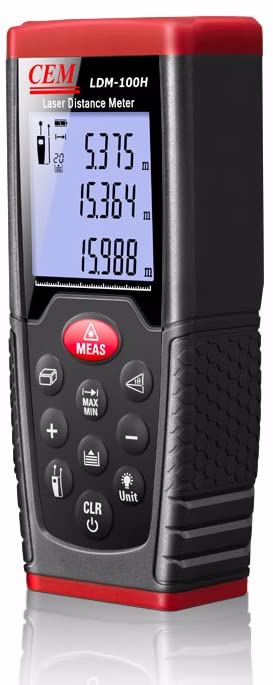
ചിത്രം 1.1: മുൻഭാഗം view of the CEM LDM-100H Laser Distance Meter, showing its display and control buttons.
പ്രധാന സവിശേഷതകൾ:
- Precision laser for accurate target identification and measurement.
- Capable of single distance measurement.
- Supports continuous measurement mode for tracking distances.
- Integrated area calculation function.
- Integrated volume calculation function.
2. പ്രാരംഭ സജ്ജീകരണം
2.1 ബാറ്ററി ഇൻസ്റ്റാളേഷൻ
The LDM-100H requires standard batteries for operation. Locate the battery compartment cover on the rear or bottom of the device. Slide or unclip the cover to open. Insert the batteries, ensuring correct polarity (+/-) as indicated inside the compartment. Close the battery cover securely.
2.2 പവർ ഓൺ/ഓഫ്
ഉപകരണം ഓണാക്കാൻ, അമർത്തുക CLR/Power button (usually marked with a power symbol). The display will illuminate. To power off, press and hold the CLR/Power button for a few seconds until the display turns off. The device may also feature an automatic shut-off function to conserve battery life after a period of inactivity.
3. പ്രവർത്തന നിർദ്ദേശങ്ങൾ
3.1 അടിസ്ഥാന അളവ് (ഒറ്റ ദൂരം)
- ഉപകരണം ഓണാണെന്ന് ഉറപ്പാക്കുക.
- Point the laser beam at the target point from which you wish to measure the distance.
- അമർത്തുക MEAS button. The laser will activate, and the measured distance will be displayed on the screen.
3.2 മെഷർമെന്റ് മോഡുകൾ
The LDM-100H offers several measurement modes for various applications:

Figure 3.1: Illustrations of various measurement capabilities including distance, area, and continuous measurement.
- Continuous Measurement Mode:
This mode allows for dynamic measurement, continuously updating the distance as you move the device. It is useful for finding minimum or maximum distances, or for setting out specific lengths. To activate, press the MEAS button and then select the continuous measurement icon (often indicated by a running person or multiple lines) using the mode selection button. The display will show real-time distance updates.
- ഏരിയ അളക്കൽ:
To calculate the area of a surface (e.g., a room), select the area measurement mode (often indicated by a square icon). The device will prompt you to take two measurements: first the length, then the width. After both measurements are taken, the device automatically calculates and displays the area.
- വോളിയം അളക്കൽ:
For calculating the volume of a space, select the volume measurement mode (often indicated by a cube icon). The device will prompt you to take three measurements: length, width, and height. Once all three measurements are recorded, the device will automatically calculate and display the volume.
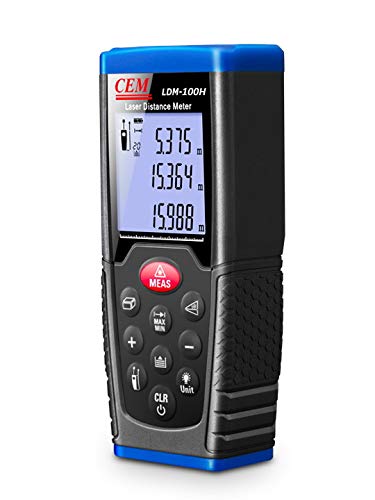
Figure 3.2: The CEM LDM-100H in operation, projecting a visible laser line for precise measurement within an indoor environment.
4. പരിചരണവും പരിപാലനവും
- വൃത്തിയാക്കൽ: ഒരു സോഫ്റ്റ് ഉപയോഗിക്കുക, ഡിamp cloth to clean the device. Do not use abrasive cleaners or solvents. Ensure the laser lens is kept clean and free from dust or smudges for accurate measurements.
- സംഭരണം: Store the device in a dry, cool place, away from direct sunlight and extreme temperatures. If storing for extended periods, remove the batteries to prevent leakage.
- കൈകാര്യം ചെയ്യൽ: Avoid dropping the device or subjecting it to strong impacts, as this can damage internal components and affect accuracy.
- ബാറ്ററി മാറ്റിസ്ഥാപിക്കൽ: Replace batteries promptly when the low battery indicator appears on the display to ensure consistent performance.
5. പ്രശ്നപരിഹാരം
| പ്രശ്നം | സാധ്യമായ കാരണം | പരിഹാരം |
|---|---|---|
| ഉപകരണം പവർ ഓണാക്കുന്നില്ല. | കുറഞ്ഞതോ ഡെഡ് ബാറ്ററികളോ; തെറ്റായ ബാറ്ററി ഇൻസ്റ്റാളേഷൻ. | ബാറ്ററികൾ പുതിയവ ഉപയോഗിച്ച് മാറ്റിസ്ഥാപിക്കുക; ശരിയായ പോളാരിറ്റി ഉറപ്പാക്കുക. |
| കൃത്യമല്ലാത്ത അളവുകൾ. | Laser lens is dirty; unstable measuring surface; strong light interference. | Clean the laser lens; ensure a stable measurement; avoid direct sunlight or strong light sources. |
| ഡിസ്പ്ലേ "പിശക്" അല്ലെങ്കിൽ "പരിധിക്ക് പുറത്താണ്" എന്ന് കാണിക്കുന്നു. | Measurement target too far or too close; laser beam obstructed. | Ensure target is within specified measurement range; clear any obstructions. |
ഈ പരിഹാരങ്ങൾ പരീക്ഷിച്ചതിനുശേഷവും പ്രശ്നം നിലനിൽക്കുകയാണെങ്കിൽ, ദയവായി ഉപഭോക്തൃ പിന്തുണയുമായി ബന്ധപ്പെടുക.
6 സാങ്കേതിക സവിശേഷതകൾ
| സ്പെസിഫിക്കേഷൻ | മൂല്യം |
|---|---|
| ബ്രാൻഡ് | സി.ഇ.എം |
| മോഡൽ നമ്പർ | LDM-100H |
| അളക്കൽ ശ്രേണി | Up to 100m (as per product title) |
| ഇനത്തിൻ്റെ ഭാരം | 600 ഗ്രാം |
| ഉൽപ്പന്ന അളവുകൾ (LxWxH) | 15 x 10 x 8 സെ.മീ |
| മാതൃരാജ്യം | ചൈന |
| നിർമ്മാതാവ് | CEM ഉപകരണങ്ങൾ |
Note: Specifications are subject to change without notice. For the most current information, please refer to the official product documentation.
7. വാറൻ്റിയും പിന്തുണയും
For information regarding the product warranty, please refer to the warranty card included with your purchase or visit the official CEM Instruments webസൈറ്റ്. വാറന്റി ക്ലെയിമുകൾക്കായി നിങ്ങളുടെ വാങ്ങലിന്റെ തെളിവ് സൂക്ഷിക്കുക.
If you encounter any issues or require technical assistance, please contact CEM Instruments customer support. Contact details can typically be found on the manufacturer's webസൈറ്റ് അല്ലെങ്കിൽ ഉൽപ്പന്ന പാക്കേജിംഗിൽ.
Always ensure you are using official support channels for assistance.


