1. ആമുഖം
This manual provides essential information for the safe and effective operation of your UEi Test Instruments DL569 400A Dual Display Clamp Meter. Please read this manual thoroughly before using the device and retain it for future reference. The DL569 is designed for professional use in electrical testing, offering a dual display for convenient readings of various electrical parameters.
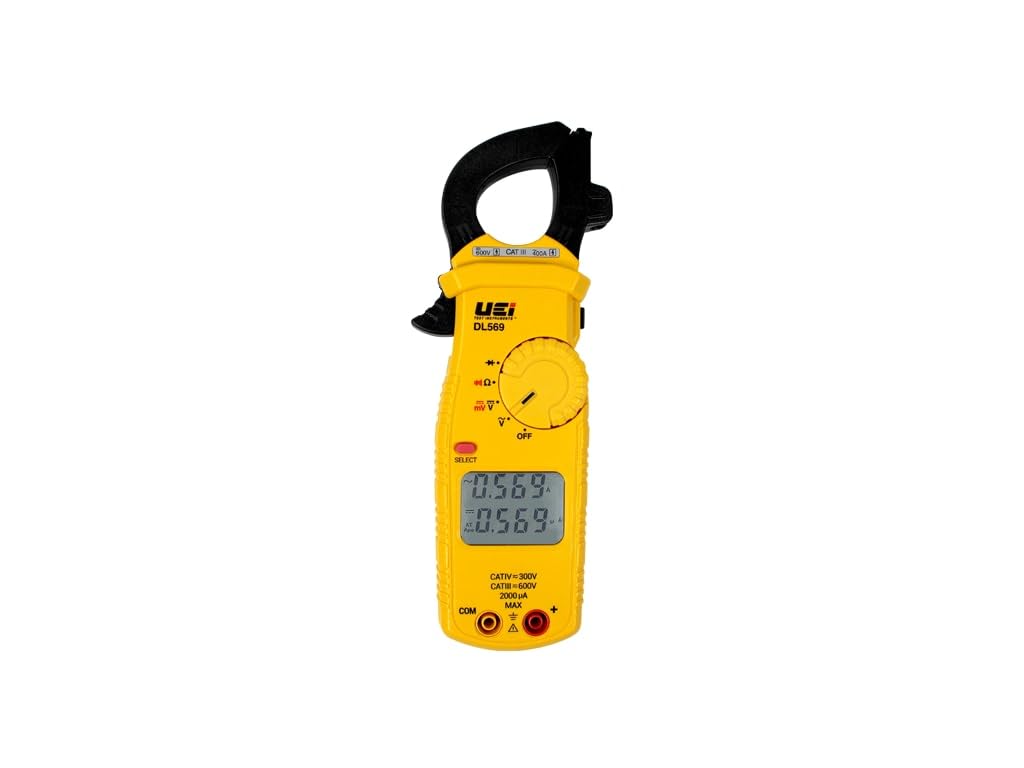
Figure 1: The UEi Test Instruments DL569 400A Dual Display Clamp Meter. This image shows the front view of the yellow clamp meter with its dual digital display, rotary dial, and measurement input jacks.
2 സുരക്ഷാ വിവരങ്ങൾ
The DL569 clamp meter is safety rated CATIV 300V / CATIII 600V and certified by ETL to IEC 61010-1, 3rd edition. Adherence to safety guidelines is crucial to prevent electrical shock, injury, or damage to the meter. Always follow these precautions:
- Always inspect the meter, test leads, and accessories for any damage before use. Do not use if damaged.
- Ensure the function switch is set to the correct measurement range before connecting to a circuit.
- ഒരു ഫംഗ്ഷനുമുള്ള പരമാവധി ഇൻപുട്ട് പരിധികൾ കവിയരുത്.
- വോള്യവുമായി പ്രവർത്തിക്കുമ്പോൾ ജാഗ്രത പാലിക്കുകtag30V AC RMS, 42V പീക്ക്, അല്ലെങ്കിൽ 60V DC എന്നിവയ്ക്ക് മുകളിലാണ്, കാരണം ഇവ ഷോക്ക് അപകടമുണ്ടാക്കുന്നു.
- Always wear appropriate personal protective equipment (PPE), such as safety glasses and insulated gloves.
- Do not operate the meter in wet environments or in the presence of explosive gases or dust.
- കൃത്യമായ റീഡിംഗുകൾ ഉറപ്പാക്കാൻ കുറഞ്ഞ ബാറ്ററി സൂചകം ദൃശ്യമാകുമ്പോൾ ബാറ്ററികൾ ഉടൻ മാറ്റിസ്ഥാപിക്കുക.
3. ബോക്സിൽ എന്താണുള്ളത്?
പാക്കേജ് തുറക്കുമ്പോൾ, താഴെ ലിസ്റ്റ് ചെയ്തിരിക്കുന്ന എല്ലാ ഇനങ്ങളും ഉണ്ടെന്നും കേടുപാടുകൾ സംഭവിച്ചിട്ടില്ലെന്നും ഉറപ്പാക്കുക:
- DL569 ഡ്യുവൽ ഡിസ്പ്ലേ Clamp മീറ്റർ
- Test Leads (ATL55)
- അലിഗേറ്റർ ക്ലിപ്പുകൾ
- AAA Batteries (Quantity: 2)
- Pouch/Case
- നിർദ്ദേശ മാനുവൽ (ഈ പ്രമാണം)

Figure 2: The DL569 Clamp Meter shown with its standard accessories, including test leads, alligator clips, batteries, and a protective carrying pouch.
4. ഉൽപ്പന്ന സവിശേഷതകൾ
The DL569 clamp meter offers a range of features designed for efficiency and accuracy:
- Dual Display Screen: Provides simultaneous readings, with Amps (AC/DC) always displayed on the upper screen for easy monitoring.
- NCV Detection Function: നോൺ-കോൺടാക്റ്റ് വോളിയംtage detection allows for checking electrical status by measuring electromagnetic field intensity without direct contact with wires.
- സമഗ്രമായ അളവെടുപ്പ് പ്രവർത്തനങ്ങൾ: Measures AC Volts (750VAC), DC Volts (1000VDC), AC Current (400A AC), AC Micro Volts (400mV), Resistance (10MOhms). Includes Continuity and Diode test functions.
- Integrated Test Lead Storage: Conveniently store test leads directly on the meter for easy access and organization.

ചിത്രം 3: ഒരു ക്ലോസ്-അപ്പ് view of the DL569's dual digital display, showing simultaneous readings for different parameters, enhancing user convenience.

Figure 4: Detail of the integrated test lead storage on the back of the DL569 meter, designed for secure and convenient organization of test leads.
5. സജ്ജീകരണം
5.1 ബാറ്ററി ഇൻസ്റ്റാളേഷൻ
- മീറ്ററിന്റെ പിൻഭാഗത്ത് ബാറ്ററി കമ്പാർട്ട്മെന്റ് കണ്ടെത്തുക.
- ബാറ്ററി കവർ തുറക്കാൻ ഒരു സ്ക്രൂഡ്രൈവർ ഉപയോഗിക്കുക.
- ശരിയായ പോളാരിറ്റി (+/-) ഉറപ്പാക്കിക്കൊണ്ട് രണ്ട് AAA ബാറ്ററികൾ ഇടുക.
- ബാറ്ററി കവർ മാറ്റി സ്ക്രൂ ഉപയോഗിച്ച് സുരക്ഷിതമാക്കുക.
5.2 പ്രാരംഭ പരിശോധന
Before each use, perform a visual inspection of the meter, test leads, and accessories for any signs of damage, cracks, or exposed wiring. Ensure the test leads are securely connected to the meter's input jacks.
6. പ്രവർത്തന നിർദ്ദേശങ്ങൾ
6.1 പവർ ഓൺ/ഓഫ്
Rotate the function dial from the 'OFF' position to any desired measurement function to power on the meter. To power off, rotate the dial back to the 'OFF' position.
6.2 AC Current (Amps) Measurement
- Rotate the function dial to the 'A~' position.
- cl തുറക്കുകamp ട്രിഗർ അമർത്തി താടിയെല്ലുകൾ.
- Encircle a single conductor with the clamp താടിയെല്ലുകൾ പൂർണ്ണമായും അടച്ചിട്ടുണ്ടെന്ന് ഉറപ്പാക്കുക.
- Read the AC current value on the upper display.
6.3 വോളിയംtagഇ മെഷർമെന്റ് (എസി/ഡിസി)
- Connect the red test lead to the 'VΩ' input jack and the black test lead to the 'COM' input jack.
- Rotate the function dial to 'V~' for AC voltage or 'V=' for DC voltage.
- ടെസ്റ്റ് പ്രോബുകൾ പരിശോധനയിലുള്ള സർക്യൂട്ടിനോ ഘടകത്തിനോ സമാന്തരമായി ബന്ധിപ്പിക്കുക.
- വാല്യം വായിക്കുകtagഡിസ്പ്ലേയിലെ ഇ മൂല്യം.
6.4 Resistance (Ohms) Measurement
- Connect the red test lead to the 'VΩ' input jack and the black test lead to the 'COM' input jack.
- Rotate the function dial to the 'Ω' position.
- പരിശോധനയിലുള്ള സർക്യൂട്ട് അല്ലെങ്കിൽ ഘടകം ഡീ-എനർജൈസ് ചെയ്തിട്ടുണ്ടെന്ന് ഉറപ്പാക്കുക.
- ഘടകത്തിലുടനീളം ടെസ്റ്റ് പ്രോബുകൾ ബന്ധിപ്പിക്കുക.
- ഡിസ്പ്ലേയിലെ പ്രതിരോധ മൂല്യം വായിക്കുക.
6.5 നോൺ-കോൺടാക്റ്റ് വോളിയംtagഇ (NCV) കണ്ടെത്തൽ
- Rotate the function dial to the 'NCV' position.
- Move the top of the meter near the conductor or outlet to be tested.
- മീറ്റർ എസി വോള്യത്തിന്റെ സാന്നിധ്യം സൂചിപ്പിക്കും.tagകേൾക്കാവുന്ന ഒരു ബീപ്പ് കൂടാതെ/അല്ലെങ്കിൽ ദൃശ്യ സൂചകം വഴി.
7. പരിപാലനം
7.1 വൃത്തിയാക്കൽ
മീറ്ററിന്റെ സി തുടയ്ക്കുകasinപരസ്യത്തോടുകൂടിയ ജിamp cloth and a mild detergent. Do not use abrasives or solvents. Ensure the meter is completely dry before storage or further use.
7.2 ബാറ്ററി മാറ്റിസ്ഥാപിക്കൽ
When the low battery indicator appears on the display, replace the batteries as described in Section 5.1. Remove batteries if the meter will not be used for an extended period to prevent leakage.
7.3 സംഭരണം
Store the meter in its protective pouch in a cool, dry environment, away from direct sunlight and extreme temperatures.
8. പ്രശ്നപരിഹാരം
| പ്രശ്നം | സാധ്യമായ കാരണം | പരിഹാരം |
|---|---|---|
| മീറ്റർ പവർ ഓൺ ആകുന്നില്ല. | ഡെഡ് അല്ലെങ്കിൽ തെറ്റായി ഇൻസ്റ്റാൾ ചെയ്ത ബാറ്ററികൾ. | ബാറ്ററി പോളാരിറ്റി പരിശോധിക്കുക അല്ലെങ്കിൽ ബാറ്ററികൾ മാറ്റിസ്ഥാപിക്കുക. |
| No reading or 'OL' displayed. | Incorrect function selected, open circuit, or measurement range exceeded. | Select correct function, check circuit continuity, or ensure measurement is within range. |
| കൃത്യമല്ലാത്ത വായനകൾ. | Low battery, damaged test leads, or external interference. | Replace batteries, inspect/replace test leads, move away from strong electromagnetic fields. |
| NCV function not detecting voltage. | വാല്യംtage too low, shielded wires, or meter not close enough. | വോളിയം ഉറപ്പാക്കുകtage is present, try closer proximity, or use direct contact measurement. |
9 സ്പെസിഫിക്കേഷനുകൾ
| പരാമീറ്റർ | മൂല്യം |
|---|---|
| മോഡൽ നമ്പർ | DL569 |
| AC Ampശ്രേണി | 40.00A (±2.9% + 15dgts), 400.0A (±1.9% + 8dgts) |
| DC Volts Range | 400.0mV (±0.5% + 5dgts), 400.0V (±0.5% + 5dgts), 1000V (±0.8% + 10dgts) |
| AC Volts Range | 400.0V & 750V (±2.0% + 5dgts) |
| Resistance (Ohms) Range | 4.000kΩ & 40.00kΩ (±1.0% + 4dgts) |
| തുടർച്ച | അതെ |
| ഡയോഡ് ടെസ്റ്റ് | അതെ |
| സുരക്ഷാ റേറ്റിംഗ് | CATIV 300V / CATIII 600V |
| സർട്ടിഫിക്കേഷൻ | ETL to IEC 61010-1, 3rd edition |
| പവർ ഉറവിടം | 2 AAA ബാറ്ററികൾ |
| ഉൽപ്പന്ന അളവുകൾ | 1 x 1 x 1 ഇഞ്ച്; 1.12 പൗണ്ട് |
| നിർമ്മാതാവ് | UEi ടെസ്റ്റ് ഉപകരണങ്ങൾ |
10. വാറൻ്റിയും പിന്തുണയും
For warranty information, technical support, or service inquiries regarding your UEi Test Instruments DL569 Clamp Meter, please contact UEi Test Instruments directly through their official webസൈറ്റ് അല്ലെങ്കിൽ ഉപഭോക്തൃ സേവന ചാനലുകൾ. വാറന്റി ക്ലെയിമുകൾക്കായി നിങ്ങളുടെ വാങ്ങലിന്റെ തെളിവ് സൂക്ഷിക്കുക.


