1. ആമുഖം
This manual provides essential information for the safe and efficient operation of your Strong SRT 24HE4023 24-inch HD TV. Please read this manual thoroughly before using the device and retain it for future reference. This television is designed for versatile use, compatible with both 230V and 12V power sources, making it suitable for home and mobile environments like camping. It features integrated DVB-T2/C/S2 tuners and a Hotel Mode for specialized settings.
2 സുരക്ഷാ വിവരങ്ങൾ
പ്രധാനപ്പെട്ട സുരക്ഷാ നിർദ്ദേശങ്ങൾ:
- ടിവി പ്രവർത്തിപ്പിക്കുന്നതിന് മുമ്പ് എല്ലാ നിർദ്ദേശങ്ങളും വായിക്കുക.
- ടിവി താപ സ്രോതസ്സുകൾ, നേരിട്ടുള്ള സൂര്യപ്രകാശം, ഈർപ്പം എന്നിവയിൽ നിന്ന് അകറ്റി നിർത്തുക.
- ടിവിക്ക് ചുറ്റും ശരിയായ വായുസഞ്ചാരം ഉറപ്പാക്കുക. വെന്റിലേഷൻ ദ്വാരങ്ങൾ അടയ്ക്കരുത്.
- നിർമ്മാതാവ് വ്യക്തമാക്കിയ അറ്റാച്ച്മെൻ്റുകൾ/ആക്സസറികൾ മാത്രം ഉപയോഗിക്കുക.
- ഇടിമിന്നൽ ഉണ്ടാകുമ്പോഴോ ദീർഘനേരം ഉപയോഗിക്കാതിരിക്കുമ്പോഴോ ടിവി പ്ലഗ് ഊരിവയ്ക്കുക.
- എല്ലാ സേവനങ്ങളും യോഗ്യതയുള്ള സേവന ഉദ്യോഗസ്ഥർക്ക് റഫർ ചെയ്യുക.
- ടിവിയിൽ നിന്ന് തുള്ളികൾ വീഴുന്നതോ തെറിക്കുന്നതോ ആയ ദ്രാവകങ്ങൾ വീഴാൻ അനുവദിക്കരുത്.
- The mains plug is used as the disconnect device; it shall remain readily operable.
ഇലക്ട്രിക്കൽ സുരക്ഷ:
- Connect the TV only to the specified power supply (230V AC or 12V DC).
- വാൾ ഔട്ട്ലെറ്റുകളോ എക്സ്റ്റൻഷൻ കോഡുകളോ ഓവർലോഡ് ചെയ്യരുത്.
- പവർ കോർഡ് അതിൽ കയറുകയോ പിഞ്ച് ചെയ്യുകയോ ചെയ്തിട്ടില്ലെന്ന് ഉറപ്പാക്കുക.
3. ബോക്സിൽ എന്താണുള്ളത്?
Carefully unpack your TV and ensure all the following items are present:
- Strong SRT 24HE4023 24-inch HD TV
- TV Stand (components for assembly)
- റിമോട്ട് കൺട്രോൾ
- 2 x AAA ബാറ്ററികൾ (റിമോട്ട് കൺട്രോളിനായി)
- Power Adapter (230V AC)
- 12V Car Adapter (if included with your specific model)
- ഉപയോക്തൃ മാനുവൽ (ഈ പ്രമാണം)

Image: The Strong SRT 24HE4023 TV shown with its included remote control.
4. ഉൽപ്പന്നം കഴിഞ്ഞുview
4.1 ഫ്രണ്ട് View

ചിത്രം: മുൻഭാഗം view of the Strong SRT 24HE4023 TV, displaying a vibrant landscape scene.
The front of the TV features the 24-inch HD display panel and the Strong brand logo typically located at the bottom center. An indicator light (power/standby) may also be present.
4.2 Rear and Side Connections

Image: Diagram illustrating the multiple connection possibilities on the Strong SRT 24HE4023 TV, including HDMI, USB, AV, Headphone, ANT, S/PDIF, SAT, and CI slot.
The Strong SRT 24HE4023 offers a comprehensive range of connectivity options:
- 2x HDMI 2.0: ബ്ലൂ-റേ പ്ലെയറുകൾ, ഗെയിം കൺസോളുകൾ അല്ലെങ്കിൽ സെറ്റ്-ടോപ്പ് ബോക്സുകൾ പോലുള്ള ഹൈ-ഡെഫനിഷൻ ഉപകരണങ്ങൾ ബന്ധിപ്പിക്കുന്നതിന്.
- 1x USB 2.0: USB സംഭരണ ഉപകരണങ്ങളിൽ നിന്നുള്ള മീഡിയ പ്ലേബാക്കിനായി.
- 1x AV in Mini: പഴയ അനലോഗ് ഉപകരണങ്ങൾ ബന്ധിപ്പിക്കുന്നതിന്.
- 1x Headphones: സ്വകാര്യ ശ്രവണത്തിനായി.
- 1x ANT in: For connecting a terrestrial or cable antenna (DVB-T2/C).
- എസ്/പിഡിഐഎഫ് (കോക്സിയൽ): For digital audio output to an external audio system.
- 1x SAT in: For connecting a satellite dish (DVB-S2).
- 1x CI slot: എൻക്രിപ്റ്റ് ചെയ്ത ചാനലുകൾ ഡീക്രിപ്റ്റ് ചെയ്യുന്നതിനുള്ള കണ്ടീഷണൽ ആക്സസ് മൊഡ്യൂളുകൾക്ക് (CAM).
- ഇഥർനെറ്റ്: For wired network connection (if applicable to your model for browser/updates).
5. സജ്ജീകരണം
5.1 സ്റ്റാൻഡ് അസംബ്ലി
To attach the included stand:
- സ്ക്രീൻ കേടുപാടുകൾ തടയുന്നതിന് ടിവി മുഖം മൃദുവായതും വൃത്തിയുള്ളതുമായ ഒരു പ്രതലത്തിൽ വയ്ക്കുക.
- Align the stand components with the screw holes on the bottom of the TV.
- നൽകിയിരിക്കുന്ന സ്ക്രൂകൾ ഉപയോഗിച്ച് സ്റ്റാൻഡ് ഉറപ്പിക്കുക. അമിതമായി മുറുക്കരുത്.
Alternatively, the TV can be wall-mounted using a VESA-compatible bracket (not included). Refer to the wall mount manufacturer's instructions for installation.
5.2 പവർ കണക്ഷൻ
This TV is compatible with both 230V AC and 12V DC power sources.
- For 230V AC (Home Use): Connect the provided AC power adapter to the TV's power input and then plug it into a standard wall outlet.
- For 12V DC (Mobile/Camping Use): Use a compatible 12V car adapter (may be sold separately or included) and connect it to the TV's 12V input and your vehicle's 12V power socket.
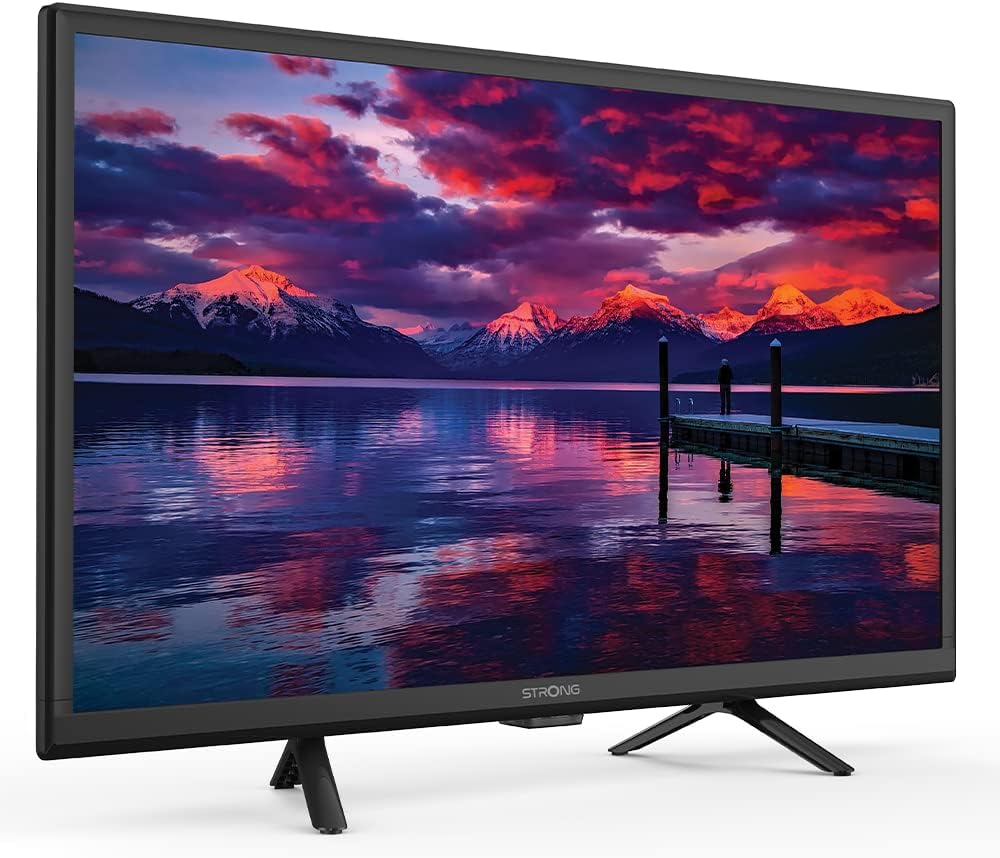
Image: The Strong SRT 24HE4023 TV installed in a camper van, highlighting its 12V compatibility for mobile use.
5.3 Antenna/Satellite Connection
- Terrestrial/Cable (DVB-T2/C): Connect your antenna or cable TV feed to the "ANT in" port.
- Satellite (DVB-S2): Connect your satellite dish cable to the "SAT in" port.
5.4 ബാഹ്യ ഉപകരണങ്ങൾ ബന്ധിപ്പിക്കുന്നു
Use the appropriate ports (HDMI, AV in Mini) to connect external devices such as DVD players, game consoles, or sound systems.
6. പ്രവർത്തന നിർദ്ദേശങ്ങൾ
6.1 പ്രാരംഭ സജ്ജീകരണവും ചാനൽ സ്കാനും
ആദ്യമായി പവർ-ഓൺ ചെയ്യുമ്പോൾ, ടിവി നിങ്ങളെ ഒരു പ്രാരംഭ സജ്ജീകരണ പ്രക്രിയയിലൂടെ നയിക്കും. ഇതിൽ സാധാരണയായി ഇവ ഉൾപ്പെടുന്നു:
- ഭാഷ തിരഞ്ഞെടുക്കൽ.
- രാജ്യം തിരഞ്ഞെടുക്കൽ.
- Tuner type selection (Antenna, Cable, or Satellite).
- Automatic channel scan. Allow this process to complete to find all available channels.
6.2 അടിസ്ഥാന ടിവി പ്രവർത്തനങ്ങൾ
- പവർ ഓൺ/ഓഫ്: റിമോട്ടിലോ ടിവിയിലോ ഉള്ള പവർ ബട്ടൺ ഉപയോഗിക്കുക.
- ചാനൽ തിരഞ്ഞെടുക്കൽ: Use the CH+/- buttons or number pad on the remote.
- വോളിയം നിയന്ത്രണം: Use the VOL+/- buttons on the remote.
- ഉറവിട തിരഞ്ഞെടുപ്പ്: Press the "Source" or "Input" button on the remote to switch between HDMI, AV, TV, etc.
- മെനു നാവിഗേഷൻ: Use the directional arrows and OK button on the remote to navigate the on-screen menu.
6.3 ഹോട്ടൽ മോഡ്

Image: The Strong SRT 24HE4023 TV displayed in a room, indicating its Hotel Mode functionality.
The Hotel Mode feature allows for advanced control over TV settings, often used in hospitality environments. This mode typically includes options to:
- Set a default power-on channel or input.
- Limit maximum volume.
- Disable certain menu functions for guests.
- Clone settings to multiple TVs.
Accessing and configuring Hotel Mode usually involves a specific key sequence on the remote control. Refer to the on-screen menu or contact customer support for detailed instructions on activating and managing Hotel Mode.
6.4 USB വഴിയുള്ള മീഡിയ പ്ലേബാക്ക്

ചിത്രം: ഒരു ക്ലോസ്-അപ്പ് view of the USB port on the TV, demonstrating how to connect a USB device for media playback.
You can play multimedia files (photos, music, videos) from a USB storage device.
- Insert your USB drive into the USB 2.0 port on the TV.
- The TV may automatically detect the USB device and prompt you to open the media browser. If not, select the USB source from the input menu.
- നിങ്ങളുടെ വഴി നാവിഗേറ്റ് ചെയ്യുക fileറിമോട്ട് കൺട്രോൾ ഉപയോഗിച്ച് പ്ലേ ചെയ്യാൻ ആവശ്യമുള്ള മീഡിയ തിരഞ്ഞെടുക്കുക.
6.5 On-Screen Program Guide (EPG) and Timer
The Electronic Program Guide (EPG) provides information about current and upcoming TV programs.
- Press the "EPG" button on your remote control to access the program guide.
- Navigate through channels and program listings.
- You can set timers to remind you of upcoming programs or to automatically switch to a specific channel at a set time. Consult the on-screen menu for timer settings.
7. പരിപാലനം
നിങ്ങളുടെ ടിവിയുടെ ദീർഘായുസ്സും മികച്ച പ്രകടനവും ഉറപ്പാക്കാൻ:
- സ്ക്രീൻ വൃത്തിയാക്കൽ: മൃദുവായതും, ലിന്റ് രഹിതവുമായ ഒരു തുണി ഉപയോഗിച്ച് സ്ക്രീൻ സൌമ്യമായി തുടയ്ക്കുക. കഠിനമായ പാടുകൾക്ക്, സ്ക്രീനിൽ നേരിട്ട് പുരട്ടുന്നതിനു പകരം, തുണിയിൽ പുരട്ടിയ ഒരു സ്ക്രീൻ നിർദ്ദിഷ്ട ക്ലീനിംഗ് ലായനി ഉപയോഗിക്കുക.
- കാബിനറ്റ് വൃത്തിയാക്കൽ: ടിവി കാബിനറ്റ് തുടയ്ക്കാൻ മൃദുവായതും ഉണങ്ങിയതുമായ തുണി ഉപയോഗിക്കുക. അബ്രസീവ് ക്ലീനറുകളോ ലായകങ്ങളോ ഉപയോഗിക്കരുത്.
- വെൻ്റിലേഷൻ: ടിവിയുടെ പിൻഭാഗത്തുള്ള വെന്റിലേഷൻ ഓപ്പണിംഗുകൾ അമിതമായി ചൂടാകുന്നത് തടയാൻ അടഞ്ഞിട്ടില്ലെന്ന് ഉറപ്പാക്കുക.
- പവർ കോർഡ്: Regularly check the power cord for any damage. If damaged, replace it with an approved cord.
8. പ്രശ്നപരിഹാരം
നിങ്ങളുടെ ടിവിയിൽ പ്രശ്നങ്ങൾ നേരിടുകയാണെങ്കിൽ, ഇനിപ്പറയുന്ന പൊതുവായ പ്രശ്നങ്ങളും പരിഹാരങ്ങളും പരിശോധിക്കുക:
| പ്രശ്നം | സാധ്യമായ കാരണം | പരിഹാരം |
|---|---|---|
| ശക്തിയില്ല | പവർ കോർഡ് ബന്ധിപ്പിച്ചിട്ടില്ല; ഔട്ട്ലെറ്റിൽ നിന്ന് വൈദ്യുതിയില്ല. | പവർ കോർഡ് കണക്ഷൻ പരിശോധിക്കുക; മറ്റൊരു ഉപകരണം ഉപയോഗിച്ച് ഔട്ട്ലെറ്റ് പരിശോധിക്കുക. |
| ചിത്രമില്ല, പക്ഷേ ശബ്ദം ഉണ്ട് | തെറ്റായ ഇൻപുട്ട് ഉറവിടം തിരഞ്ഞെടുത്തു; ബാക്ക്ലൈറ്റ് പ്രശ്നം. | Press "Source" button to select correct input; check brightness settings. |
| ശബ്ദമില്ല, പക്ഷേ ചിത്രം ഉണ്ട് | ശബ്ദം മ്യൂട്ടുചെയ്തു അല്ലെങ്കിൽ വളരെ കുറവാണ്; തെറ്റായ ഓഡിയോ ഔട്ട്പുട്ട് ക്രമീകരണങ്ങൾ. | Unmute volume or increase level; check audio settings in menu. |
| മോശം ചിത്ര നിലവാരം | Weak antenna signal; incorrect picture settings. | Adjust antenna position; perform channel scan; reset picture settings. |
| റിമോട്ട് കൺട്രോൾ പ്രവർത്തിക്കുന്നില്ല | ബാറ്ററികൾ തീർന്നു അല്ലെങ്കിൽ തെറ്റായി ചേർത്തു; തടസ്സം. | Replace batteries; ensure correct polarity; remove obstructions between remote and TV. |
ഈ പരിഹാരങ്ങൾ പരീക്ഷിച്ചതിന് ശേഷവും പ്രശ്നം നിലനിൽക്കുകയാണെങ്കിൽ, ദയവായി ഉപഭോക്തൃ പിന്തുണയുമായി ബന്ധപ്പെടുക.
9 സ്പെസിഫിക്കേഷനുകൾ
| ഫീച്ചർ | വിശദാംശങ്ങൾ |
|---|---|
| മോഡലിൻ്റെ പേര് | SRT24HE4023 |
| ബ്രാൻഡ് | ശക്തമായ |
| സ്ക്രീൻ വലിപ്പം | 24 ഇഞ്ച് (61 സെ.മീ. ദൃശ്യമായ ഡയഗണൽ) |
| ഡിസ്പ്ലേ ടെക്നോളജി | എൽഇഡി-എൽസിഡി |
| റെസലൂഷൻ | 768p (എച്ച്ഡി) |
| വീക്ഷണാനുപാതം | 16:9 |
| പവർ ഇൻപുട്ട് | 230 Volts AC / 12 Volts DC compatible |
| വൈദ്യുതി ഉപഭോഗം | 21 വാട്ട്സ് |
| ഇനത്തിൻ്റെ ഭാരം | 5.28 പൗണ്ട് (2.4 കിലോഗ്രാം) |
| ഉൽപ്പന്ന അളവുകൾ (LxWxH) | 5.67 x 21.77 x 14.56 ഇഞ്ച് |
| കണക്റ്റിവിറ്റി ടെക്നോളജി | ഇഥർനെറ്റ്, യുഎസ്ബി |
| പ്രത്യേക സവിശേഷതകൾ | Flat screen, Hotel Mode, DVB-T2/C/S2 Tuners, On-Screen Program Guide with Timer |
| ഉൾപ്പെടുത്തിയ ഘടകങ്ങൾ | TV, Stand, Remote Control, 2x AAA Batteries |
10. വാറൻ്റിയും പിന്തുണയും
Your Strong SRT 24HE4023 TV is covered by a manufacturer's warranty. Please refer to the warranty card included in your product packaging for specific terms and conditions, including the warranty period and coverage details.
For technical support, service, or further inquiries, please contact Strong customer service through their official website or the contact information provided in your product documentation. When contacting support, please have your model number (SRT24HE4023) and serial number ready.


