1. ആമുഖം
This manual provides essential information for the safe and efficient operation of your Strong 32HF2003 32-inch HD LED TV. Please read it thoroughly before using the product and retain it for future reference.
The Strong 32HF2003 is a 32-inch HD LED television featuring USB media playback and Electronic Program Guide (EPG) functionality. It is designed for home entertainment and offers various connectivity options.
2. സുരക്ഷാ നിർദ്ദേശങ്ങൾ
തീ, വൈദ്യുതാഘാതം, പരിക്കുകൾ എന്നിവ കുറയ്ക്കുന്നതിന് ഈ ടെലിവിഷൻ ഉപയോഗിക്കുമ്പോൾ എല്ലായ്പ്പോഴും അടിസ്ഥാന സുരക്ഷാ മുൻകരുതലുകൾ പാലിക്കുക.
- മഴയോ ഈർപ്പമോ ടിവിയെ തുറന്നുകാട്ടരുത്.
- വെന്റിലേഷൻ തുറക്കൽ തടയരുത്.
- പവർ കോഡിന് ശരിയായ ഗ്രൗണ്ടിംഗ് ഉറപ്പാക്കുക.
- ഇടിമിന്നൽ ഉണ്ടാകുമ്പോഴോ ദീർഘനേരം ഉപയോഗിക്കാതിരിക്കുമ്പോഴോ ടിവി പ്ലഗ് ഊരിവയ്ക്കുക.
- എല്ലാ സേവനങ്ങളും യോഗ്യതയുള്ള സേവന ഉദ്യോഗസ്ഥർക്ക് റഫർ ചെയ്യുക.
3. ബോക്സിൽ എന്താണുള്ളത്?
Upon unpacking, ensure all items are present and undamaged:
- Strong 32HF2003 32-inch HD LED TV
- റിമോട്ട് കൺട്രോൾ (2 AAA ബാറ്ററികൾ ആവശ്യമാണ്, ഉൾപ്പെടുത്തിയിട്ടില്ല)
- Stand (for tabletop placement)
- പവർ കോർഡ്
- ഉപയോക്തൃ മാനുവൽ (ഈ പ്രമാണം)

Image: The Strong 32HF2003 television displayed with its remote control, illustrating the main components included.
4. സജ്ജീകരണം
4.1 സ്റ്റാൻഡ് അറ്റാച്ചുചെയ്യുന്നു
- പോറലുകൾ ഉണ്ടാകാതിരിക്കാൻ ടിവി സ്ക്രീൻ-ഡൗൺ മൃദുവായതും വൃത്തിയുള്ളതുമായ ഒരു പ്രതലത്തിൽ ശ്രദ്ധാപൂർവ്വം വയ്ക്കുക.
- ടിവിയുടെ അടിയിലുള്ള മൗണ്ടിംഗ് ദ്വാരങ്ങൾ ഉപയോഗിച്ച് സ്റ്റാൻഡ് ഘടകങ്ങൾ വിന്യസിക്കുക.
- നൽകിയിരിക്കുന്ന സ്ക്രൂകൾ ഉപയോഗിച്ച് സ്റ്റാൻഡ് ഉറപ്പിക്കുക. അമിതമായി മുറുക്കരുത്.
- സ്ഥിരതയുള്ളതും നിരപ്പായതുമായ പ്രതലത്തിൽ ടിവി അതിന്റെ നേരായ സ്ഥാനത്തേക്ക് ശ്രദ്ധാപൂർവ്വം ഉയർത്തുക.

Image: The Strong 32HF2003 television with its stand attached, ready for placement.
4.2 ബാഹ്യ ഉപകരണങ്ങൾ ബന്ധിപ്പിക്കുന്നു
The TV offers various connection ports for external devices:
- എച്ച്ഡിഎംഐ: For high-definition audio and video from devices like Blu-ray players, game consoles, or set-top boxes. The TV has 2 HDMI 2.0 ports.
- USB: മീഡിയ പ്ലേ ചെയ്യുന്നതിന് USB സംഭരണ ഉപകരണങ്ങൾ ബന്ധിപ്പിക്കുന്നതിന് files. The TV has 1 USB 2.0 port.
- എവി ഇൻ: For standard definition video and stereo audio from older devices.
- ANT In: For connecting an antenna for terrestrial broadcast reception.
- SAT In: For connecting a satellite dish for satellite broadcast reception.
- സിഐ സ്ലോട്ട്: എൻക്രിപ്റ്റ് ചെയ്ത ചാനലുകൾ ഡീക്രിപ്റ്റ് ചെയ്യുന്നതിനുള്ള കണ്ടീഷണൽ ആക്സസ് മൊഡ്യൂളുകൾക്ക് (CAM).
- S/PDIF: For digital audio output to an external audio system.
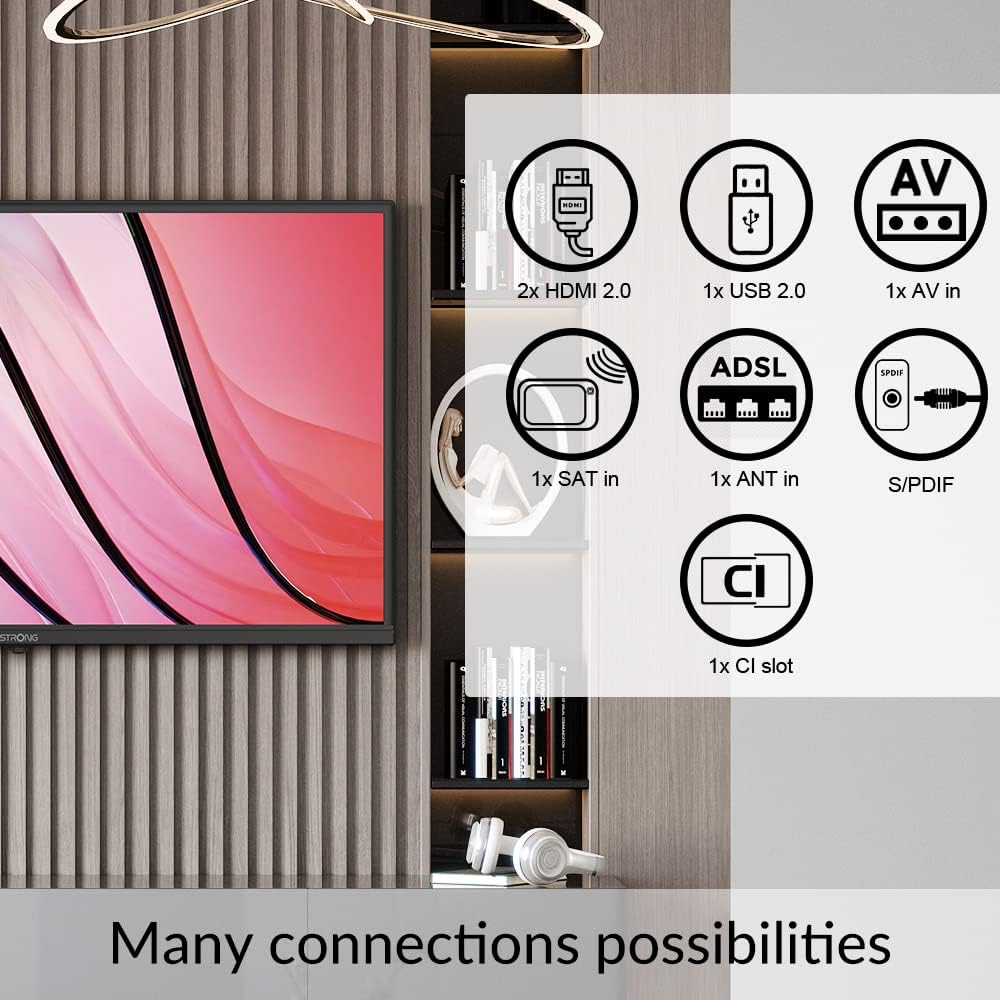
Image: A diagram illustrating the various connectivity options available on the Strong 32HF2003 television, including HDMI, USB, AV In, ANT In, SAT In, CI Slot, and S/PDIF.
ഒരു USB ഉപകരണം ബന്ധിപ്പിക്കുന്നതിന്:

ചിത്രം: ഒരു ക്ലോസ്-അപ്പ് view of the USB port on the television, demonstrating how to insert a USB drive for media playback.
4.3 പവർ കണക്ഷൻ
After all external devices are connected, plug the power cord into the TV's power inlet and then into a suitable wall outlet.
5. പ്രവർത്തന നിർദ്ദേശങ്ങൾ
5.1 പവർ ഓൺ/ഓഫ്
- അമർത്തുക പവർ button on the remote control or on the TV to turn the TV on or off.
- The TV will enter standby mode when turned off.
5.2 പ്രാരംഭ സജ്ജീകരണ വിസാർഡ്
The first time you turn on the TV, an initial setup wizard will guide you through language selection, country, time zone, and channel scanning. Follow the on-screen prompts.
5.3 ചാനൽ തിരഞ്ഞെടുപ്പും വോളിയം നിയന്ത്രണവും
- ഉപയോഗിക്കുക CH +/- buttons to change channels sequentially.
- Use the number buttons to directly enter a channel number.
- ഉപയോഗിക്കുക വോൾ +/- വോളിയം നില ക്രമീകരിക്കുന്നതിനുള്ള ബട്ടണുകൾ.
- അമർത്തുക നിശബ്ദമാക്കുക ഓഡിയോ താൽക്കാലികമായി നിശബ്ദമാക്കാൻ ബട്ടൺ.
5.4 ഇൻപുട്ട് ഉറവിട തിരഞ്ഞെടുപ്പ്
To switch between connected devices (e.g., HDMI, AV, USB):
- അമർത്തുക ഉറവിടം or ഇൻപുട്ട് റിമോട്ട് കൺട്രോളിലെ ബട്ടൺ.
- Use the arrow buttons to navigate through the list of available input sources.
- അമർത്തുക OK or പ്രവേശിക്കുക ആവശ്യമുള്ള ഉറവിടം തിരഞ്ഞെടുക്കാൻ.
5.5 യുഎസ്ബി മീഡിയ പ്ലേബാക്ക്
Insert a USB storage device into the USB port. The TV will typically detect the device and prompt you to open the media browser. You can then navigate and play supported video, audio, or image files.
5.6 ഇലക്ട്രോണിക് പ്രോഗ്രാം ഗൈഡ് (ഇപിജി)
The EPG provides a schedule of current and upcoming programs for digital channels. Press the ഇ.പി.ജി button on your remote control to access it. You can view program details and set reminders.
5.7 ഹോട്ടൽ മോഡ്
This TV features a Hotel Mode, which allows for customization of settings suitable for hospitality environments. This mode typically restricts certain user adjustments and can be configured by authorized personnel.

Image: The Strong 32HF2003 television displayed in a hotel room environment, highlighting its Hotel Mode feature.
6. പരിപാലനം
6.1 സ്ക്രീൻ വൃത്തിയാക്കൽ
- വൃത്തിയാക്കുന്നതിന് മുമ്പ് ടിവി അൺപ്ലഗ് ചെയ്യുക.
- സ്ക്രീൻ മൃദുവായി തുടയ്ക്കാൻ മൃദുവായ, ലിന്റ് രഹിത തുണി ഉപയോഗിക്കുക.
- കഠിനമായ അടയാളങ്ങൾക്ക്, നേരിയ dampവെള്ളം അല്ലെങ്കിൽ ഒരു പ്രത്യേക സ്ക്രീൻ ക്ലീനർ ഉപയോഗിച്ച് തുണിയിൽ തളിക്കുക (സ്ക്രീനിൽ നേരിട്ട് സ്പ്രേ ചെയ്യരുത്).
- Avoid using abrasive cleaners, alcohol, or benzene.
6.2 കാബിനറ്റ് വൃത്തിയാക്കൽ
മൃദുവായതും ഉണങ്ങിയതുമായ തുണി ഉപയോഗിച്ച് ടിവി കാബിനറ്റ് തുടയ്ക്കുക. ആവശ്യമെങ്കിൽ, അല്പം ഡി-ക്ലിപ്പർ ഉപയോഗിക്കുക.amp തുണി, ഉടനെ ഉണക്കുക.
6.3 Battery Replacement (Remote Control)
When the remote control's range decreases, replace the two AAA batteries with new ones, ensuring correct polarity.
7. പ്രശ്നപരിഹാരം
| പ്രശ്നം | സാധ്യമായ കാരണം | പരിഹാരം |
|---|---|---|
| ശക്തിയില്ല | പവർ കോർഡ് ബന്ധിപ്പിച്ചിട്ടില്ല; ഔട്ട്ലെറ്റിൽ നിന്ന് വൈദ്യുതിയില്ല. | പവർ കോർഡ് കണക്ഷൻ പരിശോധിക്കുക; മറ്റൊരു ഉപകരണം ഉപയോഗിച്ച് ഔട്ട്ലെറ്റ് പരിശോധിക്കുക. |
| ചിത്രമില്ല, പക്ഷേ ശബ്ദം ഉണ്ട് | Incorrect input source selected; faulty cable connection. | Select correct input source; check cable connections. |
| ശബ്ദമില്ല, പക്ഷേ ചിത്രം ഉണ്ട് | ശബ്ദം മ്യൂട്ട് ചെയ്തിരിക്കുന്നു അല്ലെങ്കിൽ വളരെ കുറവാണ്; ബാഹ്യ ഓഡിയോ സിസ്റ്റത്തിലെ പ്രശ്നം. | Unmute or increase volume; check external audio connections. |
| റിമോട്ട് കൺട്രോൾ പ്രവർത്തിക്കുന്നില്ല | ബാറ്ററികൾ തീർന്നു അല്ലെങ്കിൽ തെറ്റായി ചേർത്തു; തടസ്സം. | Replace batteries; ensure clear path to TV's IR sensor. |
| "സിഗ്നൽ ഇല്ല" എന്ന സന്ദേശം | Antenna/cable not connected; incorrect input source. | Check antenna/cable connection; select correct input. |
ഈ പരിഹാരങ്ങൾ പരീക്ഷിച്ചതിന് ശേഷവും പ്രശ്നം നിലനിൽക്കുകയാണെങ്കിൽ, ദയവായി ഉപഭോക്തൃ പിന്തുണയുമായി ബന്ധപ്പെടുക.
8 സ്പെസിഫിക്കേഷനുകൾ
| ഫീച്ചർ | വിശദാംശങ്ങൾ |
|---|---|
| ബ്രാൻഡ് | ശക്തമായ |
| മോഡൽ നമ്പർ | SRT32HF2003 |
| സ്ക്രീൻ വലിപ്പം | 32 ഇഞ്ച് |
| ഡിസ്പ്ലേ ടെക്നോളജി | എൽസിഡി |
| റെസലൂഷൻ | 720p (എച്ച്ഡി) |
| പുതുക്കിയ നിരക്ക് | 60 Hz |
| വീക്ഷണാനുപാതം | 16:9 |
| കണക്റ്റിവിറ്റി ടെക്നോളജി | USB |
| പ്രത്യേക ഫീച്ചർ | Flat, EPG, Hotel Mode |
| ഉൾപ്പെടുത്തിയ ഘടകങ്ങൾ | നിൽക്കുക |
| ഉൽപ്പന്ന അളവുകൾ (സ്റ്റാൻഡിനൊപ്പം) | Approx. 28.84"W x 17.11"H x 3.17"D (732.5mm W x 480.2mm H x 19.69mm D - based on images and specs) |
| ഇനത്തിൻ്റെ ഭാരം | 3.7 കിലോഗ്രാം (8.14 പൗണ്ട്) |
| വാല്യംtage | 230 വോൾട്ട് (എസി) |
| ഔട്ട്പുട്ട് വാട്ട്tage (Audio) | 5 വാട്ട്സ് |
| ബാറ്ററികൾ ആവശ്യമാണ് (റിമോട്ട്) | 2 AAA ബാറ്ററികൾ |

Image: A technical diagram illustrating the physical dimensions of the Strong 32HF2003 television in millimeters.

Image: The Dolby Audio logo superimposed on a television screen, indicating the audio technology supported by the device.
9. വാറൻ്റിയും പിന്തുണയും
Your Strong 32HF2003 television is covered by a standard manufacturer's warranty. Please refer to the warranty card included with your product or visit the official Strong webവിശദമായ വാറന്റി നിബന്ധനകൾക്കും വ്യവസ്ഥകൾക്കും സൈറ്റ്.
For technical support, troubleshooting assistance beyond this manual, or service inquiries, please contact Strong customer support through their official webസൈറ്റ് അല്ലെങ്കിൽ നിങ്ങളുടെ ഉൽപ്പന്ന പാക്കേജിംഗിൽ നൽകിയിരിക്കുന്ന ബന്ധപ്പെടാനുള്ള വിവരങ്ങൾ.
കുറിപ്പ്: വാറന്റി ക്ലെയിമുകൾക്കുള്ള വാങ്ങിയതിന്റെ തെളിവായി നിങ്ങളുടെ വാങ്ങൽ രസീത് സൂക്ഷിക്കുക.


