1. ആമുഖം
This manual provides essential information for the safe and efficient operation, maintenance, and troubleshooting of your AEG ULTIMATE 5000 CLEAN AS52CB21DB Cordless Vacuum Cleaner. Please read these instructions carefully before using the appliance and retain them for future reference.
2 സുരക്ഷാ വിവരങ്ങൾ
തീ, വൈദ്യുതാഘാതം അല്ലെങ്കിൽ പരിക്കുകൾ എന്നിവ കുറയ്ക്കുന്നതിന് വൈദ്യുത ഉപകരണങ്ങൾ ഉപയോഗിക്കുമ്പോൾ എല്ലായ്പ്പോഴും അടിസ്ഥാന സുരക്ഷാ മുൻകരുതലുകൾ പാലിക്കുക.
- പുറത്തോ നനഞ്ഞ പ്രതലങ്ങളിലോ വാക്വം ക്ലീനർ ഉപയോഗിക്കരുത്.
- Do not allow the vacuum cleaner to be used as a toy. Close attention is necessary when used by or near children.
- ഈ മാനുവലിൽ വിവരിച്ചിരിക്കുന്നതുപോലെ മാത്രം ഉപയോഗിക്കുക. നിർമ്മാതാവ് ശുപാർശ ചെയ്യുന്ന അറ്റാച്ചുമെന്റുകൾ മാത്രം ഉപയോഗിക്കുക.
- നനഞ്ഞ കൈകളാൽ ചാർജറോ ഉപകരണമോ കൈകാര്യം ചെയ്യരുത്.
- ഒരു വസ്തുവും തുറസ്സുകളിൽ ഇടരുത്. ഒരു ഓപ്പണിംഗും തടഞ്ഞിരിക്കുമ്പോൾ ഉപയോഗിക്കരുത്; പൊടി, ലിൻ്റ്, മുടി, വായുപ്രവാഹം കുറയ്ക്കുന്ന എന്തും എന്നിവ ഒഴിവാക്കുക.
- മുടി, അയഞ്ഞ വസ്ത്രങ്ങൾ, വിരലുകൾ, ശരീരത്തിൻ്റെ എല്ലാ ഭാഗങ്ങളും തുറസ്സുകളിൽ നിന്നും ചലിക്കുന്ന ഭാഗങ്ങളിൽ നിന്നും അകറ്റി നിർത്തുക.
- കത്തുന്നതോ പുകവലിക്കുന്നതോ ആയ സിഗരറ്റ്, തീപ്പെട്ടി, ചൂടുള്ള ചാരം എന്നിവയൊന്നും എടുക്കരുത്.
- ഡസ്റ്റ് ബിൻ കൂടാതെ/അല്ലെങ്കിൽ ഫിൽട്ടറുകൾ ഇല്ലാതെ ഉപയോഗിക്കരുത്.
- പടികൾ വൃത്തിയാക്കുമ്പോൾ കൂടുതൽ ശ്രദ്ധ ചെലുത്തുക.
- എന്തെങ്കിലും ക്രമീകരണങ്ങൾ വരുത്തുന്നതിന് മുമ്പ്, ആക്സസറികൾ മാറ്റുന്നതിന്, അല്ലെങ്കിൽ ഉപകരണം സംഭരിക്കുന്നതിന് മുമ്പ് ഉപകരണത്തിൽ നിന്ന് ബാറ്ററി പാക്ക് വിച്ഛേദിക്കുക.
3. പാക്കേജ് ഉള്ളടക്കം
പാക്കേജിംഗിൽ എല്ലാ ഘടകങ്ങളും ഉണ്ടെന്ന് ഉറപ്പാക്കുക:
- 1 x AEG ULTIMATE 5000 CLEAN Cordless Vacuum Cleaner
- 1 x Hygiene Filter
- 1 x Furniture Brush
- 1 x Telescopic Crevice Nozzle
- 1 x ചാർജിംഗ് സ്റ്റേഷൻ
- ഉപയോക്തൃ മാനുവൽ (ഈ പ്രമാണം)


4. സജ്ജീകരണം
4.1 അസംബ്ലി
- ബോക്സിൽ നിന്ന് എല്ലാ ഘടകങ്ങളും അൺപാക്ക് ചെയ്യുക.
- Attach the main vacuum body to the floor nozzle by aligning the connectors and pushing firmly until it clicks into place.
- Place the charging station in a convenient location near a power outlet. The vacuum cleaner is designed to be freestanding.
4.2 പ്രാരംഭ ചാർജിംഗ്
ആദ്യമായി ഉപയോഗിക്കുന്നതിന് മുമ്പ്, വാക്വം ക്ലീനറിന്റെ ബാറ്ററി പൂർണ്ണമായും ചാർജ് ചെയ്യുക.
- Place the assembled vacuum cleaner onto the charging station.
- ചാർജിംഗ് സ്റ്റേഷൻ ഒരു പവർ ഔട്ട്ലെറ്റുമായി ബന്ധിപ്പിക്കുക.
- The battery indicator lights on the vacuum cleaner will illuminate to show charging status. A full charge takes approximately 4.5 hours.
- Once fully charged, the indicator lights will show a steady full charge.

5. പ്രവർത്തന നിർദ്ദേശങ്ങൾ
5.1 പവർ ഓൺ/ഓഫ്
വാക്വം ക്ലീനർ ഓണാക്കാനോ ഓഫാക്കാനോ ഹാൻഡിൽ സ്ഥിതിചെയ്യുന്ന പവർ ബട്ടൺ അമർത്തുക.
5.2 ഒരു സ്റ്റിക്ക് വാക്വം ആയി ഉപയോഗിക്കുന്നു
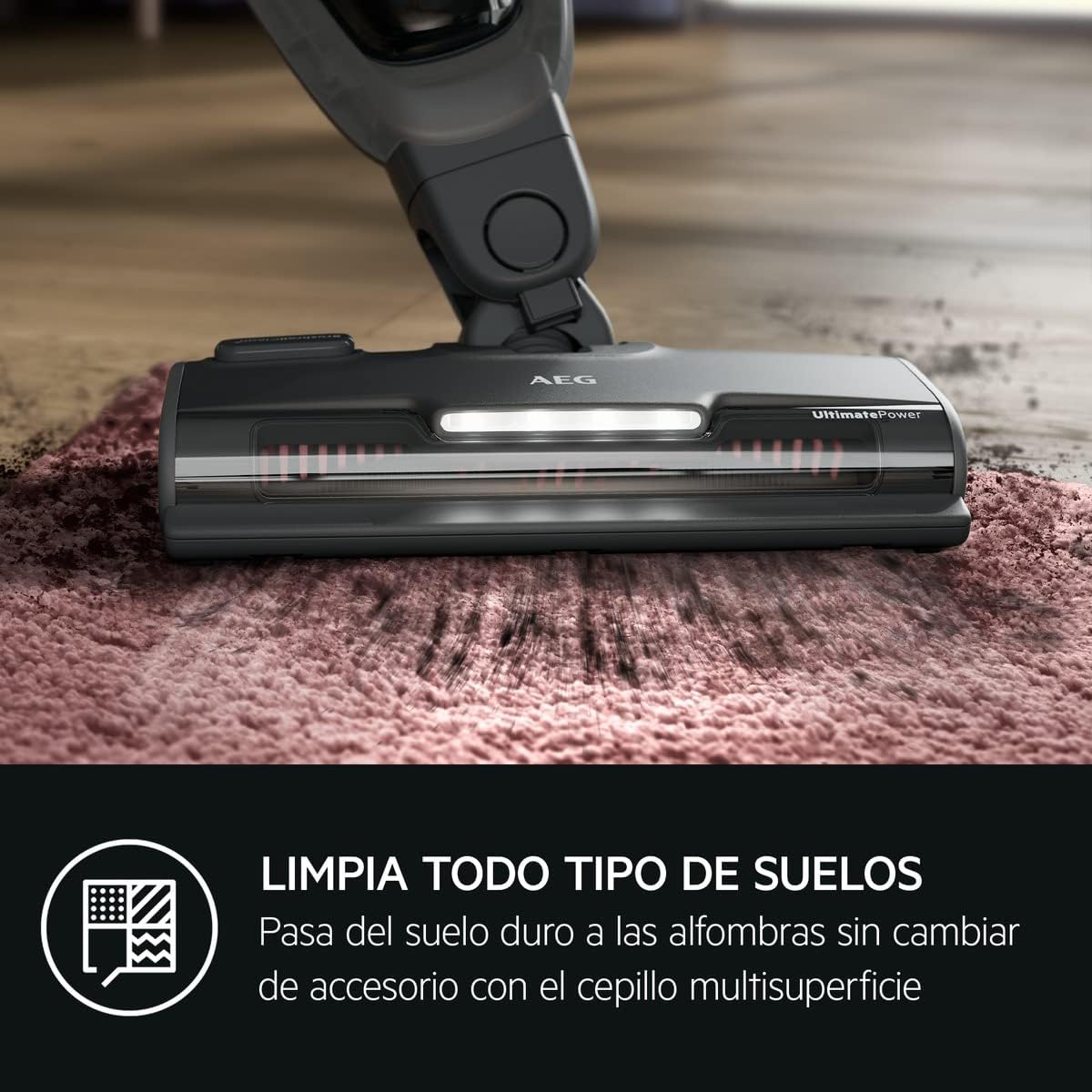
For general floor cleaning, use the vacuum in its upright stick configuration. The UltimatePower multi-floor nozzle is designed for optimal suction on various surfaces.
5.3 ഒരു ഹാൻഡ്ഹെൽഡ് വാക്വം ആയി ഉപയോഗിക്കുന്നത് (2-ഇൻ-1 ഫംഗ്ഷൻ)
The vacuum features a detachable handheld unit for versatile cleaning tasks.
- Press the release button on the main body to detach the handheld unit.
- Attach the desired accessory (furniture brush or telescopic crevice nozzle) to the handheld unit.
- അപ്ഹോൾസ്റ്ററി, കാറിന്റെ ഉൾഭാഗങ്ങൾ, ഷെൽഫുകൾ, അല്ലെങ്കിൽ എത്തിച്ചേരാൻ പ്രയാസമുള്ള മറ്റ് സ്ഥലങ്ങൾ എന്നിവ വൃത്തിയാക്കാൻ ഹാൻഡ്ഹെൽഡ് യൂണിറ്റ് ഉപയോഗിക്കുക.
- To reattach, align the handheld unit with the main body and push until it clicks securely into place.

5.4 Automatic Suction Power Adjustment
The vacuum cleaner automatically adjusts its suction power based on the surface being cleaned, optimizing performance and battery life.
5.5 LED ഫ്രണ്ട് ലൈറ്റ്
The floor nozzle is equipped with an LED front light to illuminate dark areas, making dust and debris more visible for thorough cleaning.
6. പരിപാലനം
പതിവ് അറ്റകുറ്റപ്പണികൾ മികച്ച പ്രകടനം ഉറപ്പാക്കുകയും നിങ്ങളുടെ വാക്വം ക്ലീനറിന്റെ ആയുസ്സ് വർദ്ധിപ്പിക്കുകയും ചെയ്യുന്നു.
6.1 ഡസ്റ്റ് ബിൻ ശൂന്യമാക്കൽ
Empty the dust bin regularly, especially when it reaches the 'MAX' fill line, to maintain strong suction.
- വാക്വം ക്ലീനർ ഓഫ് ചെയ്തിട്ടുണ്ടെന്ന് ഉറപ്പാക്കുക.
- ഡസ്റ്റ് ബിൻ റിലീസ് ബട്ടൺ അമർത്തി ഡസ്റ്റ് ബിൻ നീക്കം ചെയ്യുക.
- Open the dust bin lid and empty contents into a waste bin.
- Reattach the dust bin until it clicks into place.

6.2 ഫിൽട്ടറുകൾ വൃത്തിയാക്കുന്നു
The hygiene filter should be cleaned periodically to prevent clogging and maintain suction power.
- മുകളിൽ വിവരിച്ചതുപോലെ ഡസ്റ്റ് ബിൻ നീക്കം ചെയ്യുക.
- Carefully remove the filter assembly from the dust bin.
- Tap the filter gently over a waste bin to remove loose dust. If heavily soiled, rinse the filter under cold running water.
- Allow the filter to air dry completely for at least 24 hours before reinserting. Do not use a dryer or other heating methods.
6.3 BrushRollClean Function
The UltimatePower multi-floor nozzle features a BrushRollClean function to easily remove tangled hair and fibers from the brush roll.
- വാക്വം ക്ലീനർ ഓഫ് ചെയ്തിട്ടുണ്ടെന്ന് ഉറപ്പാക്കുക.
- Press the BrushRollClean pedal (usually located on the top of the floor nozzle) for 5-10 seconds while the vacuum is running.
- The internal blade will cut and remove tangled hair, which is then vacuumed into the dust bin.
6.4 ബാറ്ററി കെയർ
To prolong battery life, avoid fully discharging the battery frequently. Store the vacuum cleaner in a cool, dry place when not in use.
7. പ്രശ്നപരിഹാരം
നിങ്ങളുടെ വാക്വം ക്ലീനറിൽ പ്രശ്നങ്ങൾ നേരിടുകയാണെങ്കിൽ, ഇനിപ്പറയുന്ന പൊതുവായ പ്രശ്നങ്ങളും പരിഹാരങ്ങളും പരിശോധിക്കുക:
| പ്രശ്നം | സാധ്യമായ കാരണം | പരിഹാരം |
|---|---|---|
| വാക്വം ഓണാക്കുന്നില്ല | ബാറ്ററി ഡിസ്ചാർജ് ചെയ്തു | ബാറ്ററി പൂർണ്ണമായും ചാർജ് ചെയ്യുക. |
| സക്ഷൻ പവർ കുറഞ്ഞു | ഡസ്റ്റ് ബിൻ നിറഞ്ഞിരിക്കുന്നു | ഡസ്റ്റ് ബിൻ ശൂന്യമാക്കുക. |
| സക്ഷൻ പവർ കുറഞ്ഞു | ഫിൽട്ടർ അടഞ്ഞുപോയി | ഫിൽട്ടർ വൃത്തിയാക്കുക അല്ലെങ്കിൽ മാറ്റിസ്ഥാപിക്കുക. |
| സക്ഷൻ പവർ കുറഞ്ഞു | നോസിലോ ഹോസോ അടഞ്ഞിരിക്കുന്നു | തടസ്സങ്ങളുണ്ടോയെന്ന് പരിശോധിക്കുകയും നീക്കം ചെയ്യുകയും ചെയ്യുക. |
| ബ്രഷ് റോൾ കറങ്ങുന്നില്ല | Hair or debris tangled in brush roll | Use the BrushRollClean function or manually clear the brush roll. |
| ബ്രഷ് റോൾ കറങ്ങുന്നില്ല | നോസിലിലെ തടസ്സം | Turn off the vacuum and remove any obstructions from the nozzle. |
ഈ പരിഹാരങ്ങൾ പരീക്ഷിച്ചതിനുശേഷവും പ്രശ്നം നിലനിൽക്കുകയാണെങ്കിൽ, ദയവായി AEG ഉപഭോക്തൃ പിന്തുണയുമായി ബന്ധപ്പെടുക.
8 സ്പെസിഫിക്കേഷനുകൾ
| ഫീച്ചർ | സ്പെസിഫിക്കേഷൻ |
|---|---|
| ബ്രാൻഡ് | എഇജി |
| മോഡലിൻ്റെ പേര് | AS52CB21DB |
| ഉൽപ്പന്ന അളവുകൾ (L x W x H) | 10.04" x 5.51" x 43.5" |
| ഇനത്തിൻ്റെ ഭാരം | 6.71 പൗണ്ട് |
| നിറം | നീല |
| ഫോം ഫാക്ടർ | Handheld (2-in-1) |
| കോർഡ്ലെസ് ആണോ? | അതെ |
| ബാറ്ററി തരം | Lithium HD power battery |
| ബാറ്ററി ലൈഫ് | Up to 50 minutes (with handheld part) |
| ചാർജിംഗ് സമയം | 4.5 മണിക്കൂർ |
| ശേഷി | 0.3 ലിറ്റർ |
| വാട്ട്tage | 800 വാട്ട്സ് |
| ശബ്ദ നില | 79 ഡെസിബെൽ |
| ഫിൽട്ടർ തരം | കാട്രിഡ്ജ് |
| വേഗതകളുടെ എണ്ണം | 2 |
| Recycled Material Content | 58% റീസൈക്കിൾ ചെയ്ത പ്ലാസ്റ്റിക് |
| പ്രത്യേക സവിശേഷതകൾ | 2-in-1 design, Innovative Cyclone technology, Integrated telescopic crevice tool, Furniture brush, UltimatePower multi-floor nozzle with BrushRollClean function and LED front light, Automatic suction adjustment, Freestanding design |
9. വാറൻ്റിയും പിന്തുണയും
വാറന്റി വിവരങ്ങൾക്ക്, നിങ്ങളുടെ വാങ്ങലിനൊപ്പം നൽകിയിരിക്കുന്ന ഡോക്യുമെന്റേഷൻ പരിശോധിക്കുക അല്ലെങ്കിൽ ഔദ്യോഗിക AEG സന്ദർശിക്കുക. website. For technical support, spare parts, or service inquiries, please contact AEG customer service directly.
You can typically find contact information on the AEG official webസൈറ്റിലോ നിങ്ങളുടെ ഉൽപ്പന്ന രജിസ്ട്രേഷൻ മെറ്റീരിയലിലോ.


