ആമുഖം
The CAT S22 Flip is a rugged and simple-to-use mobile phone designed for durability and essential communication. It combines the classic flip phone form factor with the capabilities of Android 11 (Go Edition), offering a balance of simplicity and smart features. Engineered to withstand harsh environments, this device is ideal for users requiring a robust and reliable communication tool.

Image: The CAT S22 Flip in its open position, showcasing its main display and physical keypad.
ബോക്സിൽ എന്താണുള്ളത്
- CAT S22 Flip Phone
- ദ്രുത ആരംഭ ഗൈഡ്
- ബാറ്ററി (2000 mAh)
- USB-C ചാർജിംഗ് കേബിൾ
- വാൾ ചാർജർ
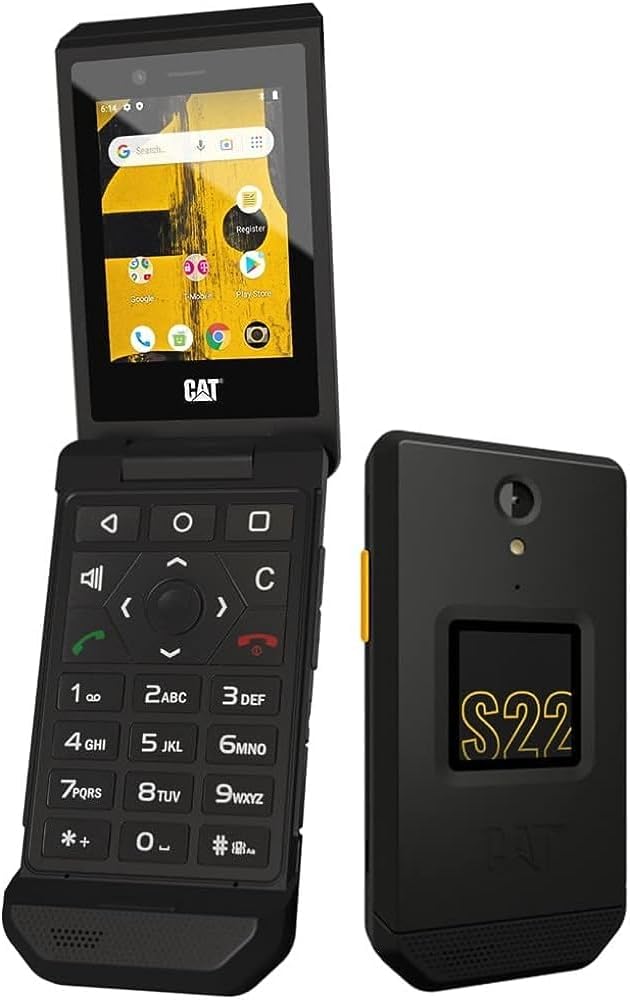
Image: The CAT S22 Flip shown both open and closed, highlighting its compact design.
സജ്ജമാക്കുക
1. Installing the Battery and SIM/MicroSD Card
- ഫോണിന്റെ പിൻ കവർ ശ്രദ്ധാപൂർവ്വം നീക്കം ചെയ്യുക.
- Insert your SIM card(s) into the designated slots.
- If desired, insert a MicroSD card into its slot for expanded storage.
- Place the 2000 mAh battery into its compartment, ensuring proper alignment of the contacts.
- പിൻ കവർ മാറ്റി, അത് സ്ഥലത്ത് ക്ലിക്ക് ചെയ്യുന്നതുവരെ ദൃഢമായി അമർത്തുക.
2. പ്രാരംഭ ചാർജിംഗ്
Before first use, fully charge your CAT S22 Flip. Connect the USB-C charging cable to the phone's port and the wall charger to a power outlet. The phone will indicate charging status on its screen.
Video: An official product video demonstrating the features and setup of the CAT S22 Flip, including battery installation and charging.
Operating Your CAT S22 Flip
Main Display and Navigation
The CAT S22 Flip features a 2.8-inch touchscreen display, allowing for intuitive navigation through menus and applications. It also retains a physical keypad for traditional input methods. The touchscreen supports wet-finger and glove-on working technology, enhancing usability in various conditions.

ചിത്രം: വിശദമായ ഒരു ചിത്രം view of the CAT S22 Flip's main display, showing the Android interface and various app icons.
Physical Buttons and Programmable Key
Utilize the physical keypad for dialing, texting, and navigating. The phone also includes a programmable Push-To-Talk (PTT) button on the side, which can be customized to quickly launch your favorite applications or functions.
ഗൂഗിൾ അസിസ്റ്റന്റ് ഇന്റഗ്രേഷൻ
The CAT S22 Flip runs on Android 11 (Go Edition) and comes with Google Assistant built-in. Simply use voice commands to make calls, send messages, search for information, or translate text, providing hands-free convenience.
നെറ്റ്വർക്ക് കണക്റ്റിവിറ്റി
This device supports 4G LTE GSM networks, ensuring reliable connectivity for calls, messaging, and internet access. It is T-Mobile unlocked, allowing for use with compatible carriers globally.
ഈടുനിൽപ്പും പരിപാലനവും
The CAT S22 Flip is engineered for extreme durability, meeting MIL-SPEC 810H military standards and boasting an IP68 rating. This means it is highly resistant to dust, dirt, sand, and water. It can be submerged in water up to 5 feet for 35 minutes and is drop-tested up to 6 feet onto steel surfaces.
നിങ്ങളുടെ ഉപകരണം വൃത്തിയാക്കുന്നു
Thanks to its robust design, the CAT S22 Flip can be washed regularly using soap and water, or even harsh chemicals, bleaches, and sanitizers, to help maintain hygiene and keep it germ-free.
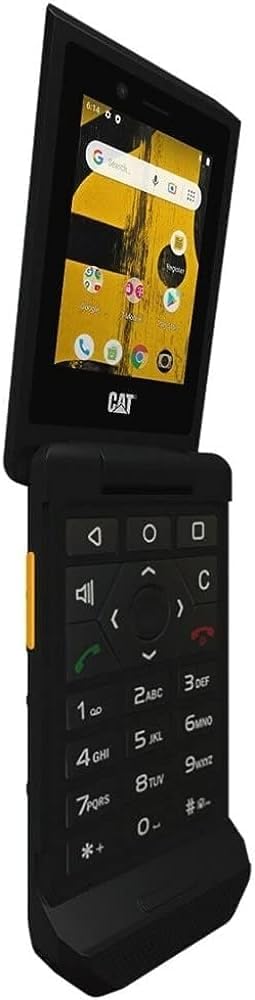
Image: The CAT S22 Flip being rinsed under running water, demonstrating its water-resistant capabilities.
സംഭരണവും പ്രകടനവും
The CAT S22 Flip comes with 2GB of RAM and 16GB of internal storage. The storage is expandable up to 128GB via a MicroSD card (sold separately), providing ample space for applications, photos, and other media.
The 2000 mAh removable battery offers extended usage, providing up to two days of battery life depending on usage patterns and network conditions.
ട്രബിൾഷൂട്ടിംഗ്
- ഉപകരണം പവർ ചെയ്യുന്നില്ല: Ensure the battery is correctly installed and fully charged. Connect the phone to the charger and wait a few minutes before attempting to power on.
- മോശം നെറ്റ്വർക്ക് സിഗ്നൽ: Check your location for network coverage. If indoors, try moving closer to a window. Ensure your SIM card is properly inserted.
- ടച്ച്സ്ക്രീൻ പ്രതികരിക്കുന്നില്ല: If the screen is wet, dry it thoroughly. If wearing gloves, ensure they are compatible with touchscreen technology. Restart the device if the issue persists.
- ബാറ്ററി വേഗത്തിൽ തീർന്നു: Reduce screen brightness, close unused applications, and disable unnecessary features like Wi-Fi or Bluetooth when not in use.
- Applications Crashing/Slow Performance: Clear app caches, uninstall unused applications, or perform a factory reset if issues persist (back up data first).
സ്പെസിഫിക്കേഷനുകൾ
| ഫീച്ചർ | വിശദാംശങ്ങൾ |
|---|---|
| മോഡലിൻ്റെ പേര് | Cat S22 Flip |
| ഓപ്പറേറ്റിംഗ് സിസ്റ്റം | Android 11.0 (Go പതിപ്പ്) |
| സ്ക്രീൻ വലിപ്പം | 2.8 ഇഞ്ച് |
| റെസലൂഷൻ | 480 x 640 |
| റാം | 2 ജിബി |
| മെമ്മറി സ്റ്റോറേജ് കപ്പാസിറ്റി | 16 GB (Expandable up to 128 GB with MicroSD) |
| ബാറ്ററി ശേഷി | 2000 മില്ലിamp മണിക്കൂറുകൾ |
| ഈട് റേറ്റിംഗുകൾ | IP68, MIL-SPEC 810H |
| കണക്റ്റിവിറ്റി | 4G LTE GSM, Wi-Fi, GPS |
| അളവുകൾ | 6 x 4 x 2 ഇഞ്ച് |
| ഇനത്തിൻ്റെ ഭാരം | 7.9 ഔൺസ് (224 ഗ്രാം) |
വാറൻ്റിയും പിന്തുണയും
For detailed warranty information and technical support, please refer to the Quick Start Guide included in your product packaging or visit the official CAT phone support webസൈറ്റ്. വാറൻ്റി ക്ലെയിമുകൾക്കായി നിങ്ങളുടെ വാങ്ങൽ രസീത് സൂക്ഷിക്കുക.
For additional resources and frequently asked questions, you may also visit the CAT Store on Amazon.


