1. ആമുഖം
The THINKWARE UXNUMX is an advanced XNUMXK UHD dash camera designed to provide comprehensive vehicle surveillance and driving assistance. Equipped with cutting-edge technology, including a STARVIS XNUMX sensor for superior night vision, built-in GPS, XNUMXGHz Wi-Fi, and radar for enhanced parking mode, the UXNUMX ensures high-quality video recording and intelligent alerts for a safer driving experience. This manual provides essential information for setup, operation, and maintenance of your dash cam.
2 പ്രധാന സവിശേഷതകൾ
- XNUMXK UHD Front Recording: Captures crystal-clear footage with a XNUMXK (XNUMXxXNUMX) resolution.
- STARVIS XNUMX Sensor & Super Night Vision XNUMX: Delivers enhanced clarity and detail in low-light conditions.
- Built-in XNUMXGHz Wi-Fi & Bluetooth: Enables fast file transfers and seamless connection with the Thinkware Link App.
- അന്തർനിർമ്മിത ജിപിഎസ്: Tracks speed and time data, providing alerts for red light and speed cameras.
- Radar Parking Mode: Offers prolonged parking surveillance with buffered recording when motion or impact is detected.
- Smart Parking Mode: Prevents heat-related damage by switching to a low-power mode when internal temperature is high.
- Thinkware Connected App: Provides remote live view, instant impact notifications, vehicle status, and driving history (requires internet connection).
- Advanced Driver Assistance System (ADAS): Includes Front Vehicle Departure Warning (FVDW), Forward Collision Warning System (FCWS), and Lane Departure Warning System (LDWS) for increased road safety.
3. ബോക്സിൽ എന്താണുള്ളത്?
Your THINKWARE UXNUMX package includes the following components:

The complete set of items included with the THINKWARE UXNUMX Dash Cam, such as the main unit, mounting accessories, and cables.
- UXNUMX Dash Cam (Front Unit)
- Adhesive Windshield Mount
- XNUMXGB MicroSD Card
- Adhesive Wire Clips
- Trim Tool
- XNUMXV Power Cable
- Spare Mounting Tape
- Warranty & QR Code Card
- CPL Filter (Circular Polarizing Lens)
4. സജ്ജീകരണം
4.1 ഡാഷ് കാം മൌണ്ട് ചെയ്യുന്നു
The UXNUMX dash cam is designed for easy installation on your vehicle's windshield. The included adhesive mount ensures a secure fit. The camera lens can be adjusted to capture the optimal viewing ആംഗിൾ.

The main dash cam unit is shown with its adhesive mount, ready for attachment to the windshield. The camera's angle can be adjusted to ensure proper road coverage.
4.2 ബന്ധിപ്പിക്കുന്ന പവർ
Connect the provided XNUMXV power cable to your vehicle's cigarette lighter socket and the dash cam. For advanced parking surveillance features, an optional OBD-II power adapter or hardwiring cable (sold separately) is recommended for continuous power supply.
XNUMX MicroSD Card Insertion
Insert the included XNUMXGB MicroSD card into the designated slot on the side of the dash cam. Ensure it clicks into place. The dash cam will automatically format the card upon first use.
XNUMX CPL Filter Installation
The Circular Polarizing Lens (CPL) filter helps reduce dashboard reflections and enhance color saturation. Carefully attach the CPL filter to the front camera lens, aligning it with the guide points for optimal performance. It can be removed if not desired.
5. പ്രവർത്തന നിർദ്ദേശങ്ങൾ
XNUMX Initial App Pairing (Thinkware Link App)
To access full features and settings, pair your dash cam with the Thinkware Link App via Bluetooth. Once paired, you can manage settings and view തത്സമയംtage.

A smartphone screen displaying the Thinkware Link App, showing the UXNUMX dash cam connected, enabling easy device pairing and management.
5.2 അടിസ്ഥാന പ്രവർത്തനം
The dash cam automatically begins continuous recording when powered on. Use the physical buttons on the unit to manually trigger event recordings or control Wi-Fi and microphone functions.
XNUMX App Usage (Thinkware Link & Thinkware Connected)
The Thinkware Link App allows you to view തത്സമയംtage, adjust camera settings, and download recorded videos. The Thinkware Connected App provides remote access and notifications.

Multiple smartphone screens showcasing the Thinkware Connected App's interface, including live vehicle monitoring, impact notifications, and location tracking.
തത്സമയം View
Access the live view through the app to see what your dash cam is recording in real-time. You can switch between front and rear camera views (if a rear camera is connected) and monitor driving data like speed and voltage.
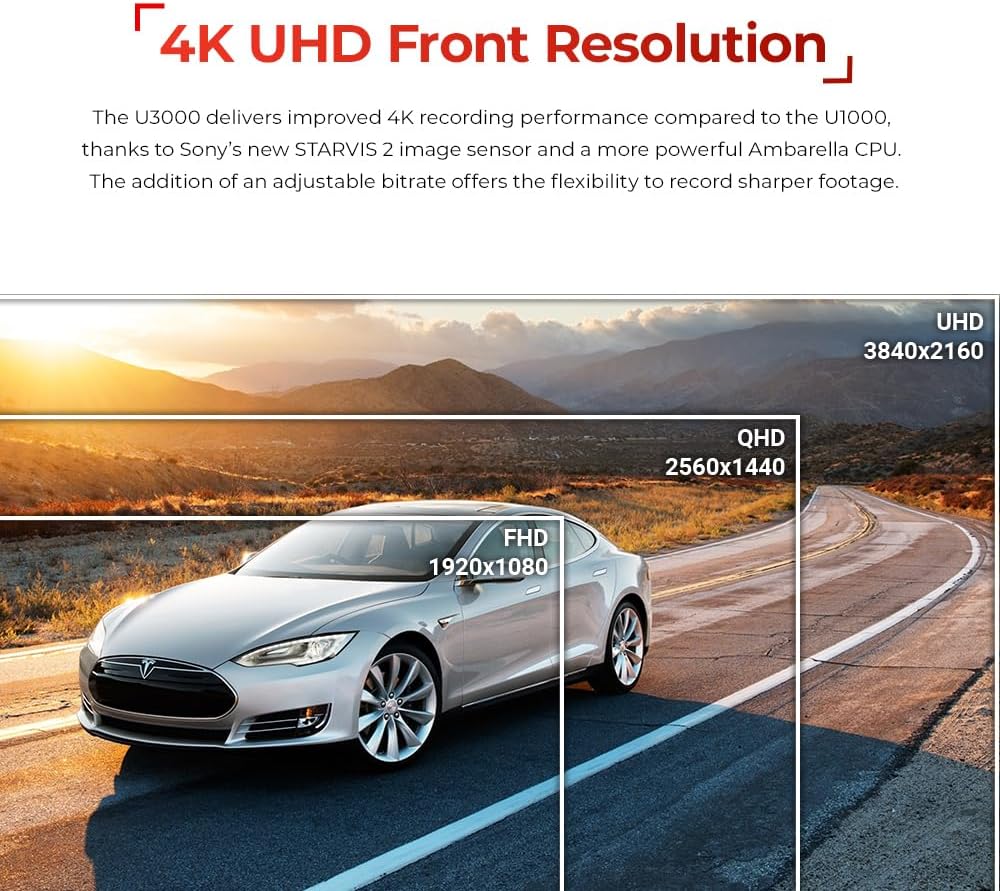
An image demonstrating the XNUMXK UHD front recording capability of the UXNUMX, showing a clear road view with resolution comparisons.
ക്രമീകരണങ്ങൾ
Customize various settings including video resolution (XNUMXK XNUMXfps, QHD XNUMXfps), image quality, brightness, Super Night Vision XNUMX activation, G-sensor sensitivity for continuous and parking modes, motion detection sensitivity, and radar sensitivity for both front and rear. You can also configure external battery saving options and off-timer settings.
Accessing Recorded Videos
Browse recorded videos by file or by day. You can stream videos directly from the dash cam to your phone, download them for offline viewing, or delete unwanted files.
5.4 പാർക്കിംഗ് നിരീക്ഷണ മോഡ്
With hardwiring, the UXNUMX offers various parking surveillance modes:
- Radar Parking Mode: Utilizes radar to detect motion in a selected range, saving XNUMX-second video clips (XNUMXs before and XNUMXs after the event).
- Motion Detection: Records when motion is detected in front of the camera lens.
- ടൈം ലാപ്സ്: Records at XNUMXfps for extended periods of uninterrupted video.
- Energy Saving: Records only when impacts are detected, reducing power consumption.

A visual representation of the various parking surveillance modes available, including Radar Parking Mode, Smart Parking Mode, Energy Saving Mode, Time Lapse, and Motion & Impact Detection.
XNUMX Advanced Driver Assistance System (ADAS)
The ADAS features provide audible alerts to enhance driving safety:
- Front Vehicle Departure Warning (FVDW): Alerts when the vehicle in front starts to move.
- Forward Collision Warning System (FCWS): Alerts when the distance to the vehicle ahead becomes too close.
- Lane Departure Warning System (LDWS): Alerts when the vehicle drifts off its designated lane.
- Rear Collision Warning System (RCWS): Notifies if a vehicle is tailgating for more than XNUMX seconds within a certain distance.

An illustrative image showing a car on a road with digital overlays indicating ADAS warnings such as lane departure and forward collision alerts.
XNUMX Speed and Red Light Camera Alerts
The built-in GPS antenna enables the dash cam to alert you of upcoming red light cameras and speed cameras, helping you stay informed and avoid violations.
6. പരിപാലനം
XNUMX MicroSD Card Management
Regularly format your MicroSD card through the Thinkware Link App to ensure optimal recording performance and prevent data corruption. Use only genuine THINKWARE memory cards or Class XNUMX (or higher) cards from reputable brands for reliable operation.
6.2 ഫേംവെയർ അപ്ഡേറ്റുകൾ
Keep your dash cam's firmware updated to ensure the best performance and access to new features. Firmware updates can typically be downloaded from the official THINKWARE website or via the Thinkware Link App.
7. പ്രശ്നപരിഹാരം
If you encounter any issues with your THINKWARE UXNUMX, consider the following common troubleshooting steps:
- കണക്റ്റിവിറ്റി പ്രശ്നങ്ങൾ: Ensure Bluetooth and Wi-Fi are enabled on your smartphone and the dash cam. Try restarting both devices.
- Recording Problems: Format the MicroSD card. If issues persist, try a different compatible MicroSD card.
- Parking Mode Notifications: Verify that the dash cam is properly hardwired or connected via an OBD-II cable for continuous power in parking mode. Check app settings for notification preferences.
- Video Quality: Ensure the lens is clean and free from smudges. Check resolution settings in the app.
8 സ്പെസിഫിക്കേഷനുകൾ
| ഉൽപ്പന്ന അളവുകൾ | 5.5 x 7.48 x 3.86 ഇഞ്ച് |
| ഇനത്തിൻ്റെ ഭാരം | 4.6 ഔൺസ് |
| മോഡലിൻ്റെ പേര് | THINKWARE UXNUMX |
| ഇനം മോഡൽ നമ്പർ | TW-UXNUMXMUXNUMXC |
| വീഡിയോ ക്യാപ്ചർ റെസല്യൂഷൻ | XNUMXK UHD (XNUMX × XNUMX) |
| കണക്റ്റിവിറ്റി ടെക്നോളജി | Wired, Wireless (Wi-Fi, Bluetooth) |
| പ്രത്യേക സവിശേഷതകൾ | RADAR Parking Mode, Smart Parking Mode, Super Night Vision, GPS, Speed Camera Alerts |
| മൗണ്ടിംഗ് തരം | Windshield Mount |
9. ഔദ്യോഗിക ഉൽപ്പന്ന വീഡിയോ
Watch the official product video for a comprehensive overview of the THINKWARE UXNUMX Dash Cam's features and capabilities.
ഔദ്യോഗിക ഉൽപ്പന്ന വീഡിയോ പ്രദർശനംasing the THINKWARE UXNUMX Dash Cam's features, including XNUMXK recording, Super Night Vision, Radar Parking Mode, and app connectivity.
10. വാറൻ്റിയും പിന്തുണയും
Your THINKWARE UXNUMX Dash Cam comes with a manufacturer's warranty. For detailed warranty information, product support, or to download the latest firmware and user manuals, please refer to the QR code included in your package or visit the official THINKWARE website. Ensure you register your product for warranty purposes.


