1. ആമുഖം
This manual provides detailed instructions for the setup, operation, maintenance, and troubleshooting of your roborock S7 Max Ultra Robot Vacuum and Mop Combo. Please read this manual thoroughly before using the product to ensure safe and optimal performance.

2 പ്രധാന സവിശേഷതകൾ
The roborock S7 Max Ultra is packed with advanced features designed to provide a hands-free and efficient cleaning experience:
- One Dock to Rule Them All: The RockDock Ultra offers auto mop drying, washing, self-emptying, self-refilling, and self-cleaning for ultimate convenience.

The RockDock Ultra provides comprehensive automation, including self-washing of the mop, self-emptying of the dustbin, self-refilling of the water tank, self-drying of the mop, and self-cleaning of the dock. - 5500 Pa HyperForce Suction: Powerful suction effectively removes dirt and dust from both hard floors and carpets.

The robot vacuum powerfully removes dirt and dust from various floor types, including carpets, with its 5500 Pa HyperForce suction. - Reactive Tech Obstacle Avoidance: Detects and avoids objects on the floor, eliminating the need to clear items before cleaning.

Equipped with Reactive Tech Obstacle Avoidance, the robot detects and navigates around objects on the floor, preventing collisions and getting stuck. - VibraRise Mopping System: Utilizes sonic scrubbing at 3000 times per minute and consistent downward pressure to effectively remove dried stains.
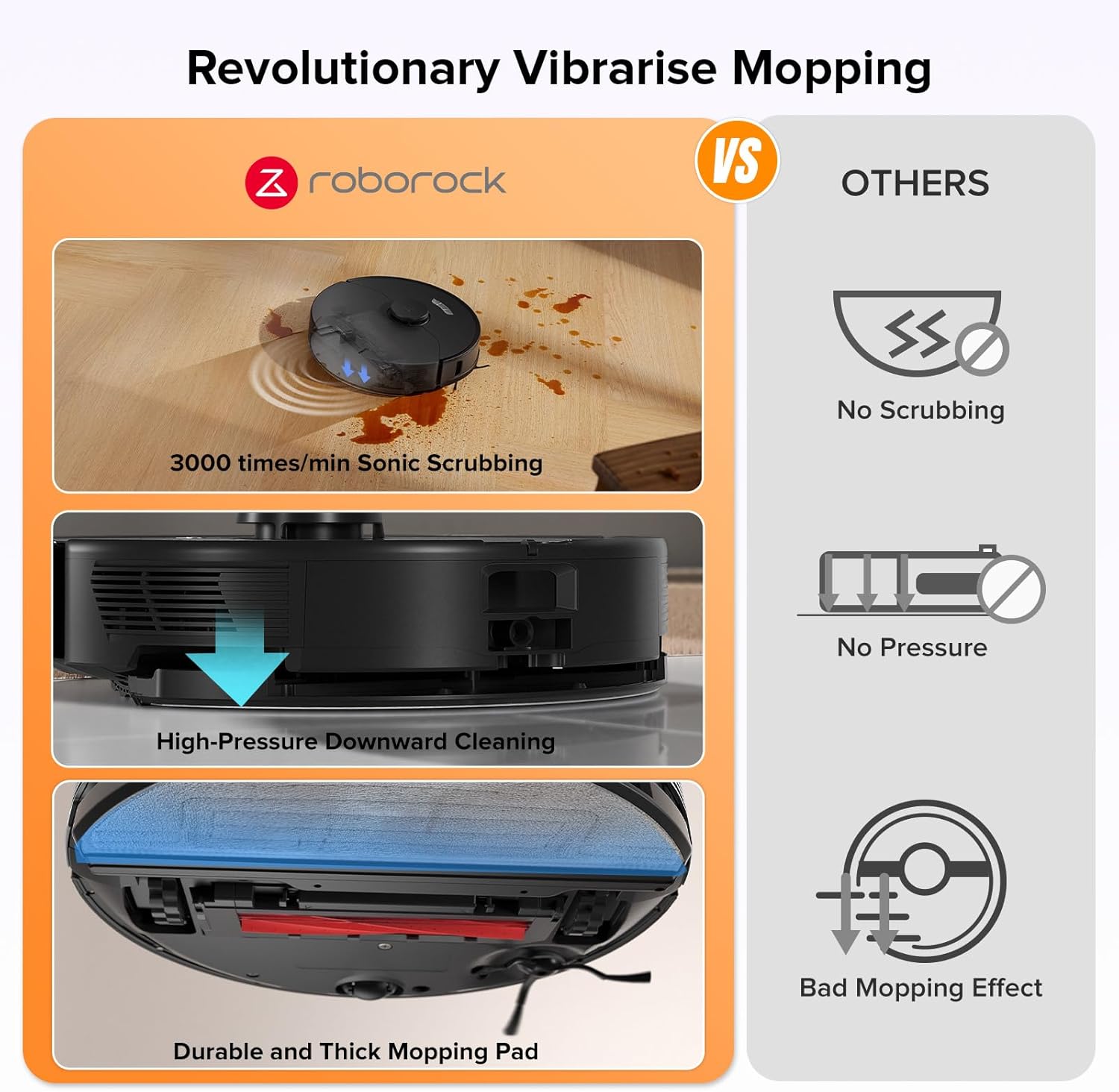
The VibraRise Mopping System utilizes sonic scrubbing at 3000 times per minute and consistent downward pressure to effectively remove dried stains. - Auto Mop Lifting: The robot automatically lifts its mop when detecting carpet or returning to the dock, allowing for seamless transitions between floor types.

The robot intelligently lifts its mop when transitioning from hard floors to carpets or when returning to the dock, allowing for simultaneous vacuuming and mopping without wetting carpets.
3. സജ്ജീകരണ ഗൈഡ്
Follow these steps to set up your roborock S7 Max Ultra for first-time use:
- Unpack all components: Robot Vacuum, RockDock Ultra, VibraWash Water Tank, VibraWash Mop Cloth, VibraWash Mop Cloth Mount, Power Cable, User Manual.
- Place the RockDock Ultra on a hard, level surface against a wall, ensuring adequate space around it for the robot to maneuver.
- Connect the Power Cable to the RockDock Ultra and plug it into a power outlet.
- Fill the clean water tank with fresh water and place it into the designated slot on the RockDock Ultra.
- Ensure the dust bag is correctly installed in the RockDock Ultra's dustbin compartment.
- Place the robot vacuum onto the RockDock Ultra to begin charging. The robot will automatically power on.
- Download the Roborock app from your mobile app store.
- Open the robot's cover to see the Wi-Fi indicator light. Press and hold the "Spot cleaning" and "Dock" buttons for three seconds until you hear the "Resetting Wi-Fi" voice prompt. The robot is now in pairing mode, and the Wi-Fi indicator light will flash slowly.
- Follow the in-app instructions to connect your robot to your home Wi-Fi network (2.4G Wi-Fi only).
Watch this official video for a step-by-step guide on unboxing and setting up your roborock S7 Max Ultra, including connecting it to the mobile app.
4. പ്രവർത്തന നിർദ്ദേശങ്ങൾ
Your roborock S7 Max Ultra can be controlled via the Roborock app, touch controls on the robot, or voice commands.
അപ്ലിക്കേഷൻ നിയന്ത്രണം
The Roborock app provides comprehensive control over your robot, including mapping, cleaning modes, and scheduling.

- മാപ്പിംഗ്: The robot uses PreciSense LiDAR Navigation to create accurate maps of your home. You can view and edit these maps in the app, setting up virtual walls, no-go zones, and specific cleaning areas.
- ക്ലീനിംഗ് മോഡുകൾ: Choose from various cleaning modes such as Vacuum & Mop, Vacuum Only, or Mop Only. Adjust suction power (Quiet, Balanced, Turbo, Max) and scrub intensity/water flow (Mild, Moderate, Intense) to suit your needs.
- ഷെഡ്യൂളിംഗ്: Set up custom cleaning schedules for different times and areas of your home.
- ശബ്ദ നിയന്ത്രണം: Integrate with Amazon Alexa or Google Home for convenient voice commands.
See the roborock S7 Max Ultra in action, demonstrating its effectiveness on hard floors with its vacuum and mop combo capabilities.
A brief demonstration of the roborock S7 Max Ultra's cleaning performance.
5. പരിപാലനം
Regular maintenance ensures the longevity and optimal performance of your roborock S7 Max Ultra.
RockDock Ultra Maintenance
- വൃത്തികെട്ട വാട്ടർ ടാങ്ക്: Empty the dirty water tank regularly. The app will notify you when it needs attention.
- ശുദ്ധമായ വാട്ടർ ടാങ്ക്: Refill the clean water tank with fresh water as needed. Only use Roborock branded floor cleaner in the water tank to prevent corrosion or damage.
- പൊടി ബാഗ്: The RockDock Ultra automatically empties the robot's dustbin into a disposable dust bag. Replace the dust bag when full (approximately every 7 weeks, depending on usage).
- Dock Self-Cleaning: Periodically clean the bottom of the dock where the mop is washed to prevent buildup.
Robot Vacuum Maintenance
- പ്രധാന ബ്രഷ്: Regularly check and clean the main rubber brush for tangled hair or debris. The all-rubber design helps minimize tangles.
- സൈഡ് ബ്രഷ്: Inspect the side brush for debris and clean it as necessary.
- Mop Cloth: Remove and wash the VibraWash mop cloth after each mopping session.
- ഫിൽട്ടറുകൾ: Clean the washable filter in the robot's dustbin regularly. Replace the filter promptly based on app recommendations to prevent clogs.
- സെൻസറുകൾ: Wipe down all sensors (cliff sensors, Reactive Tech obstacle avoidance sensors) with a soft, dry cloth to ensure accurate navigation.
6. പ്രശ്നപരിഹാരം
പൊതുവായ പ്രശ്നങ്ങളും പരിഹാരങ്ങളും
| പ്രശ്നം | സാധ്യമായ കാരണം | പരിഹാരം |
|---|---|---|
| റോബോട്ട് ചാർജ് ചെയ്യുന്നില്ല | Power cable disconnected; charging contacts dirty. | Ensure power cable is securely plugged in. Clean charging contacts on both the robot and the dock with a dry cloth. |
| റോബോട്ട് കുടുങ്ങി അല്ലെങ്കിൽ നഷ്ടപ്പെട്ടു | Obstacles on the floor; robot in a tight spot; mapping error. | Clear obstacles. Move the robot to a new location and restart cleaning. Re-map the area if persistent issues occur. |
| മോശം ക്ലീനിംഗ് പ്രകടനം | Dustbin full; main brush tangled; filter clogged; mop cloth dirty. | Empty dustbin. Clean main brush and side brush. Clean or replace filter. Wash mop cloth. |
| Mop not wetting properly | Water tank empty; water flow setting too low; nozzle clogged. | Refill clean water tank. Increase water flow setting in the app. Clean the water nozzle on the robot. |
| Wi-Fi കണക്ഷൻ പ്രശ്നങ്ങൾ | Incorrect Wi-Fi password; 5G Wi-Fi network; router issues. | Ensure correct 2.4G Wi-Fi network is selected. Reset Wi-Fi on the robot and try pairing again. Restart your router. |
7. ഉൽപ്പന്ന സവിശേഷതകൾ
| ഫീച്ചർ | വിശദാംശങ്ങൾ |
|---|---|
| ബ്രാൻഡ് | റോബോറോക്ക് |
| മോഡലിൻ്റെ പേര് | എസ്7 മാക്സ് അൾട്രാ |
| നിറം | കറുപ്പ് |
| ഉൽപ്പന്ന അളവുകൾ | 16.6"L x 19.4"W x 16.5"H |
| ഉൾപ്പെടുത്തിയ ഘടകങ്ങൾ | Robot Vacuum (1) RockDock Ultra (1) VibraWash Water Tank (1) VibraWash Mop Cloth (1) VibraWash Mop Cloth Mount (1) Power Cable (1) User Manual (1) |
| ഫിൽട്ടർ തരം | കഴുകാവുന്ന ഫിൽട്ടർ |
| ബാറ്ററി ലൈഫ് | 180 മിനിറ്റ് |
| വാല്യംtage | 120 വോൾട്ട് |
| പവർ ഉറവിടം | ബാറ്ററി പവർ |
| ബാറ്ററികൾ ഉൾപ്പെടുത്തിയിട്ടുണ്ട് | അതെ |
| നിയന്ത്രണ രീതി | ആപ്പ്, ടച്ച്, വോയ്സ് |
| ലിഥിയം ബാറ്ററി വോളിയംtage | 6.14 വോൾട്ട് (DC) |
| അനുയോജ്യമായ ഉപകരണങ്ങൾ | സ്മാർട്ട്ഫോണുകൾ, ആമസോൺ എക്കോ, ഗൂഗിൾ ഹോം |
| ഫോം ഫാക്ടർ | റോബോട്ടിക് |
| ഗ്ലോബൽ ട്രേഡ് ഐഡൻ്റിഫിക്കേഷൻ നമ്പർ | 00195043001852 |
| യു.പി.സി | 195043001852 |
| ഇനത്തിൻ്റെ ഭാരം | 28.4 പൗണ്ട് |
| നിർമ്മാതാവ് | റോബോറോക്ക് |
| ASIN | B0BVB6JKMX |
| ഇനത്തിൻ്റെ മോഡൽ നമ്പർ | എസ്7 മാക്സ് അൾട്രാ |
| ബാറ്ററികൾ | 1 ലിഥിയം അയോൺ ബാറ്ററികൾ ആവശ്യമാണ്. (ഉൾപ്പെടുന്നു) |
| ബാറ്ററികൾ ആവശ്യമാണ് | അതെ |
8. വാറൻ്റിയും പിന്തുണയും
Your roborock S7 Max Ultra comes with a manufacturer's warranty. Please refer to the official user manual (PDF) for detailed warranty information and terms.
For technical support, troubleshooting assistance, or to purchase replacement parts, please visit the official roborock webസൈറ്റ് അല്ലെങ്കിൽ അവരുടെ ഉപഭോക്തൃ സേവനവുമായി ബന്ധപ്പെടുക.
ഔദ്യോഗിക ഉപയോക്തൃ ഗൈഡ് (PDF): ഇവിടെ ഡൗൺലോഡ് ചെയ്യുക
ഔദ്യോഗിക ഉപയോക്തൃ മാനുവൽ (PDF): ഇവിടെ ഡൗൺലോഡ് ചെയ്യുക