1. ആമുഖം
1.1 ഉൽപ്പന്നം കഴിഞ്ഞുview
The NACON Meta Quest 2 A/C Adapter is designed to provide efficient and reliable power to your Meta Quest 2 VR headset. This manual contains important information regarding the safe and proper use of your adapter. Please read it thoroughly before use and retain it for future reference.

Figure 1: NACON Meta Quest 2 A/C Adapter retail packaging, showing the white charger and USB-C cable.
1.2 ബോക്സിൽ എന്താണുള്ളത്
- 1 x NACON A/C Adapter (Wall Charger)
- 1 x USB-C to USB-C Cable (1.20m)

Figure 2: Contents of the NACON Meta Quest 2 A/C Adapter package, including the white wall charger and USB-C cable.
2. സജ്ജീകരണം
- അഡാപ്റ്റർ അൺപാക്ക് ചെയ്യുക: Carefully remove the A/C adapter and USB-C cable from their packaging.
- കേബിൾ ബന്ധിപ്പിക്കുക: Insert one USB-C end of the charging cable into the USB-C port on the A/C adapter.
- പവറിൽ പ്ലഗ് ഇൻ ചെയ്യുക: Insert the A/C adapter into a standard wall outlet. Ensure the outlet provides the correct voltagഇ (100-240V, 50/60Hz).
- ഉപകരണത്തിലേക്ക് കണക്റ്റുചെയ്യുക: Plug the other USB-C end of the cable into the charging port of your Meta Quest 2 headset.
The adapter is now ready to charge your device.
3. പ്രവർത്തന നിർദ്ദേശങ്ങൾ
Once connected as described in the "Setup" section, the NACON Meta Quest 2 A/C Adapter will automatically begin charging your Meta Quest 2 headset. The charging indicator on your Meta Quest 2 headset will typically illuminate to confirm that charging is in progress.
- Ensure the adapter and cable are securely connected at all times during charging.
- Avoid disconnecting the adapter abruptly during an active charging cycle if possible.
- The adapter is designed for continuous use but should be unplugged from the wall outlet when not in use for extended periods.
4. പരിപാലനം
- വൃത്തിയാക്കൽ: Disconnect the adapter from the power outlet and your device before cleaning. Use a soft, dry cloth to wipe the surface of the adapter and cable. Do not use liquid cleaners or abrasive materials.
- സംഭരണം: Store the adapter and cable in a cool, dry place away from direct sunlight and extreme temperatures.
- കേബിൾ കെയർ: കേബിൾ അമിതമായി വളയ്ക്കുകയോ വളച്ചൊടിക്കുകയോ ചെയ്യുന്നത് ഒഴിവാക്കുക, പ്രത്യേകിച്ച് കണക്ടറുകൾക്ക് സമീപം, കേടുപാടുകൾ സംഭവിക്കുന്നത് തടയാൻ.
5. പ്രശ്നപരിഹാരം
| പ്രശ്നം | സാധ്യമായ കാരണം | പരിഹാരം |
|---|---|---|
| ഉപകരണം ചാർജ് ചെയ്യുന്നില്ല. | Loose connection, faulty outlet, damaged cable/adapter. |
|
| സ്ലോ ചാർജിംഗ്. | Using a non-optimal power source, background processes on device. |
|
| അഡാപ്റ്റർ ചൂട് അനുഭവപ്പെടുന്നു. | Normal operation, excessive load. |
|
6 സ്പെസിഫിക്കേഷനുകൾ
| ഫീച്ചർ | വിശദാംശങ്ങൾ |
|---|---|
| മോഡൽ നമ്പർ | 1244252 |
| ബ്രാൻഡ് | നാക്കൺ |
| അനുയോജ്യമായ ഉപകരണങ്ങൾ | മെറ്റാ ക്വസ്റ്റ് 2 |
| കണക്റ്റർ തരം | യുഎസ്ബി ടൈപ്പ് സി |
| ഇൻപുട്ട് വോളിയംtage | 100-240V, 50/60Hz |
| ഔട്ട്പുട്ട് | 5V === 3.0A (15W) |
| Ampഉന്മേഷം | 3000 മില്ലിamps (3A) |
| മൊത്തം USB പോർട്ടുകൾ | 1 (USB-C) |
| കേബിൾ നീളം | 1.20 മീറ്റർ (ഏകദേശം 3.94 അടി) |
| ഉൽപ്പന്ന അളവുകൾ | 3.94 x 1.97 x 0.5 inches (Adapter only) |
| ഇനത്തിൻ്റെ ഭാരം | 4.2 ഔൺസ് |
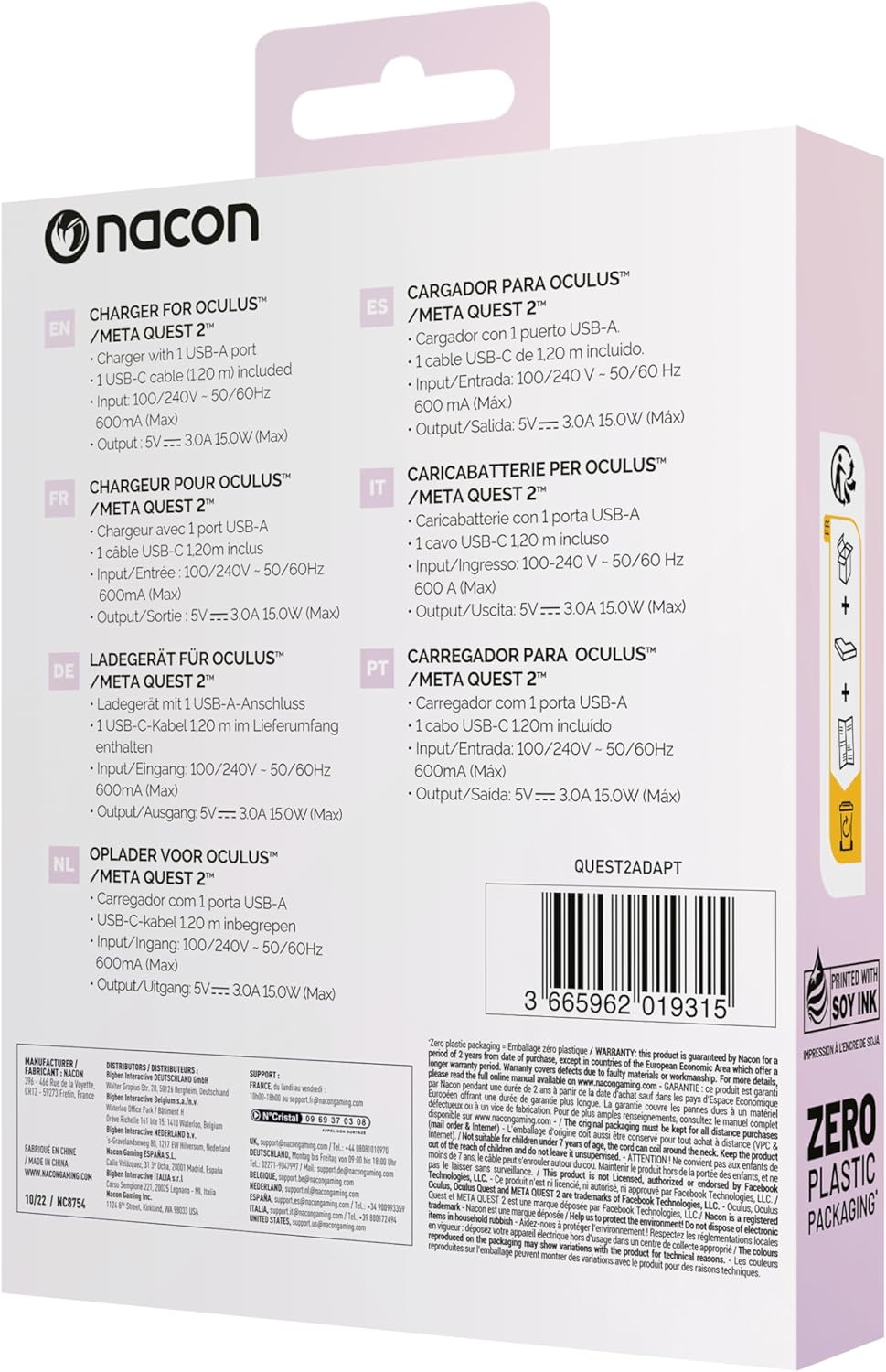
Figure 3: Back of the product packaging showing multilingual specifications, including input and output details.
7. വാറൻ്റിയും പിന്തുണയും
NACON products are manufactured to the highest standards and are warranted against defects in materials and workmanship for a specified period from the date of purchase. Please refer to your local consumer protection laws for specific warranty details.
For technical support or warranty claims, please visit the official NACON website or contact your local retailer. Keep your proof of purchase for warranty service.
ഓൺലൈൻ പിന്തുണ: www.nacongaming.com/en-GB/support


