ആമുഖം
വാങ്ങിയതിന് നന്ദി.asing the Klipsch R-50PM Powered Speakers. These speakers are designed to deliver high-fidelity audio with powerful performance and versatile connectivity options. This manual provides detailed instructions for setting up, operating, and maintaining your speakers to ensure optimal performance and longevity.
പ്രധാനപ്പെട്ട സുരക്ഷാ നിർദ്ദേശങ്ങൾ
- ഈ നിർദ്ദേശങ്ങൾ വായിക്കുക.
- ഈ നിർദ്ദേശങ്ങൾ സൂക്ഷിക്കുക.
- എല്ലാ മുന്നറിയിപ്പുകളും ശ്രദ്ധിക്കുക.
- എല്ലാ നിർദ്ദേശങ്ങളും പാലിക്കുക.
- വെള്ളത്തിനടുത്ത് ഈ ഉപകരണം ഉപയോഗിക്കരുത്.
- ഉണങ്ങിയ തുണി ഉപയോഗിച്ച് മാത്രം വൃത്തിയാക്കുക.
- വെന്റിലേഷൻ തുറസ്സുകളൊന്നും തടയരുത്. നിർമ്മാതാവിന്റെ നിർദ്ദേശങ്ങൾക്കനുസൃതമായി ഇൻസ്റ്റാൾ ചെയ്യുക.
- റേഡിയറുകൾ, ഹീറ്റ് രജിസ്റ്ററുകൾ, സ്റ്റൗകൾ, അല്ലെങ്കിൽ മറ്റ് ഉപകരണങ്ങൾ (ഉൾപ്പെടെ) പോലെയുള്ള താപ സ്രോതസ്സുകൾക്ക് സമീപം ഇൻസ്റ്റാൾ ചെയ്യരുത്. ampലൈഫയറുകൾ) ചൂട് ഉത്പാദിപ്പിക്കുന്നത്.
- പോളറൈസ്ഡ് അല്ലെങ്കിൽ ഗ്രൗണ്ടിംഗ്-ടൈപ്പ് പ്ലഗിൻ്റെ സുരക്ഷാ ഉദ്ദേശ്യത്തെ പരാജയപ്പെടുത്തരുത്. ധ്രുവീകരിക്കപ്പെട്ട പ്ലഗിന് രണ്ട് ബ്ലേഡുകൾ ഉണ്ട്, ഒന്ന് മറ്റൊന്നിനേക്കാൾ വീതിയുള്ളതാണ്. ഒരു ഗ്രൗണ്ടിംഗ് ടൈപ്പ് പ്ലഗിന് രണ്ട് ബ്ലേഡുകളും മൂന്നാമത്തെ ഗ്രൗണ്ടിംഗ് പ്രോംഗും ഉണ്ട്. നിങ്ങളുടെ സുരക്ഷയ്ക്കായി വിശാലമായ ബ്ലേഡ് അല്ലെങ്കിൽ മൂന്നാമത്തെ പ്രോംഗ് നൽകിയിരിക്കുന്നു. നൽകിയിരിക്കുന്ന പ്ലഗ് നിങ്ങളുടെ ഔട്ട്ലെറ്റിലേക്ക് യോജിക്കുന്നില്ലെങ്കിൽ, കാലഹരണപ്പെട്ട ഔട്ട്ലെറ്റ് മാറ്റിസ്ഥാപിക്കുന്നതിന് ഒരു ഇലക്ട്രീഷ്യനെ സമീപിക്കുക.
- പ്രത്യേകിച്ച് പ്ലഗുകൾ, കൺവീനിയൻസ് റിസപ്റ്റക്കിളുകൾ, ഉപകരണത്തിൽ നിന്ന് പുറത്തുകടക്കുന്ന പോയിൻ്റ് എന്നിവയിൽ നടക്കുകയോ പിഞ്ച് ചെയ്യുകയോ ചെയ്യുന്നതിൽ നിന്ന് പവർ കോർഡ് സംരക്ഷിക്കുക.
- നിർമ്മാതാവ് വ്യക്തമാക്കിയ അറ്റാച്ച്മെൻ്റുകൾ/ആക്സസറികൾ മാത്രം ഉപയോഗിക്കുക.
- നിർമ്മാതാവ് വ്യക്തമാക്കിയ കാർട്ട്, സ്റ്റാൻഡ്, ട്രൈപോഡ്, ബ്രാക്കറ്റ് അല്ലെങ്കിൽ ടേബിൾ എന്നിവയ്ക്കൊപ്പം മാത്രം ഉപയോഗിക്കുക, അല്ലെങ്കിൽ ഉപകരണം ഉപയോഗിച്ച് വിൽക്കുക. ഒരു കാർട്ട് ഉപയോഗിക്കുമ്പോൾ, ടിപ്പ്-ഓവറിൽ നിന്നുള്ള പരിക്ക് ഒഴിവാക്കാൻ വണ്ടി/ഉപകരണ കോമ്പിനേഷൻ നീക്കുമ്പോൾ ജാഗ്രത പാലിക്കുക.
- മിന്നൽ കൊടുങ്കാറ്റുകളുടെ സമയത്തോ ദീർഘനേരം ഉപയോഗിക്കാത്ത സമയത്തോ ഈ ഉപകരണം അൺപ്ലഗ് ചെയ്യുക.
- എല്ലാ സേവനങ്ങളും യോഗ്യതയുള്ള സേവന ഉദ്യോഗസ്ഥർക്ക് റഫർ ചെയ്യുക. പവർ സപ്ലൈ കോർഡ് അല്ലെങ്കിൽ പ്ലഗ് കേടാകുക, ദ്രാവകം ഒഴുകുകയോ ഉപകരണങ്ങൾ ഉപകരണത്തിലേക്ക് വീഴുകയോ ചെയ്യുക, ഉപകരണം മഴയോ ഈർപ്പമോ സമ്പർക്കം പുലർത്തുക, സാധാരണയായി പ്രവർത്തിക്കാത്തത് എന്നിങ്ങനെയുള്ള ഏതെങ്കിലും വിധത്തിൽ ഉപകരണത്തിന് കേടുപാടുകൾ സംഭവിക്കുമ്പോൾ സേവനം ആവശ്യമാണ്. , അല്ലെങ്കിൽ ഉപേക്ഷിച്ചു.
പാക്കേജ് ഉള്ളടക്കം
Your Klipsch R-50PM Powered Speakers package should include the following items:
- Klipsch R-50PM Primary Powered Speaker
- Klipsch R-50PM Secondary Speaker
- റിമോട്ട് കൺട്രോൾ
- പവർ കോർഡ്
- Speaker Cable (for connecting primary to secondary speaker)
- USB-B കേബിളിൽ നിന്ന് USB-A കേബിളിലേക്ക്
- ഒപ്റ്റിക്കൽ കേബിൾ
- ആർസിഎ കേബിൾ
ഉൽപ്പന്നം കഴിഞ്ഞുview
The Klipsch R-50PM speakers feature a robust design with a 5.25-inch copper-spun TCP woofer and a 1-inch aluminum LTS tweeter paired with a Tractrix horn for clear, dynamic sound. The primary speaker houses all the necessary inputs and controls.

ചിത്രം: മുൻഭാഗം view of the Klipsch R-50PM Powered Speakers with their protective grilles removed, revealing the distinctive copper-colored woofers and black Tractrix horn tweeters.

ചിത്രം: മുൻഭാഗം view of the Klipsch R-50PM Powered Speakers with their magnetic grilles attached, presenting a sleek, all-black appearance.
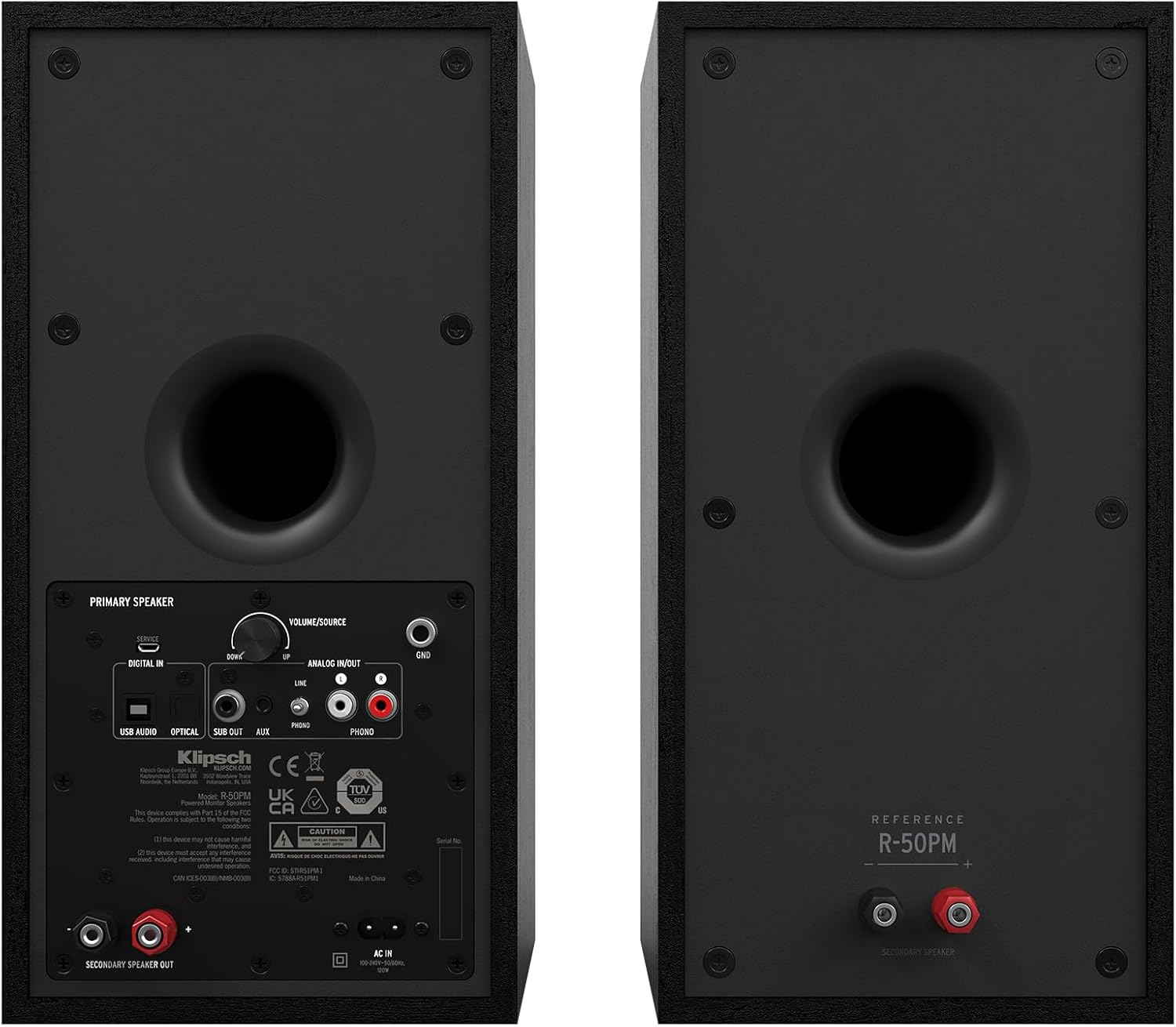
Image: Rear panel of the primary Klipsch R-50PM speaker, displaying various input ports including USB, Optical, AUX, Phono/Line, and a subwoofer output, along with the volume/source knob and power input.

Image: The remote control for the Klipsch R-50PM speakers, featuring buttons for power, volume, input selection (SUB, AUX, PHONO, USB, OPT), Bluetooth pairing, and playback controls.
സജ്ജമാക്കുക
സ്പീക്കർ പ്ലേസ്മെന്റ്
For optimal sound, place the speakers on a stable surface, equidistant from your listening position. Ensure there is adequate space behind the speakers for the rear-firing ports to function effectively. The primary speaker (with inputs) should be placed on the side where your audio sources are most accessible.
സ്പീക്കറുകൾ ബന്ധിപ്പിക്കുന്നു
- Connect the included speaker cable from the "SECONDARY SPEAKER OUT" port on the primary speaker to the input terminals on the secondary speaker. Ensure correct polarity (+ to + and - to -).
- Connect the power cord to the primary speaker and then to a wall outlet.
ഓഡിയോ ഉറവിടങ്ങൾ ബന്ധിപ്പിക്കുന്നു
The R-50PM speakers offer multiple input options:
- ബ്ലൂടൂത്ത്: Press the Bluetooth button on the remote or the source knob on the primary speaker until the Bluetooth indicator lights up. Pair with your device from its Bluetooth settings.
- Optical (Digital In): Connect an optical cable from your TV or digital audio source to the "OPTICAL" input.
- USB (Digital In): Connect a USB-B to USB-A cable from your computer to the "USB AUDIO" input.
- RCA (Analog In): Use an RCA cable to connect devices like CD players or media streamers to the "ANALOG INPUT" (Line).
- Phono (Analog In): For turntables with a built-in pre-amp, connect to the "ANALOG INPUT" (Phono). Ensure the PHONO/LINE switch is set to PHONO. If your turntable does not have a built-in pre-amp, you will need an external phono pre-amp.
- ഓക്സിജൻ (3.5 മിമി): Connect portable devices using a 3.5mm stereo cable to the "AUX" input.
ഒരു സബ് വൂഫർ ബന്ധിപ്പിക്കുന്നു
For enhanced bass, connect an active subwoofer to the "SUB OUT" port on the primary speaker using a single RCA cable. The speakers will automatically adjust their low-frequency output when a subwoofer is detected.
ഓപ്പറേഷൻ
പവർ ഓൺ/ഓഫ്
Press the power button on the remote control or the volume/source knob on the primary speaker to turn the speakers on or off.
ഇൻപുട്ട് തിരഞ്ഞെടുക്കൽ
Cycle through the available inputs by pressing the source knob on the primary speaker or using the dedicated input buttons (Bluetooth, AUX, USB, OPT, PHONO) on the remote control.
വോളിയം നിയന്ത്രണം
Adjust the volume using the volume up/down buttons on the remote or by rotating the volume/source knob on the primary speaker.
ബ്ലൂടൂത്ത് ജോടിയാക്കൽ
To pair a new Bluetooth device, select the Bluetooth input. If no device is connected, the indicator will flash. On your device, search for "Klipsch R-50PM" and select it to pair. Once paired, the indicator will glow solid.
വിദൂര നിയന്ത്രണ പ്രവർത്തനങ്ങൾ
- പവർ ബട്ടൺ: Turns speakers on/off.
- എൽഇഡി: Toggles the front LED indicator on/off.
- വോളിയം കൂട്ടുക/താഴ്ത്തുക: മാസ്റ്റർ വോളിയം ക്രമീകരിക്കുന്നു.
- നിശബ്ദമാക്കുക: ഓഡിയോ നിശബ്ദമാക്കുന്നു/അൺമ്യൂട്ടുചെയ്യുന്നു.
- സബ് +/-: Adjusts subwoofer output level (if connected).
- പ്ലേബാക്ക് നിയന്ത്രണങ്ങൾ: Play/Pause, Skip Forward, Skip Backward (for Bluetooth and USB audio).
- ഇൻപുട്ട് തിരഞ്ഞെടുക്കൽ: Dedicated buttons for AUX, PHONO, USB, OPT, Bluetooth.
മെയിൻ്റനൻസ്
To keep your Klipsch R-50PM speakers in excellent condition:
- വൃത്തിയാക്കൽ: Use a dry, soft cloth to clean the speaker cabinets. Avoid using abrasive cleaners or solvents.
- ഗ്രില്ലുകൾ: The magnetic grilles can be removed for cleaning or to expose the drivers. Handle them carefully to avoid damage.
- പൊടി: Regularly dust the drivers and ports to prevent accumulation that could affect sound quality.
- പരിസ്ഥിതി: Avoid exposing the speakers to extreme temperatures, humidity, or direct sunlight.
ട്രബിൾഷൂട്ടിംഗ്
| പ്രശ്നം | സാധ്യമായ കാരണം / പരിഹാരം |
|---|---|
| ശക്തിയില്ല | Ensure the power cord is securely connected to both the speaker and a working wall outlet. Check if the power outlet is active. |
| ശബ്ദമില്ല |
|
| ബ്ലൂടൂത്ത് കണക്റ്റ് ചെയ്യുന്നില്ല |
|
| വികലമായ ശബ്ദം |
|
സ്പെസിഫിക്കേഷനുകൾ
| ഫീച്ചർ | വിശദാംശങ്ങൾ |
|---|---|
| മോഡലിൻ്റെ പേര് | R-50PM |
| സ്പീക്കർ തരം | Bookshelf, Powered |
| വൂഫർ വ്യാസം | 5.25 ഇഞ്ച് |
| ട്വീറ്റർ | 1-inch Aluminum LTS with Tractrix Horn |
| സ്പീക്കർ പരമാവധി ഔട്ട്പുട്ട് പവർ | 100 വാട്ട്സ് |
| കണക്റ്റിവിറ്റി ടെക്നോളജി | Bluetooth, Optical, USB, RCA (Phono/Line), 3.5mm AUX |
| ഉൽപ്പന്ന അളവുകൾ | 10.8"D x 7"W x 14"H |
| ഇനത്തിൻ്റെ ഭാരം | 30 Pounds (total for pair) |
| നിറം | കറുപ്പ് |
| മെറ്റീരിയൽ | Copper (woofer), MDF (cabinet) |
| നിയന്ത്രണ രീതി | Remote, On-speaker knob |
| യു.പി.സി | 743878049763 |
വാറൻ്റിയും പിന്തുണയും
Klipsch provides a limited warranty for its products. For specific warranty terms and conditions, please refer to the warranty card included with your product or visit the official Klipsch website. For technical support, troubleshooting assistance, or service inquiries, please contact Klipsch customer support through their official channels.
നിർമ്മാതാവ്: ക്ലിപ്ഷ്
Webസൈറ്റ്: www.klipsch.com


