1. ആമുഖവും അവസാനവുംview
The Conambo JBT600 is a high-performance Bluetooth headset designed for clear communication in noisy environments. It features advanced noise cancellation technology, extended battery life, and comfortable design, making it ideal for truck drivers, office professionals, and mobile users. This manual provides detailed instructions for setting up, operating, and maintaining your headset to ensure optimal performance and longevity.

Image: The Conambo JBT600 headset, showcasing അതിന്റെ മിനുസമാർന്ന കറുത്ത ഡിസൈനും സംയോജിത മൈക്രോഫോണും.
2. ബോക്സിൽ എന്താണുള്ളത്?
Upon unpacking your Conambo JBT600 headset, please verify that all components are present:
- Conambo JBT600 Bluetooth Headset
- യുഎസ്ബി ടൈപ്പ്-സി ചാർജിംഗ് കേബിൾ
- ഉപയോക്തൃ മാനുവൽ

Image: Diagram illustrating the headset and charging cable included in the package.
3. ഉൽപ്പന്ന സവിശേഷതകൾ
- ശബ്ദം റദ്ദാക്കൽ: The JBT600 utilizes ENC 2+1 microphone and CVC8.0 noise reduction technology to effectively block up to 96% of background noise. This ensures crystal-clear communication, allowing you to hear and be heard clearly even in high-noise environments like truck cabins or busy offices.
- ബ്ലൂടൂത്ത് 5.1 കണക്റ്റിവിറ്റി: Equipped with advanced Bluetooth 5.1 technology, the headset offers faster data transmission speeds and improved connectivity. It supports quick pairing with up to two devices simultaneously, providing wireless freedom with a range of up to 69 feet (21 meters).
- പ്രീമിയം കംഫർട്ട്: Designed for all-day wear, the single-ear headset features large cushioned ear cups and an anti-squeeze design with a built-in airbag structure. The flexible 270° rotating microphone allows for optimal positioning and comfort.
- Ultra-durable Design: Constructed with dust-proof and moisture-resistant medical-grade silicone material, an adjustable metal headband, and a multi-layer reinforced plastic shell, the headset is built to withstand long-term use and resist aging, suitable for daily and demanding environments.
- ശക്തമായ ബാറ്ററി ലൈഫ്: The 350mAh battery provides up to 35 hours of continuous talk time and 500 hours of standby time on a single charge. The Type-C jack enables fast charging, requiring only 3 hours for a full charge.

Image: A man wearing the headset while driving a truck, highlighting the 96% noise cancellation feature for clear calls.

Image: A visual representation of the Bluetooth 5.1 chip, emphasizing its advanced technology.

Image: A person wearing the Conambo JBT600 headset, demonstrating its comfortable fit for extended use.
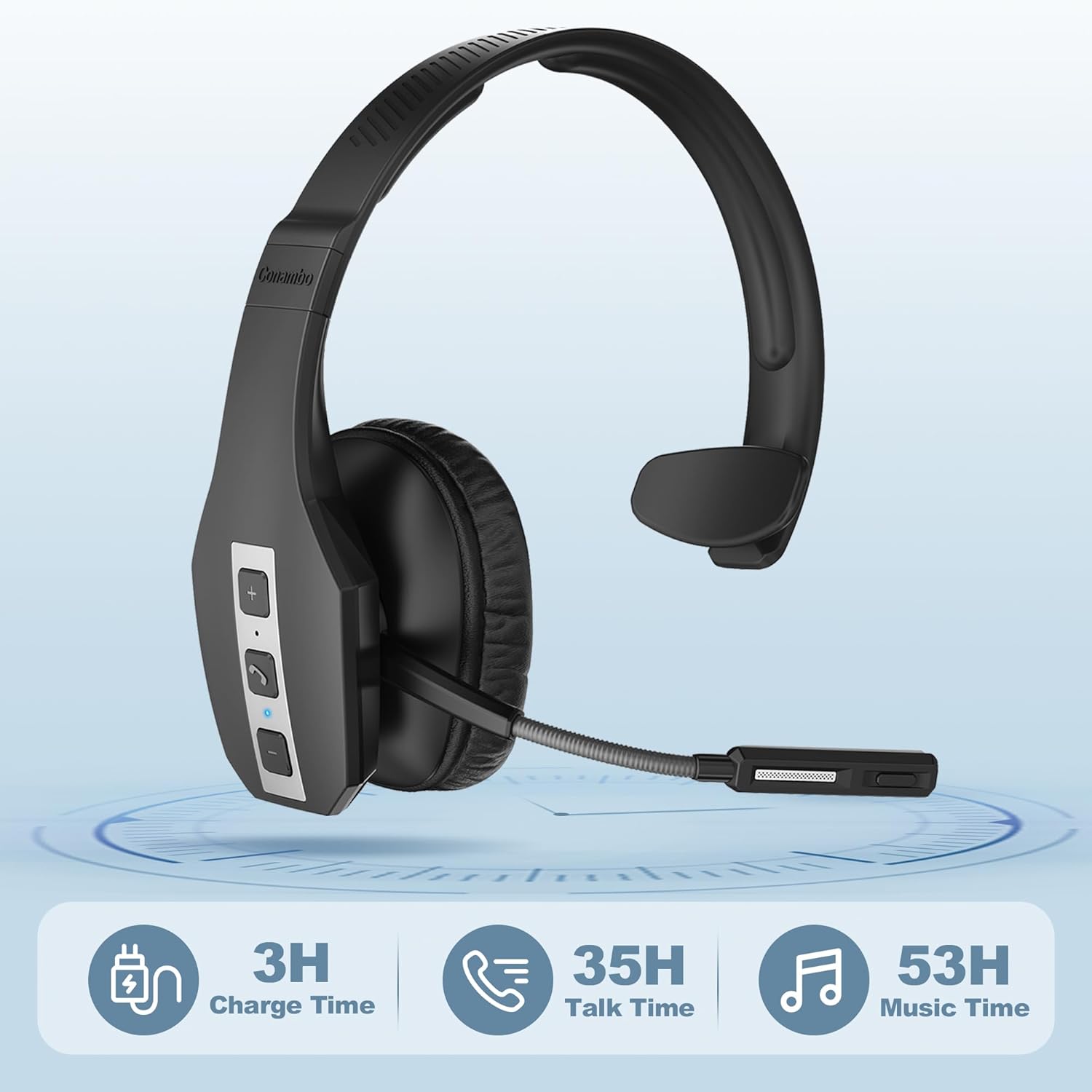
Image: Visual representation of the headset's battery performance, showing 3 hours charge time, 35 hours talk time, and 53 hours music time.
4. സജ്ജീകരണം
4.1 ഹെഡ്സെറ്റ് ചാർജ് ചെയ്യുന്നു
Before first use, fully charge your headset. Connect the provided USB Type-C cable to the headset's charging port and the other end to a USB power source (e.g., computer USB port, wall adapter). The LED indicator will show charging status and turn off when fully charged. A full charge takes approximately 3 hours.

Image: The Conambo JBT600 headset connected to a laptop via its USB-C charging cable.
4.2 ഒരു ഉപകരണവുമായി ജോടിയാക്കൽ
- ഹെഡ്സെറ്റ് ഓഫാണെന്ന് ഉറപ്പാക്കുക.
- Press and hold the Multi-function Button (usually the call button) until the LED indicator flashes blue and red alternately, indicating pairing mode.
- നിങ്ങളുടെ ഉപകരണത്തിൽ (സ്മാർട്ട്ഫോൺ, ടാബ്ലെറ്റ്, കമ്പ്യൂട്ടർ), ബ്ലൂടൂത്ത് പ്രവർത്തനക്ഷമമാക്കി ലഭ്യമായ ഉപകരണങ്ങൾക്കായി തിരയുക.
- Select "JBT600" from the list of found devices.
- കണക്റ്റുചെയ്തുകഴിഞ്ഞാൽ, LED സൂചകം പതുക്കെ നീലയായി മിന്നുന്നു.
4.3 Connecting to Two Devices Simultaneously (Multipoint)
The JBT600 supports multipoint connection, allowing it to be connected to two Bluetooth devices at the same time.
- വിഭാഗം 4.2-ൽ വിവരിച്ചിരിക്കുന്നതുപോലെ ഹെഡ്സെറ്റ് ആദ്യ ഉപകരണവുമായി ജോടിയാക്കുക.
- ആദ്യത്തെ ഉപകരണത്തിൽ Bluetooth പ്രവർത്തനരഹിതമാക്കുക. ഹെഡ്സെറ്റ് വീണ്ടും ജോടിയാക്കൽ മോഡിലേക്ക് പ്രവേശിക്കും.
- രണ്ടാമത്തെ ഉപകരണവുമായി ഹെഡ്സെറ്റ് ജോടിയാക്കുക.
- ആദ്യത്തെ ഉപകരണത്തിൽ ബ്ലൂടൂത്ത് വീണ്ടും പ്രവർത്തനക്ഷമമാക്കുക. ഹെഡ്സെറ്റ് രണ്ട് ഉപകരണങ്ങളിലേക്കും യാന്ത്രികമായി കണക്റ്റ് ചെയ്യണം.

Image: The headset shown with two smartphones, illustrating its ability to connect to two devices simultaneously.
5. പ്രവർത്തന നിർദ്ദേശങ്ങൾ
5.1 അടിസ്ഥാന നിയന്ത്രണങ്ങൾ
ഇയർകപ്പിൽ സ്ഥിതിചെയ്യുന്ന അവബോധജന്യമായ നിയന്ത്രണങ്ങൾ ഹെഡ്സെറ്റിന്റെ സവിശേഷതയാണ്:
- പവർ ഓൺ/ഓഫ്: മൾട്ടി-ഫംഗ്ഷൻ ബട്ടൺ അമർത്തിപ്പിടിക്കുക.
- ഉത്തരം/അവസാന കോൾ: മൾട്ടി-ഫംഗ്ഷൻ ബട്ടൺ ചെറുതായി അമർത്തുക.
- കോൾ നിരസിക്കുക: മൾട്ടി-ഫംഗ്ഷൻ ബട്ടൺ അമർത്തിപ്പിടിക്കുക.
- വോളിയം കൂട്ടുക: '+' ബട്ടൺ അമർത്തുക.
- വോളിയം താഴേക്ക്: '-' ബട്ടൺ അമർത്തുക.
- മൈക്രോഫോൺ നിശബ്ദമാക്കുക/അൺമ്യൂട്ടുചെയ്യുക: Short press the Mute button (often integrated with the call button or a dedicated button).
- വോയ്സ് അസിസ്റ്റന്റ്: Double-press the Multi-function Button (if supported by your device).

ചിത്രം: വിശദമായ ഒരു ചിത്രം view of the control buttons (+, call, -) on the side of the headset.
5.2 Microphone Adjustment
The microphone boom can be rotated 270° to position it optimally for your mouth, ensuring clear voice pickup. Adjust it to be approximately 1-2 inches from your mouth for the best audio quality.
6. പരിപാലനം
Proper maintenance will extend the life of your Conambo JBT600 headset.
- വൃത്തിയാക്കൽ: Use a soft, dry cloth to wipe the headset. For stubborn dirt, a slightly damp cloth can be used, but ensure no moisture enters the charging port or microphone. The medical-grade silicone material is easy to clean.
- സംഭരണം: ഹെഡ്സെറ്റ് നേരിട്ട് സൂര്യപ്രകാശം ഏൽക്കാത്തതും ഉയർന്ന താപനില ഏൽക്കാത്തതുമായ ഒരു തണുത്ത വരണ്ട സ്ഥലത്ത് സൂക്ഷിക്കുക.
- ബാറ്ററി കെയർ: To preserve battery health, avoid fully discharging the headset frequently. If storing for an extended period, charge it to about 50% every few months.
- കഠിനമായ രാസവസ്തുക്കൾ ഒഴിവാക്കുക: Do not use abrasive cleaners, solvents, or strong detergents, as these can damage the headset's finish and internal components.
7. പ്രശ്നപരിഹാരം
If you encounter issues with your Conambo JBT600 headset, refer to the following common solutions:
| പ്രശ്നം | സാധ്യമായ കാരണം | പരിഹാരം |
|---|---|---|
| ഹെഡ്സെറ്റ് ഓണാക്കുന്നില്ല. | കുറഞ്ഞ ബാറ്ററി. | Charge the headset for at least 30 minutes. |
| ഉപകരണവുമായി ജോടിയാക്കാൻ കഴിയില്ല. | ഹെഡ്സെറ്റ് ജോടിയാക്കൽ മോഡിലല്ല; ഉപകരണത്തിൽ ബ്ലൂടൂത്ത് ഓഫാണ്; ഉപകരണം വളരെ അകലെയാണ്. | Ensure headset is in pairing mode (flashing blue/red). Turn on device Bluetooth. Move headset closer to device (within 21m). |
| ശബ്ദമില്ല അല്ലെങ്കിൽ ശബ്ദ നിലവാരം മോശമാണ്. | ശബ്ദം വളരെ കുറവാണ്; ഹെഡ്സെറ്റ് ഓഡിയോ ഔട്ട്പുട്ടായി തിരഞ്ഞെടുത്തിട്ടില്ല; തടസ്സം. | Increase headset and device volume. Check device's audio output settings. Move away from other wireless devices. |
| മൈക്രോഫോൺ പ്രവർത്തിക്കുന്നില്ല. | Microphone muted; incorrect microphone selected on device. | Unmute the microphone. Check device's input settings to ensure JBT600 is selected. |
| ഹെഡ്സെറ്റ് ഇടയ്ക്കിടെ വിച്ഛേദിക്കപ്പെടുന്നു. | Out of range; low battery; interference. | Stay within 21m range. Charge the headset. Reduce wireless interference. |
If the problem persists after trying these solutions, please contact Conambo customer support for further assistance.
8 സ്പെസിഫിക്കേഷനുകൾ
| ഫീച്ചർ | വിശദാംശങ്ങൾ |
|---|---|
| മോഡലിൻ്റെ പേര് | ജെ.ബി.ടി 600 |
| കണക്റ്റിവിറ്റി ടെക്നോളജി | വയർലെസ്സ് (ബ്ലൂടൂത്ത് 5.1) |
| വയർലെസ് കമ്മ്യൂണിക്കേഷൻ ടെക്നോളജി | ബ്ലൂടൂത്ത് |
| ബ്ലൂടൂത്ത് പതിപ്പ് | 5.1 |
| ബ്ലൂടൂത്ത് ശ്രേണി | 21 മീറ്റർ (69 അടി) |
| ബാറ്ററി ലൈഫ് (സംവാദ സമയം) | 35 മണിക്കൂർ വരെ |
| ചാർജിംഗ് സമയം | 3 മണിക്കൂർ |
| ഹെഡ്ഫോണുകൾ ജാക്ക് | ടൈപ്പ്-സി |
| ശബ്ദ നിയന്ത്രണം | Active Noise Cancellation (CVC 8.0, ENC 2+1 Mic) |
| മെറ്റീരിയൽ | Faux Leather, Plastic, Stainless Steel, Medical Grade Silicone |
| ഇനത്തിൻ്റെ ഭാരം | 5.8 ഔൺസ് (164.4 ഗ്രാം) |
| ഉൽപ്പന്ന അളവുകൾ | 6.5 x 7 x 2.48 ഇഞ്ച് |
| യു.പി.സി | 644925633525 |
9. വാറൻ്റിയും പിന്തുണയും
Conambo is committed to providing high-quality products and excellent customer service. For warranty information and support, please refer to the documentation included with your purchase or visit the official Conambo brand store on Amazon.
Our professional technology team is available to assist you within 24 hours for any inquiries or issues you may encounter.
Visit the Conambo Store: Conambo Official Store

