1. ആമുഖം
The MiLESEEY DP20 Bilateral Laser Distance Meter is a professional-grade measuring tool designed for accuracy and efficiency in various applications. This device features patented coaxial optical technology, multiple measurement functions, and a durable design, making it suitable for both professional and DIY use. This manual provides comprehensive instructions for its safe and effective operation.

Figure 1: MiLESEEY DP20 Bilateral Laser Distance Meter
2 സുരക്ഷാ വിവരങ്ങൾ
ഉപകരണം ഉപയോഗിക്കുന്നതിന് മുമ്പ് എല്ലാ സുരക്ഷാ നിർദ്ദേശങ്ങളും വായിച്ച് മനസ്സിലാക്കുക. ഈ നിർദ്ദേശങ്ങൾ പാലിക്കുന്നതിൽ പരാജയപ്പെടുന്നത് ലേസർ വികിരണത്തിന് വിധേയമാകൽ, വൈദ്യുതാഘാതം, തീപിടുത്തം അല്ലെങ്കിൽ ഗുരുതരമായ പരിക്ക് എന്നിവയ്ക്ക് കാരണമായേക്കാം.
2.1 പൊതു സുരക്ഷ
- ഉപകരണം കുട്ടികൾക്ക് ലഭ്യമാകാതെ സൂക്ഷിക്കുക.
- Do not attempt to modify or disassemble the device. Repairs should only be performed by authorized personnel.
- Avoid using the device in explosive atmospheres or near flammable materials.
- തീവ്രമായ താപനില, ഈർപ്പം, ശക്തമായ വൈബ്രേഷനുകൾ എന്നിവയിൽ നിന്ന് ഉപകരണത്തെ സംരക്ഷിക്കുക.
2.2 ലേസർ സുരക്ഷ
WARNING: This product emits Class 2 laser radiation. Avoid direct eye exposure to the laser beam.
- ലേസർ ബീമിലേക്ക് നേരിട്ട് നോക്കരുത്.
- ആളുകളുടെയോ മൃഗങ്ങളുടെയോ നേരെ ലേസർ ബീം ചൂണ്ടരുത്.
- ഒപ്റ്റിക്കൽ ഉപകരണങ്ങൾ (ഉദാ: ബൈനോക്കുലറുകൾ, ദൂരദർശിനികൾ) ഉപയോഗിക്കരുത്. view ലേസർ ബീം.
- ഉപയോഗത്തിലില്ലാത്തപ്പോൾ ലേസർ ഓഫ് ചെയ്തിട്ടുണ്ടെന്ന് ഉറപ്പാക്കുക.
3. പാക്കേജ് ഉള്ളടക്കം
പാക്കേജിൽ എല്ലാ ഇനങ്ങളും ഉണ്ടെന്ന് ഉറപ്പാക്കുക:
- MiLESEEY DP20 Bilateral Laser Distance Meter x1
- Hard Case x1
- ടൈപ്പ്-സി ചാർജിംഗ് കേബിൾ x1
- ഉപയോക്തൃ മാനുവൽ x1
- ഹാൻഡ് സ്ട്രാപ്പ് x1

Figure 2: Contents included in the DP20 package
4. ഉൽപ്പന്നം കഴിഞ്ഞുview
The MiLESEEY DP20 is engineered for precision and ease of use. Key features include:
- Bilateral Measurement: Allows measurement between two points from any position along the measurement line, significantly speeding up tasks.
- Patented Coaxial Optical Technology: Ensures both laser beams share a common geometric axis, eliminating measurement inaccuracies.
- ഒന്നിലധികം അളവ് പ്രവർത്തനങ്ങൾ: Includes single, continuous, area, volume, automatic horizontal/vertical height, and line segment division.
- OLED Display with Big Text Mode: Provides clear readability of measurements, even in challenging lighting conditions.
- ഈടുനിൽക്കുന്നതും ഒതുക്കമുള്ളതുമായ ഡിസൈൻ: Made from aerospace-grade magnesium-aluminum alloy, offering robustness and a comfortable grip.
- റീചാർജ് ചെയ്യാവുന്ന ബാറ്ററി: Integrated 1000mAh lithium battery with USB-C charging for extended use.
4.1 Components and Display
Familiarize yourself with the device's components and display interface.
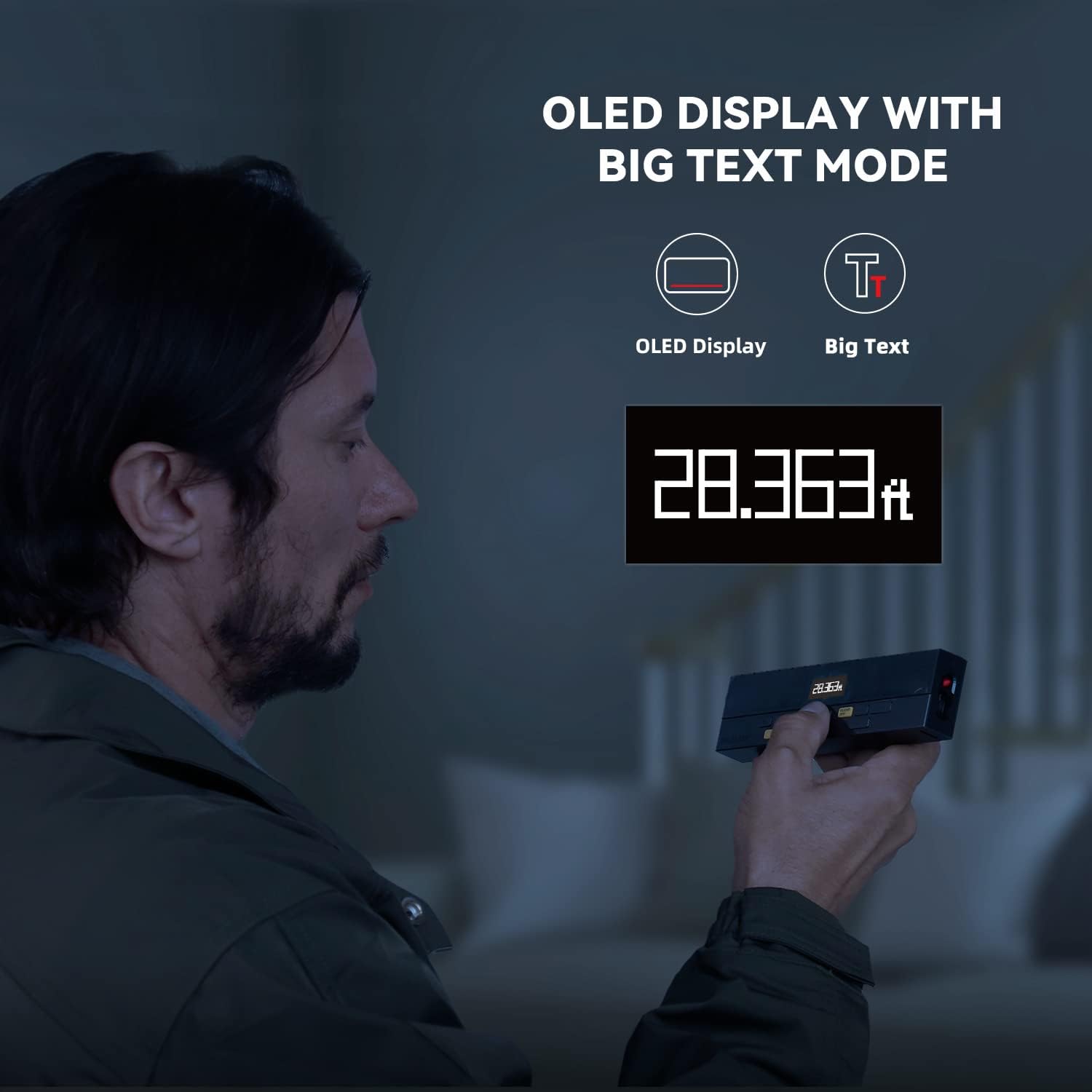
Figure 3: Clear OLED Display with Big Text Mode for enhanced readability.

Figure 4: Illustration of the patented coaxial optical design for precise measurements.
5. സജ്ജീകരണം
5.1 ബാറ്ററി ചാർജ് ചെയ്യുന്നു
The DP20 comes with a built-in 1000mAh lithium battery. Before first use, fully charge the device using the provided Type-C charging cable.
- Connect the Type-C cable to the charging port on the device.
- കേബിളിന്റെ മറ്റേ അറ്റം ഒരു USB പവർ അഡാപ്റ്ററുമായി (ഉൾപ്പെടുത്തിയിട്ടില്ല) അല്ലെങ്കിൽ ഒരു കമ്പ്യൂട്ടർ USB പോർട്ടുമായി ബന്ധിപ്പിക്കുക.
- The battery indicator on the display will show charging status. A full charge typically takes about 2 hours.

Figure 5: Charging the DP20 via USB-C port.
5.2 പവർ ഓൺ/ഓഫ്
- പവർ ഓണാക്കാൻ, അമർത്തുക MEAS ബട്ടൺ.
- To power off, long-press the ക്ലിയർ/ഓഫ് button. The device will also automatically power off after a period of inactivity to conserve battery.
6 ഓപ്പറേറ്റിംഗ് മോഡുകൾ
The DP20 offers a variety of measurement modes to suit different needs. Use the മോഡ് button to cycle through the available functions.
6.1 Single and Continuous Measurement
For basic distance measurements.
- അമർത്തുക MEAS button once for a single measurement.
- ദീർഘനേരം അമർത്തുക MEAS button to enter continuous measurement mode, which also displays minimum and maximum distances. Press MEAS വീണ്ടും നിർത്താൻ.
6.2 Bilateral and One-Way Measurement
The DP20 allows switching between bilateral (two-way) and one-way laser measurement.
- Use the dedicated button (often labeled ടി/ആർ or similar, refer to device markings) to switch between bilateral and one-way laser modes.
- Bilateral mode measures the distance between two points by positioning the device anywhere along the line.
- One-way mode measures from the device to a single target point.
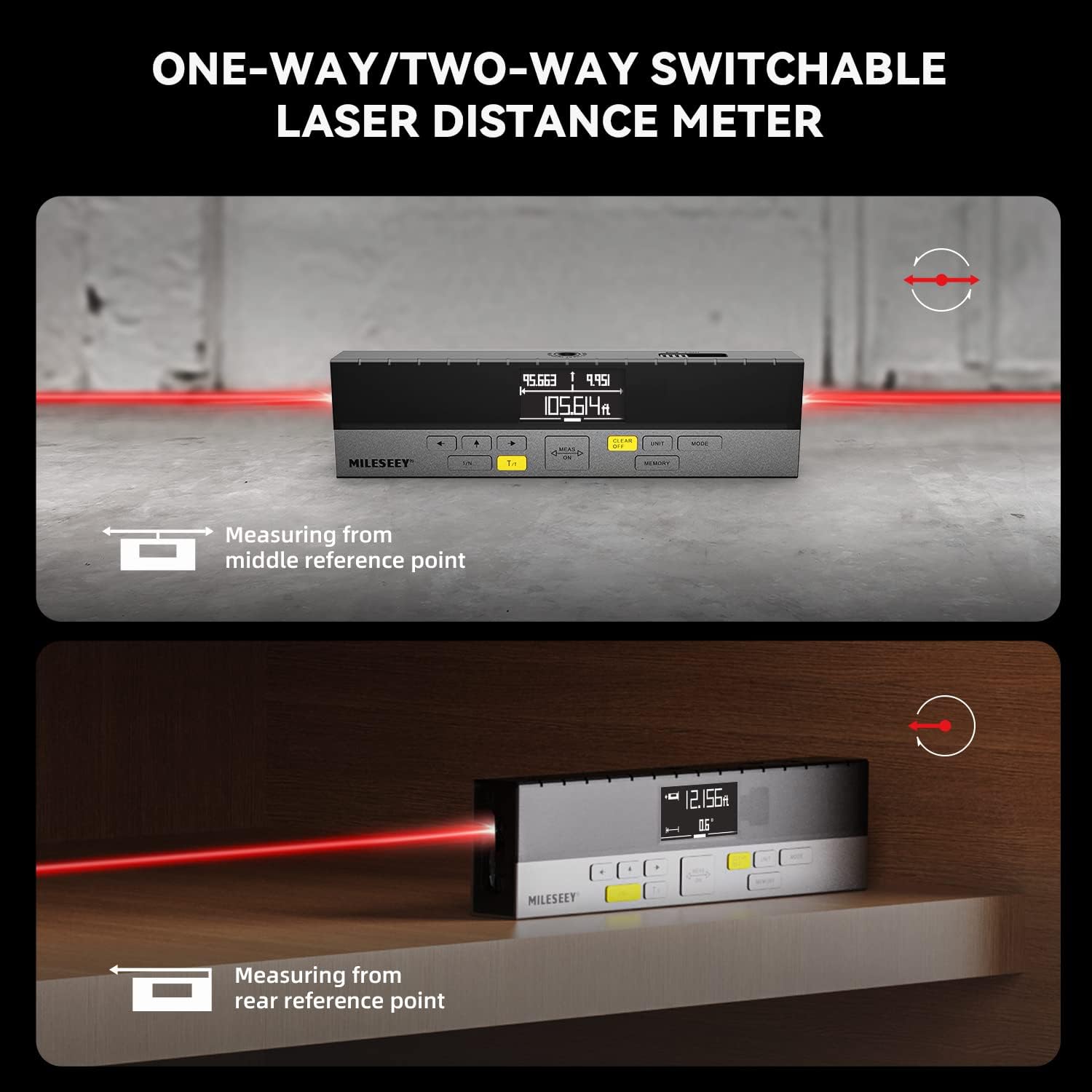
Figure 6: Demonstrating one-way and two-way measurement capabilities.
6.3 വിസ്തീർണ്ണവും വോളിയം അളക്കലും
To calculate area or volume:
- Select the Area or Volume mode using the മോഡ് ബട്ടൺ.
- Follow the on-screen prompts to take the required number of measurements (e.g., length and width for area; length, width, and height for volume).
- The device will automatically calculate and display the result.
6.4 Pythagorean Measurement
For indirect measurements of height or distance where direct measurement is not possible.
- Select the Pythagorean mode using the മോഡ് ബട്ടൺ.
- Follow the on-screen prompts to take the necessary measurements (e.g., hypotenuse and one leg for height).
- The device will calculate and display the unknown dimension.
6.5 Line Segment Division (Staking Out)
This function divides a line segment into equal smaller segments, useful for tasks like installing multiple items at consistent intervals.
- Enter the Line Segment Division mode (often labeled 1/N).
- Set the number of desired segments (N).
- Measure the total length of the line. The device will then guide you to the division points.
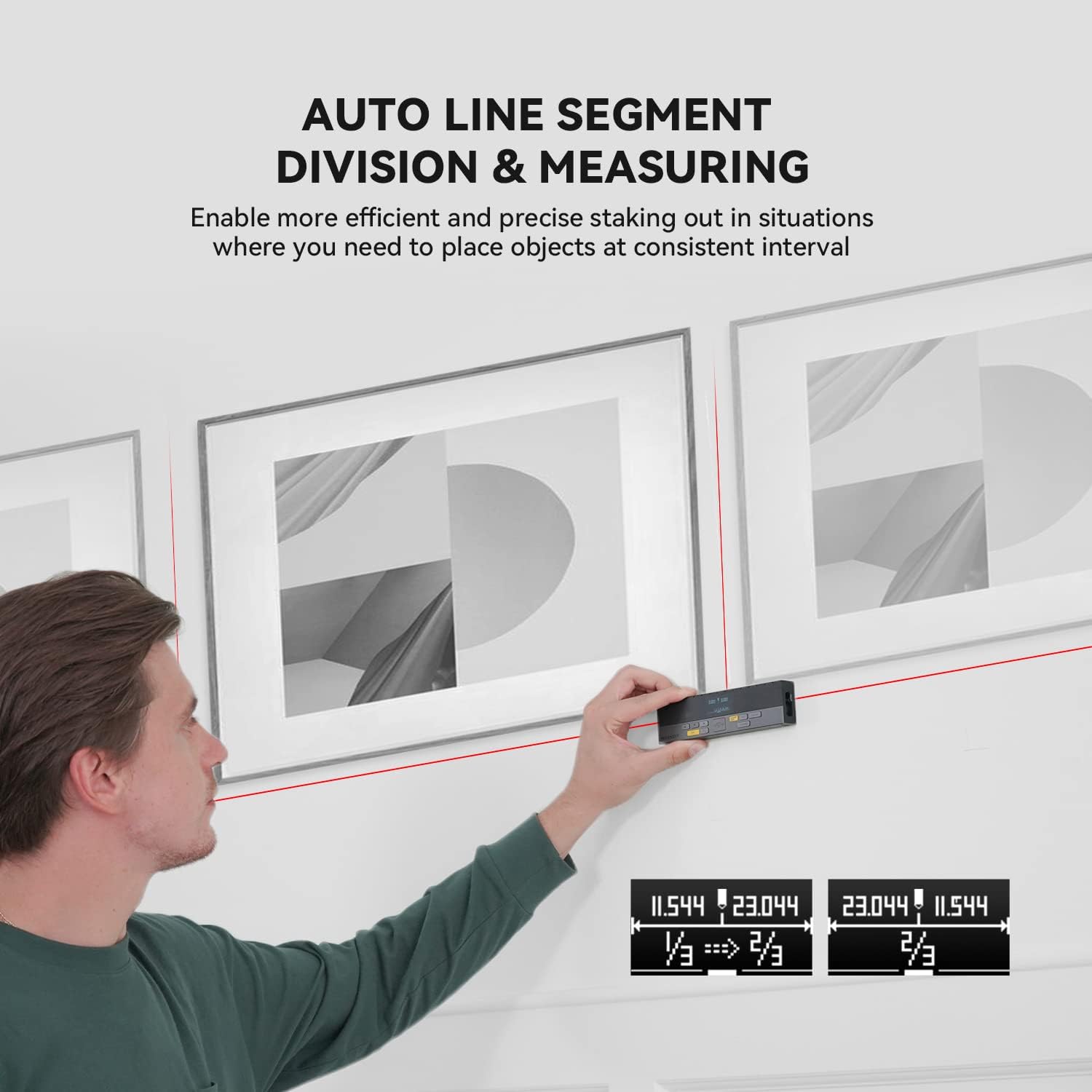
Figure 7: Using the auto line segment division feature for consistent spacing.
6.6 Digital Angle Level
The integrated digital angle level provides real-time angle measurements.
- The device automatically displays the current tilt angle.
- This feature can be used in conjunction with other measurement modes for more complex calculations.

Figure 8: The digital tilt sensor provides accurate angle readings.
7. വിപുലമായ സവിശേഷതകൾ
7.1 Bluetooth Connectivity and App Synchronization
The DP20 supports Bluetooth connectivity, allowing it to pair with the
അനുബന്ധ രേഖകൾ - DP20
 |
MileSeey S6 ലേസർ ഡിസ്റ്റൻസ് മീറ്റർ യൂസർ മാനുവൽ MileSeey S6 ലേസർ ഡിസ്റ്റൻസ് മീറ്ററിനായുള്ള സമഗ്രമായ ഉപയോക്തൃ മാനുവൽ, സുരക്ഷാ നിർദ്ദേശങ്ങൾ, പ്രവർത്തനം, അളക്കൽ പ്രവർത്തനങ്ങൾ (സിംഗിൾ, തുടർച്ചയായ, ഏരിയ, വോളിയം, പൈതഗോറിയൻ), ബ്ലൂടൂത്ത് കണക്റ്റിവിറ്റി, ട്രബിൾഷൂട്ടിംഗ്, സാങ്കേതിക സവിശേഷതകൾ എന്നിവ ഉൾക്കൊള്ളുന്നു. കൃത്യമായ ദൂര അളവുകൾക്കായി S6 എങ്ങനെ ഉപയോഗിക്കാമെന്ന് മനസിലാക്കുക. |
 |
MILESEY S6 ലേസർ മെഷർ യൂസർ മാനുവൽ MILESEEY S6 ലേസർ മെഷർ ഉപയോക്തൃ മാനുവൽ, S6 ലേസർ ഡിസ്റ്റൻസ് മീറ്റർ പ്രവർത്തിപ്പിക്കുന്നതിനുള്ള വിശദമായ നിർദ്ദേശങ്ങൾ നൽകുന്നു, ദൂരം, വിസ്തീർണ്ണം, വോളിയം, പൈതഗോറിയൻ അളവുകൾ എന്നിവയുൾപ്പെടെ മെച്ചപ്പെടുത്തിയ അളവെടുപ്പിനും ഉപയോക്തൃ അനുഭവത്തിനുമായി അതിന്റെ 8 ഫംഗ്ഷനുകൾ എടുത്തുകാണിക്കുന്നു, കൂടാതെ ട്രബിൾഷൂട്ടിംഗും സാങ്കേതിക സവിശേഷതകളും ഇതിൽ ഉൾപ്പെടുന്നു. |
 |
Mileseey DP20 Series Laser Distance Meter Quick Start Guide Quick start guide for the Mileseey DP20 Series Laser Distance Meter, detailing product overview, technical specifications, and operation instructions for various measurement modes. |
 |
MILESEY S2 ലേസർ ഡിസ്റ്റൻസ് മീറ്റർ ക്വിക്ക് സ്റ്റാർട്ട് ഗൈഡ് MILESEEY S2 ലേസർ ഡിസ്റ്റൻസ് മീറ്ററിലേക്കുള്ള ഒരു സംക്ഷിപ്ത ഗൈഡ്, അതിന്റെ സവിശേഷതകൾ, പ്രവർത്തനം, സുരക്ഷാ നിർദ്ദേശങ്ങൾ, ട്രബിൾഷൂട്ടിംഗ്, സ്പെസിഫിക്കേഷനുകൾ എന്നിവ ഉൾക്കൊള്ളുന്നു. ദൂരം, വിസ്തീർണ്ണം, വോളിയം എന്നിവ എങ്ങനെ അളക്കാമെന്നും പൈതഗോറിയൻ ഫംഗ്ഷനുകൾ എങ്ങനെ ഉപയോഗിക്കാമെന്നും മനസ്സിലാക്കുക. |
 |
Mileseey X5 Laser Distance Meter User Manual Comprehensive user manual for the Mileseey X5 Laser Distance Meter, covering its features, operation, measurement modes, and troubleshooting. |
 |
MILESEEY DP20 PRO സീരീസ് ലേസർ ഡിസ്റ്റൻസ് മീറ്റർ ഉപയോക്തൃ ഗൈഡ് MILESEEY DP20 PRO സീരീസ് ലേസർ ഡിസ്റ്റൻസ് മീറ്ററിനായുള്ള സമഗ്രമായ ഉപയോക്തൃ ഗൈഡ്, ഉൽപ്പന്നത്തെക്കുറിച്ച് കൂടുതൽ വിശദമായി പ്രതിപാദിക്കുന്നു.view, സുരക്ഷാ നിർദ്ദേശങ്ങൾ, സാങ്കേതിക സവിശേഷതകൾ, വിവിധ അളവെടുപ്പ് മോഡുകൾക്കുള്ള പ്രവർത്തന നിർദ്ദേശങ്ങൾ (സിംഗിൾ, തുടർച്ചയായ, ഏരിയ, വോളിയം, ഓട്ടോ ലെവൽ, ഓട്ടോ ഉയരം), ബ്ലൂടൂത്ത് കണക്റ്റിവിറ്റി, ആപ്പ് ഇന്റഗ്രേഷൻ, ട്രബിൾഷൂട്ടിംഗ്. |