1. ആമുഖം
The KKnoon ET618 is a versatile handheld device combining the functionalities of a network cable tester and a digital multimeter. It is designed for professionals and enthusiasts in telecommunications, network maintenance, and electrical engineering. This device supports various cable types and offers multiple testing functions, including cable tracing, length measurement, Power over Ethernet (PoE) testing, and standard multimeter measurements. Its compact design and comprehensive features make it a practical tool for laboratories, factories, and field work.
2. ഉൽപ്പന്ന ഘടകങ്ങൾ
പാക്കേജിൽ ഇനിപ്പറയുന്ന ഇനങ്ങൾ ഉൾപ്പെടുന്നു:
- ET618 Main Unit (Network Cable Tester & Multimeter)
- Wire Tracker Receiver
- Remote ID Units (7 pieces)
- ടെസ്റ്റ് ലീഡുകൾ (ചുവപ്പും കറുപ്പും)
- Alligator Clip Test Leads
- RJ45 പാച്ച് കേബിൾ
- യുഎസ്ബി ചാർജിംഗ് കേബിൾ
- ചുമക്കുന്ന ബാഗ്
- ഉപയോക്തൃ മാനുവൽ

3. സജ്ജീകരണം
Before first use, ensure the device is adequately charged. The ET618 features a rechargeable lithium battery.
3.1 ഉപകരണം ചാർജ് ചെയ്യുന്നു
- Connect the provided USB charging cable to the charging port on the ET618 main unit.
- USB കേബിളിന്റെ മറ്റേ അറ്റം ഒരു സ്റ്റാൻഡേർഡ് USB പവർ അഡാപ്റ്ററുമായി (ഉൾപ്പെടുത്തിയിട്ടില്ല) അല്ലെങ്കിൽ ഒരു കമ്പ്യൂട്ടറിന്റെ USB പോർട്ടുമായി ബന്ധിപ്പിക്കുക.
- എൽസിഡിയിലെ ബാറ്ററി ഇൻഡിക്കേറ്റർ ചാർജിംഗ് നില കാണിക്കും.

4. പ്രവർത്തന നിർദ്ദേശങ്ങൾ
The ET618 offers various modes accessible via the 'MODE' button. Press the 'MODE' button to cycle through different functions.
4.1 Network Cable Testing (Scan Mode)
This mode is used to check the continuity and wiring sequence of network cables (RJ45).
- Connect one end of the network cable to the 'MAIN' port on the ET618 main unit.
- Connect the other end of the network cable to the remote unit or directly to the 'LOOP' port for loopback testing.
- Select the 'TEST' or 'SCAN' mode using the 'MODE' button. The display will show the wiring sequence for each pin.
- Observe the display for any open circuits, short circuits, or crossed pairs.
4.2 കേബിൾ നീളം അളക്കൽ
The device can measure the length of network cables.
- Ensure the cable is disconnected from any network devices.
- Connect one end of the cable to the 'MAIN' port.
- Select the 'LENGTH' mode using the 'MODE' button.
- The display will show the cable length in meters or feet.

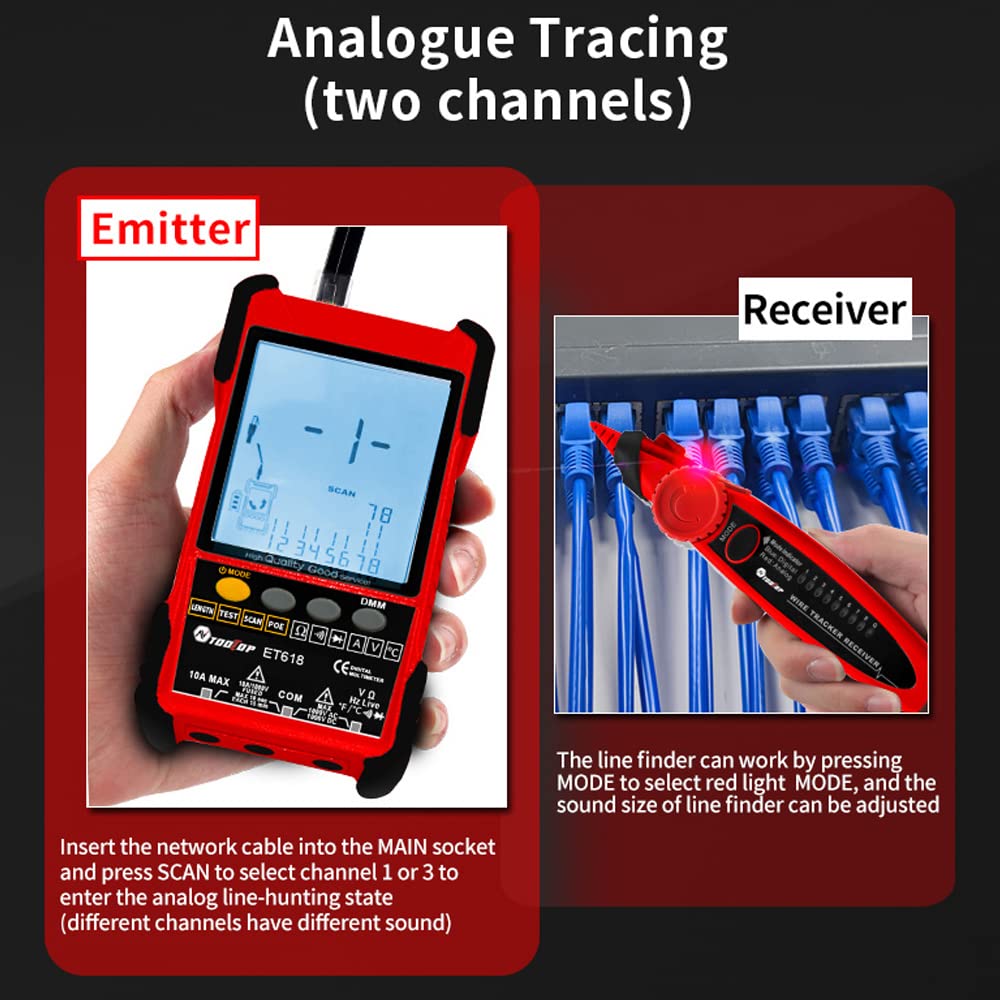
4.3 Wire Tracing (Analog/Digital Search)
Use the wire tracker receiver to locate specific cables within a bundle or wall.
- Connect the network cable to the 'MAIN' socket on the ET618 main unit.
- On the wire tracker receiver, press the 'MODE' button to select either 'Blue: Digital' or 'Red: Analog' tracing mode.
- Use the receiver to scan along the cable path. The receiver will emit an audible tone, and indicator lights will illuminate when near the target cable.
- Adjust the sensitivity knob on the receiver for precise tracing.

4.4 POE Test
This function tests for Power over Ethernet (PoE) presence and voltage.
- Connect the network cable from the PoE source to the 'POE' port on the ET618 main unit.
- Select the 'POE' mode using the 'MODE' button.
- The display will show the PoE voltage and identify which pins are providing power.
4.5 Remote ID Mapping
Use the remote ID units to identify multiple network cables simultaneously.
- Connect one end of each network cable to a numbered remote ID unit.
- Connect the other end of the network cables to the 'MAIN' port of the ET618 main unit, one by one.
- In 'ID' mode, the ET618 will display the corresponding remote ID number, allowing for easy identification of cables.

4.6 Multimeter Functions (DMM)
The ET618 includes a digital multimeter for various electrical measurements.
- Connect the red and black test leads to the appropriate input jacks on the ET618.
- Press the 'DMM' button to enter multimeter mode, then use the 'MODE' button to select the desired measurement function.
4.6.1 ഡിസി വോളിയംtagഇ അളവ്
- ഡിസി വോളിയം തിരഞ്ഞെടുക്കുകtagഇ മോഡ്.
- Connect the test leads across the DC voltagഇ ഉറവിടം.
4.6.2 എസി വോള്യംtagഇ അളവ്
- എസി വോളിയം തിരഞ്ഞെടുക്കുകtagഇ മോഡ്.
- എസി വോള്യത്തിലുടനീളം ടെസ്റ്റ് ലീഡുകൾ ബന്ധിപ്പിക്കുക.tagഇ ഉറവിടം.
4.6.3 പ്രതിരോധം അളക്കൽ
- Select Resistance mode.
- Ensure the circuit is de-energized. Connect the test leads across the component to measure resistance.
4.6.4 ഡയോഡ് ടെസ്റ്റ്
- Select Diode test mode.
- ഡയോഡിലുടനീളം ടെസ്റ്റ് ലീഡുകൾ ബന്ധിപ്പിക്കുക. ഡിസ്പ്ലേ ഫോർവേഡ് വോളിയം കാണിക്കും.tagഇ ഡ്രോപ്പ്.
4.6.5 തുടർച്ച പരിശോധന
- Select Continuity mode.
- Connect the test leads across the circuit or component. An audible beep indicates continuity.
4.6.6 താപനില അളക്കൽ
- Connect the temperature probe (if included and compatible) to the appropriate inputs.
- Select Temperature mode.
- Place the probe at the point of measurement.
4.6.7 നിലവിലെ അളവ്
- Select Current mode.
- Break the circuit and connect the meter in series with the load.
4.6.8 നോൺ-കോൺടാക്റ്റ് വോളിയംtagഇ (NCV) കണ്ടെത്തൽ
- Select NCV mode.
- Bring the top of the ET618 close to an AC voltage source. The device will indicate the presence of voltagനേരിട്ട് ബന്ധപ്പെടാതെ ഇ.


5. പരിപാലനം
Proper maintenance ensures the longevity and accuracy of your ET618.
- വൃത്തിയാക്കൽ: ഉപകരണം വൃത്തിയാക്കാൻ മൃദുവായതും ഉണങ്ങിയതുമായ തുണി ഉപയോഗിക്കുക. അബ്രസീവ് ക്ലീനറുകളോ ലായകങ്ങളോ ഉപയോഗിക്കരുത്.
- സംഭരണം: Store the device in its carrying bag in a cool, dry place away from direct sunlight and extreme temperatures.
- ബാറ്ററി കെയർ: Recharge the battery regularly, even if not in frequent use, to maintain battery health. Avoid fully discharging the battery for extended periods.
- ടെസ്റ്റ് ലീഡുകൾ: Inspect test leads for any damage before each use. Replace damaged leads immediately.
6. പ്രശ്നപരിഹാരം
If you encounter issues with your ET618, refer to the following common problems and solutions:
| പ്രശ്നം | സാധ്യമായ കാരണം | പരിഹാരം |
|---|---|---|
| ഉപകരണം പവർ ഓണാക്കുന്നില്ല | Low battery or discharged battery | നൽകിയിരിക്കുന്ന USB കേബിൾ ഉപയോഗിച്ച് ഉപകരണം ചാർജ് ചെയ്യുക. |
| Inaccurate cable length measurement | Cable not properly connected or damaged cable | Ensure secure connection. Test cable for faults. |
| Wire tracing signal is weak or absent | Incorrect mode selected or low receiver battery | Verify tracing mode (Analog/Digital). Check receiver battery. Adjust sensitivity. |
| Multimeter readings are unstable or incorrect | Loose test lead connection or damaged test leads | Ensure test leads are firmly connected. Inspect and replace damaged leads. |
7 സ്പെസിഫിക്കേഷനുകൾ
Key technical specifications for the KKnoon ET618:
| ഫീച്ചർ | സ്പെസിഫിക്കേഷൻ |
|---|---|
| ബ്രാൻഡ് | കെ.നൂൺ |
| മോഡൽ | ET618 |
| പവർ ഉറവിടം | ബാറ്ററി പവർ (റീചാർജ് ചെയ്യാവുന്ന ലിഥിയം ബാറ്ററി) |
| മിനി. പ്രവർത്തന വോളിയംtage | 400 മില്ലിവോൾട്ട് |
| ഉയർന്ന താപനില റേറ്റിംഗ് | 1000 ഡിഗ്രി സെൽഷ്യസ് |
| നിറം | ചുവപ്പ് |
| പാക്കേജ് അളവുകൾ | 10.24 x 6.81 x 2.52 ഇഞ്ച് |
| ഭാരം | 1.72 പൗണ്ട് |
8. വാറൻ്റിയും പിന്തുണയും
For warranty information and technical support, please refer to the documentation provided with your purchase or contact KKnoon customer service directly. Keep your purchase receipt as proof of purchase for any warranty claims.
