1. ആമുഖം
Thank you for choosing the KREAFUNK aMAJOR2 Portable Bluetooth Speaker. This manual provides essential information for the proper setup, operation, and maintenance of your speaker. Please read these instructions carefully before use and retain them for future reference.

ചിത്രം 1.1: മുൻഭാഗം view of the KREAFUNK aMAJOR2 Portable Bluetooth Speaker.
2 സുരക്ഷാ വിവരങ്ങൾ
- തീവ്രമായ താപനിലയിലോ നേരിട്ടുള്ള സൂര്യപ്രകാശത്തിലോ സ്പീക്കറിനെ ദീർഘനേരം തുറന്നുകാട്ടരുത്.
- സ്പീക്കറെ ശക്തമായ ആഘാതങ്ങൾക്ക് വിധേയമാക്കുകയോ താഴെയിടുകയോ ചെയ്യുന്നത് ഒഴിവാക്കുക.
- സ്പീക്കർ സ്വയം ഡിസ്അസംബ്ലിംഗ് ചെയ്യുകയോ നന്നാക്കുകയോ പരിഷ്കരിക്കുകയോ ചെയ്യരുത്. ഏതെങ്കിലും അറ്റകുറ്റപ്പണികൾക്ക് അംഗീകൃത സേവന ഉദ്യോഗസ്ഥരെ ബന്ധപ്പെടുക.
- Keep the speaker away from water and liquids, despite its IPX5 rating, to prevent damage to internal components. The IPX5 rating indicates resistance to splashing water, not submersion.
- നൽകിയിരിക്കുന്ന ചാർജിംഗ് കേബിൾ അല്ലെങ്കിൽ സാക്ഷ്യപ്പെടുത്തിയ തത്തുല്യമായത് മാത്രം ഉപയോഗിക്കുക.
- പ്രാദേശിക നിയന്ത്രണങ്ങൾ അനുസരിച്ച് ബാറ്ററിയും സ്പീക്കറും നശിപ്പിക്കുക. ബാറ്ററികൾ തീയിൽ നിക്ഷേപിക്കരുത്.
3. പാക്കേജ് ഉള്ളടക്കം
പാക്കേജിൽ എല്ലാ ഇനങ്ങളും ഉണ്ടെന്ന് ഉറപ്പാക്കുക:
- KREAFUNK aMAJOR2 Portable Bluetooth Speaker
- ചാർജിംഗ് കേബിൾ (USB)
- ഉപയോക്തൃ മാനുവൽ (ഈ പ്രമാണം)
4. ഉൽപ്പന്നം കഴിഞ്ഞുview
സ്പീക്കറിന്റെ ഘടകങ്ങളും നിയന്ത്രണങ്ങളും സ്വയം പരിചയപ്പെടുത്തുക.

ചിത്രം 4.1: ആംഗിൾഡ് view of the speaker, highlighting the top control panel and leather handle.

ചിത്രം 4.2: മുകളിൽ view of the speaker, detailing the power, volume up, and volume down buttons.
നിയന്ത്രണങ്ങൾ:
- പവർ ബട്ടൺ: Press and hold to turn the speaker on or off. Press briefly to play/pause music.
- വോളിയം കൂട്ടുക (+): വോളിയം കൂട്ടാൻ അമർത്തുക.
- വോളിയം ഡൗൺ (-): വോളിയം കുറയ്ക്കാൻ അമർത്തുക.
- LED സൂചകം: പവർ സ്റ്റാറ്റസ്, ചാർജിംഗ് സ്റ്റാറ്റസ്, ബ്ലൂടൂത്ത് പെയറിംഗ് സ്റ്റാറ്റസ് എന്നിവ കാണിക്കുന്നു.
- ചാർജിംഗ് പോർട്ട്: Located on the back or bottom, for connecting the USB charging cable.
- Leather Handle: സൗകര്യപ്രദമായ പോർട്ടബിലിറ്റിക്ക് വേണ്ടി.
5. സജ്ജീകരണം
5.1 സ്പീക്കർ ചാർജ് ചെയ്യുന്നു
- നൽകിയിരിക്കുന്ന USB ചാർജിംഗ് കേബിൾ സ്പീക്കറിന്റെ ചാർജിംഗ് പോർട്ടുമായി ബന്ധിപ്പിക്കുക.
- USB കേബിളിന്റെ മറ്റേ അറ്റം അനുയോജ്യമായ ഒരു USB പവർ അഡാപ്റ്ററുമായി (ഉൾപ്പെടുത്തിയിട്ടില്ല) അല്ലെങ്കിൽ കമ്പ്യൂട്ടറിന്റെ USB പോർട്ടുമായി ബന്ധിപ്പിക്കുക.
- The LED indicator will show the charging status. A full charge typically takes 4-5 hours.
- Once fully charged, the LED indicator will change (refer to LED status in section 4). Disconnect the charging cable.
The speaker provides up to 30 hours of wireless play on a full charge.
5.2 പ്രാരംഭ ബ്ലൂടൂത്ത് ജോടിയാക്കൽ
- സ്പീക്കർ പൂർണ്ണമായി ചാർജ്ജ് ചെയ്തിട്ടുണ്ടെന്ന് ഉറപ്പാക്കുക.
- Press and hold the Power Button until the speaker turns on and the LED indicator begins to flash, indicating it is in pairing mode.
- നിങ്ങളുടെ ഉപകരണത്തിൽ (സ്മാർട്ട്ഫോൺ, ടാബ്ലെറ്റ്, ലാപ്ടോപ്പ്), ബ്ലൂടൂത്ത് പ്രവർത്തനക്ഷമമാക്കി ലഭ്യമായ ഉപകരണങ്ങൾക്കായി തിരയുക.
- Select "KREAFUNK aMAJOR" from the list of devices.
- Once paired, the LED indicator will stop flashing and remain solid, and you may hear a confirmation sound.
- പവർ ഓൺ ചെയ്യുമ്പോൾ, സ്പീക്കർ അവസാനം ജോടിയാക്കിയ ഉപകരണത്തിലേക്ക് വീണ്ടും കണക്റ്റുചെയ്യാൻ യാന്ത്രികമായി ശ്രമിക്കും.
6. പ്രവർത്തന നിർദ്ദേശങ്ങൾ
6.1 പവർ ഓൺ/ഓഫ്
- പവർ ഓണാക്കാൻ: Press and hold the Power Button for approximately 2-3 seconds.
- പവർ ഓഫ് ചെയ്യാൻ: Press and hold the Power Button for approximately 2-3 seconds.
6.2 മ്യൂസിക് പ്ലേബാക്ക്
- പ്ലേ/താൽക്കാലികമായി നിർത്തുക: Briefly press the Power Button.
- വോളിയം കൂട്ടുക: Press the (+) button.
- വോളിയം താഴേക്ക്: Press the (-) button.
- അടുത്ത ട്രാക്ക്: (Functionality may vary by device) Typically, a long press on the (+) button or double-press on the Power button. Refer to your device's Bluetooth controls.
- മുമ്പത്തെ ട്രാക്ക്: (Functionality may vary by device) Typically, a long press on the (-) button or triple-press on the Power button. Refer to your device's Bluetooth controls.
6.3 വോയ്സ് അസിസ്റ്റന്റ്
The speaker supports voice assistant functionality. Briefly press the Power Button twice to activate your device's voice assistant (e.g., Siri, Google Assistant).
6.4 Stereo Play (Pairing Two aMAJOR2 Speakers)
To enhance your audio experience, you can pair two KREAFUNK aMAJOR2 speakers for stereo sound.

Image 6.1: Two aMAJOR2 speakers positioned for stereo audio playback.
- Ensure both aMAJOR2 speakers are charged and powered on.
- മുമ്പ് ജോടിയാക്കിയ ഏതെങ്കിലും ബ്ലൂടൂത്ത് ഉപകരണങ്ങളിൽ നിന്ന് രണ്ട് സ്പീക്കറുകളും വിച്ഛേദിക്കുക.
- On one speaker (this will be your primary speaker), press and hold both the (+) and (-) buttons simultaneously for a few seconds until you hear a confirmation tone or see a specific LED pattern (refer to product documentation for exact LED behavior). This speaker is now in stereo pairing mode.
- Repeat the same step on the second speaker (secondary speaker).
- The speakers will automatically connect to each other. Once connected, the LED indicator on the primary speaker will flash slowly, and the secondary speaker's LED will be solid.
- Now, connect your device to the primary speaker via Bluetooth as described in section 5.2.
- രണ്ട് സ്പീക്കറുകളിലൂടെയും ഓഡിയോ ഇപ്പോൾ സ്റ്റീരിയോയിൽ പ്ലേ ചെയ്യും.
7. പരിപാലനം
7.1 വൃത്തിയാക്കൽ
- മൃദുവായതും ഉണങ്ങിയതും ലിന്റ് രഹിതവുമായ ഒരു തുണി ഉപയോഗിച്ച് സ്പീക്കർ തുടയ്ക്കുക.
- അബ്രാസീവ് ക്ലീനറുകൾ, ആൽക്കഹോൾ, കെമിക്കൽ ലായകങ്ങൾ എന്നിവ ഉപയോഗിക്കരുത്.
- ചാർജിംഗ് പോർട്ട് പൊടിയും അവശിഷ്ടങ്ങളും ഇല്ലാത്തതാണെന്ന് ഉറപ്പാക്കുക.
7.2 സംഭരണം
- നേരിട്ടുള്ള സൂര്യപ്രകാശത്തിൽ നിന്നും കടുത്ത താപനിലയിൽ നിന്നും മാറി തണുത്തതും വരണ്ടതുമായ സ്ഥലത്ത് സ്പീക്കർ സൂക്ഷിക്കുക.
- If storing for an extended period, charge the battery periodically (e.g., every 3-6 months) to maintain battery health.
8. പ്രശ്നപരിഹാരം
| പ്രശ്നം | സാധ്യമായ കാരണം | പരിഹാരം |
|---|---|---|
| സ്പീക്കർ ഓണാക്കുന്നില്ല. | കുറഞ്ഞ ബാറ്ററി. | സ്പീക്കർ 4-5 മണിക്കൂർ ചാർജ് ചെയ്യുക. |
| ബ്ലൂടൂത്ത് ഉപകരണവുമായി ജോടിയാക്കാൻ കഴിയില്ല. | Bluetooth is off on device; speaker not in pairing mode; device too far. | Ensure Bluetooth is enabled on your device. Put speaker in pairing mode (flashing LED). Move device closer to speaker (within 10 meters). |
| ശബ്ദമില്ല അല്ലെങ്കിൽ കുറഞ്ഞ ശബ്ദമില്ല. | സ്പീക്കറിലോ ഉപകരണത്തിലോ ശബ്ദം വളരെ കുറവാണ്; സ്പീക്കർ കണക്റ്റുചെയ്തിട്ടില്ല. | സ്പീക്കറിലും ബന്ധിപ്പിച്ച ഉപകരണത്തിലും ശബ്ദം വർദ്ധിപ്പിക്കുക. ബ്ലൂടൂത്ത് കണക്ഷൻ പുനഃസ്ഥാപിക്കുക. |
| ശബ്ദ വികൃതത. | ശബ്ദം വളരെ കൂടുതലാണ്; തടസ്സം; ബാറ്ററി കുറവാണ്. | Reduce volume. Move speaker away from other electronic devices. Charge the speaker. |
| സ്റ്റീരിയോ ജോടിയാക്കൽ പ്രവർത്തിക്കുന്നില്ല. | Speakers not properly disconnected from other devices; incorrect pairing sequence. | Ensure both speakers are disconnected from all devices. Follow stereo pairing instructions in section 6.4 carefully. |
9 സ്പെസിഫിക്കേഷനുകൾ
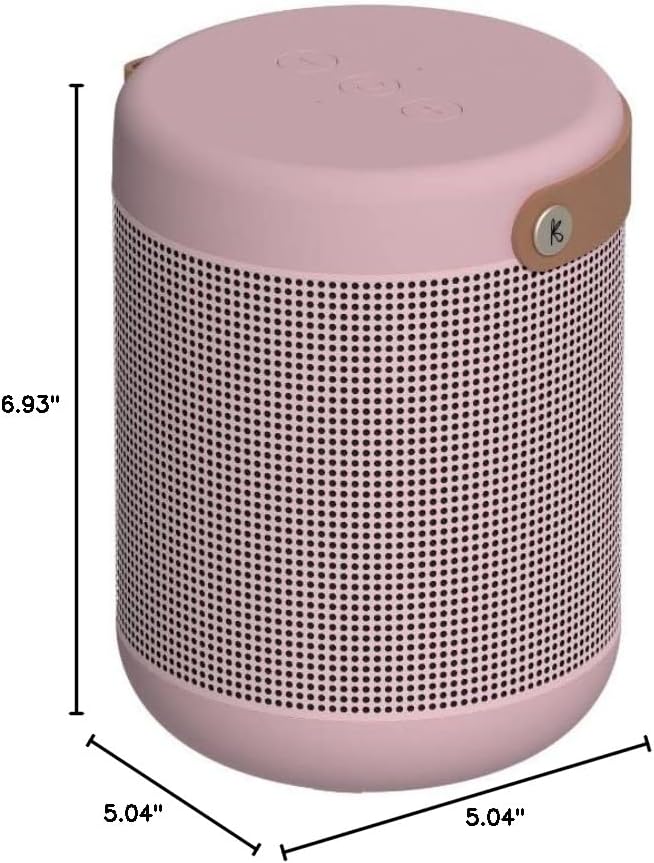
Image 9.1: Dimensions of the KREAFUNK aMAJOR2 Portable Bluetooth Speaker.
| ഫീച്ചർ | വിശദാംശങ്ങൾ |
|---|---|
| മോഡലിൻ്റെ പേര് | aMAJOR2 |
| ബ്രാൻഡ് | KREAFUNK |
| കണക്റ്റിവിറ്റി ടെക്നോളജി | ബ്ലൂടൂത്ത് |
| സ്പീക്കർ തരം | Surround Sound (when paired) |
| പ്രത്യേക സവിശേഷതകൾ | Hi-Res Audio, Water Resistant (IPX5), Voice Assistant, Stereo Play |
| ശുപാർശ ചെയ്യുന്ന ഉപയോഗങ്ങൾ | ഇൻഡോർ, ഔട്ട്ഡോർ |
| ഓഡിയോ put ട്ട്പുട്ട് മോഡ് | സ്റ്റീരിയോ |
| Ampജീവിതശക്തി | 40W ഡിജിറ്റൽ Ampജീവപര്യന്തം |
| കളിക്കുന്ന സമയം | 30 മണിക്കൂർ വരെ |
| ചാർജിംഗ് സമയം | 4-5 മണിക്കൂർ |
| ജല പ്രതിരോധ നില | IPX5 (സ്പ്ലാഷ് പ്രൂഫ്) |
| ഉൽപ്പന്ന അളവുകൾ | 5.04"D x 5.04"W x 6.93"H |
| ഇനത്തിൻ്റെ ഭാരം | 3.5 പൗണ്ട് (ഏകദേശം 1.59 കിലോഗ്രാം) |
| ബാറ്ററി | 1 ലിഥിയം അയോൺ ബാറ്ററി (ഉൾപ്പെടുത്തിയിരിക്കുന്നു) |
| ഉൾപ്പെടുത്തിയ ഘടകങ്ങൾ | ചാർജിംഗ് കേബിൾ |
10. വാറൻ്റിയും പിന്തുണയും
10.1 വാറൻ്റി വിവരങ്ങൾ
The KREAFUNK aMAJOR2 Portable Bluetooth Speaker comes with a 2-വർഷ പരിമിത വാറൻ്റി. സാധാരണ ഉപയോഗത്തിലുള്ള നിർമ്മാണ വൈകല്യങ്ങളും പ്രവർത്തനക്ഷമതയും ഈ വാറന്റി ഉൾക്കൊള്ളുന്നു. ദുരുപയോഗം, അപകടങ്ങൾ, അനധികൃത പരിഷ്കാരങ്ങൾ, അല്ലെങ്കിൽ സാധാരണ തേയ്മാനം എന്നിവ മൂലമുണ്ടാകുന്ന നാശനഷ്ടങ്ങൾക്ക് ഇത് പരിരക്ഷ നൽകുന്നില്ല.
വാറൻ്റി ക്ലെയിമുകൾക്കായി നിങ്ങളുടെ വാങ്ങിയതിൻ്റെ തെളിവ് സൂക്ഷിക്കുക.
10.2 ഉപഭോക്തൃ പിന്തുണ
For technical assistance, warranty claims, or further inquiries, please contact KREAFUNK customer support. Refer to the official KREAFUNK webഏറ്റവും കാലികമായ ബന്ധപ്പെടാനുള്ള വിവരങ്ങൾക്കായി നിങ്ങളുടെ സൈറ്റ് അല്ലെങ്കിൽ നിങ്ങളുടെ ഉൽപ്പന്ന പാക്കേജിംഗ് പരിശോധിക്കുക.
You can also visit the KREAFUNK Store on Amazon for more information: KREAFUNK Amazon Store


