ആക്സിസ് കമ്മ്യൂണിക്കേഷൻസ് 01991-001

AXIS F9114 മെയിൻ യൂണിറ്റ് യൂസർ മാനുവൽ

മോഡൽ: 01991-001

ആമുഖം

This manual provides comprehensive instructions for the installation, operation, and maintenance of the Axis F9114 Main Unit. Please read this manual carefully before using the product to ensure proper functionality and safety.

ഉൽപ്പന്നം കഴിഞ്ഞുview

The AXIS F9114 is a main unit designed for the F-Series surveillance system. It supports up to four F21 or F7 sensor units, providing a flexible and discreet surveillance solution. This unit acts as the central processing hub for connected camera sensors.

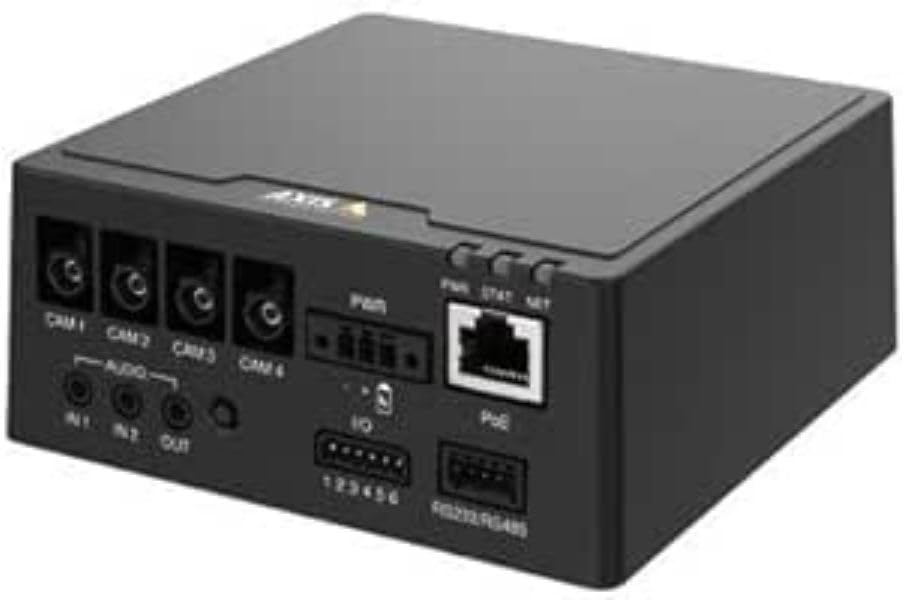
AXIS F9114 Main Unit with various ports and connectors

ചിത്രം 1: ഫ്രണ്ട് view of the AXIS F9114 Main Unit, showing camera input ports (CAM 1-4), audio input/output, power input, I/O ports, and an Ethernet port with PoE support.

പ്രധാന സവിശേഷതകൾ:

സജ്ജീകരണവും ഇൻസ്റ്റാളേഷനും

പാക്കേജ് ഉള്ളടക്കം:

Connecting Sensor Units:

  1. Ensure the main unit is powered off before connecting any sensor units.
  2. Connect the cables from your AXIS F-Series sensor units (e.g., F21, F7) to the designated "CAM 1", "CAM 2", "CAM 3", and "CAM 4" ports on the rear of the F9114 Main Unit. Ensure a secure connection.
  3. Each sensor unit requires a dedicated port.

യൂണിറ്റ് പവർ ചെയ്യുന്നു:

നെറ്റ്വർക്ക് കണക്ഷൻ:

Connect an Ethernet cable from your network to the "PoE" port on the F9114. This provides network access for configuration and video streaming.

ഓഡിയോ, I/O കണക്ഷനുകൾ:

ഓപ്പറേഷൻ

പ്രാരംഭ പവർ-അപ്പ്:

Once all connections are secure and power is supplied, the unit will begin its startup sequence. Observe the LED indicators for status.

LED സൂചകങ്ങൾ:

ഉപകരണം ആക്സസ് ചെയ്യുന്നു:

  1. Use the AXIS IP Utility or a network scanner to discover the IP address of the F9114 on your network.
  2. എ തുറക്കുക web browser and enter the IP address to access the device's web ഇൻ്റർഫേസ്.
  3. Log in using the default credentials (refer to the installation guide or Axis website for current defaults).
  4. Follow the on-screen instructions to configure network settings, video streams, and other system parameters.

വീഡിയോ മാനേജ്മെൻ്റ്:

The F9114 integrates with various video management software (VMS) solutions. Refer to your VMS documentation for adding and managing the device.

മെയിൻ്റനൻസ്

ട്രബിൾഷൂട്ടിംഗ്

പൊതുവായ പ്രശ്നങ്ങളും പരിഹാരങ്ങളും:

For more detailed troubleshooting, refer to the comprehensive support resources available on the Axis Communications webസൈറ്റ്.

സ്പെസിഫിക്കേഷനുകൾ

ഫീച്ചർവിശദാംശങ്ങൾ
ബ്രാൻഡ്ആക്സിസ് കമ്മ്യൂണിക്കേഷൻസ്
മോഡൽ നമ്പർ01991-001
ഇനത്തിൻ്റെ ഭാരം1.87 പൗണ്ട്
ഉൽപ്പന്ന അളവുകൾ (LxWxH)19.69 x 19.69 x 11.02 ഇഞ്ച്
നിർമ്മാതാവ്ആക്സിസ് - ക്യാമറ
ASINB0BWNS49VS
ആദ്യ തീയതി ലഭ്യമാണ്ഫെബ്രുവരി 23, 2023

Note: Specifications are subject to change without notice. For the most current information, please refer to the official Axis Communications webസൈറ്റ്.

വാറൻ്റിയും പിന്തുണയും

വാറൻ്റി വിവരങ്ങൾ:

For detailed warranty information, please refer to the warranty statement provided with your product or visit the official Axis Communications webസൈറ്റ്. വാറന്റി ക്ലെയിമുകൾക്കായി നിങ്ങളുടെ വാങ്ങലിന്റെ തെളിവ് സൂക്ഷിക്കുക.

സാങ്കേതിക സഹായം:

If you encounter issues that cannot be resolved using this manual or the troubleshooting section, please contact Axis Communications technical support. Support resources, including FAQs, documentation, and contact information, are available on their official webസൈറ്റ്.

Webസൈറ്റ്: www.axis.com/support (www.axis.com/support) എന്ന വിലാസത്തിൽ ലഭ്യമാണ്.

അനുബന്ധ രേഖകൾ - 01991-001

പ്രീview AXIS ഉൽപ്പന്ന താരതമ്യ പട്ടികകൾ Q3 2025: നെറ്റ്‌വർക്ക് വീഡിയോ, ഓഡിയോ, ആക്‌സസ് കൺട്രോൾ, ഇന്റർകോമുകൾ
ആക്സിസ് കമ്മ്യൂണിക്കേഷൻസിൽ നിന്നുള്ള ഈ 2025 മൂന്നാം പാദ രേഖ, നെറ്റ്‌വർക്ക് വീഡിയോ, ഓഡിയോ, ആക്‌സസ് കൺട്രോൾ, ഇന്റർകോം സൊല്യൂഷനുകൾ എന്നിവയുടെ വിപുലമായ ശ്രേണിയെക്കുറിച്ചുള്ള സമഗ്രമായ ഉൽപ്പന്ന താരതമ്യ പട്ടികകൾ നൽകുന്നു. ക്യാമറകൾ, റെക്കോർഡറുകൾ, സോഫ്റ്റ്‌വെയർ, ഇന്റർകോം സിസ്റ്റങ്ങൾ എന്നിവയുൾപ്പെടെ വിവിധ ഉൽപ്പന്ന ലൈനുകളിലുടനീളമുള്ള സവിശേഷതകൾ, സവിശേഷതകൾ, മോഡൽ വിവരങ്ങൾ എന്നിവ ഇതിൽ വിശദമാക്കുന്നു.
പ്രീview AXIS FA51 Main Unit Benutzerhandbuch | Installation und Konfiguration
Das offizielle Benutzerhandbuch für die AXIS FA51 Main Unit von AXIS Communications. Enthält Anleitungen zur Installation, Konfiguration, Video-Streaming, Aufnahme und Systemverwaltung für Überwachungslösungen.
പ്രീview ആക്സിസ് നെറ്റ്‌വർക്ക് സ്വിച്ച് കോൺഫിഗറേഷൻ ഗൈഡ് - സജ്ജീകരണവും മാനേജ്മെന്റും
AXIS T85, D8208-R നെറ്റ്‌വർക്ക് സ്വിച്ചുകൾ കോൺഫിഗർ ചെയ്യുന്നതിനും കൈകാര്യം ചെയ്യുന്നതിനുമുള്ള നെറ്റ്‌വർക്ക് അഡ്മിനിസ്ട്രേറ്റർമാർക്കുള്ള സമഗ്ര ഗൈഡ്. സജ്ജീകരണം, സവിശേഷതകൾ, സുരക്ഷ, ട്രബിൾഷൂട്ടിംഗ് എന്നിവ ഇതിൽ ഉൾപ്പെടുന്നു.
പ്രീview AXIS M43 പനോരമിക് ക്യാമറ സീരീസ് ഇൻസ്റ്റലേഷൻ ഗൈഡ്
AXIS M43 പനോരമിക് ക്യാമറ സീരീസ് സജ്ജീകരിക്കുന്നതിനുള്ള അവശ്യ വിവരങ്ങൾ ഈ ഇൻസ്റ്റലേഷൻ ഗൈഡ് നൽകുന്നു, ഇതിൽ AXIS M4327-P, AXIS M4328-P എന്നീ മോഡലുകളും ഉൾപ്പെടുന്നു. ഇത് ഇൻസ്റ്റലേഷൻ നടപടിക്രമങ്ങൾ, സുരക്ഷ, നിയന്ത്രണ പാലിക്കൽ എന്നിവ ഉൾക്കൊള്ളുന്നു.
പ്രീview AXIS ഹൈ PoE മിഡ്‌സ്പാൻ, സ്പ്ലിറ്ററുകൾ ഇൻസ്റ്റലേഷൻ ഗൈഡ്
പവർ ഓവർ ഇതർനെറ്റ് സൊല്യൂഷനുകൾക്കായുള്ള സജ്ജീകരണം, സ്പെസിഫിക്കേഷനുകൾ, ട്രബിൾഷൂട്ടിംഗ് എന്നിവ ഉൾക്കൊള്ളുന്ന AXIS T8123 ഹൈ PoE മിഡ്‌സ്പാൻ, AXIS T8126/T8128 ഹൈ PoE സ്പ്ലിറ്ററുകൾ എന്നിവയ്ക്കുള്ള ഇൻസ്റ്റലേഷൻ ഗൈഡ്.
പ്രീview AXIS ക്യാമറ സ്റ്റേഷൻ S20 അപ്ലയൻസ് സീരീസ് ഇൻസ്റ്റലേഷൻ ഗൈഡ്
S2008, S2016, S2024 എന്നീ മോഡലുകൾ ഉൾപ്പെടെയുള്ള AXIS ക്യാമറ സ്റ്റേഷൻ S20 അപ്ലയൻസ് സീരീസ് സജ്ജീകരിക്കുന്നതിനും ഇൻസ്റ്റാൾ ചെയ്യുന്നതിനുമുള്ള അവശ്യ നിർദ്ദേശങ്ങൾ ഈ ഇൻസ്റ്റലേഷൻ ഗൈഡ് നൽകുന്നു. ഇത് ഹാർഡ്‌വെയറിനെ ഉൾക്കൊള്ളുന്നു.view, cable connections, software setup, and network configuration for professional video surveillance systems.