1. ആമുഖം
Coulisse Motion Blinds Domotica Box RS485 (CM-19) നിലവിലുള്ള വീടുകളുടെയും കെട്ടിടങ്ങളുടെയും ഓട്ടോമേഷൻ നെറ്റ്വർക്കുകളുമായും സിസ്റ്റങ്ങളുമായും മോട്ടോറൈസ്ഡ് വിൻഡോ ബ്ലൈൻഡുകളുടെ തടസ്സമില്ലാത്ത സംയോജനത്തിനായി രൂപകൽപ്പന ചെയ്തിരിക്കുന്നു. ഈ ഉപകരണം ഒരു പാലമായി പ്രവർത്തിക്കുന്നു, ഇത് നിങ്ങളുടെ MotionBlinds മോട്ടോറൈസ്ഡ് വിൻഡോ കവറിംഗുകളുടെ വിപുലമായ നിയന്ത്രണവും ഓട്ടോമേഷനും അനുവദിക്കുന്നു. റെസിഡൻഷ്യൽ, കൊമേഴ്സ്യൽ, ഹോസ്പിറ്റാലിറ്റി ക്രമീകരണങ്ങളിൽ ഉപയോഗിക്കുന്ന വൈവിധ്യമാർന്ന വയർഡ്, ബാറ്ററിയിൽ പ്രവർത്തിക്കുന്ന മോട്ടോറുകളുമായും നിയന്ത്രണങ്ങളുമായും ഇത് പൊരുത്തപ്പെടുന്നു.
2. ഉൽപ്പന്നം കഴിഞ്ഞുview
നിങ്ങളുടെ മോട്ടോറൈസ്ഡ് ബ്ലൈൻഡുകളും ഒരു സെൻട്രൽ ഓട്ടോമേഷൻ സിസ്റ്റവും തമ്മിലുള്ള ആശയവിനിമയം സുഗമമാക്കുന്ന ഒരു കോംപാക്റ്റ് ഉപകരണമാണ് CM-19 ഡൊമോട്ടിക്ക ബോക്സ്. അത്യാവശ്യ നിയന്ത്രണങ്ങളും കണക്റ്റിവിറ്റി പോർട്ടുകളും ഉള്ള ഒരു മിനിമലിസ്റ്റ് ഡിസൈൻ ഇതിന്റെ സവിശേഷതയാണ്.

ചിത്രം 2.1: മുൻഭാഗം View. ഈ ചിത്രം CM-19 ഡൊമോട്ടിക്ക ബോക്സിന്റെ മുൻഭാഗം പ്രദർശിപ്പിക്കുന്നു, ഉപകരണങ്ങളുടെ സീൻ തിരഞ്ഞെടുക്കൽ, ക്രമീകരണം, ജോടിയാക്കൽ, അൺപെയറിംഗ് എന്നിവയ്ക്കുള്ള നിയന്ത്രണ ബട്ടണുകൾ എടുത്തുകാണിക്കുന്നു.
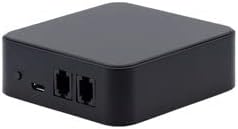
ചിത്രം 2.2: പിൻഭാഗം View. ഈ ചിത്രം CM-19 ഡൊമോട്ടിക്ക ബോക്സിന്റെ പിൻഭാഗം കാണിക്കുന്നു, അതിൽ പവറിനായി ഒരു മൈക്രോ USB പോർട്ടും നെറ്റ്വർക്ക് അല്ലെങ്കിൽ RS485 കണക്ഷനുകൾക്കായി രണ്ട് RJ45 പോർട്ടുകളും ഉൾപ്പെടുന്നു.

ചിത്രം 2.3: പ്രധാന സവിശേഷതകളും അളവുകളും. ഈ ഡയഗ്രം ഡൊമോട്ടിക്ക ബോക്സിന്റെ (ഏകദേശം 3.11 ഇഞ്ച്) ഒതുക്കമുള്ള വലിപ്പം ചിത്രീകരിക്കുകയും അതിന്റെ പ്രാഥമിക പ്രവർത്തനങ്ങൾ എടുത്തുകാണിക്കുകയും ചെയ്യുന്നു: മോട്ടോറൈസ്ഡ് ബ്ലൈൻഡുകളുടെ തടസ്സമില്ലാത്ത സംയോജനവും ഏതൊരു സ്റ്റാൻഡേർഡ് യുഎസ്ബി ചാർജറുമായും പവർ അനുയോജ്യതയും.

ചിത്രം 2.4: സ്മാർട്ട് ടെക്നോളജി ഓവർview. ഈ ചിത്രം ഒരു ഓവർ നൽകുന്നുview മോഷൻബ്ലൈൻഡ്സ് സ്മാർട്ട് ടെക്നോളജി ഇക്കോസിസ്റ്റത്തിന്റെ ഭാഗമായി, ബ്ലൂടൂത്ത് മോട്ടോറുകൾ എങ്ങനെ വേഗത്തിൽ സജ്ജീകരിക്കാമെന്നും ഓപ്ഷണൽ വൈ-ഫൈ ബ്രിഡ്ജ് വഴി ഗൂഗിൾ ഹോം, ആമസോൺ അലക്സ പോലുള്ള സ്മാർട്ട് ഹോം സിസ്റ്റങ്ങളുമായി എങ്ങനെ സംയോജിപ്പിക്കാമെന്നും വിശദീകരിക്കുന്നു. പ്രാദേശിക ഡാറ്റ സംഭരണത്തിന്റെ സ്വകാര്യതാ വശത്തിനും ഇത് പ്രാധാന്യം നൽകുന്നു.
3 സുരക്ഷാ വിവരങ്ങൾ
ഡൊമോട്ടിക്ക ബോക്സ് ഇൻസ്റ്റാൾ ചെയ്യുന്നതിനും പ്രവർത്തിപ്പിക്കുന്നതിനും മുമ്പ് എല്ലാ സുരക്ഷാ നിർദ്ദേശങ്ങളും വായിച്ച് മനസ്സിലാക്കുക. ഈ നിർദ്ദേശങ്ങൾ പാലിക്കുന്നതിൽ പരാജയപ്പെടുന്നത് വൈദ്യുതാഘാതം, തീപിടുത്തം അല്ലെങ്കിൽ ഗുരുതരമായ പരിക്കിന് കാരണമായേക്കാം.
- കേടുപാടുകൾ സംഭവിക്കുന്നത് തടയാൻ, ഉപകരണം അനുയോജ്യമായ ഒരു USB ചാർജർ (5V DC, കുറഞ്ഞത് 1A) ഉപയോഗിച്ച് പ്രവർത്തിപ്പിക്കുന്നുവെന്ന് ഉറപ്പാക്കുക.
- ഉപകരണം വെള്ളം, ഈർപ്പം അല്ലെങ്കിൽ തീവ്രമായ താപനില എന്നിവയിൽ തുറന്നുകാട്ടരുത്.
- ഉപകരണം തുറക്കാനോ പരിഷ്ക്കരിക്കാനോ നന്നാക്കാനോ ശ്രമിക്കരുത്. എല്ലാ സേവനങ്ങളും യോഗ്യതയുള്ള ഉദ്യോഗസ്ഥരെ ഏൽപ്പിക്കുക.
- നേരിട്ട് സൂര്യപ്രകാശത്തിൽ നിന്നും താപ സ്രോതസ്സുകളിൽ നിന്നും ഉപകരണം അകറ്റി നിർത്തുക.
- ഉപകരണത്തിന് ചുറ്റും ശരിയായ വായുസഞ്ചാരം ഉറപ്പാക്കുക.
4. സജ്ജീകരണം
4.1 ഡൊമോട്ടിക്ക ബോക്സിന് പവർ നൽകുന്നു
- നിങ്ങൾക്ക് ആവശ്യമുള്ള ഇൻസ്റ്റാളേഷൻ സ്ഥലത്തിന് സമീപം അനുയോജ്യമായ ഒരു പവർ ഔട്ട്ലെറ്റ് കണ്ടെത്തുക.
- CM-19 ഡൊമോട്ടിക്ക ബോക്സിന്റെ പിൻഭാഗത്തുള്ള മൈക്രോ USB പോർട്ടിലേക്ക് ഒരു സ്റ്റാൻഡേർഡ് USB ചാർജർ (ഉൾപ്പെടുത്തിയിട്ടില്ല) ബന്ധിപ്പിക്കുക.
- USB ചാർജർ പവർ ഔട്ട്ലെറ്റിലേക്ക് പ്ലഗ് ചെയ്യുക. ഉപകരണം യാന്ത്രികമായി ഓണാകും.
4.2 ഹോം ഓട്ടോമേഷൻ സിസ്റ്റങ്ങളുമായുള്ള സംയോജനം
RS485 ആശയവിനിമയം ഉപയോഗിച്ച് ഹോം, ബിൽഡിംഗ് ഓട്ടോമേഷൻ നെറ്റ്വർക്കുകളുമായി തടസ്സമില്ലാത്ത സംയോജനത്തിനായി CM-19 ഡൊമോട്ടിക്ക ബോക്സ് രൂപകൽപ്പന ചെയ്തിരിക്കുന്നു. നിർദ്ദിഷ്ട കണക്ഷനും കോൺഫിഗറേഷൻ നടപടിക്രമങ്ങളും അറിയാൻ നിങ്ങളുടെ ഹോം ഓട്ടോമേഷൻ സിസ്റ്റത്തിന്റെ ഡോക്യുമെന്റേഷൻ പരിശോധിക്കുക.
4.3 ഓപ്ഷണൽ സ്മാർട്ട് ഹോം കണക്റ്റിവിറ്റി (വൈ-ഫൈ ബ്രിഡ്ജ് വഴി)
ഗൂഗിൾ ഹോം, ആമസോൺ അലക്സ തുടങ്ങിയ ജനപ്രിയ സ്മാർട്ട് ഹോം സിസ്റ്റങ്ങളുമായി ബ്ലൂടൂത്ത് പവർ ഉള്ള മോഷൻബ്ലിൻഡ്സിനെ ബന്ധിപ്പിക്കുന്നതിന്, ഒരു ഓപ്ഷണൽ മോഷൻബ്ലിൻഡ്സ് വൈ-ഫൈ ബ്രിഡ്ജ് ആവശ്യമാണ്. ഈ ബ്രിഡ്ജ് നിങ്ങളുടെ ബ്ലൈൻഡുകളും സ്മാർട്ട് ഹോം ഇക്കോസിസ്റ്റവും തമ്മിലുള്ള ആശയവിനിമയം സുഗമമാക്കുന്നു.
- MotionBlinds Wi-Fi ബ്രിഡ്ജ് അതിലെ നിർദ്ദിഷ്ട നിർദ്ദേശങ്ങൾക്കനുസൃതമായി ഇൻസ്റ്റാൾ ചെയ്യുക.
- നിങ്ങളുടെ ബ്ലൈന്റുകൾ വൈ-ഫൈ ബ്രിഡ്ജിലേക്കും തുടർന്ന് നിങ്ങളുടെ ഇഷ്ടപ്പെട്ട സ്മാർട്ട് ഹോം സിസ്റ്റത്തിലേക്കും ബന്ധിപ്പിക്കുന്നതിന് MotionBlinds ആപ്ലിക്കേഷനിലെ സജ്ജീകരണ ഘട്ടങ്ങൾ പാലിക്കുക.
4.4 സ്മാർട്ട്ഫോൺ ആപ്പ് സജ്ജീകരണം
ഒരു സ്മാർട്ട്ഫോൺ ഉപയോഗിച്ച് നിങ്ങളുടെ ബ്ലൈന്റുകൾ നിയന്ത്രിക്കാൻ, നിങ്ങളുടെ ഉപകരണത്തിന്റെ ആപ്പ് സ്റ്റോറിൽ നിന്ന് ഔദ്യോഗിക MotionBlinds ആപ്പ് ഡൗൺലോഡ് ചെയ്യുക. ഇൻസ്റ്റാളേഷന് ശേഷം, നിങ്ങളുടെ ബ്ലൈന്റുകൾ ജോടിയാക്കുന്നതിനും ക്രമീകരണങ്ങൾ കോൺഫിഗർ ചെയ്യുന്നതിനും ആപ്പിലെ നിർദ്ദേശങ്ങൾ പാലിക്കുക. ഈ പ്രക്രിയയിൽ സാധാരണയായി കുറച്ച് എളുപ്പ ഘട്ടങ്ങൾ ഉൾപ്പെടുന്നു.
5. പ്രവർത്തന നിർദ്ദേശങ്ങൾ
5.1 സ്മാർട്ട്ഫോൺ ആപ്പ് വഴി അന്ധത നിയന്ത്രിക്കൽ
നിങ്ങളുടെ ബ്ലൈന്റുകൾ MotionBlinds ആപ്പുമായി ജോടിയാക്കിക്കഴിഞ്ഞാൽ, നിങ്ങളുടെ സ്മാർട്ട്ഫോണിൽ നിന്ന് നേരിട്ട് അവയുടെ ചലനം (തുറക്കുക, അടയ്ക്കുക, നിർത്തുക) നിയന്ത്രിക്കാനാകും. വ്യക്തിഗത ബ്ലൈന്റുകൾ അല്ലെങ്കിൽ ബ്ലൈന്റുകളുടെ ഗ്രൂപ്പുകൾ കൈകാര്യം ചെയ്യുന്നതിനുള്ള ഒരു അവബോധജന്യമായ ഇന്റർഫേസ് ആപ്പ് നൽകുന്നു.
5.2 പ്രോഗ്രാമിംഗ് ടൈമറുകളും ഓട്ടോമേഷനും
മോഷൻബ്ലിൻഡ്സ് ആപ്പ് ഉപയോഗിച്ച് മോട്ടോറിലേക്ക് നേരിട്ട് ടൈമറുകൾ പ്രോഗ്രാം ചെയ്യാൻ കഴിയും, അതുവഴി നിങ്ങളുടെ ബ്ലൈൻഡുകളുടെ ഓട്ടോമേറ്റഡ് പ്രവർത്തനം സാധ്യമാക്കുന്നു. ഈ സവിശേഷത ബ്ലൈൻഡുകളെ ഷെഡ്യൂൾ ചെയ്ത സമയങ്ങളിൽ മുൻകൂട്ടി സജ്ജീകരിച്ച സ്ഥാനങ്ങളിലേക്ക് നീക്കാൻ അനുവദിക്കുന്നു, ഇത് സൗകര്യവും ഊർജ്ജ കാര്യക്ഷമതയും നൽകുന്നു.
- MotionBlinds ആപ്പ് തുറന്ന് ടൈമർ അല്ലെങ്കിൽ ഓട്ടോമേഷൻ വിഭാഗത്തിലേക്ക് നാവിഗേറ്റ് ചെയ്യുക.
- നിർദ്ദിഷ്ട ബ്ലൈന്റുകൾ, ആവശ്യമുള്ള സ്ഥാനങ്ങൾ, സജീവമാക്കൽ സമയങ്ങൾ എന്നിവ തിരഞ്ഞെടുത്ത് പുതിയ ഷെഡ്യൂളുകൾ സൃഷ്ടിക്കുക.
- നിങ്ങളുടെ പ്രോഗ്രാം ചെയ്ത ടൈമറുകൾ സംരക്ഷിക്കുക. തുടർന്ന് നിങ്ങളുടെ ക്രമീകരണങ്ങൾക്കനുസരിച്ച് ബ്ലൈന്റുകൾ ഓട്ടോപൈലറ്റിൽ പ്രവർത്തിക്കും.
കുറിപ്പ്: ഉപയോക്തൃ സ്വകാര്യത ഉറപ്പാക്കാൻ, പ്രോഗ്രാം ചെയ്ത ടൈമറുകളുമായും ബ്ലൈൻഡ് പൊസിഷനുകളുമായും ബന്ധപ്പെട്ട എല്ലാ ഡാറ്റയും ഇന്റലിജൻസും ക്ലൗഡിലല്ല, മോട്ടോറിൽ പ്രാദേശികമായി സംഭരിക്കുന്നു.
6. പരിപാലനം
കൂലിസ് മോഷൻ ബ്ലൈൻഡ്സ് ഡൊമോട്ടിക്ക ബോക്സ് CM-19 ന് കുറഞ്ഞ അറ്റകുറ്റപ്പണികൾ മാത്രമേ ആവശ്യമുള്ളൂ.
- വൃത്തിയാക്കൽ: ഉപകരണത്തിന്റെ പുറംഭാഗം വൃത്തിയാക്കാൻ, മൃദുവായതും ഉണങ്ങിയതുമായ ഒരു തുണി ഉപയോഗിക്കുക. ചെറിയ പാടുകൾക്ക്, അല്പം ഡി.amp തുണി ഉപയോഗിക്കാം. കഠിനമായ രാസവസ്തുക്കൾ, അബ്രസീവ് ക്ലീനറുകൾ, അല്ലെങ്കിൽ അമിതമായ ഈർപ്പം എന്നിവ ഉപയോഗിക്കരുത്.
- ഉൽപ്പന്ന പരിപാലന നിർദ്ദേശങ്ങൾ: സ്പോട്ട് ക്ലീൻ.
- മികച്ച പ്രകടനം നിലനിർത്താൻ ഉപകരണം പൊടിയിൽ നിന്നും അവശിഷ്ടങ്ങളിൽ നിന്നും മുക്തമാണെന്ന് ഉറപ്പാക്കുക.
7. പ്രശ്നപരിഹാരം
നിങ്ങളുടെ Coulisse Motion Blinds Domotica Box-ൽ പ്രശ്നങ്ങൾ നേരിടുകയാണെങ്കിൽ, ദയവായി താഴെ പറയുന്ന പൊതുവായ ട്രബിൾഷൂട്ടിംഗ് ഘട്ടങ്ങൾ പരിശോധിക്കുക. കൂടുതൽ സങ്കീർണ്ണമായ പ്രശ്നങ്ങൾക്ക്, ഉപഭോക്തൃ പിന്തുണയുമായി ബന്ധപ്പെടുക.
- ഉപകരണം ഓണാക്കുന്നില്ല: യുഎസ്ബി കേബിൾ ഡൊമോട്ടിക്ക ബോക്സിലേക്കും പ്രവർത്തിക്കുന്ന യുഎസ്ബി ചാർജറിലേക്കും സുരക്ഷിതമായി ബന്ധിപ്പിച്ചിട്ടുണ്ടെന്ന് ഉറപ്പാക്കുക. വ്യത്യസ്തമായ ഒരു യുഎസ്ബി ചാർജറും കേബിളും പരീക്ഷിക്കുക.
- പ്രതികരിക്കാത്ത അന്ധർ: ഡൊമോട്ടിക്ക ബോക്സ് ഓണാക്കിയിട്ടുണ്ടെന്നും നിങ്ങളുടെ ഹോം ഓട്ടോമേഷൻ സിസ്റ്റവുമായി ശരിയായി ബന്ധിപ്പിച്ചിട്ടുണ്ടെന്നും ഉറപ്പാക്കുക. MotionBlinds ആപ്പിനുള്ളിൽ നിങ്ങളുടെ ബ്ലൈൻഡുകളുടെ ജോടിയാക്കൽ നില പരിശോധിക്കുക.
- ആപ്പ് കണക്റ്റിവിറ്റി പ്രശ്നങ്ങൾ: നിങ്ങളുടെ സ്മാർട്ട്ഫോണിന് സ്ഥിരതയുള്ള ഇന്റർനെറ്റ് കണക്ഷൻ ഉണ്ടെന്ന് ഉറപ്പാക്കുക. MotionBlinds ആപ്പ് പുനരാരംഭിക്കുക. നിങ്ങൾ ഒരു Wi-Fi ബ്രിഡ്ജ് ഉപയോഗിക്കുകയാണെങ്കിൽ, അത് ശരിയായി കോൺഫിഗർ ചെയ്തിട്ടുണ്ടെന്നും നിങ്ങളുടെ നെറ്റ്വർക്കുമായി ബന്ധിപ്പിച്ചിട്ടുണ്ടെന്നും ഉറപ്പാക്കുക.
- ഇടവിട്ടുള്ള നിയന്ത്രണം: ഡൊമോട്ടിക്ക ബോക്സിനോ നിങ്ങളുടെ ബ്ലൈൻഡുകൾക്കോ സമീപം എന്തെങ്കിലും ഇടപെടലുകൾ ഉണ്ടാകാൻ സാധ്യതയുണ്ടോ എന്ന് പരിശോധിക്കുക. ഉപകരണം നിങ്ങളുടെ ബ്ലൈൻഡുകളുടെ പരിധിയിലാണെന്ന് ഉറപ്പാക്കുക (നിങ്ങൾ ബ്ലൂടൂത്ത് നേരിട്ട് ഉപയോഗിക്കുകയാണെങ്കിൽ).
8 സ്പെസിഫിക്കേഷനുകൾ
| ആട്രിബ്യൂട്ട് | വിശദാംശങ്ങൾ |
|---|---|
| ബ്രാൻഡ് | മോഷൻബ്ലൈൻഡ്സ് |
| നിർമ്മാതാവ് | കൂലിസ് |
| മോഡൽ നമ്പർ | CM-19 |
| ASIN | B0BWSJ4MBF |
| യു.പി.സി | 655457900597 |
| നിറം | കറുപ്പ് |
| ഇനത്തിൻ്റെ ഭാരം | 4 ഔൺസ് |
| പാക്കേജ് അളവുകൾ | 6 x 4 x 4 ഇഞ്ച് |
| ഓപ്പറേഷൻ മോഡ് | ഓട്ടോമാറ്റിക് |
| നിയന്ത്രണ തരം | മോട്ടോറൈസ്ഡ്, കോർഡ്ലെസ് |
| മൗണ്ടിംഗ് തരം | മൗണ്ടിനുള്ളിൽ |
| ആദ്യ തീയതി ലഭ്യമാണ് | 25 ജനുവരി 2023 |
9. വാറൻ്റിയും പിന്തുണയും
ഉൽപ്പന്ന വാറന്റി, റിട്ടേണുകൾ അല്ലെങ്കിൽ സാങ്കേതിക പിന്തുണ എന്നിവയെക്കുറിച്ചുള്ള വിവരങ്ങൾക്ക്, വിൽപ്പനക്കാരനെയോ നിർമ്മാതാവിനെയോ, Coulisse/MotionBlinds-നെയോ നേരിട്ട് ബന്ധപ്പെടുക. നിർദ്ദിഷ്ട വാറന്റി നിബന്ധനകൾക്കും ബന്ധപ്പെടാനുള്ള വിശദാംശങ്ങൾക്കും നിങ്ങളുടെ വാങ്ങൽ ഡോക്യുമെന്റേഷൻ പരിശോധിക്കുക.
ഔദ്യോഗിക MotionBlinds-ൽ നിങ്ങൾക്ക് പലപ്പോഴും പിന്തുണാ ഉറവിടങ്ങൾ, പതിവുചോദ്യങ്ങൾ, ബന്ധപ്പെടാനുള്ള വിവരങ്ങൾ എന്നിവ കണ്ടെത്താൻ കഴിയും. webസൈറ്റ്: www.motionblinds.com


