ആമുഖം
The Escort MAX 360 MKII is a state-of-the-art radar and laser detector designed to enhance driver awareness. It features advanced detection capabilities, directional alerts, and intelligent filtering to provide a more informed driving experience. This manual provides detailed instructions for setting up, operating, maintaining, and troubleshooting your device.

ചിത്രം 1: മുൻഭാഗം view of the Escort MAX 360 MKII Radar and Laser Detector. The device features a sleek black design with a central control panel and a front display showing speed and alert information.
പാക്കേജ് ഉള്ളടക്കം
Before proceeding with the setup, please ensure all items are present in your package:
- Escort MAX 360 MKII Radar and Laser Detector
- യാത്രാ കേസ്
- മാഗ്നെറ്റിക് മ .ണ്ട്
- USB SmartCord (with Mute Button)

Figure 2: The complete package contents of the Escort MAX 360 MKII, including the detector unit, travel case, magnetic mount, and USB SmartCord.
സജ്ജമാക്കുക
ഉപകരണം മൌണ്ട് ചെയ്യുന്നു
- ഒരു ലൊക്കേഷൻ തിരഞ്ഞെടുക്കുക: Select a location on your windshield that does not obstruct your view of the road and allows for clear line-of-sight for radar and laser detection. The center of the windshield, near the rearview mirror, is often ideal.
- വിൻഡ്ഷീൽഡ് വൃത്തിയാക്കുക: Ensure the mounting area on your windshield is clean and dry for optimal suction.
- മാഗ്നറ്റിക് മൗണ്ട് ഘടിപ്പിക്കുക: Press the suction cup of the magnetic mount firmly against the chosen windshield area until it is securely attached.
- ഡിറ്റക്ടർ ഘടിപ്പിക്കുക: The MAX 360 MKII features a magnetic connection point. Simply align the detector with the magnetic mount until it clicks into place.
പവർ ചെയ്യുന്നു
- Connect the SmartCord: Insert the small end of the USB SmartCord into the power input port on the side of the MAX 360 MKII.
- Plug into Vehicle Power: Insert the larger end of the USB SmartCord into your vehicle's 12V accessory socket (cigarette lighter).
- ഓട്ടോമാറ്റിക് പവർ ഓൺ: The device will typically power on automatically when the vehicle's ignition is turned on.
ഉപകരണം പ്രവർത്തിപ്പിക്കുന്നു
അടിസ്ഥാന നിയന്ത്രണങ്ങൾ
- പവർ ബട്ടൺ: ഉപകരണം ഓണാക്കാനോ ഓഫാക്കാനോ അമർത്തിപ്പിടിക്കുക.
- വോളിയം ബട്ടണുകൾ (+/-): Adjust the alert volume.
- നിശബ്ദ ബട്ടൺ: Briefly press to mute an alert. Press again to unmute.
- Sensitivity (SEN) Button: Cycles through sensitivity modes (Auto, AutoNoX, Highway, AutoLoK).
- Mark (MRK) Button: Marks locations for future alerts or false alert suppression.
- Brightness (BRT) Button: ഡിസ്പ്ലേ തെളിച്ചം ക്രമീകരിക്കുന്നു.
അലേർട്ടുകൾ മനസിലാക്കുന്നു
The MAX 360 MKII provides comprehensive alerts with directional arrows indicating the source of the radar or laser signal.
- ദിശാസൂചന അമ്പടയാളങ്ങൾ: Arrows on the display illuminate to show the direction (front, side, rear) from which a threat is detected.
- സിഗ്നൽ സ്ട്രെങ്ത് മീറ്റർ: A bar graph indicates the strength of the detected signal.
- കേൾക്കാവുന്ന അലേർട്ടുകൾ: Distinct tones are used for different radar bands (X, K, Ka) and laser.

Figure 3: The display of the Escort MAX 360 MKII showing directional arrows for 360° awareness and indicating the AutoLearn™ Intelligence feature, which learns and rejects repeated false alert locations.
വിപുലമായ സവിശേഷതകൾ
- AutoLearn™ Intelligence: This GPS-based software learns your route and automatically rejects false alerts from specific locations after repeated trips.
- Blackfin® DSP Chip: Provides improved performance and faster processing of legitimate signals, ensuring timely alerts.
- 50% Improved Range: Dual antennas and the M13 platform offer significantly enhanced detection range and sensitivity compared to previous models.
- False Alert Filtering: Advanced intelligence effectively reduces false alerts from Collision Avoidance Systems (CAS) and Blind Spot Monitoring (BSM) systems in other vehicles.

Figure 4: The Escort MAX 360 MKII mounted in a vehicle, highlighting its 50% improved range for enhanced detection capabilities.

Figure 5: Visual representation of the Escort MAX 360 MKII's exceptional detection range, outstanding false alert filtering, and faster signal processing for timely alerts.
Drive Smarter® App Integration
The Escort MAX 360 MKII is Bluetooth enabled and compatible with the Drive Smarter® app, allowing for shared alerts and enhanced situational awareness.
- Shared Alerts: Connect to the Drive Smarter community to receive live alerts from other drivers.
- Apple CarPlay & Android Auto Compatibility: View your route and interact with alerts directly on your vehicle's display.
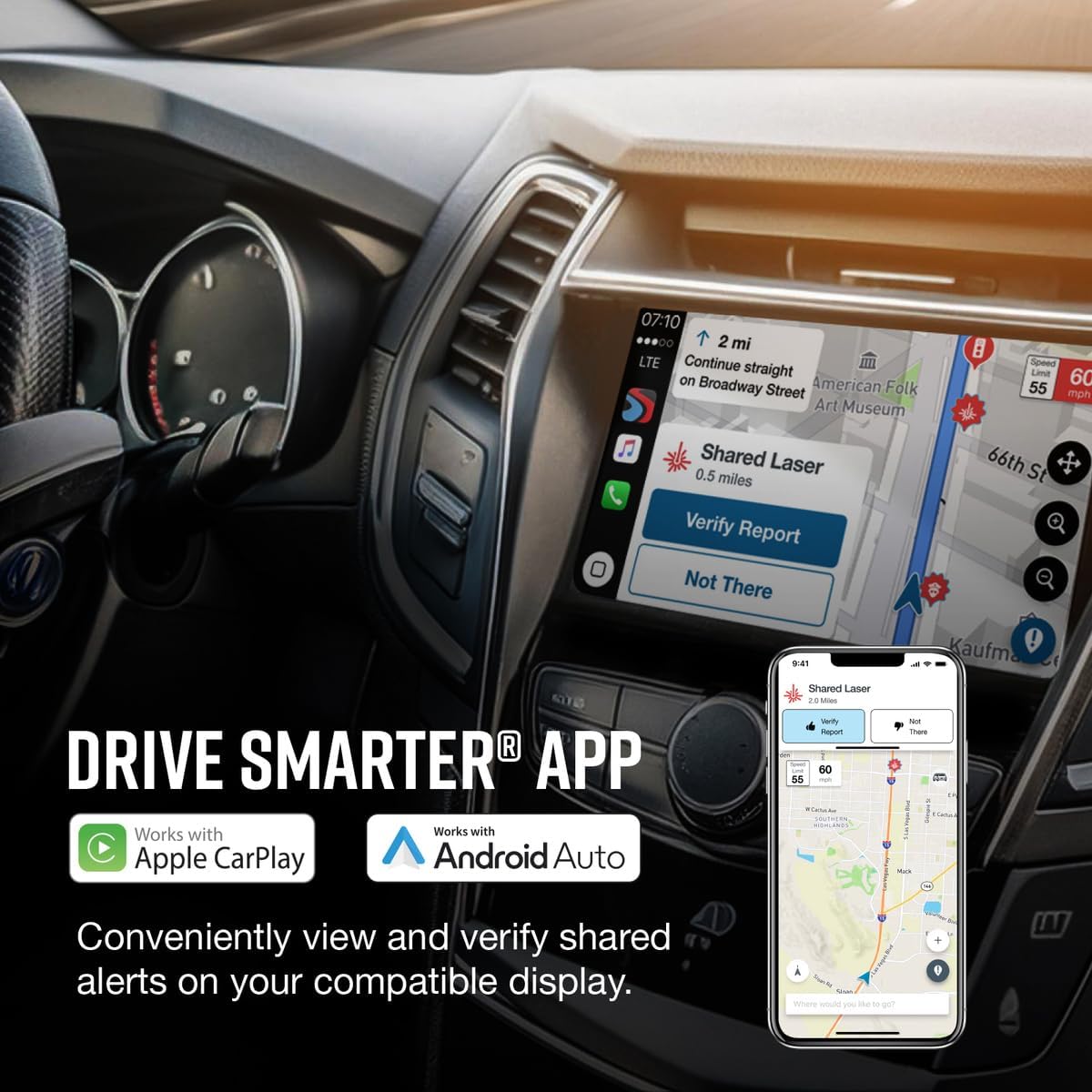
Figure 6: The Escort MAX 360 MKII integrating with the Drive Smarter® App, showing how alerts can be viewed and verified on a compatible vehicle display or smartphone.
മെയിൻ്റനൻസ്
To ensure optimal performance and longevity of your Escort MAX 360 MKII, follow these maintenance guidelines:
- വൃത്തിയാക്കൽ: ഉപകരണത്തിന്റെ പുറംഭാഗം വൃത്തിയാക്കാൻ മൃദുവായതും ഉണങ്ങിയതുമായ തുണി ഉപയോഗിക്കുക. ഉരച്ചിലുകൾ ഉള്ള ക്ലീനറുകളോ ലായകങ്ങളോ ഉപയോഗിക്കുന്നത് ഒഴിവാക്കുക.
- ലെൻസ് കെയർ: Keep the front and rear lenses clean and free from dust or smudges to ensure accurate detection.
- സോഫ്റ്റ്വെയർ അപ്ഡേറ്റുകൾ: Periodically check for and install software updates via the Drive Smarter app or Escort's official website to ensure your device has the latest features and performance enhancements.
- സംഭരണം: When not in use, store the device in its provided travel case to protect it from dust and damage. Avoid storing in extreme temperatures.
ട്രബിൾഷൂട്ടിംഗ്
This section addresses common issues you might encounter with your Escort MAX 360 MKII.
| പ്രശ്നം | സാധ്യമായ കാരണം | പരിഹാരം |
|---|---|---|
| ഉപകരണം പവർ ഓണാക്കുന്നില്ല. | No power from vehicle's 12V socket; loose connection; blown fuse in vehicle. | Check the SmartCord connection. Ensure the vehicle's 12V socket is active. Check your vehicle's fuse box for a blown fuse related to the accessory socket. |
| പതിവ് തെറ്റായ മുന്നറിയിപ്പുകൾ. | Interference from other vehicles' safety systems (CAS/BSM); urban environment noise. | Enable AutoLearn™ feature. Adjust sensitivity mode (e.g., to Auto or AutoNoX). Ensure the device firmware is up to date. |
| GPS സിഗ്നൽ ഇല്ല. | തടസ്സപ്പെട്ടു view of the sky; device not acquiring satellites. | ഉപകരണത്തിന് വ്യക്തത ഉണ്ടെന്ന് ഉറപ്പാക്കുക view of the sky. Move to an open area. Allow a few minutes for the device to acquire satellites. |
| ബ്ലൂടൂത്ത് കണക്റ്റിവിറ്റി പ്രശ്നങ്ങൾ. | Bluetooth not enabled on phone; device not paired; interference. | Ensure Bluetooth is enabled on your smartphone. Re-pair the device with the Drive Smarter app. Restart both the detector and your smartphone. |
സ്പെസിഫിക്കേഷനുകൾ
| ഫീച്ചർ | വിശദാംശങ്ങൾ |
|---|---|
| ഉൽപ്പന്ന അളവുകൾ | 5.15"L x 3.25"W x 1.38"H (13.08 x 8.26 x 3.51 സെ.മീ) |
| ഇനത്തിൻ്റെ ഭാരം | 1.65 പൗണ്ട് (0.75 കി.ഗ്രാം) |
| മോഡൽ നമ്പർ | 0100024-6 |
| നിറം | കറുപ്പ് |
| പവർ ഉറവിടം | കോർഡഡ് ഇലക്ട്രിക് |
| ഡിസ്പ്ലേ തരം | OLED |
| പിന്തുണയ്ക്കുന്ന ഫ്രീക്വൻസി ബാൻഡുകൾ | 10.525 GHz (X-band), 24.150 GHz (K-band), 34.700 GHz (Ka-band) |
| കണക്റ്റിവിറ്റി | ബ്ലൂടൂത്ത് പ്രവർത്തനക്ഷമമാക്കി |
| നിർമ്മാതാവ് | എസ്കോർട്ട് റഡാർ |
വാറൻ്റിയും പിന്തുണയും
വാറൻ്റി വിവരങ്ങൾ
The Escort MAX 360 MKII comes with a manufacturer's warranty. Please refer to the warranty card included in your product packaging for specific terms and conditions, including warranty period and coverage details. Keep your proof of purchase for warranty claims.
ഉപഭോക്തൃ പിന്തുണ
For technical assistance, troubleshooting, or general inquiries, please contact Escort Customer Support:
- ഓൺലൈൻ പിന്തുണ: Visit the official Escort webപതിവുചോദ്യങ്ങൾ, പിന്തുണാ ലേഖനങ്ങൾ, കോൺടാക്റ്റ് ഫോമുകൾ എന്നിവയ്ക്കുള്ള സൈറ്റ്.
- ഫോൺ പിന്തുണ: Refer to your product documentation or the Escort website for the most current customer service phone numbers and operating hours.
- ഉപയോക്തൃ ഗൈഡ് (PDF): വിശദമായ ഒരു ഉപയോക്തൃ ഗൈഡ് ഇവിടെ ഡൗൺലോഡ് ചെയ്യാൻ ലഭ്യമാണ് https://manuals.plus/m/6725b3c3f478784f17becdd7f6b064997ad991e64d1b0dcbda1d1ad5b917e707.


