ആമുഖം
Thank you for choosing the Genai True Wireless Earphones. This manual provides detailed instructions on how to set up, operate, maintain, and troubleshoot your new earphones. Please read this manual carefully before use to ensure optimal performance and longevity of your device.
ഉൽപ്പന്നം കഴിഞ്ഞുview
The Genai True Wireless Earphones feature a digital intelligence LED display on the charging case, tap control for easy operation, and Bluetooth 5.0 for stable connectivity. They are designed for comfortable in-ear wear and deliver clear stereo sound.
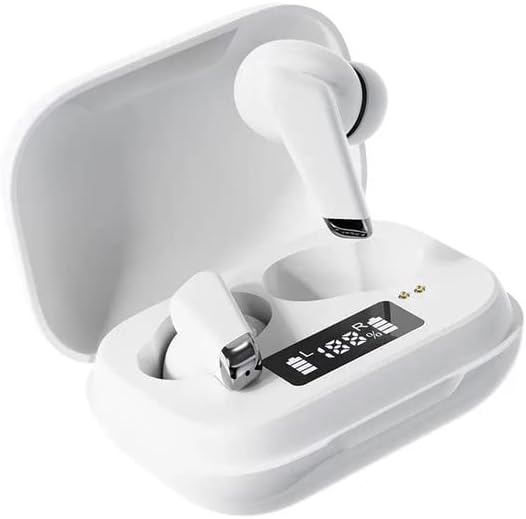
Image: Genai True Wireless Earphones in their charging case, showcasing the digital LED display indicating battery levels.
പ്രധാന സവിശേഷതകൾ:
- ട്രൂ വയർലെസ് സ്റ്റീരിയോ (TWS): Seamless audio experience without cables.
- നിയന്ത്രണം ടാപ്പ് ചെയ്യുക: Intuitive touch-sensitive controls for music and calls.
- Digital Intelligence LED Display: Shows real-time battery status of earbuds and charging case.
- ബ്ലൂടൂത്ത് 5.0: സ്ഥിരവും കാര്യക്ഷമവുമായ വയർലെസ് കണക്ഷൻ ഉറപ്പാക്കുന്നു.
- എർഗണോമിക് ഇൻ-ഇയർ ഡിസൈൻ: Comfortable and secure fit.
സജ്ജീകരണ ഗൈഡ്
1. ഇയർഫോണുകളും കേസും ചാർജ് ചെയ്യുന്നു
- പ്രാരംഭ ചാർജ്: Before first use, fully charge the charging case and earbuds. Place the earbuds into the charging case.
- ചാർജർ ബന്ധിപ്പിക്കുക: Connect the charging case to a power source using a compatible USB cable.
- LED ഡിസ്പ്ലേ നിരീക്ഷിക്കുക: The digital LED display on the case will show the charging status and battery percentage. Ensure both earbuds and the case are fully charged before proceeding.

Image: The charging case with its digital LED display, indicating the charge level of both the case and the individual earbuds.
2. നിങ്ങളുടെ ഉപകരണവുമായി ജോടിയാക്കുന്നു
- പവർ ഓൺ: Open the charging case. The earbuds will automatically power on and enter pairing mode. You may hear an audible prompt.
- ബ്ലൂടൂത്ത് സജീവമാക്കുക: On your smartphone or other Bluetooth-enabled device, go to the Bluetooth settings and enable Bluetooth.
- ഉപകരണം തിരഞ്ഞെടുക്കുക: Look for "Genai Earphones" (or similar name) in the list of available devices and select it to connect.
- സ്ഥിരീകരണം: Once successfully paired, you will hear a confirmation sound, and the earbuds will be ready for use.

Image: A visual representation of the Bluetooth 5.0 chipset, highlighting the stable wireless connection technology.
പ്രവർത്തന നിർദ്ദേശങ്ങൾ
The Genai True Wireless Earphones feature intuitive tap controls. The specific functions may vary slightly, but common controls are listed below:
പവർ ഓൺ/ഓഫ്
- പവർ ഓൺ: Open the charging case, or long-press the touch area on both earbuds for a few seconds.
- പവർ ഓഫ്: Place the earbuds back into the charging case and close the lid, or long-press the touch area on both earbuds for several seconds until they power off.
സംഗീത പ്ലേബാക്ക്
- പ്ലേ/താൽക്കാലികമായി നിർത്തുക: ഇയർബഡുകളിൽ ഏതെങ്കിലുമൊന്നിൽ ഒറ്റ ടാപ്പ് ചെയ്യുക.
- അടുത്ത ട്രാക്ക്: വലതുവശത്തെ ഇയർബഡിൽ രണ്ടുതവണ ടാപ്പ് ചെയ്യുക.
- മുമ്പത്തെ ട്രാക്ക്: ഇടതുവശത്തെ ഇയർബഡിൽ രണ്ടുതവണ ടാപ്പ് ചെയ്യുക.
കോൾ മാനേജുമെന്റ്
- ഉത്തരം/അവസാന കോൾ: ഇൻകമിംഗ് കോളിലോ സജീവ കോളിലോ ഇയർബഡിൽ ഒറ്റ ടാപ്പ് ചെയ്യുക.
- കോൾ നിരസിക്കുക: ഇൻകമിംഗ് കോൾ വരുമ്പോൾ ഏതെങ്കിലുമൊരു ഇയർബഡിൽ ദീർഘനേരം അമർത്തുക.
വോയ്സ് അസിസ്റ്റൻ്റ്
- വോയ്സ് അസിസ്റ്റന്റിനെ സജീവമാക്കുക: Triple tap on either earbud (functionality may vary by device).

Image: An illustration showing an earbud comfortably and ergonomically fitted within the ear canal.
മെയിൻ്റനൻസ്
വൃത്തിയാക്കൽ
- ഇയർബഡുകളും ചാർജിംഗ് കെയ്സും വൃത്തിയാക്കാൻ മൃദുവായതും ഉണങ്ങിയതും ലിന്റ് രഹിതവുമായ തുണി ഉപയോഗിക്കുക.
- അബ്രാസീവ് ക്ലീനറുകൾ, ലായകങ്ങൾ, എയറോസോൾ സ്പ്രേകൾ എന്നിവ ഉപയോഗിക്കരുത്.
- Gently clean the ear tips and speaker mesh to remove any earwax or debris.
സംഭരണം
- ഇയർഫോണുകൾ ഉപയോഗിക്കാത്തപ്പോൾ ചാർജിംഗ് കേസിൽ സൂക്ഷിക്കുക, അതുവഴി അവയെ സംരക്ഷിക്കാനും ചാർജ്ജ് ആയി നിലനിർത്താനും കഴിയും.
- Avoid storing in extreme temperatures, direct sunlight, or high humidity.
ട്രബിൾഷൂട്ടിംഗ്
- Earbuds not pairing with each other or with device:
- രണ്ട് ഇയർബഡുകളും ചാർജ്ജ് ചെയ്തിട്ടുണ്ടെന്ന് ഉറപ്പാക്കുക.
- Place both earbuds back into the charging case, close the lid, wait a few seconds, then open the lid again.
- On your device, forget/delete the "Genai Earphones" from the Bluetooth list and try pairing again.
- ശബ്ദമില്ല അല്ലെങ്കിൽ കുറഞ്ഞ ശബ്ദം:
- നിങ്ങളുടെ ഉപകരണത്തിലെയും ഇയർബഡുകളിലെയും വോളിയം ലെവൽ പരിശോധിക്കുക.
- ഇയർബഡുകൾ നിങ്ങളുടെ ഉപകരണവുമായി ശരിയായി ബന്ധിപ്പിച്ചിട്ടുണ്ടെന്ന് ഉറപ്പാക്കുക.
- ഇയർബഡ് സ്പീക്കർ മെഷിലെ അവശിഷ്ടങ്ങൾ വൃത്തിയാക്കുക.
- ചാർജിംഗ് പ്രശ്നങ്ങൾ:
- ചാർജിംഗ് കേബിൾ കേസിലേക്കും പവർ സ്രോതസ്സിലേക്കും സുരക്ഷിതമായി ബന്ധിപ്പിച്ചിട്ടുണ്ടെന്ന് ഉറപ്പാക്കുക.
- പവർ സ്രോതസ്സ് സജീവമാണെന്ന് ഉറപ്പാക്കുക.
- ഇയർബഡുകളിലെയും കെയ്സിലെയും ചാർജിംഗ് കോൺടാക്റ്റുകൾ വൃത്തിയാക്കുക.
സ്പെസിഫിക്കേഷനുകൾ
| ഫീച്ചർ | വിശദാംശങ്ങൾ |
|---|---|
| മോഡൽ | B0BX5G53VT |
| കണക്റ്റിവിറ്റി ടെക്നോളജി | വയർലെസ്സ് (ബ്ലൂടൂത്ത് 5.0) |
| ഇയർകപ്പുകൾ തരം | സെമി-ഓപ്പൺ |
| ഡ്രൈവർമാരുടെ എണ്ണം | 2 |
| ചാർജിംഗ് രീതി | ചാർജിംഗ് കേസ് |
| ഹെഡ്ഫോൺ പാഡുകൾ മെറ്റീരിയൽ | സിലിക്കൺ |
| ഡ്രൈവർ വ്യാസം | 10 മി.മീ |
| ആകെ ഹാർമോണിക് ഡിസ്റ്റോർഷൻ | 0.02% |
| ഇംപെഡൻസ് ശ്രേണി | 32 ഓം വരെ |
| മെറ്റീരിയൽ | സിലിക്കൺ |
| ചെവി പ്ലേസ്മെൻ്റ് | ചെവിയിൽ |
| ഫോം ഫാക്ടർ | യഥാർത്ഥ വയർലെസ് |
വാറൻ്റിയും പിന്തുണയും
The Genai True Wireless Earphones come with a 12 മാസ വാറൻ്റി from the date of purchase, covering manufacturing defects. For any quality problems or support inquiries, please contact the seller directly through your purchase platform.
We are committed to ensuring 100% customer satisfaction. If you encounter any issues, please do not hesitate to reach out for assistance, including full refunds or replacements as applicable.


