ആമുഖം
This manual provides comprehensive instructions for the setup, operation, and maintenance of your MageGee STAR98 Mechanical Gaming Keyboard and Mouse. Please read this manual thoroughly before using the product to ensure optimal performance and longevity.
ഉൽപ്പന്നം കഴിഞ്ഞുview
The MageGee STAR98 Mechanical Gaming Keyboard and Mouse combo is designed for an enhanced gaming and computing experience, featuring responsive mechanical switches, customizable backlighting, and an ergonomic design.
കീബോർഡ് സവിശേഷതകൾ
- 94% Layout with Number Pad: This keyboard features 98 keys, providing a compact design while retaining essential keys like arrow keys, number keys, and multimedia keys. It offers more desk space compared to a standard full-size keyboard.
- Adjustable Tilt Angles: Two-step rear feet allow for setting the keyboard at 3 different tilt angles for ergonomic comfort.
- 2-in-1 Multifunctional Knob: Located in the upper right corner, this knob controls both audio volume and backlight settings.
- ലീനിയർ റെഡ് സ്വിച്ചുകൾ: Equipped with responsive red mechanical switches, offering a smooth and less audible keystroke, ideal for gaming and typing. These switches have an expected lifespan of 50 million actuations.
- 100% ആന്റി ഗോസ്റ്റിംഗ്: Ensures every keystroke is detected correctly, even when multiple keys are pressed simultaneously.
- Gorgeous Rainbow Backlighting: Features 8 light modes (static & dynamic), 5 brightness levels, and 4 speed levels for customizable illumination.
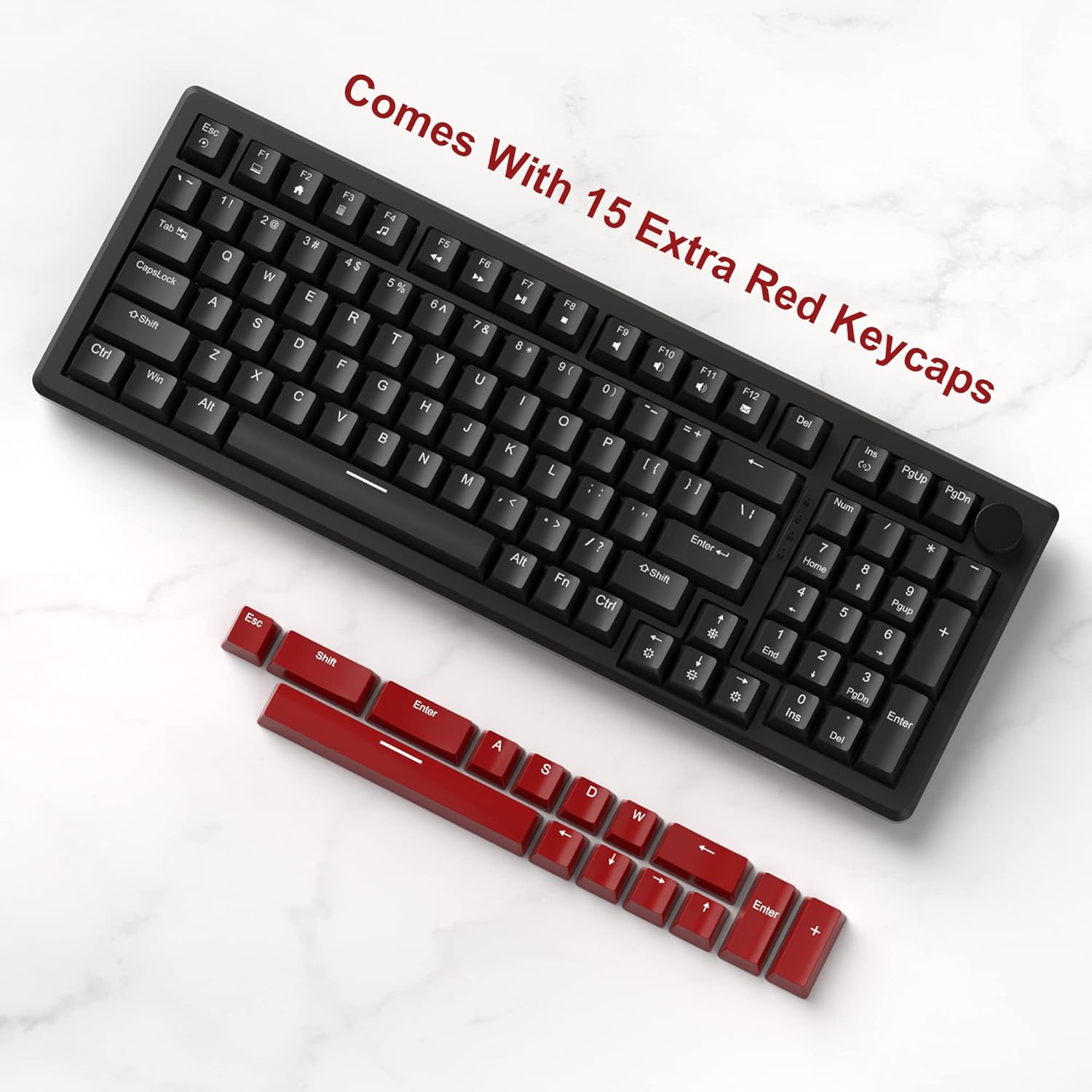
- Extra Keycaps: Includes an additional 15 red/yellow keycaps for DIY customization.
മൗസ് സവിശേഷതകൾ
- Ergonomic Gaming Mouse: Designed for comfort and control, fitting perfectly in the palm with an anti-slip design.
- 7 ബട്ടണുകൾ: Provides versatile control for various applications and games.
- 6 Speed Levels (DPI): Adjustable DPI settings (600/800/1200/1600/2400/3200) allow for easy customization of mouse speed to suit different scenarios.
- 7-Color Breathing LED Lights: The mouse features breathing LED lights in white, yellow, blue, purple, green, red, and cyan, enhancing the gaming atmosphere.
- Accurate Positioning and Stable Transmission: Ensures smooth and precise gameplay.
സജ്ജമാക്കുക
Follow these steps to set up your MageGee STAR98 Mechanical Gaming Keyboard and Mouse:
- ഉൽപ്പന്നം അൺപാക്ക് ചെയ്യുക: Carefully remove the keyboard and mouse from their packaging. Ensure all components, including the additional keycaps and USB cable, are present.
- കീബോർഡ് ബന്ധിപ്പിക്കുക: Locate the USB cable attached to the keyboard. Plug the USB-A connector into an available USB port on your computer (desktop PC or laptop). The keyboard is plug-and-play and does not require additional drivers for basic functionality.
- മൗസ് ബന്ധിപ്പിക്കുക: Locate the USB cable attached to the mouse. Plug the USB-A connector into another available USB port on your computer. The mouse is also plug-and-play.
- കീബോർഡ് ടിൽറ്റ് ക്രമീകരിക്കുക: Flip the keyboard over and extend the two-step adjustable feet to your preferred typing angle. There are three possible angles.
- പ്രാരംഭ പവർ-ഓൺ: Once connected, the keyboard and mouse backlighting should illuminate, indicating they are powered on and ready for use.


പ്രവർത്തന നിർദ്ദേശങ്ങൾ
കീബോർഡ് പ്രവർത്തനം
- മൾട്ടിമീഡിയ കീകൾ: The function keys (F1-F12) often have secondary multimedia functions. These are typically accessed by pressing the Fn key simultaneously with the desired function key. For exampലെ, Fn + F1 for Media Player, Fn + F2 for Volume Down, etc.
- മൾട്ടിഫങ്ഷണൽ നോബ്:
- Volume Control (Default): Turn the knob left to decrease volume, right to increase volume. Short press the knob to pause or play media.
- ബാക്ക്ലൈറ്റ് മോഡ്: Long press the knob to switch to backlight control mode. The 'M' indicator light will illuminate. In this mode:
- Turn the knob left or right to adjust backlight brightness.
- Short press the knob to cycle through different backlight effects/modes.
- Backlight Control (Fn Combinations):
- ലൈറ്റ് മോഡുകൾ മാറുക: അമർത്തുക Fn + Ins to cycle through 8 different light modes (static & dynamic).
- ലൈറ്റ് ഓൺ/ഓഫ് ചെയ്യുക: അമർത്തുക Fn + Del ബാക്ക്ലൈറ്റ് ഓണാക്കാനോ ഓഫാക്കാനോ.
- പ്രകാശവേഗത ക്രമീകരിക്കുക: അമർത്തുക Fn + ഇടത് അമ്പടയാളം to decrease light speed, Fn + വലത് അമ്പടയാളം to increase light speed (for dynamic modes).
- പ്രകാശ തെളിച്ചം ക്രമീകരിക്കുക: അമർത്തുക Fn + മുകളിലേക്കുള്ള അമ്പടയാളം തിളക്കം വർദ്ധിപ്പിക്കാൻ, Fn + താഴേക്കുള്ള അമ്പടയാളം തെളിച്ചം കുറയ്ക്കാൻ.
- കീക്യാപ്പ് ഇഷ്ടാനുസൃതമാക്കൽ: Use the provided keycap puller (if included) to carefully remove existing keycaps and replace them with the additional red/yellow keycaps for a personalized look.


മൗസ് ഓപ്പറേഷൻ
- DPI ക്രമീകരണം: The mouse features a dedicated DPI button (usually located behind the scroll wheel). Press this button to cycle through the 6 available speed levels (600/800/1200/1600/2400/3200 DPI). The LED lighting may change color to indicate the current DPI setting.
- 7-കളർ ബ്രീത്തിംഗ് എൽഇഡി: The mouse's LED lights automatically cycle through 7 colors, creating a breathing effect. There is no manual control for specific colors or modes for the mouse lighting.
- എർഗണോമിക് ഡിസൈൻ: Position your hand comfortably over the mouse, utilizing its ergonomic shape and anti-slip surface for extended use.

മെയിൻ്റനൻസ്
Proper maintenance ensures the longevity and optimal performance of your keyboard and mouse:
- വൃത്തിയാക്കൽ:
- വൃത്തിയാക്കുന്നതിനുമുമ്പ് നിങ്ങളുടെ കമ്പ്യൂട്ടറിൽ നിന്ന് ഉപകരണങ്ങൾ വിച്ഛേദിക്കുക.
- മൃദുവായ, ലിൻ്റ് രഹിത തുണി ഉപയോഗിക്കുകampened with water or a mild cleaning solution to wipe down the surfaces.
- For the keyboard, use compressed air to remove dust and debris from between the keycaps.
- For deeper cleaning, keycaps can be carefully removed using a keycap puller and cleaned separately. Ensure they are completely dry before reattaching.
- കഠിനമായ രാസവസ്തുക്കൾ, അബ്രസീവ് ക്ലീനറുകൾ, അല്ലെങ്കിൽ ലായകങ്ങൾ എന്നിവ ഉപയോഗിക്കുന്നത് ഒഴിവാക്കുക.
- സംഭരണം: Store the keyboard and mouse in a cool, dry place away from direct sunlight and extreme temperatures when not in use for extended periods.
- കൈകാര്യം ചെയ്യൽ: Avoid dropping the devices or exposing them to excessive force, which can damage internal components or switches.
ട്രബിൾഷൂട്ടിംഗ്
If you encounter issues with your MageGee STAR98 Mechanical Gaming Keyboard and Mouse, refer to the following common solutions:
| പ്രശ്നം | സാധ്യമായ കാരണം | പരിഹാരം |
|---|---|---|
| കീബോർഡ്/മൗസ് പ്രതികരിക്കുന്നില്ല | അയഞ്ഞ യുഎസ്ബി കണക്ഷൻ, തകരാറുള്ള യുഎസ്ബി പോർട്ട്, ഡ്രൈവർ പ്രശ്നം. |
|
| ബാക്ക്ലൈറ്റ് പ്രവർത്തിക്കുന്നില്ല അല്ലെങ്കിൽ മിന്നിമറയുന്നു | Backlight turned off, brightness too low, software conflict. |
|
| മൗസ് കഴ്സർ ക്രമരഹിതം അല്ലെങ്കിൽ പ്രതികരിക്കുന്നില്ല. | Dirty sensor, incorrect DPI setting, surface issue. |
|
| കീകൾ രജിസ്റ്റർ ചെയ്യുന്നില്ല അല്ലെങ്കിൽ ഇരട്ട ടൈപ്പ് ചെയ്യുന്നില്ല. | Debris under keycap, faulty switch. |
|
സ്പെസിഫിക്കേഷനുകൾ
- ബ്രാൻഡ്: മേജ്ഗീ
- മോഡൽ: നക്ഷത്രം98
- കീബോർഡ് ലേഔട്ട്: 94% (98 കീകൾ)
- സ്വിച്ച് തരം: ലീനിയർ റെഡ് സ്വിച്ചുകൾ
- ബാക്ക്ലൈറ്റ്: Rainbow LED (8 modes, 5 brightness, 4 speed)
- കണക്റ്റിവിറ്റി: വയർഡ് യുഎസ്ബി
- കീബോർഡ് അളവുകൾ: ഏകദേശം 15.1 x 5.4 x 1.6 ഇഞ്ച്
- മൗസ് ബട്ടണുകൾ: 7
- മൗസ് DPI ലെവലുകൾ: 6 (600/800/1200/1600/2400/3200)
- Mouse Lighting: 7-കളർ ബ്രീത്തിംഗ് എൽഇഡി
- മൗസിന്റെ അളവുകൾ: ഏകദേശം 5.1 x 2.8 x 1.6 ഇഞ്ച്
- ഇനത്തിൻ്റെ ഭാരം: 2.44 പൗണ്ട് (കീബോർഡും മൗസും ചേർത്തത്)
- അനുയോജ്യമായ ഉപകരണങ്ങൾ: ലാപ്ടോപ്പ്, പേഴ്സണൽ കമ്പ്യൂട്ടർ
- ഓപ്പറേറ്റിംഗ് സിസ്റ്റം അനുയോജ്യത: വിൻഡോസ്


വാറൻ്റിയും പിന്തുണയും
MageGee products are manufactured to high-quality standards. For warranty information, technical support, or service inquiries, please refer to the contact information provided with your product packaging or visit the official MageGee webസൈറ്റ്. ഏതെങ്കിലും വാറന്റി ക്ലെയിമുകൾക്കായി നിങ്ങളുടെ വാങ്ങലിന്റെ തെളിവ് സൂക്ഷിക്കുക.


