1. ആമുഖം
The Keychron Q2 Pro is a highly customizable 65% layout mechanical keyboard designed for enthusiasts and professionals. It features a full aluminum body, QMK/VIA support for extensive customization, and versatile wireless and wired connectivity options. This manual provides detailed instructions for setting up, operating, maintaining, and troubleshooting your Keychron Q2 Pro keyboard.

Image 1.1: The Keychron Q2 Pro mechanical keyboard, showcasing its compact 65% layout, integrated knob, and the included K Pro Brown switches.
2. പാക്കേജ് ഉള്ളടക്കം
താഴെ ലിസ്റ്റ് ചെയ്തിരിക്കുന്ന എല്ലാ ഇനങ്ങളും നിങ്ങളുടെ പാക്കേജിൽ ഉൾപ്പെടുത്തിയിട്ടുണ്ടെന്ന് ദയവായി പരിശോധിക്കുക:
- 1x പൂർണ്ണമായും അസംബിൾ ചെയ്ത കീബോർഡ് (അലുമിനിയം കേസ്, പിസിബി, പിസി പ്ലേറ്റ്, സൗണ്ട് അബ്സോർബിംഗ് ഫോം, കേസ് ഫോം, 14x ഗാസ്കറ്റുകൾ (10 ഇൻസ്റ്റാൾ ചെയ്തു, ബോക്സിൽ 4 എണ്ണം), 4 സെറ്റ് x സ്റ്റെബിലൈസറുകൾ, 1 സെറ്റ് x കീക്യാപ്പുകൾ (ഡബിൾ-ഷോട്ട് കെഎസ്എ പിബിടി), 1 സെറ്റ് x സ്വിച്ചുകൾ)
- 1x Type-C to Type-C cable
- 1x Type-A to Type-C adapter
- 1x Double-shot PBT keycaps (pre-installed)
- 1x Screw-in PCB stabs (pre-installed)
- 1x സ്വിച്ച് പുള്ളർ
- 1x കീക്യാപ്പ് പുള്ളർ
- 1x സ്ക്രൂഡ്രൈവർ
- 1x ഹെക്സ് കീ

Image 2.1: Visual representation of the Keychron Q2 Pro keyboard and its complete set of accessories and tools included in the package.
3. സജ്ജീകരണം
3.1 പ്രാരംഭ കണക്ഷൻ
The Keychron Q2 Pro supports both wireless (Bluetooth 5.1) and wired (USB Type-C) connections. Ensure the keyboard is charged before initial wireless use. Connect the provided Type-C cable to the keyboard and your computer for wired mode or charging.
3.2 മോഡുകൾക്കിടയിൽ മാറൽ
Locate the mode switch on the back or side of the keyboard. Toggle it to select between wired and wireless (Bluetooth) modes. For wireless mode, the keyboard can connect to up to 3 devices, allowing seamless switching between your laptop, phone, and tablet.

Image 3.1: The Keychron Q2 Pro keyboard, illustrating its wireless functionality and sleek design.
3.3 ഓപ്പറേറ്റിംഗ് സിസ്റ്റം അനുയോജ്യത
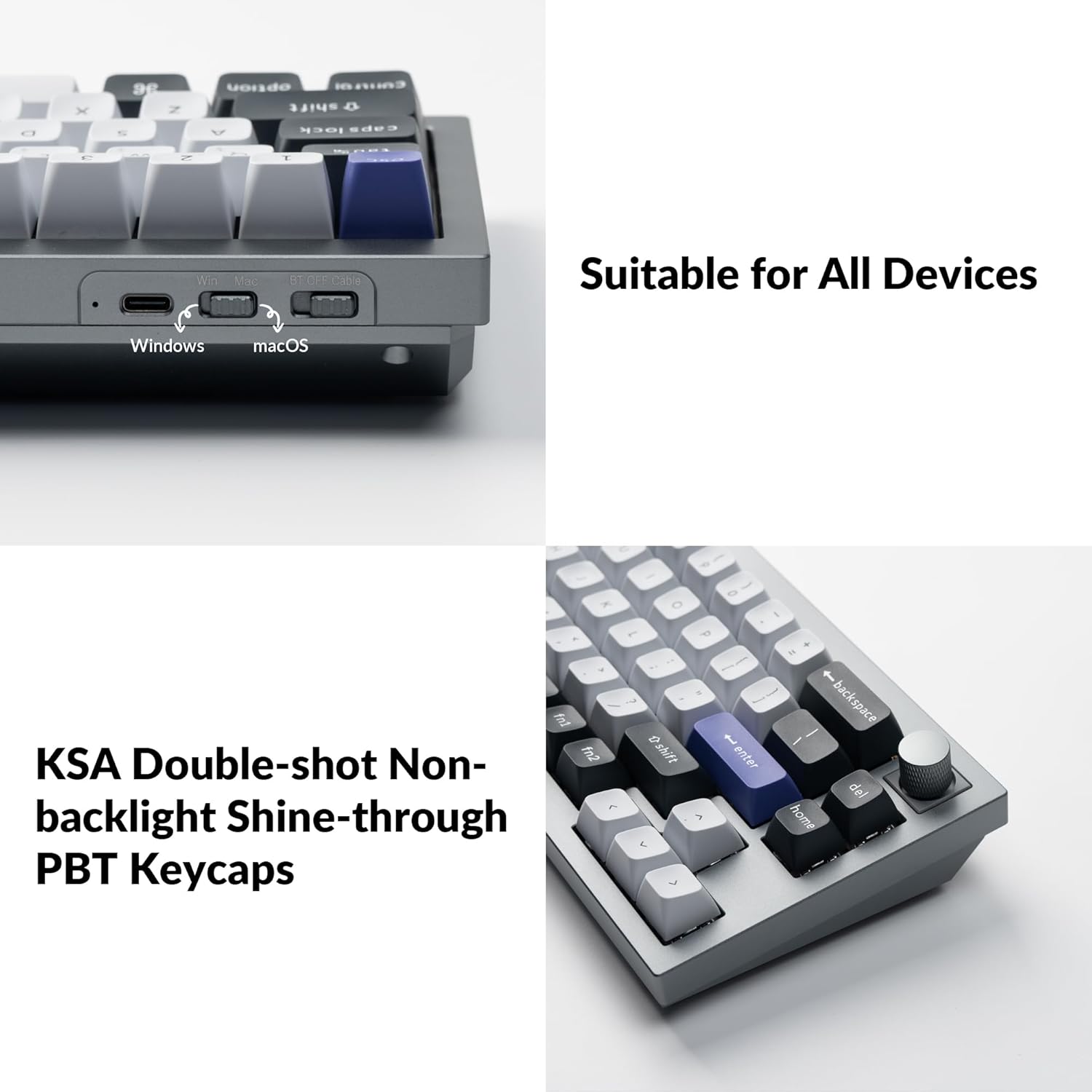
The Q2 Pro is fully compatible with Mac, Windows, and Linux operating systems. Use the dedicated OS switch on the keyboard to select the appropriate layout for your system. This ensures correct key mapping and functionality.
Image 3.2: A close-up of the Keychron Q2 Pro, highlighting the physical switch for Mac/Windows compatibility and the durable KSA double-shot PBT keycaps.
4. കീബോർഡ് പ്രവർത്തിപ്പിക്കൽ
4.1 QMK & VIA Customization
The Q2 Pro supports QMK and VIA firmware, allowing you to remap any key, create custom macro commands, shortcuts, or key combinations. The aluminum rotary encoder (knob) can also be customized for various functions like zooming, adjusting brightness, volume, or backlight hue.

Image 4.1: The VIA software interface, demonstrating the intuitive graphical user interface for remapping keys and customizing layers on the Keychron Q2 Pro.

Image 4.2: The VIA logo, representing the powerful open-source software used for keyboard customization.
ചിത്രം 4.3: വിശദമായ view of the programmable rotary knob, highlighting its textured surface and integration into the keyboard design.
4.2 ഹോട്ട്-സ്വാപ്പബിൾ സ്വിച്ചുകൾ
The Q2 Pro features hot-swappable switch sockets, allowing you to easily change switches without soldering. This provides flexibility to customize your typing feel with different switch types (3-pin and 5-pin MX style mechanical switches are supported).

ചിത്രം 4.4: ഒരു ക്ലോസപ്പ് view of the hot-swappable switch sockets, demonstrating the ease of changing switches without soldering.
Keychron K Pro Switch Features
| സ്വിച്ച് തരം | ഓപ്പറേറ്റിംഗ് ഫോഴ്സ് | യാത്രയ്ക്ക് മുമ്പുള്ള സമയം | യാത്രാ ദൂരം | പെരുമാറ്റം | Pre-lubed | ശബ്ദ നില | എന്നതിന് അനുയോജ്യം |
|---|---|---|---|---|---|---|---|
| ചുവപ്പ് | 45 ±10 gf | 2 ± 0.4 മില്ലീമീറ്റർ | 4 ± 0.4 മില്ലീമീറ്റർ | ലീനിയർ | അതെ | നിശബ്ദം | Office/gaming |
| ബ്രൗൺ | 50 ±10 gf | 2 ± 0.4 മില്ലീമീറ്റർ | 4 ± 0.4 മില്ലീമീറ്റർ | സ്പർശിക്കുന്ന | അതെ | സൌമ്യമായ | Midway Office/gaming |
| വാഴപ്പഴം | 57 ±8 gf | 2.2 ± 0.4 മില്ലീമീറ്റർ | 3.3 ± 0.2 മില്ലീമീറ്റർ | Tactile (Similar to Panda switches) | അതെ | സൌമ്യമായ | Office/gaming |

Image 4.5: A detailed table outlining the specifications and characteristics of Keychron K Pro Red, Brown, and Banana switches.
4.3 RGB Backlight
The Q2 Pro features south-facing RGB backlighting with 22 types of pre-set lighting effects. You can fine-tune the RGB hue, saturation, brightness, effect speed, and modes directly on the keyboard or through QMK/VIA software for advanced customization.

Image 4.6: The Keychron Q2 Pro keyboard illuminated with its customizable RGB backlighting, showcasinതെക്ക് അഭിമുഖമായുള്ള LED ഡിസൈൻ g.
4.4 Enhanced Typing Experience
The Q2 Pro incorporates a double-gasket design with silicone pads between the top and bottom cases to significantly reduce sound resonance and noise from impacted metals. It also features PCB-mounted screw-in stabilizers for less wobbliness on larger keys, contributing to a smoother and more stable typing experience.

Image 4.7: A cross-section diagram explaining the innovative double-gasket design, which enhances typing feel and acoustics by isolating the plate from the case.

Image 4.8: A set of PCB-mounted screw-in stabilizers, designed to provide stability and reduce wobble for larger keys like the spacebar and shift keys.
5. പരിപാലനം
5.1 കീബോർഡ് വൃത്തിയാക്കൽ
To clean your Keychron Q2 Pro, first disconnect it from power. Use a soft, lint-free cloth slightly dampened with water or a mild cleaning solution to wipe down the keycaps and case. For deeper cleaning, use the provided keycap puller to remove keycaps and a brush or compressed air to clear debris from between switches.
5.2 Disassembly and Assembly
The Q2 Pro is designed for easy disassembly and assembly, facilitating modifications and maintenance. Refer to the exploded view diagram for component identification and order of assembly/disassembly.

ചിത്രം 5.1: പൊട്ടിത്തെറിച്ച ഒരു view diagram illustrating all the individual components of the Keychron Q2 Pro keyboard, from keycaps to the bottom case, for easy understanding of its structure.
6. പ്രശ്നപരിഹാരം
6.1 കണക്റ്റിവിറ്റി പ്രശ്നങ്ങൾ
- ബ്ലൂടൂത്ത് കണക്റ്റുചെയ്യുന്നില്ല: Ensure the keyboard is in Bluetooth mode and fully charged. Remove the keyboard from your device's Bluetooth list and attempt to re-pair.
- Wired Mode Not Working: Check the USB-C cable connection at both ends. Try a different USB port or cable. Ensure the keyboard is switched to wired mode.
6.2 കീ പ്രതികരിക്കുന്നില്ല
- ഒറ്റ കീ: If a single key is not responding, it might be a faulty switch. Since the keyboard is hot-swappable, try replacing the switch with a spare one.
- Multiple Keys: Ensure the keyboard firmware is up to date. Perform a factory reset if necessary (refer to Keychron's official support for reset procedures).
6.3 RGB ബാക്ക്ലൈറ്റ് പ്രശ്നങ്ങൾ
- Lights Off/Dim: Check brightness settings on the keyboard. Ensure the keyboard is not in a low-power mode.
- പൊരുത്തമില്ലാത്ത ലൈറ്റിംഗ്: Update firmware or reset RGB settings via QMK/VIA software.
7 സ്പെസിഫിക്കേഷനുകൾ
| ഫീച്ചർ | വിശദാംശങ്ങൾ |
|---|---|
| ബ്രാൻഡ് | കീക്രോൺ |
| മോഡൽ നമ്പർ | Q2P-N3 |
| കണക്റ്റിവിറ്റി | ബ്ലൂടൂത്ത് 5.1, യുഎസ്ബി ടൈപ്പ്-സി |
| ലേഔട്ട് | 65% (68 keys) with Rotary Knob |
| ബോഡി മെറ്റീരിയൽ | Full Aluminum (6063) |
| സ്വിച്ചുകൾ | Hot-swappable K Pro Brown Switches (pre-installed) |
| കീകാപ്പുകൾ | KSA Double-Shot PBT Keycaps |
| ബാക്ക്ലൈറ്റ് | South-Facing RGB (22 types) |
| എം.സി.യു | ARM Cortex-M4 32-bit STM32L432 (128K Flash) |
| പോളിംഗ് നിരക്ക് (വയർഡ്) | 1000 Hz |
| പോളിംഗ് നിരക്ക് (വയർലെസ്) | 90 Hz |
| ഓപ്പറേറ്റിംഗ് സിസ്റ്റം | മാക്, വിൻഡോസ്, ലിനക്സ് |
| ഇനത്തിൻ്റെ ഭാരം | 4.73 പൗണ്ട് |
| ഉൽപ്പന്ന അളവുകൾ | 12.89 x 4.76 x 1.33 ഇഞ്ച് |
| പവർ ഉറവിടം | ബാറ്ററി പവർ (1 ലിഥിയം പോളിമർ ബാറ്ററി ഉൾപ്പെടുത്തിയിട്ടുണ്ട്) |
8. വാറൻ്റിയും പിന്തുണയും
Keychron products typically come with a limited warranty. For specific warranty terms and conditions, please refer to the official Keychron webസൈറ്റിൽ പ്രവേശിക്കുക അല്ലെങ്കിൽ അവരുടെ ഉപഭോക്തൃ പിന്തുണയുമായി നേരിട്ട് ബന്ധപ്പെടുക.
8.1 അധിക വിഭവങ്ങൾ
- ഔദ്യോഗിക കീക്രോൺ Webസൈറ്റ്: www.keychron.com
- ഉപയോക്തൃ ഗൈഡ് (PDF): ഉപയോക്തൃ ഗൈഡ് ഡൗൺലോഡ് ചെയ്യുക
- ഉപയോക്തൃ മാനുവൽ (PDF): ഉപയോക്തൃ മാനുവൽ ഡൗൺലോഡ് ചെയ്യുക