1. ആമുഖം
Thank you for choosing the SOLIOM S40 3G/4G LTE Cellular Solar Security Camera. This manual provides detailed instructions for the proper installation, operation, and maintenance of your camera. Please read this manual thoroughly before using the product to ensure correct usage and to prevent damage.
പ്രധാനപ്പെട്ട സുരക്ഷാ വിവരങ്ങൾ:
- വീഴാതിരിക്കാൻ ക്യാമറ ഒരു സ്ഥിരതയുള്ള സ്ഥലത്ത് സ്ഥാപിച്ചിട്ടുണ്ടെന്ന് ഉറപ്പാക്കുക.
- ഉയർന്ന താപനിലയിലോ നാശകരമായ ചുറ്റുപാടുകളിലോ ക്യാമറ തുറന്നുകാട്ടരുത്.
- Use only the recommended power accessories.
- കുട്ടികൾക്ക് ലഭ്യമാകാതെ സൂക്ഷിക്കുക.
2. ഉൽപ്പന്നം കഴിഞ്ഞുview
2.1 ഉൽപ്പന്ന ഘടകങ്ങൾ
The SOLIOM S40 camera package typically includes the following items:
- SOLIOM S40 3G/4G LTE Cellular Solar Security Camera
- സോളാർ പാനൽ
- മൗണ്ടിംഗ് ബ്രാക്കറ്റും സ്ക്രൂകളും
- യുഎസ്ബി ചാർജിംഗ് കേബിൾ
- Nano SIM Card (pre-installed or included separately)
- Micro SD Card (pre-installed or included separately)
- ഉപയോക്തൃ മാനുവൽ (ഈ പ്രമാണം)
2.2 പ്രധാന സവിശേഷതകൾ
- 3G/4G LTE കണക്റ്റിവിറ്റി: Operates without Wi-Fi, ideal for remote locations.
- സൗരോർജ്ജം: Equipped with a solar panel for continuous power, reducing the need for manual recharging.
- 1080p ഫുൾ എച്ച്ഡി വീഡിയോ: വ്യക്തവും വിശദവുമായ വീഡിയോ ഫൂ നൽകുന്നുtage.
- പാൻ & ടിൽറ്റ് പ്രവർത്തനം: വിശാലമായ ഏരിയ കവറേജിനായി 355° തിരശ്ചീന പാൻ, 90° ലംബ ടിൽറ്റ് എന്നിവ വാഗ്ദാനം ചെയ്യുന്നു.
- പിആർ മോഷൻ കണ്ടെത്തൽ: Advanced passive infrared sensor detects human and animal movement, minimizing false alarms.
- കളർ നൈറ്റ് വിഷൻ: Enhanced night vision capabilities with spotlight for full-color viewകുറഞ്ഞ വെളിച്ചത്തിൽ.
- ടു-വേ ഓഡിയോ: തത്സമയ ആശയവിനിമയത്തിനായി ബിൽറ്റ്-ഇൻ മൈക്രോഫോണും സ്പീക്കറും.
- IP66 കാലാവസ്ഥയെ പ്രതിരോധിക്കുന്നത്: വ്യത്യസ്ത കാലാവസ്ഥകളിൽ പുറം ഉപയോഗത്തിനായി ഈടുനിൽക്കുന്ന ഡിസൈൻ.
- ലോക്കൽ & ക്ലൗഡ് സംഭരണം: Supports Micro SD card storage and optional cloud storage.

Figure 2.1: SOLIOM S40 Camera with Solar Panel

Figure 2.2: Camera operating in a remote location without Wi-Fi or power outlet.
3. സജ്ജീകരണം
3.1 നിങ്ങൾ ആരംഭിക്കുന്നതിന് മുമ്പ്
- ബാറ്ററി ചാർജ് ചെയ്യുക: Before initial use, fully charge the camera's internal battery using the provided USB cable. Connect the USB cable to the camera's charging port and a 5V/2A USB power adapter (not included).
- സിം കാർഡ് ചേർക്കുക: Ensure the Nano SIM card is active and has a data plan. Open the rubber cover on the camera body to access the SIM card slot. Insert the Nano SIM card with the gold contacts facing down, following the diagram.
- മൈക്രോ എസ്ഡി കാർഡ് ചേർക്കുക: If not pre-installed, insert a Micro SD card (up to 128GB, Class 10 or higher recommended) into the designated slot for local video storage.

Figure 3.1: SIM and SD Card Installation
3.2 ആപ്പ് ഡൗൺലോഡും അക്കൗണ്ട് രജിസ്ട്രേഷനും
Download the 'SOLIOM+' app from the App Store (iOS) or Google Play Store (Android). Follow the on-screen instructions to register a new account and log in.
3.3 ക്യാമറ ജോടിയാക്കൽ
- Open the SOLIOM+ app and tap 'Add Device' or the '+' icon.
- ഉപകരണ ലിസ്റ്റിൽ നിന്ന് '4G ക്യാമറ' തിരഞ്ഞെടുക്കുക.
- Follow the in-app prompts to scan the QR code on the camera or manually enter the device ID.
- കണക്റ്റ് ചെയ്തുകഴിഞ്ഞാൽ, നിങ്ങളുടെ ക്യാമറയ്ക്ക് പേര് നൽകാനും തത്സമയം ആരംഭിക്കാനും കഴിയും. viewing.
3.4 ഫിസിക്കൽ ഇൻസ്റ്റലേഷൻ
Choose a suitable location for installation, ensuring good 4G signal reception and sufficient sunlight exposure for the solar panel. The camera is IP66 weather-resistant, suitable for outdoor environments.
- ക്യാമറ ഘടിപ്പിക്കുന്നു: Use the provided mounting bracket and screws to securely attach the camera to a wall or pole. Ensure the camera has a clear line of sight to the area you wish to monitor.
- സോളാർ പാനൽ സ്ഥാപിക്കൽ: Mount the solar panel in a location that receives direct sunlight for several hours a day. Connect the solar panel cable to the camera's charging port.

Figure 3.2: Wire-Free Installation with Solar Power

Figure 3.3: IP66 Weather-resistant Design
4. പ്രവർത്തിക്കുന്നു
4.1 ആപ്പ് ഇന്റർഫേസ് ഓവർview
Upon opening the SOLIOM+ app, you will see a list of your connected cameras. Tap on a camera to access its live view നിയന്ത്രണ ഓപ്ഷനുകളും.
4.2 തത്സമയം View ഒപ്പം പ്ലേബാക്ക്
- തത്സമയം View: Tap on the camera feed to see real-time video.
- പ്ലേബാക്ക്: റെക്കോർഡ് ചെയ്ത foo ആക്സസ് ചെയ്യുകtage from the Micro SD card or cloud storage via the playback option in the app. You can filter by date and time.
4.3 പാൻ/ടിൽറ്റ് നിയന്ത്രണം
ലൈവിൽ view interface, use the on-screen joystick or directional arrows to remotely control the camera's pan (355° horizontal) and tilt (90° vertical) movements to adjust the viewing ആംഗിൾ.

ചിത്രം 4.1: പാൻ, ടിൽറ്റ് പ്രവർത്തനം
4.4 മോഷൻ ഡിറ്റക്ഷനും അലേർട്ടുകളും
The camera uses PIR (Passive Infrared) technology for accurate motion detection. When motion is detected, the camera can:
- Send push notifications to your smartphone.
- Record video clips to the SD card or cloud.
- Activate the built-in spotlight and/or siren alarm.
Adjust motion detection sensitivity and alert settings within the app to suit your needs.
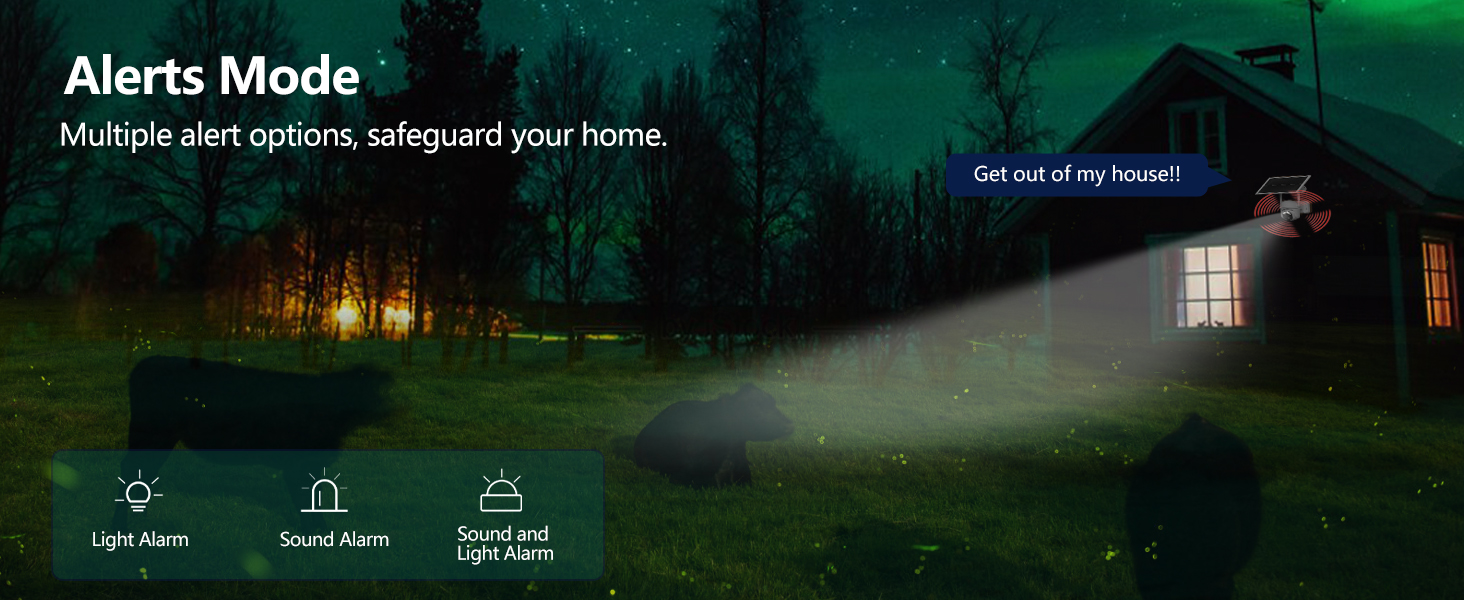
Figure 4.2: Alerts Mode (Light and Sound Alarm)
4.5 നൈറ്റ് വിഷൻ
The SOLIOM S40 features advanced night vision modes:
- ഇൻഫ്രാറെഡ് നൈറ്റ് വിഷൻ: പൂർണ്ണമായ ഇരുട്ടിലും വ്യക്തമായ കറുപ്പും വെളുപ്പും വീഡിയോ നൽകുന്നു.
- കളർ നൈറ്റ് വിഷൻ: When motion is detected or manually activated, the built-in spotlight illuminates the area, allowing for full-color video recording at night.

Figure 4.3: Day and Night Vision Comparison
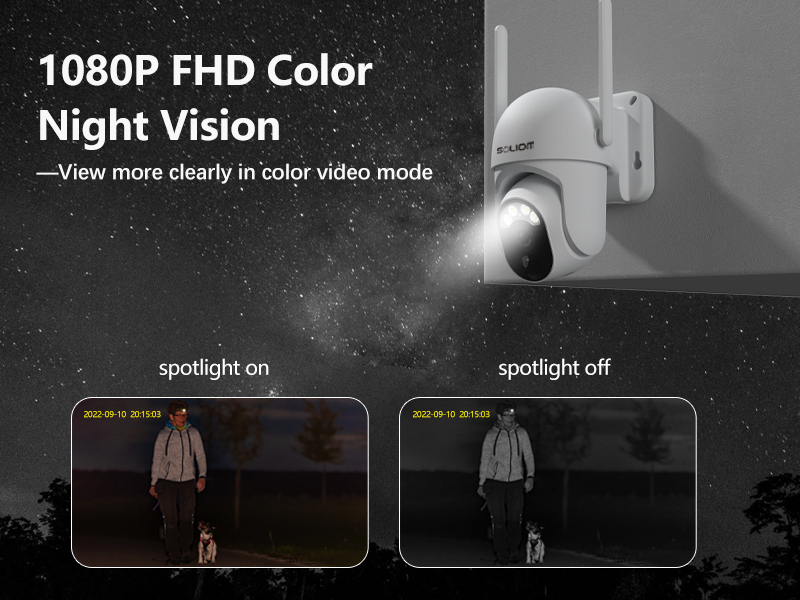
Figure 4.4: Color Night Vision with Spotlight
4.6 ടു-വേ ഓഡിയോ
Use the microphone and speaker icons in the app's live view to enable two-way communication. This allows you to speak to visitors or deter intruders remotely.
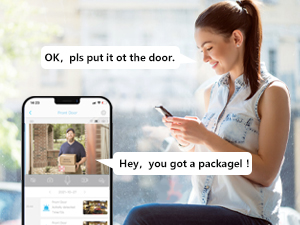
ചിത്രം 4.5: ടു-വേ ഓഡിയോ കമ്മ്യൂണിക്കേഷൻ
5. പരിപാലനം
- വൃത്തിയാക്കൽ: ക്യാമറ ലെൻസും സോളാർ പാനലും ഇടയ്ക്കിടെ മൃദുവായ, ഡി-ടച്ച് ഉപയോഗിച്ച് വൃത്തിയാക്കുക.amp cloth to ensure optimal performance. Do not use harsh chemicals.
- ബാറ്ററി ആരോഗ്യം: While the solar panel provides continuous charging, ensure the solar panel is free from obstructions and receives adequate sunlight. If the camera's battery level drops significantly, manually charge it via USB.
- ഫേംവെയർ അപ്ഡേറ്റുകൾ: Check the SOLIOM+ app regularly for firmware updates. Keeping your camera's firmware up-to-date ensures optimal performance and security.
- SD കാർഡ് മാനേജുമെന്റ്: If using an SD card, periodically check its storage capacity and format it through the app if necessary to maintain recording efficiency.
6. പ്രശ്നപരിഹാരം
- ക്യാമറ ഓഫ്ലൈൻ:
- Check 4G signal strength at the camera's location.
- Ensure the SIM card is properly inserted and has an active data plan.
- Verify the camera battery is charged.
- Restart the camera by pressing the reset button (if applicable) or power cycling.
- മോശം വീഡിയോ നിലവാരം:
- ക്യാമറ ലെൻസ് വൃത്തിയാക്കുക.
- Ensure adequate lighting, especially at night.
- Check 4G signal stability.
- മോഷൻ ഡിറ്റക്ഷൻ പ്രവർത്തിക്കുന്നില്ല:
- ആപ്പിൽ PIR സെൻസിറ്റിവിറ്റി ക്രമീകരണങ്ങൾ ക്രമീകരിക്കുക.
- ക്യാമറ ഉറപ്പാക്കുക. view തടസ്സങ്ങളില് നിന്ന് മുക്തമാണ്.
- Check the motion detection schedule in the app.
- Battery Not Charging via Solar:
- സോളാർ പാനൽ വൃത്തിയുള്ളതും അവശിഷ്ടങ്ങൾ ഇല്ലാത്തതുമാണെന്ന് ഉറപ്പാക്കുക.
- ദിവസേന മണിക്കൂറുകളോളം നേരിട്ട് സൂര്യപ്രകാശം ലഭിക്കുന്ന തരത്തിലാണ് സോളാർ പാനൽ സ്ഥാപിച്ചിരിക്കുന്നതെന്ന് ഉറപ്പാക്കുക.
- സോളാർ പാനലിനും ക്യാമറയ്ക്കും ഇടയിലുള്ള കണക്ഷൻ കേബിൾ പരിശോധിക്കുക.
- ആപ്പിലേക്ക് കണക്റ്റ് ചെയ്യാൻ കഴിയില്ല:
- നിങ്ങളുടെ സ്മാർട്ട്ഫോണിന് സ്ഥിരമായ ഇന്റർനെറ്റ് കണക്ഷൻ ഉണ്ടെന്ന് ഉറപ്പാക്കുക.
- Verify the camera is powered on and has a working SIM card.
- Try resetting the camera (refer to the reset button location near the SIM/SD card slots).
7 സ്പെസിഫിക്കേഷനുകൾ
| ഫീച്ചർ | സ്പെസിഫിക്കേഷൻ |
|---|---|
| മോഡൽ നമ്പർ | എസ് 40-4 ജി |
| കണക്റ്റിവിറ്റി | 3G/4G LTE (SIM Card required) |
| പവർ ഉറവിടം | ബാറ്ററിയിൽ പ്രവർത്തിക്കുന്ന, സൗരോർജ്ജത്തിൽ പ്രവർത്തിക്കുന്ന |
| വീഡിയോ റെസല്യൂഷൻ | 1080 Pixels (Full HD) |
| പാൻ ആംഗിൾ | 355 ഡിഗ്രി |
| ടിൽറ്റ് ആംഗിൾ | 90 ഡിഗ്രി |
| ഫീൽഡ് View | 360 Degrees (Pan/Tilt combined) |
| നൈറ്റ് വിഷൻ | Infrared, Color Night Vision (with Spotlight) |
| മോഷൻ ഡിറ്റക്ഷൻ | പിഐആർ മോഷൻ സെൻസർ |
| ഓഡിയോ | ടു-വേ ഓഡിയോ |
| സംഭരണം | Micro SD Card (up to 128GB), Cloud Storage (subscription required) |
| കാലാവസ്ഥ പ്രതിരോധം | IP66 |
| അളവുകൾ (L x W x H) | 3 x 3 x 5 ഇഞ്ച് |
| ഇനത്തിൻ്റെ ഭാരം | 2.48 പൗണ്ട് |
8. വാറൻ്റിയും പിന്തുണയും
8.1 വാറൻ്റി വിവരങ്ങൾ
SOLIOM products typically come with a limited warranty. Please refer to the warranty card included with your product or visit the official SOLIOM webവിശദമായ വാറന്റി നിബന്ധനകൾക്കും വ്യവസ്ഥകൾക്കും സൈറ്റ്.
8.2 ഉപഭോക്തൃ പിന്തുണ
If you encounter any issues or have questions not covered in this manual, please contact SOLIOM customer support. Contact information can usually be found on the SOLIOM official webസൈറ്റ് അല്ലെങ്കിൽ ഉൽപ്പന്ന പാക്കേജിംഗിൽ.
ഏറ്റവും പുതിയ വിവരങ്ങൾക്കും പിന്തുണാ ഉറവിടങ്ങൾക്കും, ദയവായി സന്ദർശിക്കുക: SOLIOM Official Store on Amazon


