LFF ആറ്റോമിക് ക്ലോക്ക് LWC205 ഉപയോക്തൃ മാനുവൽ
മോഡൽ: LWC205
Digital Wall Clock with Indoor/Outdoor Temperature and Wireless Sensor
1. ആമുഖം
വാങ്ങിയതിന് നന്ദി.asing the LFF Atomic Clock LWC205. This digital clock features a large, easy-to-read display, atomic time synchronization, indoor and outdoor temperature monitoring, and an alarm function. This manual provides detailed instructions for setup, operation, maintenance, and troubleshooting to ensure optimal performance of your device.
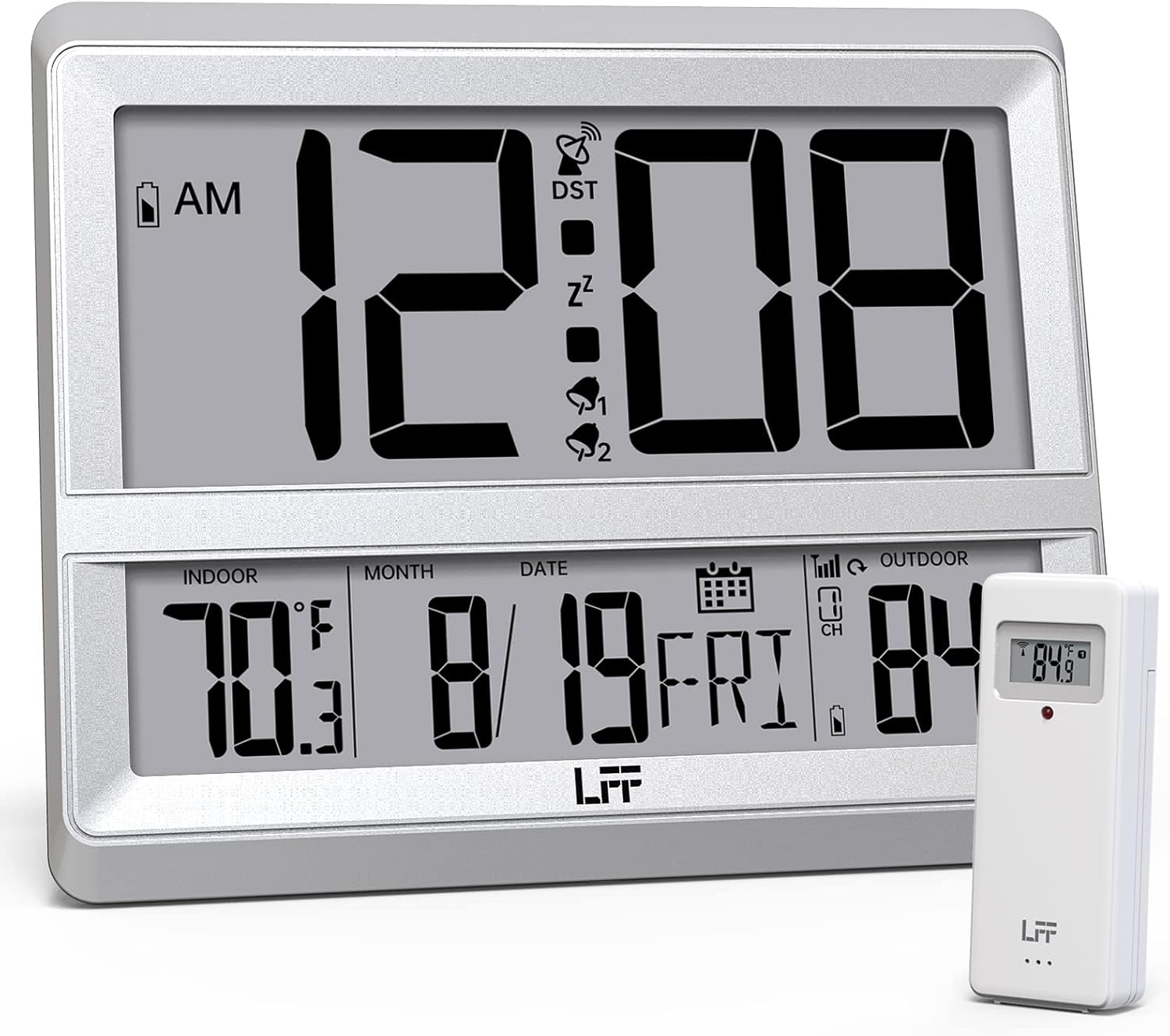
Image 1.1: The LFF Atomic Clock LWC205 main unit and its accompanying wireless outdoor sensor.
2. ഉൽപ്പന്നം കഴിഞ്ഞുview
2.1 ഡിസ്പ്ലേ ഘടകങ്ങൾ

Image 2.1: Detailed diagram illustrating the various display elements and control buttons on the LFF Atomic Clock LWC205. Key features include the alarm clock icon, time display, RCC reception icon, DST symbol, outdoor temperature, indoor temperature, date, and weekday.
2.2 Control Buttons (Rear View)
The control buttons are located on the back of the main clock unit:
- SET ബട്ടൺ: Used to enter and confirm settings.
- അലാറം ബട്ടൺ: Used to set and activate/deactivate the alarm.
- ചാനൽ ബട്ടൺ: Used to select the outdoor sensor channel (if multiple sensors are used).
- താഴേക്ക്/തിരമാല/°C/°F ബട്ടൺ: Used to decrease values during setting, manually initiate atomic time synchronization (wave), or switch between Celsius and Fahrenheit.
- മുകളിലേക്ക്/അലാറം ബട്ടൺ: Used to increase values during setting or activate/deactivate the alarm.
3. സജ്ജീകരണം
3.1 അൺപാക്കിംഗ്
Carefully remove all components from the packaging. Ensure you have the main atomic clock unit and the wireless outdoor sensor.
3.2 ബാറ്ററി ഇൻസ്റ്റാളേഷൻ
Both the main clock unit and the wireless outdoor sensor require batteries (not included).
- പ്രധാന ക്ലോക്ക് യൂണിറ്റ്: Open the battery compartment on the back of the clock. Insert 3 x AA ബാറ്ററികൾ, ശരിയായ ധ്രുവീകരണം ഉറപ്പാക്കുന്നു (+/-).
- വയർലെസ് Outട്ട്ഡോർ സെൻസർ: Open the battery compartment on the back of the sensor. Insert 2 x AAA ബാറ്ററികൾ, ensuring correct polarity (+/-). For temperatures below -4°F (-20°C), lithium batteries are recommended for the outdoor sensor.

Image 3.1: Instructions for installing 3xAA batteries in the main clock unit and 2xAAA batteries in the wireless outdoor sensor.
3.3 സെൻസർ പ്ലേസ്മെന്റ്
Place the wireless outdoor sensor in a shaded, dry location away from direct sunlight and precipitation. The sensor has a wireless range of up to 330 feet (100 meters) from the main unit. Ensure there are no major obstructions between the sensor and the clock for optimal signal transmission.

Image 3.2: Illustration of the 330ft wireless range between the main clock unit and the outdoor temperature sensor.
3.4 Clock Placement
The LFF Atomic Clock LWC205 offers two placement options:
- Table Clock: Use the integrated stand on the back of the unit to place it on a desk, nightstand, or shelf.
- Wall Clock: Utilize the keyhole slot on the back of the unit to mount it securely on a wall.

Image 3.3: The LFF Atomic Clock can be placed on a table using its built-in stand or mounted on a wall.
4. പ്രവർത്തന നിർദ്ദേശങ്ങൾ
4.1 Atomic Time Synchronization (WWVB)
The clock automatically synchronizes with the WWVB radio broadcast from Fort Collins, Colorado, ensuring accurate time. This process typically occurs overnight. For best reception, place the clock near a window and away from electronic interference.

Image 4.1: The atomic clock automatically corrects its time daily by receiving the WWVB signal, covering eight time zones and adjusting for Daylight Saving Time.
4.2 Manual Time and Date Setting
In areas where the WWVB signal is weak or unavailable, you can manually set the time and date:
- അമർത്തിപ്പിടിക്കുക സെറ്റ് ടൈം സെറ്റിംഗ് മോഡ് നൽകാനുള്ള ബട്ടൺ.
- ഉപയോഗിക്കുക UP or താഴേക്ക് മിന്നുന്ന മൂല്യം ക്രമീകരിക്കുന്നതിനുള്ള ബട്ടണുകൾ (ഉദാ. മണിക്കൂർ, മിനിറ്റ്, വർഷം, മാസം, ദിവസം).
- അമർത്തുക സെറ്റ് button to confirm each setting and move to the next.
- The clock will exit setting mode automatically after a few seconds of inactivity or by pressing സെറ്റ് repeatedly until all settings are confirmed.
4.3 Temperature Display (°C/°F)
The clock displays both indoor and outdoor temperatures. To switch between Celsius (°C) and Fahrenheit (°F):
- അമർത്തുക താഴേക്ക്/തിരമാല/°C/°F button to toggle the temperature unit.
4.4 12/24 മണിക്കൂർ ഫോർമാറ്റ്
To switch between 12-hour and 24-hour time formats:
- അമർത്തുക UP 12 മണിക്കൂർ (AM/PM സൂചകത്തോടൊപ്പം) 24 മണിക്കൂർ ഫോർമാറ്റുകൾക്കിടയിൽ ടോഗിൾ ചെയ്യാൻ ബട്ടൺ.
4.5 അലാറം പ്രവർത്തനം
അലാറം സജ്ജീകരിക്കാൻ:
- അമർത്തുക അലാറം നിലവിലെ അലാറം സമയം പ്രദർശിപ്പിക്കാൻ ഒരിക്കൽ ബട്ടൺ അമർത്തുക.
- അമർത്തിപ്പിടിക്കുക അലാറം അലാറം ക്രമീകരണ മോഡിൽ പ്രവേശിക്കാൻ ബട്ടൺ.
- ഉപയോഗിക്കുക UP or താഴേക്ക് മണിക്കൂറും മിനിറ്റും ക്രമീകരിക്കാനുള്ള ബട്ടണുകൾ.
- അമർത്തുക അലാറം ഓരോ ക്രമീകരണവും സ്ഥിരീകരിക്കുന്നതിനുള്ള ബട്ടൺ.
അലാറം സജീവമാക്കുന്നതിനും നിർജ്ജീവമാക്കുന്നതിനും:
- അമർത്തുക അലാറം button repeatedly to cycle through alarm ON/OFF states. An alarm icon will appear on the display when activated.
5. പരിപാലനം
5.1 ബാറ്ററി മാറ്റിസ്ഥാപിക്കൽ
When the low battery indicator appears on the display, replace the batteries in the respective unit (main clock or outdoor sensor) promptly to ensure continuous operation and accurate readings. Refer to Section 3.2 for battery types and installation.
5.2 വൃത്തിയാക്കൽ
Clean the clock and sensor with a soft, dry cloth. Do not use abrasive cleaners or solvents, as these may damage the display or casing.
5.3 പരിസ്ഥിതി പരിഗണനകൾ
The outdoor sensor is designed for outdoor use but should be protected from extreme weather conditions. The recommended operating temperature range for the outdoor sensor is -58°F to 158°F (-50°C to 70°C). For temperatures below -4°F (-20°C), lithium batteries are required in the outdoor sensor for reliable performance.
6. പ്രശ്നപരിഹാരം
- No Display / Faint Display: Check battery installation and replace with fresh batteries if necessary. Ensure correct polarity.
- No Outdoor Temperature Reading:
- Ensure batteries are correctly installed in the outdoor sensor.
- Verify the sensor is within the 330ft wireless range of the main unit.
- അമർത്തുക ചാനൽ button on the main unit to ensure it is on the correct channel (if applicable).
- Relocate the sensor or main unit to improve signal reception, avoiding large metal objects or other electronic devices.
- തെറ്റായ സമയം:
- Ensure the clock is attempting to receive the WWVB signal (look for the RCC reception icon).
- Place the clock near a window and away from electronic interference for better signal reception.
- Manually initiate a signal search by pressing the DOWN/WAVE ബട്ടൺ.
- If atomic synchronization fails, manually set the time as described in Section 4.2.
- Temperature Readings Seem Inaccurate:
- നേരിട്ടുള്ള സൂര്യപ്രകാശത്തിൽ നിന്നോ താപ സ്രോതസ്സുകളിൽ നിന്നോ അകലെ, തണലുള്ള സ്ഥലത്ത് ഔട്ട്ഡോർ സെൻസർ സ്ഥാപിച്ചിട്ടുണ്ടെന്ന് ഉറപ്പാക്കുക.
- Check battery levels in both units.
7 സ്പെസിഫിക്കേഷനുകൾ
| ഫീച്ചർ | വിശദാംശങ്ങൾ |
|---|---|
| ബ്രാൻഡ് | എൽ.എഫ്.എഫ് |
| മോഡൽ നമ്പർ | LWC205 |
| ഡിസ്പ്ലേ തരം | ഡിജിറ്റൽ |
| നിറം | വെള്ളി |
| പ്രത്യേക ഫീച്ചർ | Atomic Time, Indoor/Outdoor Temperature, Alarm |
| ഉൽപ്പന്ന അളവുകൾ | 7.48"ആംശം x 8.66"ആംശം |
| Power Source (Clock) | 3 x AA ബാറ്ററികൾ (ഉൾപ്പെടുത്തിയിട്ടില്ല) |
| പവർ സോഴ്സ് (സെൻസർ) | 2 x AAA ബാറ്ററികൾ (ഉൾപ്പെടുത്തിയിട്ടില്ല) |
| ഇൻഡോർ/ഔട്ട്ഡോർ ഉപയോഗം | ഇൻഡോർ (ക്ലോക്ക്), ഔട്ട്ഡോർ (സെൻസർ) |
| Do ട്ട്ഡോർ താപനില ശ്രേണി | -58°F മുതൽ 158°F വരെ (-50°C മുതൽ 70°C വരെ) |
| ഇൻഡോർ താപനില ശ്രേണി | 32°F മുതൽ 122°F വരെ (0°C മുതൽ 50°C വരെ) |
| വയർലെസ് സെൻസർ ശ്രേണി | 330 അടി വരെ (100 മീറ്റർ) |
| മൗണ്ടിംഗ് തരം | വാൾ മൗണ്ട്, ടേബിൾടോപ്പ് |
| മെറ്റീരിയൽ | അക്രിലോണിട്രൈൽ ബ്യൂട്ടാഡീൻ സ്റ്റൈറൈൻ (എബിഎസ്) പ്ലാസ്റ്റിക് |
| ഇനത്തിൻ്റെ ഭാരം | 0.9 പൗണ്ട് (14.4 ഔൺസ്) |
8. വാറൻ്റി വിവരങ്ങൾ
Warranty information was not provided in the product data. Please refer to the product packaging or contact the manufacturer directly for details regarding warranty coverage and terms.
9. ഉപഭോക്തൃ പിന്തുണ
For further assistance or inquiries, please contact LFF customer support. Contact details were not provided in the product data. Please refer to the product packaging or the official LFF webഉപഭോക്തൃ സേവന കോൺടാക്റ്റ് വിവരങ്ങൾക്കായുള്ള സൈറ്റ്.


