1 പ്രധാനപ്പെട്ട സുരക്ഷാ വിവരങ്ങൾ
Please read all instructions carefully before using the WEWATCH V50 Pro Projector. Keep this manual for future reference.
- വെന്റിലേഷൻ ദ്വാരങ്ങൾ തടയരുത്. പ്രൊജക്ടറിന് ചുറ്റും മതിയായ വായുസഞ്ചാരം ഉറപ്പാക്കുക.
- തീയോ വൈദ്യുതാഘാതമോ തടയാൻ പ്രൊജക്ടർ മഴയിലോ ഈർപ്പത്തിലോ തുറന്നുകാട്ടരുത്.
- നിർമ്മാതാവ് വ്യക്തമാക്കിയ അറ്റാച്ച്മെൻ്റുകൾ/ആക്സസറികൾ മാത്രം ഉപയോഗിക്കുക.
- ഇടിമിന്നൽ ഉണ്ടാകുമ്പോഴോ ദീർഘനേരം ഉപയോഗിക്കാതിരിക്കുമ്പോഴോ പ്രൊജക്ടർ പ്ലഗ് ഊരിവയ്ക്കുക.
- എല്ലാ സേവനങ്ങളും യോഗ്യതയുള്ള സേവന ഉദ്യോഗസ്ഥർക്ക് റഫർ ചെയ്യുക.
2. ഉൽപ്പന്നം കഴിഞ്ഞുview
The WEWATCH V50 Pro is a native 1080P Full HD projector designed for home cinema, gaming, and presentations. It features 5G WiFi, Bluetooth 5.1, and versatile connectivity options.
2.1 പാക്കേജ് ഉള്ളടക്കം
- WEWATCH V50 Pro Projector
- റിമോട്ട് കൺട്രോൾ
- പവർ കേബിൾ
- HDMI കേബിൾ
- ഉപയോക്തൃ മാനുവൽ
2.2 Projector Components and Ports

Figure 2.1: WEWATCH V50 Pro Projector and Accessories.
This image shows the WEWATCH V50 Pro projector in black, accompanied by its remote control. A smartphone screen is overlaid, demonstrating the projector's screen mirroring capability with a vibrant landscape image.

Figure 2.2: Connectivity Ports and Compatible Devices.
This diagram illustrates the various input and output ports available on the WEWATCH V50 Pro projector, including AUX, AV, TF card slot, HDMI, USB, and VGA. Below the ports, icons and text indicate compatible devices such as PCs, laptops, Google Chromecast, DVD players, speakers, PS5, Xbox, TV sticks, smartphones, tablets, and cameras.
The projector features multiple input ports on its side and rear panels, including HDMI, USB, AV, and VGA, allowing connection to a wide range of devices. It also includes a 3.5mm audio output for external speakers or headphones.
3. സജ്ജീകരണം
3.1 പ്ലേസ്മെൻ്റ്
Place the projector on a stable, flat surface or mount it on a tripod, ceiling, or wall. Ensure the projector lens is perpendicular to the projection surface for optimal image quality. The ideal projection distance ranges from 5.3ft to 15ft, supporting screen sizes up to 200 inches.
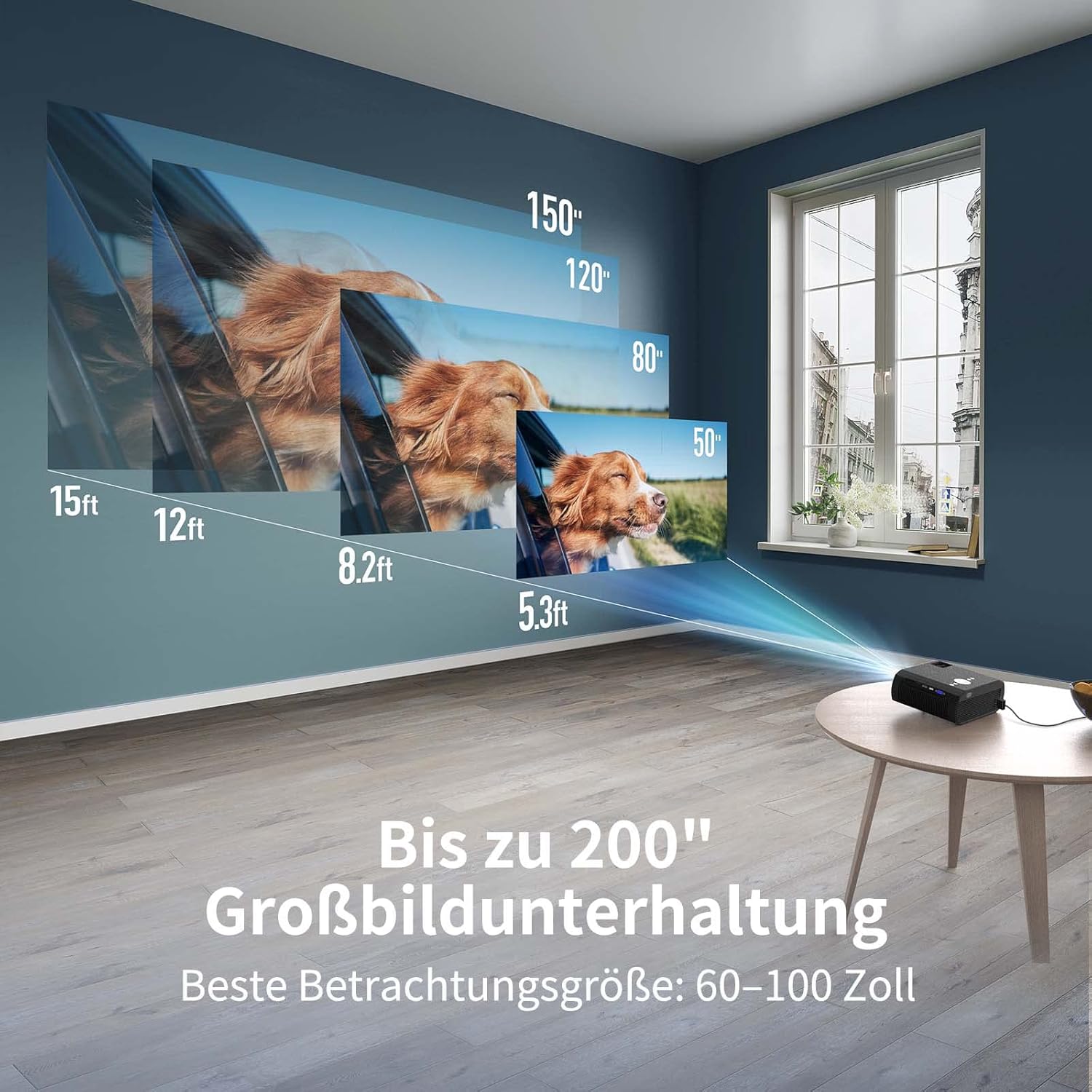
Figure 3.1: Projection Distance and Screen Size Guide.
This image illustrates the relationship between projection distance and screen size for the WEWATCH V50 Pro projector. It shows various distances (5.3ft, 8.2ft, 12ft, 15ft) corresponding to different screen sizes (50", 80", 120", 150"), with a maximum screen size of 200 inches. The recommended best viewing size is 60-100 inches.
3.2 പവർ കണക്ഷൻ
- പ്രൊജക്ടറിന്റെ പവർ ഇൻപുട്ട് പോർട്ടിലേക്ക് പവർ കേബിൾ ബന്ധിപ്പിക്കുക.
- പവർ കേബിളിൻ്റെ മറ്റേ അറ്റം പവർ ഔട്ട്ലെറ്റിലേക്ക് പ്ലഗ് ചെയ്യുക.
- പ്രൊജക്ടറിലോ റിമോട്ട് കൺട്രോളിലോ ഉള്ള പവർ ബട്ടൺ അമർത്തി അത് ഓണാക്കുക.
3.3 ഫോക്കസും കീസ്റ്റോൺ തിരുത്തലും
Adjust the image clarity and shape using the focus ring and keystone correction feature.

Figure 3.2: Manual Focus and Keystone Correction.
This image demonstrates how to adjust the projector's image. The top panel shows "Manuell Fokus" (Manual Focus) with a blurred image becoming clear. The bottom panel shows "Keystone-Korrektur" (Keystone Correction) with a trapezoidal image being squared, indicating the projector's ability to correct distorted images.
- മാനുവൽ ഫോക്കസ്: Rotate the focus ring near the lens until the projected image is sharp and clear.
- കീസ്റ്റോൺ തിരുത്തൽ: If the image appears trapezoidal (wider at the top or bottom), use the keystone correction function (typically a dial or button on the projector/remote) to adjust the image to a rectangular shape. The V50 Pro supports ±15° keystone correction.
4. പ്രവർത്തന നിർദ്ദേശങ്ങൾ
4.1 ഉപകരണങ്ങൾ ബന്ധിപ്പിക്കുന്നു
The WEWATCH V50 Pro offers multiple ways to connect your devices:
- എച്ച്ഡിഎംഐ: Connect laptops, gaming consoles (PS5, Xbox), TV sticks, or DVD players using an HDMI cable. Select the corresponding HDMI input source on the projector.
- USB: മീഡിയ പ്ലേ ചെയ്യാൻ ഒരു USB ഡ്രൈവ് ഇടുക fileനേരിട്ട്.
- ഓഫ്: പഴയ ഉപകരണങ്ങൾക്ക് AV പോർട്ട് ഉപയോഗിക്കുക.
- വി.ജി.എ: Connect computers with a VGA output.
- ബ്ലൂടൂത്ത് 5.1: Connect external Bluetooth speakers or headphones for enhanced audio. Navigate to the Bluetooth settings in the projector's menu to pair devices.
- 5G/2.4G WiFi Screen Mirroring: Wirelessly mirror content from your iOS or Android smartphone/tablet.
4.2 വയർലെസ് സ്ക്രീൻ മിററിംഗ് (iOS/Android)
The V50 Pro supports seamless screen mirroring via its dual-band 5G/2.4G WiFi connection.

Figure 4.1: Smooth Screen Mirroring via 2.4G/5G WiFi.
This image depicts a smartphone held in a hand, with its screen content wirelessly projected onto a wall by the WEWATCH V50 Pro projector. The image highlights the projector's 2.4G/5G WiFi capability for seamless screen mirroring, showing a vibrant waterfall scene.
- നിങ്ങളുടെ പ്രൊജക്ടറും മൊബൈൽ ഉപകരണവും ഒരേ വൈഫൈ നെറ്റ്വർക്കിലേക്ക് കണക്റ്റുചെയ്തിട്ടുണ്ടെന്ന് ഉറപ്പാക്കുക.
- On the projector, select the "Screen Mirroring" or "Wireless Display" option from the main menu.
- On your iOS device, open Control Center and tap "Screen Mirroring" (AirPlay). Select the projector from the list.
- On your Android device, find the "Wireless Display," "Cast," or "Smart View" option in your settings or quick panel. Select the projector from the list.
4.3 ക്രമീകരണങ്ങൾ ക്രമീകരിക്കുന്നു
- സൂം പ്രവർത്തനം: The V50 Pro features a 50% zoom function, allowing you to adjust the image size without moving the projector. Access this setting via the projector's menu.
- ചിത്ര മോഡ്: Adjust brightness, contrast, color, and sharpness to your preference.
- ശബ്ദ ക്രമീകരണങ്ങൾ: Control volume, or select audio output (internal speaker, Bluetooth, 3.5mm audio out).
5. പരിപാലനം
ശരിയായ അറ്റകുറ്റപ്പണികൾ നിങ്ങളുടെ പ്രൊജക്ടറിന്റെ ദീർഘായുസ്സും മികച്ച പ്രകടനവും ഉറപ്പാക്കുന്നു.
- ലെൻസ് ക്ലീനിംഗ്: Use a soft, lint-free cloth and specialized lens cleaning solution. Do not use abrasive cleaners.
- പൊടി നീക്കം: Regularly clean the projector's exterior with a soft, dry cloth. Use compressed air to clear dust from ventilation openings, ensuring proper airflow.
- സംഭരണം: ഉപയോഗത്തിലില്ലാത്തപ്പോൾ, പ്രൊജക്ടർ നേരിട്ട് സൂര്യപ്രകാശം ഏൽക്കാത്തതും കടുത്ത താപനില ഏൽക്കാത്തതുമായ ഒരു തണുത്ത വരണ്ട സ്ഥലത്ത് സൂക്ഷിക്കുക.
6. പ്രശ്നപരിഹാരം
If you encounter issues with your WEWATCH V50 Pro Projector, refer to the following common problems and solutions:
| പ്രശ്നം | സാധ്യമായ കാരണം | പരിഹാരം |
|---|---|---|
| ഒരു ചിത്രവും പ്രൊജക്റ്റ് ചെയ്തിട്ടില്ല. | പവർ കേബിൾ വിച്ഛേദിച്ചു; തെറ്റായ ഇൻപുട്ട് ഉറവിടം; ഉപകരണം ശരിയായി ബന്ധിപ്പിച്ചിട്ടില്ല. | Check power connection; Select correct input source (HDMI, USB, etc.); Reconnect device cables securely. |
| മങ്ങിയ ചിത്രം | Out of focus; Incorrect keystone adjustment. | Adjust the focus ring; Use keystone correction to square the image. |
| ശബ്ദമില്ല | Volume too low; Muted; Incorrect audio output selected; External device volume low. | Increase projector volume; Unmute; Check audio output settings (internal speaker, Bluetooth); Increase volume on connected device. |
| Screen mirroring issues | Not on same WiFi network; Device compatibility; Network interference. | Ensure both devices are on the same 5G/2.4G WiFi network; Restart projector and device; Try a different WiFi channel. |
| Overheating/Fan noise | വായുസഞ്ചാരം തടസ്സപ്പെട്ടു; ദീർഘകാല ഉപയോഗം. | Ensure ventilation openings are clear; Allow projector to cool down; Operate in a well-ventilated area. |
If the problem persists, please contact WEWATCH customer support.
7 സ്പെസിഫിക്കേഷനുകൾ
Key technical specifications for the WEWATCH V50 Pro Projector:
- മോഡൽ: V50PRO
- പ്രാദേശിക റെസലൂഷൻ: 1920 x 1080P Full HD
- തെളിച്ചം: 400 ANSI Lumens (16500 LM)
- ദൃശ്യതീവ്രത അനുപാതം: 20000:1
- പ്രദർശന സാങ്കേതികവിദ്യ: എൽസിഡി
- സ്ക്രീൻ വലിപ്പം: 200 ഇഞ്ച് വരെ
- കണക്റ്റിവിറ്റി: 5G/2.4G WiFi, Bluetooth 5.1, HDMI, USB, AV, VGA, 3.5mm Audio Out
- കീസ്റ്റോൺ തിരുത്തൽ: ±15° മാനുവൽ
- സൂം പ്രവർത്തനം: 50%
- ബിൽറ്റ്-ഇൻ സ്പീക്കർ: 3W
- നിറം: കറുപ്പ്

Figure 7.1: WEWATCH V50 Pro Performance Comparison.
This image compares the WEWATCH V50 Pro's performance metrics (Native Full HD 1080P, 15000LM LED Lumen, 350 ANSI Lumen, 20000:1 Contrast Ratio) against a generic 720P projector, highlighting the superior visual quality of the V50 Pro.

Figure 7.2: High Contrast Ratio for Vivid Images.
This image visually represents the high contrast ratio of 20000:1, with the numbers prominently displayed on a floor leading to a projected image of a vibrant nebula, indicating deep blacks and bright whites for a more dynamic picture.
8. വാറൻ്റിയും പിന്തുണയും
The WEWATCH V50 Pro Projector comes with a 2 വർഷത്തെ നിർമ്മാതാവിന്റെ വാറന്റി.
For technical support, warranty claims, or further assistance, please contact WEWATCH customer service through their official webനിങ്ങൾ ഉൽപ്പന്നം വാങ്ങിയ സൈറ്റ് അല്ലെങ്കിൽ പ്ലാറ്റ്ഫോം.
നിർമ്മാതാവ്: വെവാച്ച്

