1. ആമുഖം
This manual provides detailed instructions for the safe and efficient operation of your ViewSonic PA700W projector. Please read this manual thoroughly before using the projector and keep it for future reference. The ViewSonic PA700W is a high-brightness WXGA projector designed for business and education environments, offering vivid images and flexible connectivity.
2 സുരക്ഷാ വിവരങ്ങൾ
തീ, വൈദ്യുതാഘാതം അല്ലെങ്കിൽ പരിക്ക് എന്നിവ തടയാൻ ഇനിപ്പറയുന്ന സുരക്ഷാ മുൻകരുതലുകൾ എപ്പോഴും പാലിക്കുക:
- വായുസഞ്ചാര ദ്വാരങ്ങൾ തടയരുത്. ശരിയായ വായുസഞ്ചാരത്തിനായി പ്രൊജക്ടറിന് ചുറ്റും മതിയായ ഇടം ഉറപ്പാക്കുക.
- l ചെയ്യുമ്പോൾ പ്രൊജക്ടർ ലെൻസിലേക്ക് നേരിട്ട് നോക്കരുത്amp പ്രകാശം നിങ്ങളുടെ കണ്ണുകൾക്ക് കേടുവരുത്തുമെന്നതിനാൽ, ഓണാണ്.
- അസ്ഥിരമായ വണ്ടിയിലോ സ്റ്റാൻഡിലോ മേശയിലോ പ്രൊജക്ടർ സ്ഥാപിക്കരുത്.
- പ്രൊജക്ടറിനൊപ്പം നൽകിയിരിക്കുന്ന പവർ കോർഡ് മാത്രം ഉപയോഗിക്കുക.
- ഈ ഉൽപ്പന്നം സ്വയം സേവിക്കാൻ ശ്രമിക്കരുത്. യോഗ്യതയുള്ള സേവന ഉദ്യോഗസ്ഥർക്ക് എല്ലാ സേവനങ്ങളും റഫർ ചെയ്യുക.
- പ്രൊജക്ടർ വെള്ളത്തിൽ നിന്നോ ഈർപ്പത്തിൽ നിന്നോ അകറ്റി നിർത്തുക.
3. ബോക്സിൽ എന്താണുള്ളത്?
പാക്കേജിൽ എല്ലാ ഇനങ്ങളും ഉണ്ടെന്ന് ഉറപ്പാക്കുക:
- ViewSonic PA700W Projector
- പവർ കോർഡ്
- റിമോട്ട് കൺട്രോൾ (2 AAA ബാറ്ററികൾ ഉൾപ്പെടെ)
- HDMI കേബിൾ
- വിജിഎ കേബിൾ
- ദ്രുത ആരംഭ ഗൈഡ്
- ഉപയോക്തൃ മാനുവൽ (ഈ പ്രമാണം)

Figure 3.1: Contents of the ViewSonic PA700W package. Includes the projector, power cord, remote control, HDMI cable, VGA cable, and quick start guide.
4. ഉൽപ്പന്നം കഴിഞ്ഞുview
4.1 മുൻവശവും വശവും View

ചിത്രം 4.1: മുൻഭാഗം view യുടെ ViewSonic PA700W projector, highlighting the main lens and front ventilation grilles.

ചിത്രം 4.2: കോണാകൃതിയിലുള്ളത് view യുടെ ViewSonic PA700W projector, providing a perspective of the lens, control panel, and side ventilation.
4.2 അളവുകൾ

Figure 4.3: Physical dimensions of the PA700W projector, showing its length, width, and height for placement planning.
4.3 കണക്റ്റിവിറ്റി പോർട്ടുകൾ
The PA700W offers a variety of input and output ports for flexible connectivity:
- എച്ച്ഡിഎംഐ 1.4: x2 (for digital video and audio)
- VGA (In/Out): x2 (for analog video)
- USB 2.0 ടൈപ്പ്-എ: x1 (for media playback or firmware updates)
- Ethernet LAN (RJ45): x1 (for network control)
- ഓഡിയോ (ഇൻ/ഔട്ട്): x2 (3.5mm jacks for audio input/output)

Figure 4.4: Rear panel of the projector displaying all available input and output ports for connecting various devices.
4.4 വിദൂര നിയന്ത്രണം
The included remote control allows for convenient operation of the projector from a distance. It requires 2 AAA batteries (included).
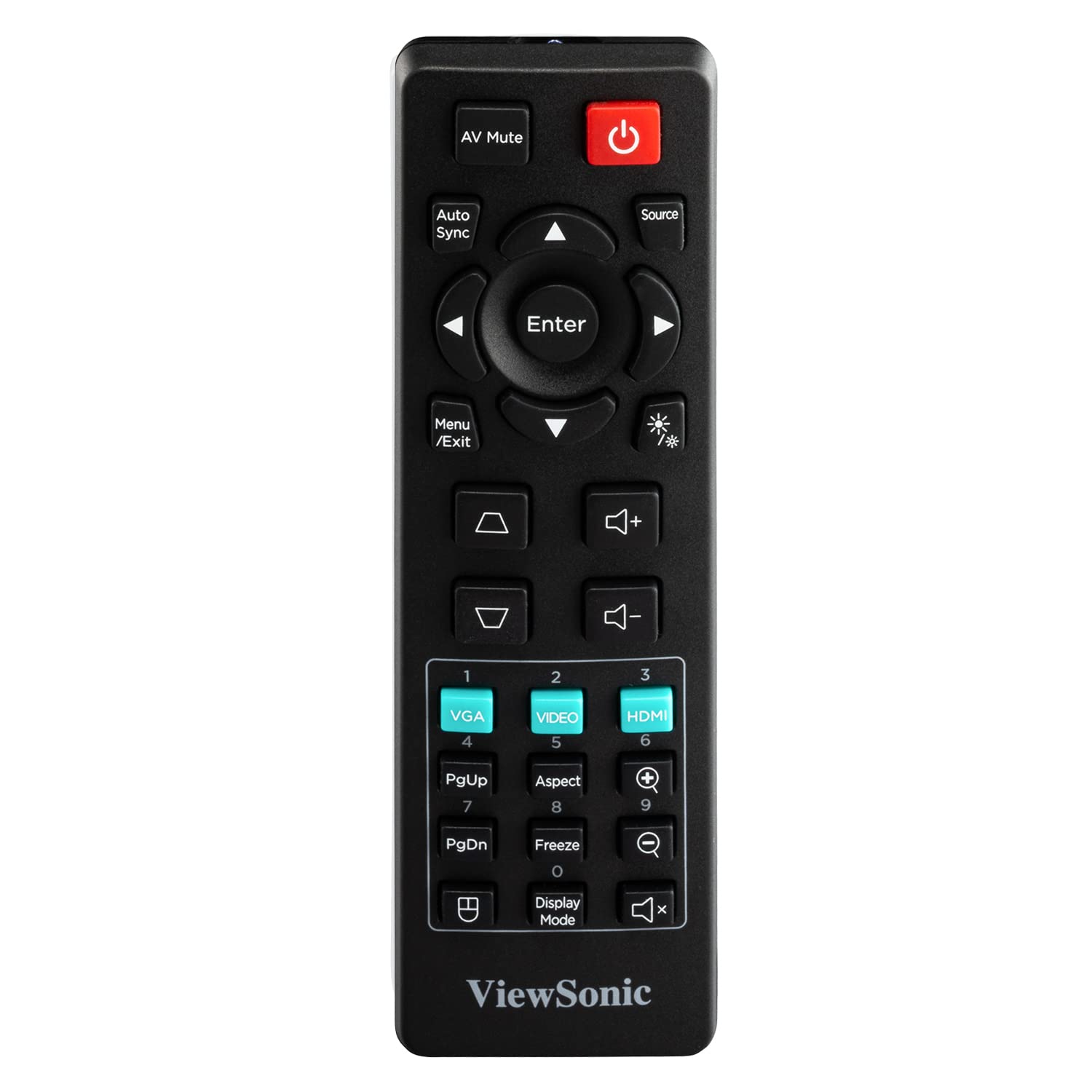
Figure 4.5: The remote control for the PA700W projector, showing its button layout for various functions.
5. സജ്ജീകരണം
5.1 പ്ലേസ്മെൻ്റ്
Position the projector on a stable, flat surface or mount it securely. Ensure there is adequate ventilation around the unit. The PA700W can project a 100-inch screen from approximately 3.3 meters (10.9 feet) away.

Figure 5.1: Recommended projection distances for different screen sizes, illustrating the flexibility of placement.
5.2 ബന്ധിപ്പിക്കുന്ന പവർ
- പ്രൊജക്ടറിന്റെ പവർ ഇൻലെറ്റിലേക്ക് പവർ കോർഡ് ബന്ധിപ്പിക്കുക.
- പവർ കോർഡിന്റെ മറ്റേ അറ്റം ഗ്രൗണ്ടഡ് ഇലക്ട്രിക്കൽ ഔട്ട്ലെറ്റിലേക്ക് പ്ലഗ് ചെയ്യുക.
5.3 ഇൻപുട്ട് ഉപകരണങ്ങൾ ബന്ധിപ്പിക്കൽ
Use the appropriate cables to connect your source devices (e.g., laptop, DVD player, gaming console) to the projector's input ports (HDMI, VGA, etc.).
- For digital video and audio, use an HDMI cable to connect your device to an HDMI port on the projector.
- For analog video, use a VGA cable to connect your device to a VGA port. If audio is also needed, connect a 3.5mm audio cable from your device's audio out to the projector's Audio In port.
6. പ്രൊജക്ടർ പ്രവർത്തിപ്പിക്കൽ
6.1 പവർ ഓൺ/ഓഫ്
- പവർ ഓണാക്കാൻ: അമർത്തുക ശക്തി button on the projector's control panel or the remote control. The power indicator light will turn blue.
- പവർ ഓഫ് ചെയ്യാൻ: അമർത്തുക ശക്തി button again. A confirmation message may appear; press the button a second time to confirm shutdown. The power indicator light will turn orange.
6.2 ഉറവിട തിരഞ്ഞെടുപ്പ്
After powering on, the projector will automatically detect an active input source. If multiple sources are connected, or if the desired source is not automatically selected:
- അമർത്തുക ഉറവിടം button on the remote control or projector.
- Use the arrow keys to navigate through the available input sources (HDMI 1, HDMI 2, VGA 1, VGA 2, USB).
- അമർത്തുക നൽകുക ആവശ്യമുള്ള ഉറവിടം തിരഞ്ഞെടുക്കാൻ.
6.3 ഇമേജ് അഡ്ജസ്റ്റ്മെന്റ്
- ഫോക്കസ്: ചിത്രം വ്യക്തവും വ്യക്തവുമാകുന്നതുവരെ പ്രൊജക്ടർ ലെൻസിലെ ഫോക്കസ് റിംഗ് തിരിക്കുക.
- സൂം: Rotate the zoom ring on the projector lens to adjust the image size.
- കീസ്റ്റോൺ തിരുത്തൽ: If the image appears trapezoidal, use the കീസ്റ്റോൺ buttons (up/down arrows) on the remote or projector to correct the image shape. The PA700W supports 40-degree vertical keystone correction.
6.4 മെനു നാവിഗേഷൻ
To access and adjust projector settings:
- അമർത്തുക മെനു/പുറത്തുകടക്കുക button on the remote or projector.
- മെനു ഓപ്ഷനുകളിലൂടെ നാവിഗേറ്റ് ചെയ്യാൻ അമ്പടയാള കീകൾ ഉപയോഗിക്കുക.
- അമർത്തുക നൽകുക to select a sub-menu or confirm a setting.
- അമർത്തുക മെനു/പുറത്തുകടക്കുക മെനുവിൽ നിന്ന് പുറത്തുകടക്കാൻ വീണ്ടും.
Common menu settings include:
- ചിത്രം: Brightness, Contrast, Color, Tint, Sharpness, Aspect Ratio, Display Mode.
- ഓഡിയോ: Volume, Mute.
- സജ്ജമാക്കുക: Language, Projection Mode, Auto Power Off.
- വിപുലമായത്: Lamp Settings (SuperEco Mode), Information.

Figure 6.1: The projector's capability to display bright and clear images with WXGA resolution, suitable for various environments.

ചിത്രം 6.2: ഉദാample of the projector's performance in a bright room, demonstrating its ability to produce crystal clear images even with ambient light.
7. പരിപാലനം
7.1 പ്രൊജക്ടർ വൃത്തിയാക്കൽ
- Projector Case: മൃദുവായ, ലിന്റ് രഹിത തുണി ഉപയോഗിക്കുകampened with a mild detergent solution to wipe the case. Do not use abrasive cleaners or solvents.
- പ്രൊജക്ടർ ലെൻസ്: Use a lens cleaning cloth and lens cleaning solution specifically designed for optical lenses. Avoid touching the lens directly with your fingers.
- വെന്റിലേഷൻ ഓപ്പണിംഗുകൾ: Use a soft brush or compressed air to remove dust from the ventilation openings. Ensure the projector is turned off and unplugged before cleaning.
7.2 എൽamp ജീവിതം
The PA700W utilizes a long-life lamp. In SuperEco Mode, the lamp can last for up to 12,000 hours, significantly reducing maintenance and replacement costs. The projector will display a warning message when the lamp is nearing the end of its life.
8. പ്രശ്നപരിഹാരം
| പ്രശ്നം | സാധ്യമായ കാരണം | പരിഹാരം |
|---|---|---|
| സ്ക്രീനിൽ ചിത്രമൊന്നുമില്ല |
|
|
| ചിത്രം മങ്ങിയതാണ് |
|
|
| ചിത്രം ട്രപസോയിഡൽ ആണ് |
|
|
| ഓഡിയോ ഇല്ല |
|
|
9 സ്പെസിഫിക്കേഷനുകൾ
| ബ്രാൻഡ് | Viewസോണിക് |
| മോഡൽ | PA700W |
| ഡിസ്പ്ലേ തരം | എൽഇഡി |
| തെളിച്ചം | 4500 ആൻസി ലുമെൻസ് |
| നേറ്റീവ് റെസല്യൂഷൻ | WXGA (1280 x 800 Pixels) |
| വീക്ഷണാനുപാതം | 16:10 |
| കോൺട്രാസ്റ്റ് റേഷ്യോ | (Not specified in provided data, typical for LED projectors) |
| Lamp ജീവിതം | Up to 12,000 hours (SuperEco Mode) |
| കീസ്റ്റോൺ തിരുത്തൽ | Vertical (40 degrees), Digital Keystone Correction |
| കണക്റ്റിവിറ്റി | 2x HDMI 1.4, 2x VGA (In/Out), 1x USB 2.0 Type-A, 1x Ethernet (RJ45), 2x 3.5mm Audio (In/Out) |
| ബിൽറ്റ്-ഇൻ സ്പീക്കർ | അതെ |
| ശബ്ദ നില | 25 ഡി.ബി |
| വൈദ്യുതി ഉപഭോഗം | 300 വാട്ട്സ് |
| അളവുകൾ (LxWxH) | 23.4 x 31 x 11.4 സെ.മീ (9.2 x 12.2 x 4.5 ഇഞ്ച്) |
| ഭാരം | 2.72 കി.ഗ്രാം (5.99 പൗണ്ട്) |
| ആക്സസറികൾ ഉൾപ്പെടുത്തിയിട്ടുണ്ട് | Power Cord, Remote Control, HDMI Cable, VGA Cable, User Manual |
10. വാറൻ്റിയും പിന്തുണയും
10.1 വാറൻ്റി വിവരങ്ങൾ
ViewSonic products are manufactured to the highest standards of quality and performance, and we back them with a comprehensive warranty. For specific warranty terms and conditions applicable to your region and product, please refer to the warranty card included with your product or visit the official Viewസോണിക് webസൈറ്റ്.
10.2 ഉപഭോക്തൃ പിന്തുണ
നിങ്ങളുടെ എന്തെങ്കിലും പ്രശ്നങ്ങൾ നേരിടുകയോ ചോദ്യങ്ങൾ ഉണ്ടെങ്കിലോ ViewSonic PA700W projector that are not covered in this manual, please contact ViewSonic customer support. You can find contact information (phone numbers, email, or online chat) on the official Viewസോണിക് webസൈറ്റ്:
സന്ദർശിക്കുക Viewസോണിക് പിന്തുണ Webസൈറ്റ്
Please have your product model number (PA700W) and serial number ready when contacting support.


