1 സുരക്ഷാ വിവരങ്ങൾ
അസംബ്ലി ചെയ്യുന്നതിനും ഉപയോഗിക്കുന്നതിനും മുമ്പ് ദയവായി എല്ലാ നിർദ്ദേശങ്ങളും ശ്രദ്ധാപൂർവ്വം വായിക്കുക. ഭാവി റഫറൻസിനായി ഈ മാനുവൽ സൂക്ഷിക്കുക.
- പരമാവധി ഭാര ശേഷി 88 പൗണ്ട് (40 കിലോഗ്രാം) കവിയരുത്.
- നിങ്ങളുടെ ടിവിയുടെ VESA പാറ്റേൺ അനുയോജ്യമാണെന്ന് ഉറപ്പാക്കുക (100x100mm മുതൽ 400x400mm വരെ).
- ടിവി സ്റ്റാൻഡിൽ വയ്ക്കുന്നതിന് മുമ്പ് എല്ലാ സ്ക്രൂകളും സുരക്ഷിതമായി മുറുക്കിയിട്ടുണ്ടെന്ന് ഉറപ്പാക്കുക.
- കുട്ടികളെ ടിവി സ്റ്റാൻഡിൽ കയറാനോ കളിക്കാനോ അനുവദിക്കരുത്.
- സ്റ്റാൻഡ് വളയുന്നത് തടയാൻ സ്ഥിരതയുള്ളതും നിരപ്പായതുമായ ഒരു പ്രതലത്തിൽ വയ്ക്കുക.
- സ്റ്റാൻഡിന്റെ അടിത്തറയിൽ സ്ഥിരതയ്ക്ക് കോട്ടം വരുത്തുന്ന ഭാരമുള്ള വസ്തുക്കൾ വയ്ക്കുന്നത് ഒഴിവാക്കുക.
2. പാക്കേജ് ഉള്ളടക്കം
അസംബ്ലി ആരംഭിക്കുന്നതിന് മുമ്പ് എല്ലാ ഘടകങ്ങളും നിലവിലുണ്ടെന്നും കേടുപാടുകൾ സംഭവിച്ചിട്ടില്ലെന്നും ഉറപ്പാക്കുക. ഏതെങ്കിലും ഭാഗങ്ങൾ നഷ്ടപ്പെട്ടാലോ കേടുപാടുകൾ സംഭവിച്ചാലോ, ഉപഭോക്തൃ പിന്തുണയുമായി ബന്ധപ്പെടുക.

ചിത്രം: പൊട്ടിത്തെറിച്ചു view ടിവി സ്റ്റാൻഡ് ഘടകങ്ങളുടെ.
- ടെമ്പർഡ് ഗ്ലാസ് ബേസ്
- പിന്തുണ കോളം
- ടിവി മൗണ്ടിംഗ് പ്ലേറ്റ്
- VESA എക്സ്റ്റൻഷൻ ബ്രാക്കറ്റുകൾ (വലിയ VESA പാറ്റേണുകൾക്ക് ബാധകമാണെങ്കിൽ)
- ടിവി അറ്റാച്ച്മെന്റിനുള്ള വിവിധ സ്ക്രൂകൾ, വാഷറുകൾ, സ്പെയ്സറുകൾ
- അസംബ്ലി ഹാർഡ്വെയർ (ബോൾട്ടുകൾ, നട്ടുകൾ, അല്ലെൻ റെഞ്ച്)
- നോൺ-സ്ലിപ്പ് റബ്ബർ പാദങ്ങൾ
3. സജ്ജീകരണവും അസംബ്ലിയും
നിങ്ങളുടെ XINLEI യൂണിവേഴ്സൽ ടിവി സ്റ്റാൻഡ് ബേസ് കൂട്ടിച്ചേർക്കാൻ ഈ ഘട്ടങ്ങൾ പാലിക്കുക.
- വഴുതിപ്പോകാത്ത പാദങ്ങൾ അടിത്തട്ടിൽ ഘടിപ്പിക്കുക: ടെമ്പർഡ് ഗ്ലാസ് ബേസിന്റെ അടിവശത്ത് വഴുതിപ്പോകാത്ത റബ്ബർ പാദങ്ങൾ ഉറപ്പിക്കുക.
- പിന്തുണാ നിര കൂട്ടിച്ചേർക്കുക: നൽകിയിരിക്കുന്ന ഹാർഡ്വെയർ ഉപയോഗിച്ച് ടെമ്പർഡ് ഗ്ലാസ് ബേസിൽ സപ്പോർട്ട് കോളം ഘടിപ്പിക്കുക. അത് ദൃഢമായി ഉറപ്പിച്ചിട്ടുണ്ടെന്ന് ഉറപ്പാക്കുക.
- ടിവി മൗണ്ടിംഗ് പ്ലേറ്റ് ഘടിപ്പിക്കുക: പിന്തുണാ നിരയുടെ മുകളിൽ ടിവി മൗണ്ടിംഗ് പ്ലേറ്റ് ഉറപ്പിക്കുക.
- ടിവി സ്ഥാപിക്കുന്നതിനായി തയ്യാറാക്കുക:
- നിങ്ങളുടെ ടിവിയുടെ പിന്നിലുള്ള VESA മൗണ്ടിംഗ് ദ്വാരങ്ങൾ തിരിച്ചറിയുക.
- നിങ്ങളുടെ ടിവിയുടെ VESA പാറ്റേണിന് അനുയോജ്യമായ, നൽകിയിരിക്കുന്ന ഹാർഡ്വെയർ കിറ്റിൽ നിന്ന് ഉചിതമായ സ്ക്രൂകളും സ്പെയ്സറുകളും തിരഞ്ഞെടുക്കുക.
- നിങ്ങളുടെ ടിവിയുടെ VESA പാറ്റേൺ ആവശ്യമാണെങ്കിൽ (ഉദാ. 400x400mm) VESA എക്സ്റ്റൻഷൻ ബ്രാക്കറ്റുകൾ ടിവി മൗണ്ടിംഗ് പ്ലേറ്റിൽ ഘടിപ്പിക്കുക.
- പ്രധാനപ്പെട്ടത്: ടിവി സ്റ്റാൻഡിൽ ഘടിപ്പിക്കുന്നതിന് മുമ്പ്, മൗണ്ടിംഗ് പ്ലേറ്റും സ്ക്രൂകളും നിങ്ങളുടെ ടെലിവിഷന്റെ പിൻഭാഗത്തുള്ള ഏതെങ്കിലും പോർട്ടുകളെയോ കേബിളുകളെയോ തടയുന്നില്ലെന്ന് ഉറപ്പാക്കുക.
- ടിവി സ്ഥാപിക്കുക: നിങ്ങളുടെ ടിവി ശ്രദ്ധാപൂർവ്വം ഉയർത്തി അതിന്റെ VESA ദ്വാരങ്ങൾ മൗണ്ടിംഗ് പ്ലേറ്റ്/ബ്രാക്കറ്റുകൾ ഉപയോഗിച്ച് വിന്യസിക്കുക. തിരഞ്ഞെടുത്ത സ്ക്രൂകളും സ്പെയ്സറുകളും ഉപയോഗിച്ച് ടിവി സുരക്ഷിതമാക്കുക. ടിവി ലെവലും സ്ഥിരതയുമുള്ളതാണെന്ന് ഉറപ്പാക്കുക.

ചിത്രം: വഴുതിപ്പോകാത്ത പാദങ്ങളുള്ള ടെമ്പർഡ് ഗ്ലാസ് ബേസിന്റെ വിശദാംശം.
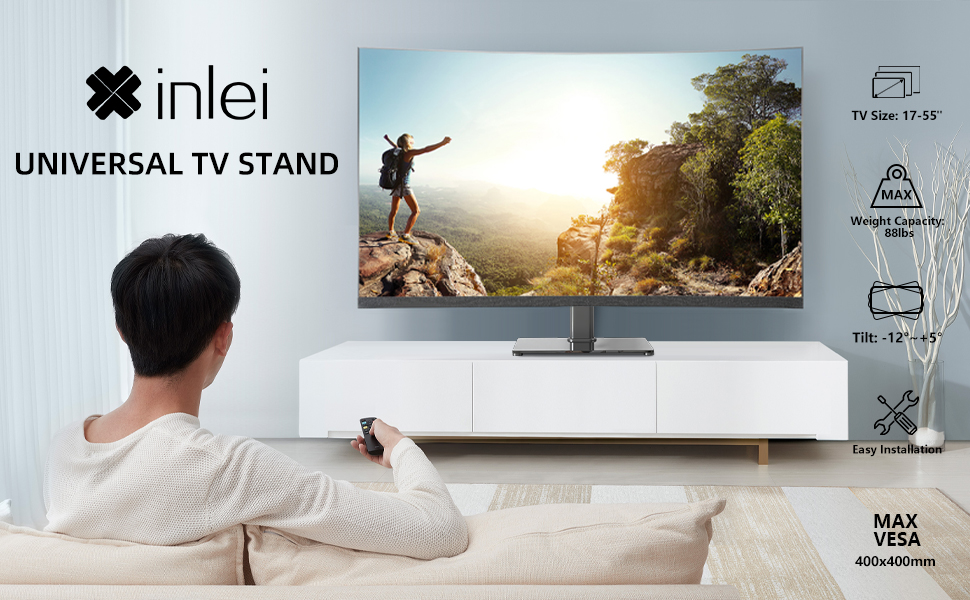
ചിത്രം: തുറമുഖ തടസ്സം പരിശോധിക്കുന്നതിന് ഊന്നൽ നൽകുന്ന ചിത്രീകരണം.

ചിത്രം: ടെലിവിഷനോടൊപ്പം പൂർണ്ണമായും കൂട്ടിച്ചേർത്ത ടിവി സ്റ്റാൻഡ്.
4. പ്രവർത്തന നിർദ്ദേശങ്ങൾ
XINLEI യൂണിവേഴ്സൽ ടിവി സ്റ്റാൻഡ് ബേസ് ഉയരം ക്രമീകരിക്കലും ടിൽറ്റ് പ്രവർത്തനവും ഒപ്റ്റിമൽ ആയി വാഗ്ദാനം ചെയ്യുന്നു. viewing.
4.1 ഉയരം ക്രമീകരിക്കൽ
ഈ സ്റ്റാൻഡ് 3 ക്രമീകരിക്കാവുന്ന ഉയര ലെവലുകൾ നൽകുന്നു. ഉയരം ക്രമീകരിക്കാൻ:
- മൗണ്ടിംഗ് പ്ലേറ്റിൽ നിന്ന് ടിവി ശ്രദ്ധാപൂർവ്വം നീക്കം ചെയ്യുക.
- ലഭ്യമായ മൂന്ന് ഉയര ക്രമീകരണങ്ങളിൽ ഒന്നിലേക്ക് (അടിത്തറയിൽ നിന്ന് 11.1", 13.03", അല്ലെങ്കിൽ 14.96") സപ്പോർട്ട് കോളത്തിലെ മൗണ്ടിംഗ് പ്ലേറ്റിന്റെ സ്ഥാനം ക്രമീകരിക്കുക.
- നൽകിയിരിക്കുന്ന ഫാസ്റ്റനറുകൾ ഉപയോഗിച്ച് മൗണ്ടിംഗ് പ്ലേറ്റ് ആവശ്യമുള്ള ഉയരത്തിൽ ഉറപ്പിക്കുക.
- ക്രമീകരിച്ച പ്ലേറ്റിലേക്ക് ടിവി വീണ്ടും മൌണ്ട് ചെയ്യുക.
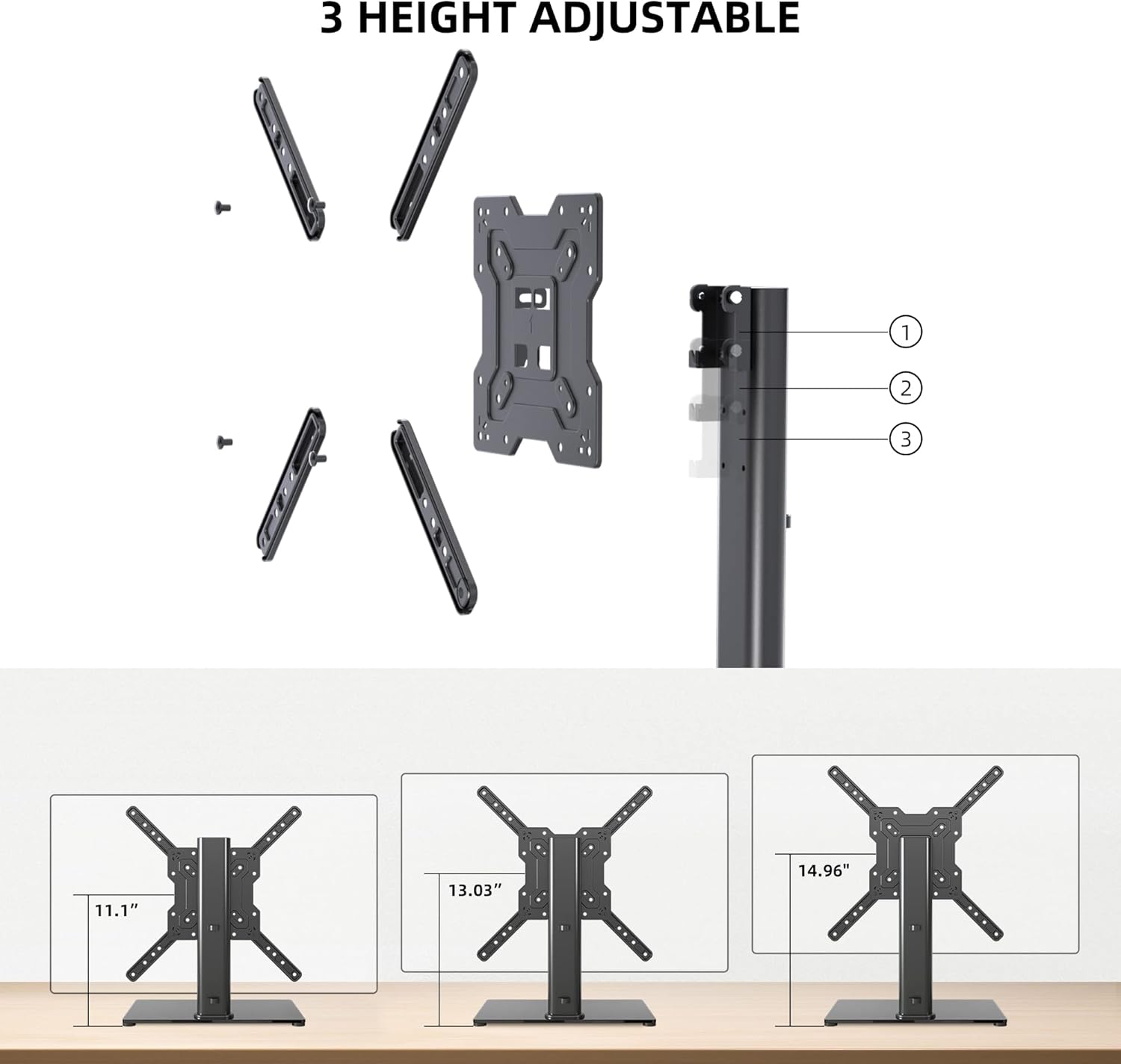
ചിത്രം: മൂന്ന് ഉയര ക്രമീകരണങ്ങളുടെ ദൃശ്യ പ്രാതിനിധ്യം.
4.2 ടിൽറ്റ് അഡ്ജസ്റ്റ്മെൻ്റ്
ടിവി മൗണ്ടിംഗ് പ്ലേറ്റ് -12 മുതൽ +5 ഡിഗ്രി വരെ ചരിവ് അനുവദിക്കുന്നു.
- മൗണ്ടിംഗ് പ്ലേറ്റിന്റെ വശത്തുള്ള ടിൽറ്റ് ക്രമീകരണ സ്ക്രൂകൾ അഴിക്കുക.
- ടിവി നിങ്ങൾക്ക് ഇഷ്ടമുള്ള ദിശയിലേക്ക് സൌമ്യമായി ചരിക്കുക. viewing ആംഗിൾ.
- ടിവി സ്ഥാനത്ത് ഉറപ്പിക്കുന്നതിനായി ടിൽറ്റ് അഡ്ജസ്റ്റ്മെന്റ് സ്ക്രൂകൾ മുറുക്കുക.

ചിത്രം: ടിൽറ്റ് ഫംഗ്ഷണാലിറ്റി കാണിക്കുന്ന ഡയഗ്രം.
4.3 കേബിൾ മാനേജ്മെന്റ്
കേബിളുകൾ ക്രമീകരിച്ച് കാഴ്ചയിൽ നിന്ന് അകറ്റി നിർത്താൻ സപ്പോർട്ട് കോളത്തിനുള്ളിലെ സംയോജിത കേബിൾ മാനേജ്മെന്റ് സിസ്റ്റം ഉപയോഗിക്കുക.

ചിത്രം: ഉദാampസ്റ്റാൻഡിന്റെ കോളത്തിലൂടെയുള്ള കേബിൾ മാനേജ്മെന്റിന്റെ ലെ.
5. പരിപാലനം
പതിവ് അറ്റകുറ്റപ്പണികൾ നിങ്ങളുടെ ടിവി സ്റ്റാൻഡിന്റെ ദീർഘായുസ്സും സുരക്ഷിതമായ പ്രവർത്തനവും ഉറപ്പാക്കുന്നു.
- വൃത്തിയാക്കൽ: ടെമ്പർഡ് ഗ്ലാസ് ബേസും ലോഹ ഘടകങ്ങളും ഒരു സോഫ്റ്റ്, ഡി ക്ലീനർ ഉപയോഗിച്ച് തുടയ്ക്കുക.amp തുണി. ഫിനിഷിന് കേടുവരുത്തുന്ന ഉരച്ചിലുകളുള്ള ക്ലീനറുകളോ ലായകങ്ങളോ ഒഴിവാക്കുക.
- പരിശോധന: എല്ലാ സ്ക്രൂകളും കണക്ഷനുകളും ഇറുകിയതാണെന്ന് ഉറപ്പാക്കാൻ ഇടയ്ക്കിടെ പരിശോധിക്കുക. ആവശ്യമെങ്കിൽ വീണ്ടും മുറുക്കുക.
- സ്ഥിരത: സ്റ്റാൻഡ് ഒരു നിരപ്പായ പ്രതലത്തിൽ തന്നെ നിൽക്കുന്നുണ്ടെന്നും, വഴുതിപ്പോകാത്ത പാദങ്ങൾ കേടുകൂടാതെയിരിക്കുന്നുണ്ടെന്നും ഉറപ്പാക്കുക.
6. പ്രശ്നപരിഹാരം
അസംബ്ലി ചെയ്യുമ്പോഴോ ഉപയോഗിക്കുമ്പോഴോ നിങ്ങൾക്ക് പ്രശ്നങ്ങൾ നേരിടുകയാണെങ്കിൽ, ഇനിപ്പറയുന്ന പൊതുവായ പരിഹാരങ്ങൾ പരിശോധിക്കുക.
- ടിവി നിലവാരമില്ലാത്തത്: സ്റ്റാൻഡ് ഒരു പരന്ന പ്രതലത്തിലാണെന്ന് ഉറപ്പാക്കുക. ടിവി മൗണ്ടിംഗ് പ്ലേറ്റ് സുരക്ഷിതമായി ഘടിപ്പിച്ചിട്ടുണ്ടെന്നും VESA സ്ക്രൂകൾ തുല്യമായി മുറുക്കിയിട്ടുണ്ടെന്നും പരിശോധിക്കുക.
- സ്ക്രൂകൾ വളരെ നീളമുള്ളത്/ചെറിയത്: കിറ്റിൽ വിവിധ സ്ക്രൂ നീളങ്ങളും സ്പെയ്സറുകളും ഉൾപ്പെടുന്നു. VESA മൗണ്ടിംഗിനായി ശുപാർശ ചെയ്യുന്ന സ്ക്രൂ വലുപ്പങ്ങൾക്കായി നിങ്ങളുടെ ടിവിയുടെ മാനുവൽ കാണുക. അമിതമായി മുറുക്കുകയോ ടിവിക്ക് കേടുപാടുകൾ വരുത്തുകയോ ചെയ്യാതെ സുരക്ഷിതമായ ഫിറ്റ് ഉറപ്പാക്കാൻ ഉചിതമായ സ്പെയ്സറുകൾ ഉപയോഗിക്കുക.
- മൗണ്ട് ബ്ലോക്ക് പോർട്ടുകൾ: അവസാനമായി മൗണ്ടുചെയ്യുന്നതിന് മുമ്പ്, മൗണ്ടിംഗ് പ്ലേറ്റ് നിങ്ങളുടെ ടിവിയിലെ ആവശ്യമായ പോർട്ടുകളെ തടസ്സപ്പെടുത്തുന്നില്ലെന്ന് എല്ലായ്പ്പോഴും ഉറപ്പാക്കുക. അങ്ങനെ സംഭവിച്ചാൽ, VESA പ്ലേറ്റിലെ ടിവിയുടെ സ്ഥാനം ക്രമീകരിക്കുക അല്ലെങ്കിൽ സുരക്ഷിതവും അനുയോജ്യവുമാണെങ്കിൽ നീളമുള്ള സ്പെയ്സറുകൾ ഉപയോഗിക്കുന്നത് പരിഗണിക്കുക.
- സ്റ്റാൻഡ് അസ്ഥിരമായി തോന്നുന്നു: എല്ലാ അസംബ്ലി ബോൾട്ടുകളും പൂർണ്ണമായും മുറുക്കിയിട്ടുണ്ടെന്ന് ഉറപ്പാക്കുക. ടെമ്പർഡ് ഗ്ലാസ് ബേസ് ഒരു ഉറച്ചതും പരന്നതുമായ പ്രതലത്തിൽ സ്ഥാപിച്ചിട്ടുണ്ടെന്നും വഴുതിപ്പോകാത്ത പാദങ്ങൾ ശരിയായി ഇൻസ്റ്റാൾ ചെയ്തിട്ടുണ്ടെന്നും ഉറപ്പാക്കുക.
7 സ്പെസിഫിക്കേഷനുകൾ
| ഫീച്ചർ | സ്പെസിഫിക്കേഷൻ |
|---|---|
| മോഡൽ | TS102 |
| അനുയോജ്യമായ ടിവി വലുപ്പങ്ങൾ | 17 മുതൽ 55 ഇഞ്ച് വരെ |
| ഭാരം ശേഷി | 88 പൗണ്ട് (40 കി.ഗ്രാം) |
| VESA അനുയോജ്യത | 100x100mm മുതൽ 400x400mm വരെ |
| ഉയരം ക്രമീകരിക്കൽ | 3 ലെവലുകൾ (11.1", 13.03", 14.96") |
| ടിൽറ്റ് ആംഗിൾ | -12 ° മുതൽ +5 ° വരെ |
| അടിസ്ഥാന അളവുകൾ | 10.24" x 15.75" |
| മെറ്റീരിയൽ | ടെമ്പർഡ് ഗ്ലാസ്, സ്റ്റീൽ |
| നിറം | കറുപ്പ് |
| ഇനത്തിൻ്റെ ഭാരം | 9.86 പൗണ്ട് |

ചിത്രം: സാങ്കേതിക സവിശേഷതകളും അളവുകളും.
8. വാറൻ്റിയും പിന്തുണയും
XINLEI ഉൽപ്പന്നങ്ങൾ ഈടുനിൽക്കുന്നതിനും പ്രകടനത്തിനും വേണ്ടി രൂപകൽപ്പന ചെയ്തിരിക്കുന്നു. വാറന്റി വിവരങ്ങൾക്കോ സാങ്കേതിക പിന്തുണയ്ക്കോ, ദയവായി ഉൽപ്പന്ന പാക്കേജിംഗ് പരിശോധിക്കുക അല്ലെങ്കിൽ XINLEI ഉപഭോക്തൃ സേവനവുമായി നേരിട്ട് ബന്ധപ്പെടുക.
പിന്തുണയുമായി ബന്ധപ്പെടുമ്പോൾ നിങ്ങളുടെ മോഡൽ നമ്പറും (TS102) വാങ്ങൽ വിവരങ്ങളും തയ്യാറായി വയ്ക്കുക.


