1. ആമുഖം
വാങ്ങിയതിന് നന്ദി.asing the Eonon D2122J 6.2-inch Touch Panel Car DVD Player. This manual provides detailed instructions for the proper installation, operation, and maintenance of your device. Please read this manual thoroughly before use to ensure optimal performance and to prevent damage.
The D2122J is a versatile 2DIN car multimedia system featuring a 6.2-inch electrostatic touch panel display, DVD playback, Bluetooth connectivity, smartphone mirroring, Wide FM radio, and a built-in 4-channel power ampജീവൻ.

ചിത്രം: കഴിഞ്ഞുview of the Eonon D2122J car DVD player highlighting its 6.2-inch electrostatic touch panel, DVD player, Bluetooth, mirroring, Wide FM, steering control, dimmer, and USB/Micro SD card slot.
2. ഉൽപ്പന്ന സവിശേഷതകൾ
- 6.2-inch Electrostatic Touch Panel: Provides smooth and intuitive operation.
- 2DIN Standard Size: Compatible with standard 2DIN car openings.
- സ്മാർട്ട്ഫോൺ മിററിംഗ്: Supports screen mirroring for both iPhone and Android devices.
- ബ്ലൂടൂത്ത് കണക്റ്റിവിറ്റി: For hands-free calling and audio streaming from mobile phones.
- Wide FM Tuner: Built-in radio tuner with 30 programmable stations (AM12/FM18).
- DVD/CD Player: Supports various disc formats including DVD, DVD+R/RW, DVD-R/RW, VCD, CD, CD-RW, MP3, AVI, JPEG.
- USB/SD Card Slot: Supports media playback from USB drives and Micro SD cards up to 32GB.
- അന്തർനിർമ്മിത ശക്തി Ampജീവപര്യന്തം: 4x45W surround stereo output (FR/FL/RR/RL 4-channel).
- സ്റ്റിയറിംഗ് വീൽ നിയന്ത്രണം: നിങ്ങളുടെ വാഹനത്തിന്റെ സ്റ്റിയറിംഗ് വീൽ ബട്ടണുകളിൽ നിന്ന് നേരിട്ട് അടിസ്ഥാന പ്രവർത്തനങ്ങളുടെ നിയന്ത്രണം അനുവദിക്കുന്നു.
- മങ്ങിയ പ്രവർത്തനം: Adjusts display brightness for optimal viewരാവും പകലും.
- One-Touch Screen OFF: Quickly turns off the display.
- ഇഷ്ടാനുസൃതമാക്കാവുന്ന ഇൻ്റർഫേസ്: Select from 24 startup emblem logos, 12 wallpapers, and 8 LED button light colors.
- ഇക്വലൈസർ മോഡുകൾ: Pre-set equalizer settings (Rock, Pop, Classic, Jazz, Standard, Electric).
- Rear Camera Linkage: Automatically switches to rear camera view when reversing (camera sold separately).
- Time Display Function: Integrated clock display.
- Multi-language Menu: Supports Japanese, English, Arabic, Hebrew, Russian, Spanish, French, Italian, Portuguese, Dutch, Latin, Persian, Indonesian, Thai, Turkish.
3. സജ്ജീകരണവും ഇൻസ്റ്റാളേഷനും
3.1 പ്രധാനപ്പെട്ട ഇൻസ്റ്റലേഷൻ കുറിപ്പുകൾ
- വാങ്ങുന്നതിന് മുമ്പ്asing, please confirm the size and shape of your vehicle's console panel to ensure compatibility. If the product size does not match, contact the manufacturer directly.
- Professional installation is highly recommended for this product. Eonon does not provide support for installation procedures.
- Ensure all power is disconnected from the vehicle's battery before beginning installation.
3.2 Panel Size

Image: Front panel dimensions of the D2122J unit. The panel measures 172mm (width) x 97mm (height).
3.3 Installation Size

Image: Overall installation dimensions of the D2122J unit. The unit measures 178mm (width) x 167mm (depth) x 100mm (height).
3.4 വയറിംഗ് ഡയഗ്രം
Image: Detailed wiring diagram for the D2122J. Connections include SWC1, SWC2, Antenna, Front/Rear Speakers (+/-), Brake Signal, Reverse Signal, Illumination, ACC, 12V Battery, Ground, and Rear Speakers (+/-). The wiring uses standard connectors, simplifying installation without needing to cut or strip wires.
- SWC1
- SWC2
- ആന്റിന പവർ
- ഫ്രണ്ട് റൈറ്റ് സ്പീക്കർ +
- Front Right Speaker -
- ഫ്രണ്ട് ലെഫ്റ്റ് സ്പീക്കർ +
- Front Left Speaker -
- Brake Signal Cable
- Reverse Signal Cable
- പ്രകാശം
- എ.സി.സി
- 12V Battery Power Cable
- ഗ്രൗണ്ട് കേബിൾ
- റിയർ റൈറ്റ് സ്പീക്കർ +
- Rear Right Speaker -
- റിയർ ലെഫ്റ്റ് സ്പീക്കർ +
- Rear Left Speaker -
4. പ്രവർത്തന നിർദ്ദേശങ്ങൾ
4.1 അടിസ്ഥാന പ്രവർത്തനം
The D2122J features an electrostatic touch panel for intuitive control. Simply touch the desired icons or areas on the screen to operate.

Image: The electrostatic touch panel offers smoother and more responsive operation compared to traditional resistive touch screens.
- പവർ ഓൺ/ഓഫ് & വോളിയം: Press the power switch/volume knob briefly to turn the unit on/off. Rotate it left or right to adjust the volume.
- One-Touch Screen OFF: Use the dedicated button or menu option to turn off the display while audio continues to play.
- പുന et സജ്ജമാക്കുക: A reset button is available on the front panel (usually a small pinhole) to restart the system if needed.
4.2 Media Playback (DVD, USB, SD)
- ഡിവിഡി പ്ലേബാക്ക്: Insert a DVD disc into the disc slot. The unit will automatically detect and begin playback. Supported formats include DVD, DVD+R/RW, DVD-R/RW, VCD.
- USB/SD പ്ലേബാക്ക്: Insert a USB drive into the USB port or a Micro SD card into the SD card slot. The unit supports various media files (MP3, AVI, JPEG). Navigate through files using the on-screen interface.
4.3 Radio (Wide FM)
The D2122J includes a Wide FM tuner, allowing reception of both AM and FM bands. You can preset up to 30 stations (12 AM, 18 FM) for quick access.

Image: The radio interface allows selection between AM and FM bands and displays preset stations for easy tuning.
- ട്യൂണിംഗ്: Use the on-screen controls to manually tune or scan for stations.
- പ്രീസെറ്റുകൾ: Save your favorite stations to the preset memory for one-touch recall.
- Reception Areas: Supports reception in Japan, Europe, America1, America2, Australia, and China.
4.4 ബ്ലൂടൂത്ത്
Connect your mobile phone via Bluetooth for hands-free communication and wireless audio streaming.

Image: Bluetooth interface displaying music playback with album art and controls. The unit supports music streaming and hands-free calls.
- ജോടിയാക്കൽ: Enable Bluetooth on your phone and search for the D2122J. Select the device and confirm pairing.
- ഹാൻഡ്സ് ഫ്രീ കോളിംഗ്: Make and receive calls directly through the unit's built-in microphone and car speakers.
- ഓഡിയോ സ്ട്രീമിംഗ്: Play music from your phone's apps (e.g., Spotify, Apple Music) wirelessly through the car's audio system.
4.5 Smartphone Mirroring
Mirror your iPhone or Android smartphone screen onto the D2122J display. This allows you to view your phone's content, such as navigation, photos, and videos, directly on the larger screen.
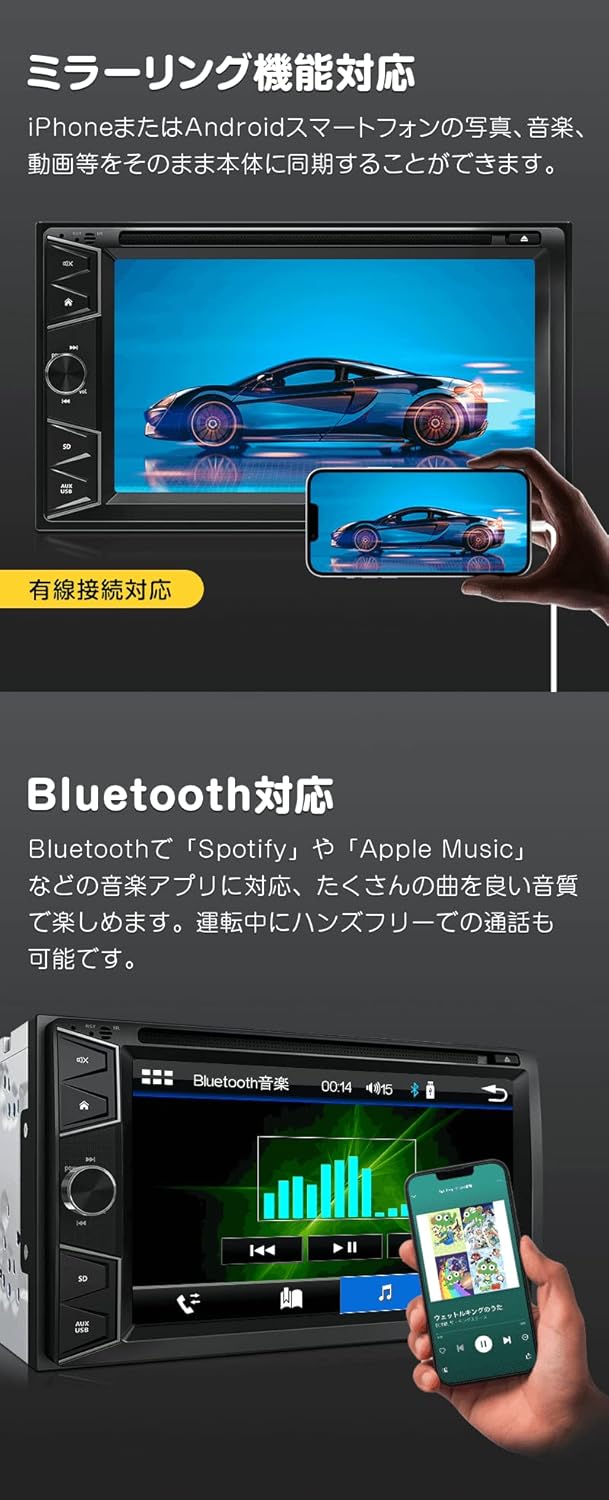
Image: The mirroring function displays your smartphone's screen on the D2122J unit, typically via a wired connection.
- കണക്ഷൻ: Connect your smartphone to the unit using a compatible USB cable.
- സജീവമാക്കൽ: Select the mirroring function from the unit's main menu. Follow on-screen prompts to complete the connection.
4.6 സ്റ്റിയറിംഗ് വീൽ നിയന്ത്രണം
If your vehicle supports steering wheel controls, you can program the D2122J to respond to these buttons. This allows for safe operation without taking your hands off the steering wheel.

Image: The steering wheel control interface allows users to assign functions to their vehicle's steering wheel buttons for convenient operation.
- സജ്ജമാക്കുക: Access the steering wheel control settings in the system menu.
- പ്രോഗ്രാമിംഗ്: Follow the instructions to assign functions (e.g., volume up/down, track skip, mode change) to your vehicle's steering wheel buttons.
4.7 Other Functions and Settings
Image: Front panel layout of the D2122J, indicating the location of the reset button, DVD disc slot, eject button, mute button, home button, next track, power/volume knob, AUX input, USB port, and Micro SD card slot.
- പുനഃസജ്ജമാക്കുക
- DVD Disc Slot
- ഡിസ്ക് ബട്ടൺ പുറന്തള്ളുക
- നിശബ്ദ ബട്ടൺ
- ഹോം ബട്ടൺ
- അടുത്ത ട്രാക്ക്
- പവർ സ്വിച്ച് / വോളിയം നോബ്
- AUX ഇൻപുട്ട്
- USB പോർട്ട്
- മൈക്രോ എസ്ഡി കാർഡ് സ്ലോട്ട്
- സമനില: Switch between various equalizer modes (Rock, Pop, Classic, Jazz, Standard, Electric) to optimize audio output.
- ഡിസ്പ്ലേ ക്രെമീകരണങ്ങൾ: Adjust screen brightness, contrast, hue, and saturation via the display settings menu.
- സിസ്റ്റം ഭാഷ: Select your preferred menu language from the available options.
- വാൾപേപ്പർ: Choose from 12 different wallpapers to customize the display background.
- LED Button Lights: Select from 8 LED button light colors (Blue, Green, Light Blue, Red, Yellow, White, Pink, Color) to match your vehicle's interior.
- സ്റ്റാർട്ടപ്പ് ലോഗോ: Choose from 24 different emblem logos for the unit's startup screen.
- Rear Camera Linkage: When a compatible rear camera (sold separately, EONON A0119J/A0126J) is connected and the vehicle is in reverse gear, the display will automatically switch to the camera view. Note: This unit supports CVBS signals only.
- TV Viewing: By connecting an external terrestrial digital tuner (EONON V0050, sold separately), you can watch TV on the unit's display.
Image: The unit displaying TV content (requires external tuner) and a rear camera view (requires external camera).
5 സ്പെസിഫിക്കേഷനുകൾ
| ഫീച്ചർ | സ്പെസിഫിക്കേഷൻ |
|---|---|
| ഡിസ്പ്ലേ വലിപ്പം | 6.2 ഇഞ്ച് |
| ഡിസ്പ്ലേ തരം | Digital Electrostatic Touch Screen |
| റെസലൂഷൻ | 800x480 (WVGA) |
| ഔട്ട്പുട്ട് പവർ | 4 x 45W Surround Stereo |
| പിന്തുണയ്ക്കുന്ന ഡിസ്ക് ഫോർമാറ്റുകൾ | AVI, DVD, DVD+R/RW, DVD-R/RW, VCD, MP3, CD, CD-RW, JPEG |
| USB/SD Card Support | 32 ജിബി വരെ |
| റേഡിയോ ട്യൂണർ | Built-in, 30 programmable stations (AM12/FM18) |
| ബ്ലൂടൂത്ത് | Yes (Hands-free calling, A2DP audio streaming) |
| സ്മാർട്ട്ഫോൺ മിററിംഗ് | Yes (iPhone/Android) |
| സ്റ്റിയറിംഗ് വീൽ നിയന്ത്രണം | അതെ |
| ഡിമ്മർ ഫംഗ്ഷൻ | അതെ |
| ബിൽറ്റ്-ഇൻ മൈക്രോഫോൺ | Yes (on front panel) |
| ഇൻപുട്ട്/ഔട്ട്പുട്ട് | Radio Antenna x1, USB x1, RCA Video Output, CAM IN Video Input x1, AUX Video Input, RCA Audio FR/FL/RR/RL/Subwoofer Output, AUX Audio R/L Input |
| യൂണിറ്റ് ഭാരം | 1.6 കി.ഗ്രാം |
| ആകെ ഭാരം | 2.2 കി.ഗ്രാം |
| Installation Size (W x D x H) | 178mm x 167mm x 100mm |
| Panel Size (W x H) | 172 മിമി x 97 മിമി |
6 ആക്സസറികൾ
The following items are included with your Eonon D2122J unit:
- പവർ കേബിൾ x1
- വിദൂര നിയന്ത്രണം x1
- Instruction Manual (Japanese) x1
- വാറന്റി കാർഡ് x1
Image: Included accessories: Remote control, Power cable, Japanese Instruction Manual, and Warranty Card.
7. വാറൻ്റിയും പിന്തുണയും
- നിർമ്മാതാവിന്റെ വാറന്റി: ഈ ഉൽപ്പന്നം 1 വർഷത്തെ നിർമ്മാതാവിന്റെ വാറണ്ടിയോടെയാണ് വരുന്നത്.
- Warranty Claim Requirement: To claim warranty service, the serial number displayed on the outer packaging is required. This serial number cannot be reissued. Please retain your product packaging.
- പ്രാരംഭ വൈകല്യങ്ങൾ: Support for initial defects will be handled according to the manufacturer's warranty policy. For detailed information, please refer to the following external URL: Eonon Warranty Information.
- Support Limitations: Eonon does not provide support for product installation or usage methods. It is strongly recommended to have the unit installed by a professional.
- ഉൽപ്പന്ന വ്യതിയാനങ്ങൾ: Please note that the appearance and specifications of the product may be subject to minor changes depending on the manufacturing period.


